Bot-docs: App ID and Password does seem to be required when running locally
Hi,
This is partially feedback for this example project, so I can file an issue there if that would be more appropriate:
https://github.com/microsoft/BotBuilder-Samples/tree/main/samples/csharp_dotnetcore/80.skills-simple-bot-to-bot#testing-the-bot-using-bot-framework-emulator
Anyway, I'm trying to run that project locally, and this note mentions you don't need an app ID or password when running the project locally, if you have 4.11 or higher of the Bot Framework Emulator:
https://docs.microsoft.com/en-us/azure/bot-service/skill-implement-skill?view=azure-bot-service-4.0&tabs=cs#prerequisites
I updated to version 4.13, and tried running the project locally, which works, but when I make a request to it from the Bot Framework Emulator, I get an error like this:

That makes sense since I didn't set anything in my appsettings.json, so I set those variables to fake values (FakeAppIdRoot, FakeAppPasswordRoot, etc.). However, even with those set I just get 401 errors from the Bot Framework Emulator:
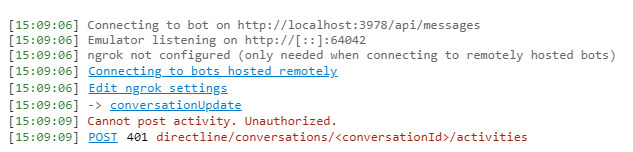
If I try providing the fake app ID and password I set in the appsettings.json, I get a 400 error instead:
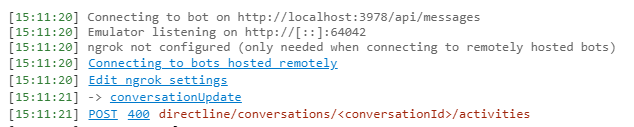
I've tried a couple other configurations but all fail at some point, either with authenticating with the bot at all or when it starts forwarding requests to the echo skills bot.
Am I doing something wrong? It seems like either the documentation article or the example project itself is missing some details or small changes about how to run locally.
Thanks,
Greg
Document Details
⚠ Do not edit this section. It is required for docs.microsoft.com ➟ GitHub issue linking.
- ID: e9f33f10-eb7a-a0ca-a662-31d47af1ad54
- Version Independent ID: a63dc7ae-75ac-31e7-b432-84e7e95c1437
- Content: Implement a skill - Bot Service
- Content Source: articles/v4sdk/skill-implement-skill.md
- Service: bot-service
- GitHub Login: @JonathanFingold
- Microsoft Alias: kamrani
 olucafont6
All 5 comments
There are a few permutations here (and there's a minor bug in sample 80):
- If both the skill and the skill consumer are running locally, then neither one should need an app ID and password.
- If one of the bots has an app ID and password, then the other bot also needs one. (I have only tried this using valid app IDs and passwords.)
- If either one is deployed, then both need a valid app ID and password.
@stevkan is working on a fix for sample 80. Once the fix is in, I'll update the article.
- Remove the following lines from the root bot's constructor:
cs if (string.IsNullOrWhiteSpace(_botId)) { throw new ArgumentException($"{MicrosoftAppCredentials.MicrosoftAppIdKey} is not set in configuration"); } - In the appsettings.json file in the root bot project, set the skill's app ID and password values to the empty string.
- Then the bots should be testable in the emulator.
There is some additional information in how to Debug a skill or skill consumer.
 JonathanFingold
on 22 Jun 2021
JonathanFingold
on 22 Jun 2021
@JonathanFingold Ah, okay yeah that was my problem. I assumed I needed to set the AppId for the skills bot in the appsetttings.json of the root bot. But yeah, if I just make it blank, and remove all the app ID's and passwords, it works fine.
Thanks so much for the quick response and fix! Appreciate it!
olucafont6
on 22 Jun 2021
@olucafont6 Glad I could help.
JonathanFingold
on 24 Jun 2021
Samples fix is in samples PR 3333.
JonathanFingold
on 24 Jun 2021
@JonathanFingold Nice, change looks good :)
olucafont6
on 24 Jun 2021
Related issues
 4h5j6For
·
5Comments
4h5j6For
·
5Comments
 MisinformedDNA
·
4Comments
MisinformedDNA
·
4Comments
 Santhosh0505
·
4Comments
Santhosh0505
·
4Comments
 v-kydela
·
5Comments
v-kydela
·
5Comments
 pkirch
·
4Comments
pkirch
·
4Comments