Current behavior
I drag-and-drop images from the web to Boostnotes. They are inserted correctly, no problem. After closing and reopening boostnotes, this happens:
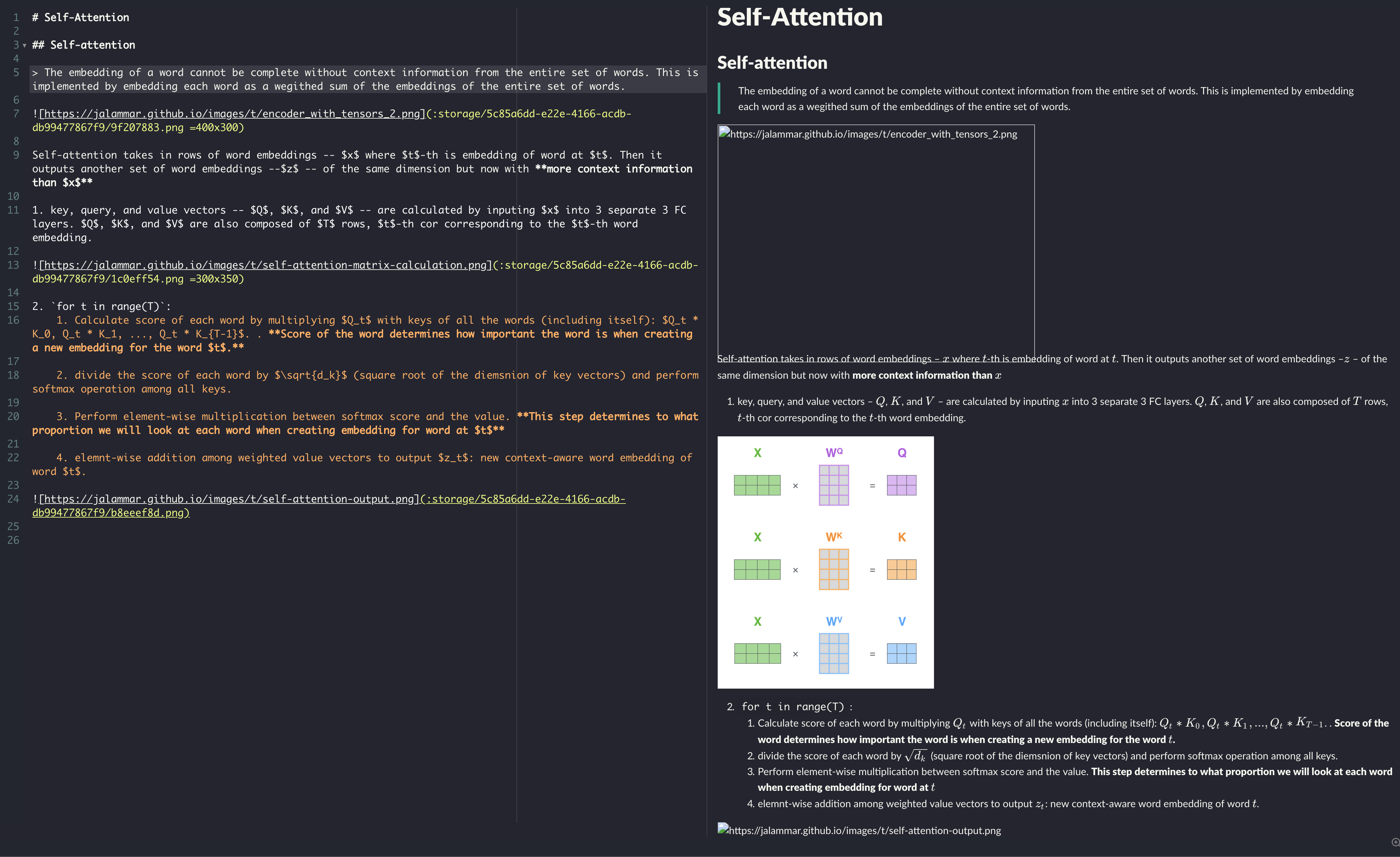
The images disappear
Please include some screenshots with the developer tools open (console tab) when you report a bug.
Expected behavior
Steps to reproduce
2.
3.
Environment
- Version : 0.13.0
- OS Version and name : MacOS Catalyna.
Folder is set to a directory in iCloud.
 ThisIsIsaac
All 6 comments
Does this note contain more than 5 images by any chance?
 Flexo013
on 22 Nov 2019
Flexo013
on 22 Nov 2019
no
ThisIsIsaac
on 22 Nov 2019
Could try un-ticking this setting in Preferences->Interface (about halfway down):

Please let us know whether that helps at all or not.
Flexo013
on 22 Nov 2019
Gave it a shot.
I'll ping you if it occurs again.
ThisIsIsaac
on 22 Nov 2019
I have had the exact same issue on Windows 10 for quite a while. I paste the image in the note and it shows. However, when I change to another note and them back to the original one the image has disappeared. The attachment folder still exists, however the image is no longer there.
I will also change the setting to see if it makes a difference for me.


 victorbrca
on 17 Dec 2019
victorbrca
on 17 Dec 2019
For now this fix seems sufficient. I'll close this issue.
If you do have this problem AFTER applying the above fix, then leave a comment here and we'll reopen this issue.
Flexo013
on 8 Mar 2020
Related issues
 croulibri
·
3Comments
croulibri
·
3Comments
 Petroochio
·
3Comments
Petroochio
·
3Comments
 necan
·
3Comments
necan
·
3Comments
 Rokt33r
·
3Comments
Rokt33r
·
3Comments
 N2ITN
·
3Comments
N2ITN
·
3Comments
Most helpful comment
Could try un-ticking this setting in Preferences->Interface (about halfway down):

Please let us know whether that helps at all or not.