Boostnote: MD editor scrolls to the top whenever I add new content

Current behavior
When I add new content or even type an enter in the text under MD document, the editor always scrolls to the top of the document.
Expected behavior
Page should stay where the cursor is placed.
Steps to reproduce
Open a long MD file and try to edit it at the end.
Environment
- Version : Boostnote 0.11.16
- OS Version and name : Windows 10
IssueHunt Summary
 hikerpig has been rewarded.
Backers (Total: $20.00)
boostio ($20.00)
Submitted pull Requests
- #3177 MarkdownPreview should scroll to top after selecting another note, also fix #3023
Tips
- Checkout the Issuehunt explorer to discover more funded issues.
- Need some help from other developers? Add your repositories on IssueHunt to raise funds.
IssueHunt has been backed by the following sponsors. Become a sponsor
 askming
All 24 comments
I can't reproduce this bug in Linux.
 ZeroX-DG
on 23 May 2019
ZeroX-DG
on 23 May 2019
i have the same problem. same os same version.
 L1l1thLY
on 23 May 2019
L1l1thLY
on 23 May 2019
this problem did not appear in version 0.11.15.
L1l1thLY
on 23 May 2019
+1 experiencing same in windows 10 Enterprise Version 1703.
 Sweeet
on 23 May 2019
Sweeet
on 23 May 2019
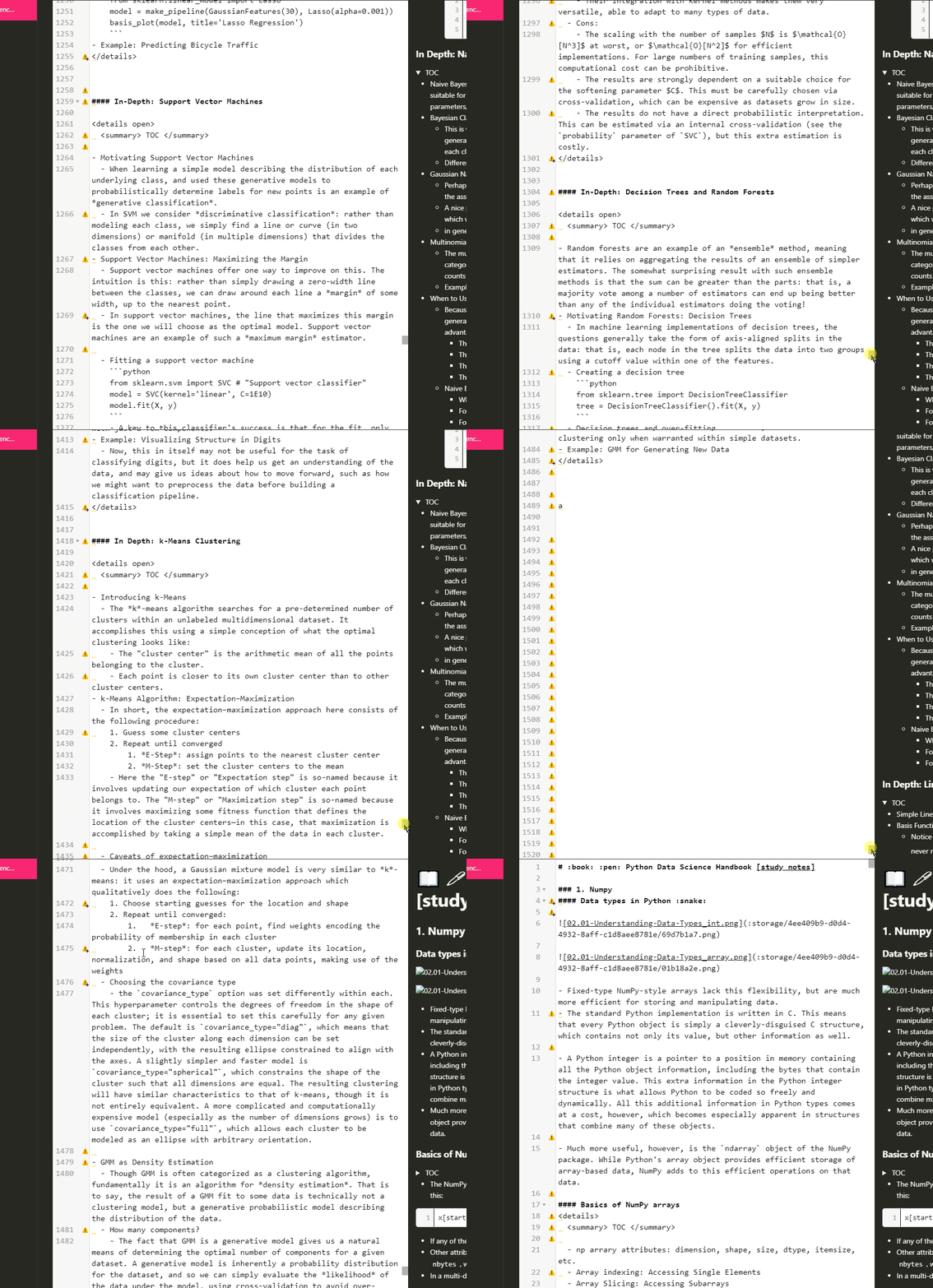
Here is a gif of the problem. @ZeroX-DG
askming
on 24 May 2019
i met the same problem when upgrade to lastes
version: 0.11.16(2019/5/22)
 daxingshen
on 24 May 2019
daxingshen
on 24 May 2019
Confirm the bug in the 0.11.16 version. Thank you for reporting!
ZeroX-DG
on 27 May 2019
It still occurs in the 0.11.17 version. And the theme problem as well.
I found it may be a problem of Preview part. When I uncheck “When scrolling, synchronize preview with editor”, the Edit part won't scroll up to top, but the Preview part does. So if they are synchronized they will go to the top together.
 zzxxhhzxh
on 28 May 2019
zzxxhhzxh
on 28 May 2019
Same issue here. Unchecking When scrolling, synchronize preview with editor makes it possible to edit the note but the preview pane still scrolls up to the top on each keypress.
Version : Boostnote 0.11.17
OS Version and name : macOS Mojave 10.14.5
 MarkMoudy
on 31 May 2019
MarkMoudy
on 31 May 2019
I think issues 3047 and 3023 are related to 3021 as well:
https://github.com/BoostIO/Boostnote/issues/3021
 mfouet
on 3 Jun 2019
mfouet
on 3 Jun 2019
I met the same problem, I came from #3047.
Version : Boostnote 0.11.17
OS Version and name : Windows 10
Unchecked "When scrolling, synchronize preview with editor" option.
Occuring situation
- __Contains image.__
- Both scroll bars are at the bottom.
- Enter Any character.

NOT Occuring situation
- __NOT Contains image.__
- Both scroll bars are at the bottom.
- Enter Any character.

 lilacs2039
on 4 Jun 2019
lilacs2039
on 4 Jun 2019
Same here; I too have images in the note; had to disable the auto-scroll so that I can still write. Yet, the preview goes back to top regardless
 payacoub
on 6 Jun 2019
payacoub
on 6 Jun 2019
@boostio has funded $20.00 to this issue.
- Submit pull request via IssueHunt to receive this reward.
- Want to contribute? Chip in to this issue via IssueHunt.
- Checkout the IssueHunt Issue Explorer to see more funded issues.
- Need help from developers? Add your repository on IssueHunt to raise funds.
 IssueHuntBot
on 7 Jun 2019
IssueHuntBot
on 7 Jun 2019
same here, it happened on both Windows and Ubuntu OS.
I also discovered that the problem occurred whenever the image inserting syntax is completed.
Either
![image]()
or
![alt text][ref]
[ref]: a
will trigger the error.
 ericyan3000
on 12 Jun 2019
ericyan3000
on 12 Jun 2019
I got the same issue, i'm on Windows 10. Boostnote 0.11.17 and both preview and text go full up. But only when i have an image.
 RaiZiStyle
on 19 Jul 2019
RaiZiStyle
on 19 Jul 2019
I've done some digging and found it is caused by this line.
The initial commit message c667e1465d755d843f4ffd99b3d2cc4cc05a3382 explains the purpose and it's ok then. But some time after that, the code got moved around and becoming buggy.
I will make a PR to fix this
 hikerpig
on 28 Jul 2019
hikerpig
on 28 Jul 2019
Having the samme issue in version 0.12.1 on Windows 10
 matneu03
on 8 Aug 2019
matneu03
on 8 Aug 2019
Having the same issue in Ubuntu 18.04 version 0.12.1
 mjhoshea
on 19 Aug 2019
mjhoshea
on 19 Aug 2019
Having the same issue version 0.12.1 on Windows 10.
Happens when there is an image preview present in the markdown.
 MihaelBercic
on 20 Aug 2019
MihaelBercic
on 20 Aug 2019
@rokt33r has rewarded $18.00 to @hikerpig. See it on IssueHunt
- :moneybag: Total deposit: $20.00
- :tada: Repository reward(0%): $0.00
- :wrench: Service fee(10%): $2.00
![issuehunt-app[bot] picture](https://avatars.githubusercontent.com/in/29881?v=4&s=40) issuehunt-app[bot]
on 26 Aug 2019
issuehunt-app[bot]
on 26 Aug 2019
Reopening this until the fix is released.
 Flexo013
on 8 Oct 2019
Flexo013
on 8 Oct 2019
Release ETA?
 MatthewWolff
on 10 Oct 2019
MatthewWolff
on 10 Oct 2019
Pre-release can be found here: https://github.com/BoostIO/boost-releases/releases/tag/v0.13.0-0
If no major problems with it are discovered then the full release will be in 3 days.
Flexo013
on 11 Oct 2019
Fix has been released: https://github.com/BoostIO/boost-releases/releases
Flexo013
on 18 Oct 2019
Related issues
 NourEldin275
·
3Comments
NourEldin275
·
3Comments
 luong-komorebi
·
3Comments
luong-komorebi
·
3Comments
 ysshah
·
3Comments
ysshah
·
3Comments
 shunchuan
·
3Comments
shunchuan
·
3Comments
 aurelkurtula
·
3Comments
aurelkurtula
·
3Comments
Most helpful comment
I've done some digging and found it is caused by this line.
The initial commit message c667e1465d755d843f4ffd99b3d2cc4cc05a3382 explains the purpose and it's ok then. But some time after that, the code got moved around and becoming buggy.
I will make a PR to fix this