Boostnote: Add collapsible code blocks

I do network recon and use Boostnote to track the progress and results. That often involves pasting command line output and device config files into the note as code blocks. These blocks, especially the configs, can be hundreds of lines long.
It would make the note much more readable if code blocks were collapsible when viewing the note, especially if blocks over a certain length (10-15 lines) defaulted to being collapsed.
There is a $60.00 open bounty on this issue. Add more on Issuehunt.
- Checkout the Issuehunt explorer to discover more funded issues.
- Need some help from other developers? Add your repositories on Issuehunt to raise funds.
 ReK42
ReK42
All 15 comments
@ReK42 I'm also in need of collapsible block so I will implement that today or tomorrow...
Here the syntax I plan to use:
%>## Title
%>
%>foobar
%>
%>```
%> print "Hello world!"
%>```
What do you think?
 daiyam
on 1 Oct 2018
daiyam
on 1 Oct 2018
@daiyam so each line would need to be prefaced with "%>"? Would it be possible to do it as a block instead, so each line does not need to be modifed? Something like:
%>
## Title

foobar

\```
print "Hello world!"
\```
%>
@ReK42 Yes, prefaced by %> like blockquotes.
daiyam
on 1 Oct 2018
@daiyam is a syntax change required at all? I envisioned this as a UI change when the markdown is rendered: all code blocks are collapsible and either all, or just ones with >10 lines, default to being collapsed.
As mentioned, these blocks can reach hundreds of lines. Requiring the user to add a couple characters to the beginning of every line is a significant burden. If a syntax change is required, can a start/end tag be used instead, like how the triple backtick for code blocks currently works?
Edit: Another alternative would be to limit the size of rendered code blocks to 10-15 lines and include a vertical scrollbar to navigate within them.
ReK42
on 1 Oct 2018
Looking into it, it appears you're using CodeMirror to render these blocks. CodeMirror has built-in support for dynamic height. Right now the height is always set to auto, which will show the full contents. The collapsing could be implemented by adding a collapse icon above/next to the block and having the onclick toggle the height between auto and a fixed value. There should probably also be a hidden overlay that becomes visible when collapsed and provides a visual hint to the user that there is more content.
ReK42
on 1 Oct 2018
@ReK42 sorry, we are talking about 2 different features, my bad 😢
You are looking to collapse all or a part of only the code blocks.
That wouldn't need any syntax changes; only some extra settings.
Do you have an example/code of what you are looking for?
daiyam
on 1 Oct 2018
@daiyam I've attached a quick PoC I drew up. The important bits are all in index.html:
- The style element at line 12285
- The script element at line 12343
- The added button element inside the span.filename element of the code block, at line 12382
ReK42
on 2 Oct 2018
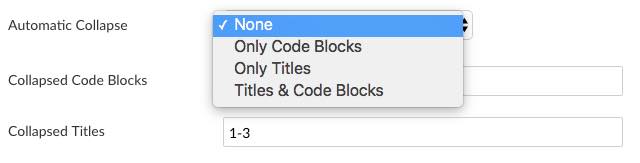
@ReK42 what do you think of the following preferences ?

daiyam
on 4 Oct 2018
@daiyam yes, that looks great!
ReK42
on 4 Oct 2018
@ReK42 I've implemented it in the PR #2471.
daiyam
on 6 Oct 2018
@daiyam thanks! I've tested it and posted a few issues in the PR thread.
ReK42
on 9 Oct 2018
Killer feature for me. Any progress?
 thorro
on 18 Nov 2018
thorro
on 18 Nov 2018
@thorro I would need to split my PR to just collapse code blocks.
daiyam
on 18 Nov 2018
@boostio has funded $60.00 to this issue.
- Submit pull request via IssueHunt to receive this reward.
- Want to contribute? Chip in to this issue via IssueHunt.
- Checkout the IssueHunt Issue Explorer to see more funded issues.
- Need help from developers? Add your repository on IssueHunt to raise funds.
 IssueHuntBot
on 1 May 2019
IssueHuntBot
on 1 May 2019
What I nice feature to have, please.
 matheusfaustino
on 30 May 2019
matheusfaustino
on 30 May 2019
Related issues
 lijinglue
·
3Comments
lijinglue
·
3Comments
 npeeples
·
3Comments
npeeples
·
3Comments
 shunchuan
·
3Comments
shunchuan
·
3Comments
 Ocanamat
·
3Comments
Ocanamat
·
3Comments
 croulibri
·
3Comments
croulibri
·
3Comments
Most helpful comment
@ReK42 what do you think of the following preferences ?