Boostnote: Hotkey `m` should not activated in editor mode.
Current behavior
When toggle the markdown preview with m button in keyboard it got little bit annoying since when I try to type from, at the time I arrive in m letter, I didn't get my m showing instead I just toggle the side markdown preview.
Expected behavior
When in editor mode, it shouldn't toggle the side markdown preview.
Steps to reproduce
- Create a new note
- Type
from - When you arrive at
mletter, it will automatically toggle the markdown preview where it should just typem. Perhaps we need to change the hotkey for preview toggle.
Environment
- Version :
0.11.6 - OS Version and name : Mac OS X Sierra (10.12.6)
 empeje
All 9 comments
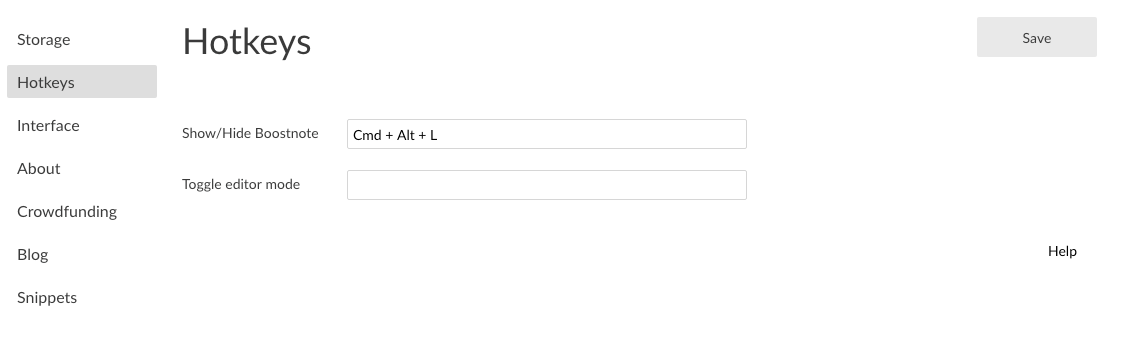
I was questioning my sanity, sneaky little bug. This behavior can be fixed though by emptying the
"Toggle editor mode" field in settings (see screenshot).
Edit: This issue is a duplicate of #2086
 neurotronix
on 15 Jun 2018
neurotronix
on 15 Jun 2018
Thanks @neurotronix
empeje
on 15 Jun 2018
This has been driving me crazy since the last update and kind of renders the boostnote un-usable.
Thanks so much for the explanation and the fix.
 aturkewi
on 15 Jun 2018
aturkewi
on 15 Jun 2018
I thought my Macbook keyboard had finally given out on me, and I was trying to figure out which modifier key was now permanently stuck on. So happy it's just a bug!
 konrad0101
on 15 Jun 2018
konrad0101
on 15 Jun 2018
Aha! I installed an older version because I had no idea what was happening! Thanks for describing it.
 jstobin
on 16 Jun 2018
jstobin
on 16 Jun 2018
The bug actually stems from Boostnote not respecting whether the M key was pressed with or without the CMD key, so just the M key will suffice to trigger the CMD + M hotkey.
 kschiffer
on 17 Jun 2018
kschiffer
on 17 Jun 2018
Glad to see I wasn't the only one. This bug was driving me crazy.
 do-adams
on 18 Jun 2018
do-adams
on 18 Jun 2018
I'll look around this soon. Sorry for making you suffer...:cry:
 Rokt33r
on 20 Jun 2018
Rokt33r
on 20 Jun 2018
@boostio cancelled funding, $80, of this issue. Visit this issue on Issuehunt
 IssueHuntBot
on 4 Sep 2018
IssueHuntBot
on 4 Sep 2018
Related issues
Rokt33r
·
3Comments
 NonlinearFruit
·
3Comments
NonlinearFruit
·
3Comments
 gavvvr
·
3Comments
gavvvr
·
3Comments
 DanielRamosAcosta
·
3Comments
DanielRamosAcosta
·
3Comments
 ysshah
·
3Comments
ysshah
·
3Comments
Most helpful comment
I was questioning my sanity, sneaky little bug. This behavior can be fixed though by emptying the
"Toggle editor mode" field in settings (see screenshot).
Edit: This issue is a duplicate of #2086
