Boostnote: Reintroduce separate Snippets Pop-Up Window (was removed in 0.9.0)
Also, there is no preference to set the shortcut for the snippets anymore.
Was the feature completely removed? I've been using it extensively :(
 vvs
vvs
All 18 comments
i tested it on windows 10 x64, there is no problem
 tatoosh
on 4 Feb 2018
tatoosh
on 4 Feb 2018
@tatoosh I meant the separate pop-up window with a configurable keyboard shortcut (the window had convenient search on top, active by default). It is gone now, no window and no possibility to configure the shortcut for such a window in preferences.
vvs
on 4 Feb 2018
Hi @vvs , actually the Finder feature was discarded at v0.9.0 because used ver rarely.
Thank you.
 kazup01
on 5 Feb 2018
kazup01
on 5 Feb 2018
I was a great feature 👎
 viggin543
on 11 Feb 2018
viggin543
on 11 Feb 2018
Holy smokes this was a stellar feature. Would there anything breaking about re-introducing it, or should we just rebuild the last 0.8.x release and never update?
 adamellsworth
on 13 Feb 2018
adamellsworth
on 13 Feb 2018
+1 for adding this back in. The Finder (quick search) window is the primary reason that I use Boostnote over other similar software.
What is the better alternative for accessing a snippet and copying it to the clipboard quickly? I'll be staying on 0.8.20 unless a better solution is in place.
 8bit-echo
on 13 Feb 2018
8bit-echo
on 13 Feb 2018
Used very rarely? really?
Finder was very usefull feature. I am confused as it is removed.
 hosiken
on 19 Feb 2018
hosiken
on 19 Feb 2018
I had to build it from source: https://github.com/BoostIO/Boostnote/releases/tag/v0.8.19
adamellsworth
on 19 Feb 2018
Let's discuss here!!
@vvs @dick-ey @adamellsworth @viggin543 @hosiken @adamellsworth
Could you tell us which OS you are using?
We discarded it because:
1. The usage statistics said that it was rarely used.
We discard it because the data told us that it was quite rarely used.(about less than 10 times for a day while note creation happened thousands times)
Of course, some of you might disable our usage tracking!
2. It was too buggy.
There was a critical bug on Windows and Linux when quitting the app. And, it makes auto updating fragile.
Anyway, I'm willing to roll back the feature if lots of people wanted.
 Rokt33r
on 20 Feb 2018
Rokt33r
on 20 Feb 2018
We have another option, making the popup optional. So some users like you can enable it and take the risk from it.
Rokt33r
on 20 Feb 2018
I was using this feature on Windows 10 x64. Mostly for copy-pasting my most often used data, stored in the same Note.
With different shortcuts, for the main window and for the pop-up window, it was very quick and convenient. When I wanted to open the main app, I press one shortcut, but when I quickly wanted to copy-paste something, and not interfere with the main window and the currently opened Note, I just press another shortcut to get the pop-up window with my data.
I will be grateful if this pop-up feature is returned in some form and it could be optional. But please, personally, the feature will be needed only if the shortcut for opening the pop-up window is re-introduced as well.
P.S. As for telemetry, I have it disabled, and I assume many others did the same. ;)
vvs
on 20 Feb 2018
I’m on macOS 10.13.x
I would love to have this added back in even as an optional feature. I’d say I use the finder feature about 50 times per week, and use the main window maybe 1 or 2 times per week.
For me, Boostnote is an app for recalling my snippets and notes, not creating them. I have a MySQL script that I have to run multiple times every day and I use boostnote to copy-paste the template. I never disabled telemetry, so I hope my stats are making it to you.
8bit-echo
on 20 Feb 2018
I don't mind if you guys telemetry. 😄Anyway, I'll try to fix it and land it in this weekend.
Rokt33r
on 20 Feb 2018
Is it safe to assume this feature is never coming back?
adamellsworth
on 27 Jul 2018
I hope not. I’m still using 0.8.20 for this feature. @Rokt33r, any word?
8bit-echo
on 28 Jul 2018
It seems that this feature is now back. So I'm closing this issue for now. If I am mistaken or more needs to be discussed here, then just reopen this ticket.
 Flexo013
on 18 Aug 2019
Flexo013
on 18 Aug 2019
I just downloaded 0.12.1 and I'm still not seeing a way to do this. @Flexo013 Can you elaborate on what you found that solves this?
8bit-echo
on 22 Aug 2019
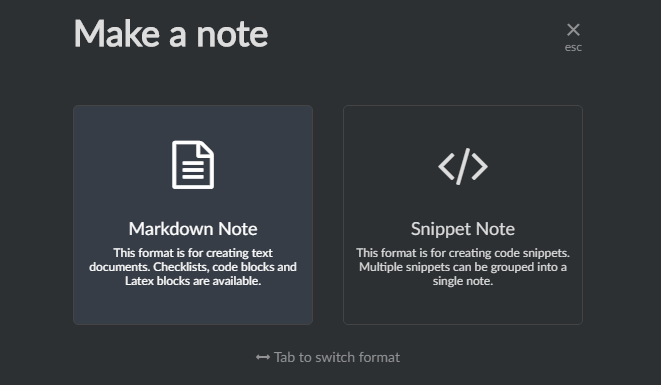
My bad, when I skimmed through this thread I thought it was about creating a new snippet note with one simple shortcut, which is possible.
@8bit-echo Could you attach images (with descriptions/shortcuts) of the functionality that you would like to see back in newer versions of Boostnote?
Flexo013
on 23 Aug 2019
Related issues
 ryochack
·
3Comments
ryochack
·
3Comments
 ysshah
·
3Comments
ysshah
·
3Comments
 luong-komorebi
·
3Comments
luong-komorebi
·
3Comments
 DanielRamosAcosta
·
3Comments
DanielRamosAcosta
·
3Comments
 shunchuan
·
3Comments
shunchuan
·
3Comments
Most helpful comment
I was a great feature 👎