Boostnote: [Feature Request] Add Preferences to OSX menu
It's fairly standard in OSX to have Preferences listed in the native app menu. (See screenshots of Atom and Macdown as examples). I find myself looking there for preferences, rather than in the app UI. Is it possible to add?
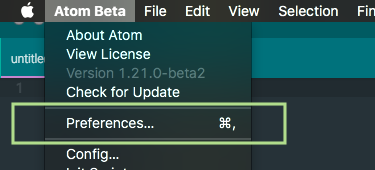
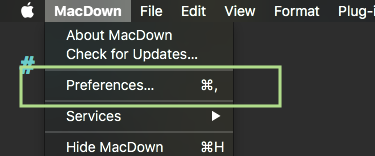
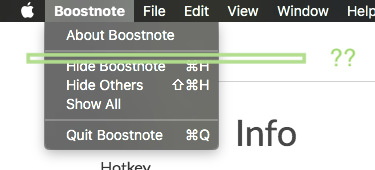
 initializard
All 16 comments
Hi @initializard , thanks for your suggestion!
I agree with you. We will add it.
BTW, how do you think about fix UI like below image?

 kazup01
on 28 Sep 2017
kazup01
on 28 Sep 2017
I like it, but some people might miss the full title bar.
initializard
on 28 Sep 2017
Ok, we should get feedback from other people.
kazup01
on 28 Sep 2017
@kazup01 I like the design change, but if you do it I think the corners of the app should be rounded so that they match other mac apps (and the bottom).
 MrBMT
on 28 Sep 2017
MrBMT
on 28 Sep 2017
It's much prettier without the hideous title bar ^^.
 ghost
on 28 Sep 2017
ghost
on 28 Sep 2017
I agree with you. Thanks! @MrBMT
kazup01
on 29 Sep 2017
The Atom editor offers the option to show/hide the title bar. Don't know how hard it is to offer an option in the preferences.
Personally, I like it without the white bar. Hope Windows adapts this system one day.
 PascalAOMS
on 30 Sep 2017
PascalAOMS
on 30 Sep 2017
Thanks @PascalAOMS !
kazup01
on 1 Oct 2017
Is there still interest in making the preferences also appear in the native app menu?
 KaceyGambill
on 14 Oct 2017
KaceyGambill
on 14 Oct 2017
Hi @KaceyGambill , nobody has made this feature yet. We're welcome to your pull request! #Hacktoberfest
kazup01
on 14 Oct 2017
@KaceyGambill Did you end up getting to this? I'd like to take a swing at it, but if you are already working on it I don't want to intrude.
 KaminFay
on 20 Oct 2017
KaminFay
on 20 Oct 2017
@AlwaysKamin Go for it, I was working on it but was slightly confused how to like main-menu.js with the openModal to load Preferences, not sure if I was doing it right... But my laptop broke yesterday morning heh so definitely go for it!
KaceyGambill
on 20 Oct 2017
Has anyone made progress on this issue? @KaceyGambill @AlwaysKamin
Also, I personally feel the discussion of UI is slightly off topic for the issue - but I prefer the dark bar.
 draganmarjanovic
on 29 Oct 2017
draganmarjanovic
on 29 Oct 2017
@draganmarjanovic Sorry for the late response. I've been able to get the tab to appear but I'm still unsure how to set it up to respond to the click. But I am working still.
KaminFay
on 29 Oct 2017
I think we need to use ipcRender? to get it to display, I was able to get the Preference button in the menu bar and get it to load external resources... but I for the life of me can't seem to figure out how to load the Preferences.
KaceyGambill
on 30 Oct 2017
v0.8.17 is out! I wrote the release note. https://medium.com/boostnote/thanks-to-your-contribution-boostnote-v0-8-17-is-out-5fea9c7727f2
Enjoy :)
kazup01
on 25 Nov 2017
Related issues
 DanielRamosAcosta
·
3Comments
DanielRamosAcosta
·
3Comments
 N2ITN
·
3Comments
N2ITN
·
3Comments
 Ocanamat
·
3Comments
Ocanamat
·
3Comments
 ysshah
·
3Comments
ysshah
·
3Comments
 cyber-arsenull
·
3Comments
cyber-arsenull
·
3Comments
Most helpful comment
@draganmarjanovic Sorry for the late response. I've been able to get the tab to appear but I'm still unsure how to set it up to respond to the click. But I am working still.