Boostnote: After update, all of previous notes gone
Please paste some screenshots with the developer tool open if you report a bug.
I was using this with added more storages which located at "/Users/rico345100/Desktop/development/boots-repo", but after recent update, they're gone.
I can see the files still there but there is no way to load them. How do I load them?
 rico345100
All 42 comments
I have the same issue..
 Andrehatlo
on 25 Sep 2017
Andrehatlo
on 25 Sep 2017
Hi I am Boostnote's maintainer. Sorry for inconvenience.
You guys data has NOT deleted. Please relink the file from Preferences -> Storages -> Add Storage.

 kazup01
on 25 Sep 2017
kazup01
on 25 Sep 2017
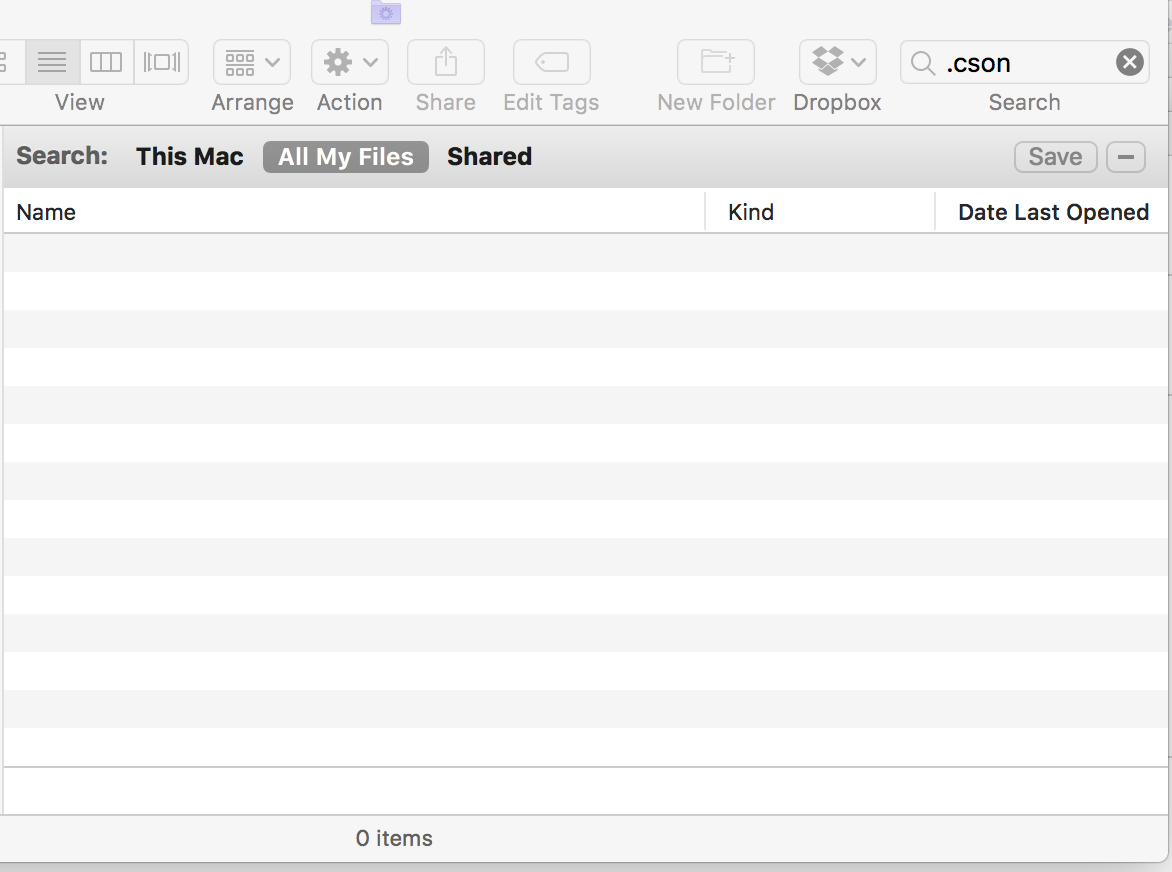
If im not mistaken, the application saves all files as .cson.
Searching through all my files it clearly tells that all my .cson files are gone from my system.
Andrehatlo
on 25 Sep 2017
Hi @Andrehatlo , thanks for your replying.
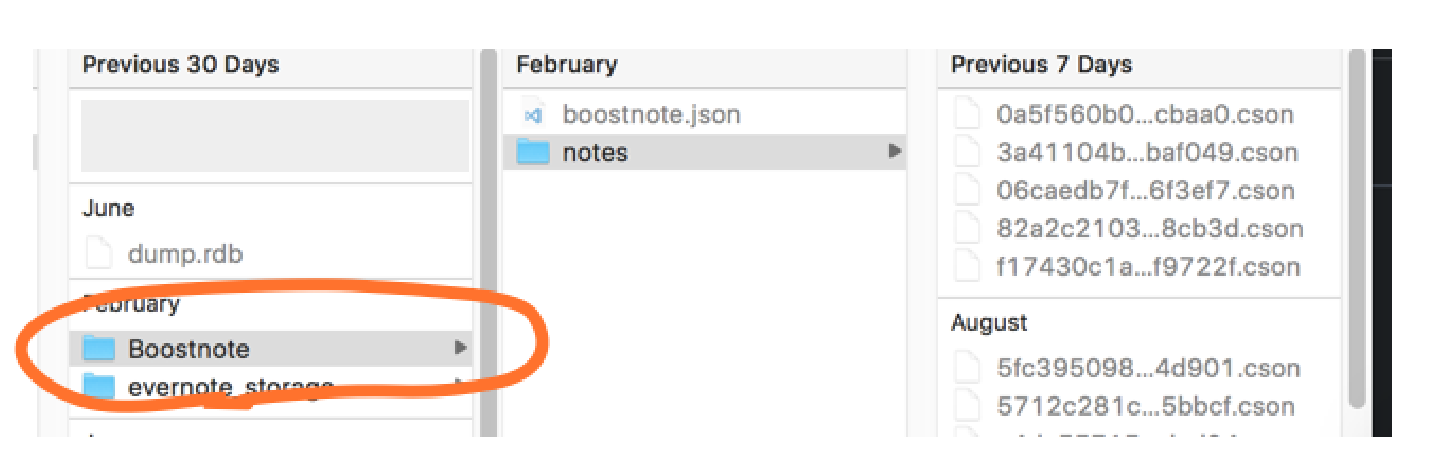
Please select the Folder that contains .cson files, not each .cson files.
kazup01
on 25 Sep 2017
I got the same issue, and nothing in the folder. Each cson file I supose that is each note. The Boostnote folder appartenly has been created when I update. Any other place where could been saved?
 davesnx
on 25 Sep 2017
davesnx
on 25 Sep 2017
@davesnx I don't know if it was something I set or an old default configuration, but my Boostnote folder was in my Documents directory on MacOS. Also, because I am very unobservant I was trying to add the notes directory instead of the "Boostnote" directory circled in bright orange 😑 . I was confused because of the directions:
Please select the Folder that contains .cson files, ...
And was reinforced by the leading "notes" directory in the image which is all I gathered from the image the first time around 😕
 autobrain-stanley
on 25 Sep 2017
autobrain-stanley
on 25 Sep 2017
Nothing in Documents/ neither.
Any other place where Boostnote was saving it? @kazup01
davesnx
on 25 Sep 2017
FFS I just lost over an hour of my time to this, on a busy day with a deadline. It took me forever to figure out how to re-link to my storage -- the ONLY way was to unlink and then start from scratch. No option to just edit the storage setting.
Then I had to REBUILD my UI preferences, because my preferences were blown away in this update.
So yes, I'm pissed. Especially because I didn't even have the option to delay the update.
MY RECOMMENDATIONS:
Give the user the option to refuse an update ("update later")
Fix whatever problem causes preferences to get blown away when there's an update. (Seriously, this should be your top priority.)
Let users select or edit their storage by BROWSING instead of having to type in the file path.
:-/
 blork-mtl
on 25 Sep 2017
blork-mtl
on 25 Sep 2017
I'm terribly sorry for your inconvenience. @autobrain-stanley
If you didn't set anything, file will be created here. @davesnx

kazup01
on 26 Sep 2017
Yes, the file is created but all my old notes are gone. @kazup01
davesnx
on 26 Sep 2017
Notes are not delete automatically. Please search for files already you made. @davesnx
kazup01
on 26 Sep 2017
@kazup01 you may not have intended to delete the notes, but I also found that all my notes were deleted after the forced update.
 aweary
on 27 Sep 2017
aweary
on 27 Sep 2017
Hey @kazup01,
I think I didn't explain the problem well enough. I had 100 notes on Boostnote before the update, and after that were only 2 (the default ones). I can't find the old notes and I suspect that are gone.
Nothing on the folder Documents/Boostnote neither Documents/Boostnote/notes. Nothing on All files > Find *.cson.
Anyway I could recover my data?
Thanks.
davesnx
on 27 Sep 2017
Hi @davesnx , thank you for the detailed information. Again, my apologies for inconvenience.
Have you also search for files other than /Documents?
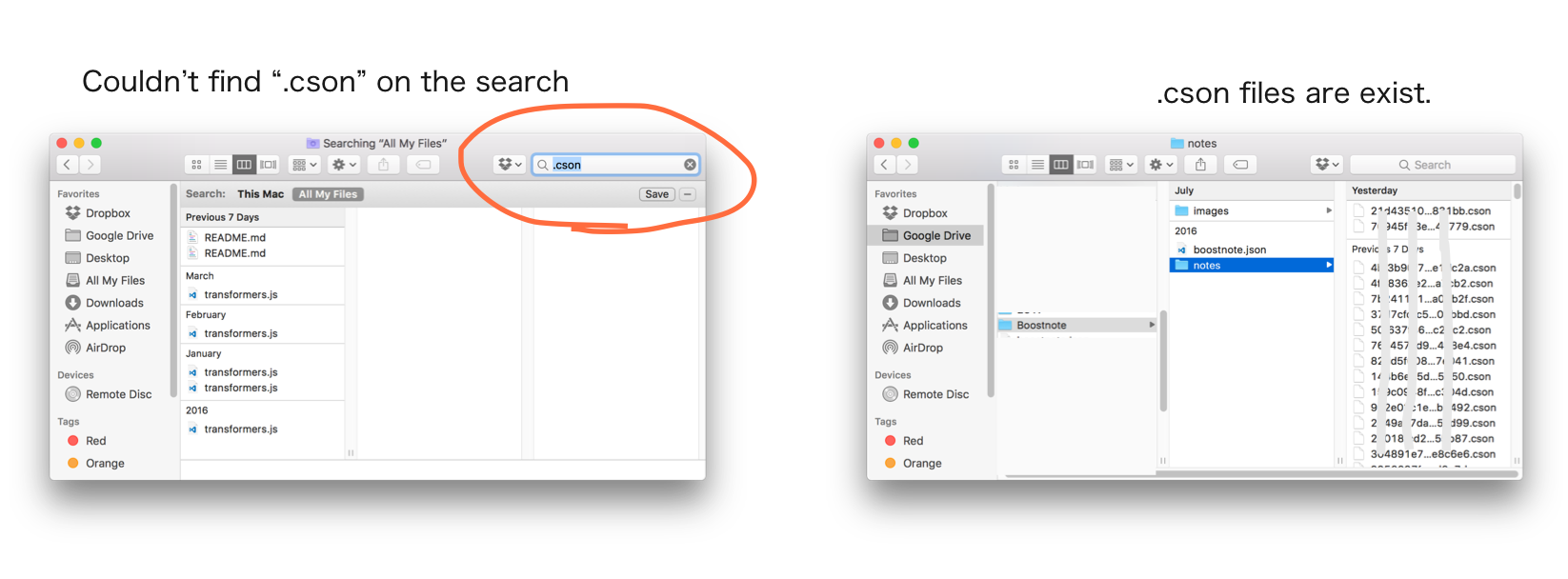
My computer(macOC Sierra v10.12.6) also could not find the .cson files on the search, but I have those files. (I moved these files to Google drive and save them.)
kazup01
on 27 Sep 2017
Hi @aweary, sorry for inconvenience. What is "delete"? Notes are not deleted automatically even if these are unlinked.
kazup01
on 27 Sep 2017
I'm terribly sorry for you guys inconvenience again. I think we must fix this problem.
Could you teach me about you guys dev environment?
In my computer didn't this bug occurred. macOS Sierra v10.12.6
@rico345100 @Andrehatlo @davesnx @autobrain-stanley @aweary
kazup01
on 28 Sep 2017
Hi @kazup01, macOS Sierra 10.12.3.
davesnx
on 28 Sep 2017
Thanks @davesnx .
kazup01
on 28 Sep 2017
@kazup01 Using MacOS 10.12.5.
rico345100
on 28 Sep 2017
Thanks @rico345100 .
kazup01
on 28 Sep 2017
I had the same issue few days back. Boostnote did prompt me with the Initialise Storage screen but didn't thought through why I got this after an update, which eventually wiped out my notes. I really liked the easiness of using Boostnote but regretted not keeping a backup. Win7 user Boostnote 0.8.15 upgrade.
 pksh
on 29 Sep 2017
pksh
on 29 Sep 2017
Having the same issue. Boostnote 0.8.15 on macOS 10.12.6. Last upgrade seems to have overwritten the contents of the notes directory. Fortunately, I backed up my notes before upgrading.
 larrypolk
on 1 Oct 2017
larrypolk
on 1 Oct 2017
Every time I update the application I lose the link to all my notes and then have to spend the time to relink. This has happened several times. Yesterday, I was forced to update again. Now the relinking doesn't even work. I liked the UI and functionality of this application, but I'm tired of fighting these updates.
 johnbreau
on 12 Oct 2017
johnbreau
on 12 Oct 2017
experiencing the same problem.
Windows 10 Home.
Boostnote 0.8.15
I can see where the cson files are, but I'm not able to get Boostnote to recognize them. They're contained in [user]/Boostnote/notes. I select that folder and the application creates a /notes folder within it (so it's linked to /Boostnote/notes/notes. I then select /Boostnote/, and it says it's linked to the /Boostnotes/notes folder, but the notes included are empty - it doesn't grab any of them. I placed some important code in a note just the day before the upgrade and now can't seem to access it. Shame - it's a nice little application.
 mugshepherd
on 18 Oct 2017
mugshepherd
on 18 Oct 2017
@mugshepherd That's exactly same with me. I have the cson files but tried to load them results nothing.
rico345100
on 18 Oct 2017
@mugshepherd @rico345100 Same thing for me. I didn't spell it out in my earlier comment but that is the exact same behavior I'm seeing.
larrypolk
on 18 Oct 2017
+1
Windows 10 Pro
Boostnote 0.8.15
Files still there on drive, just can't get them to show up. Tried re-linking, removing/adding storage, no luck after updating to 0.8.15
 david-hollifield
on 27 Oct 2017
david-hollifield
on 27 Oct 2017
Also tried to add storage to my folder with all my previous .cson files. Still nothing shows up. This kind of bug will cause desastrious loss of your users.
 vilmes21
on 19 Nov 2017
vilmes21
on 19 Nov 2017
Firstly apologies on the length of this post, it kind of got out of hand as I was testing a few things.
I've just encountered this problem and maybe have a solution for those struggling with this.
Things that I know prior to the issue:
- I'm on Windows 10 Pro (creators update) and version 0.8.18 of Boostnote.
- I have recently added some large markdown notes.
- I dragged a note from one folder to another (within the Boostnote UI).
- I created a second storage folder for another project.
When I opened Boostnote I was presented with only 2 notes out of 50+ and the trash was empty.
I navigated to the CSON files as suggested above and verified all of the data was present in the files. I checked the boostnote.json and the hashes within that file matched the individual CSON note files.
I then poked around (using Notepad++) the most recent notes to see if there was anything different and I noticed that some of the newest ones were missing data from the top of the file:
Newest files:
type: "MARKDOWN_NOTE"
content: '''
All of the older files:
type: "MARKDOWN_NOTE"
folder: "e426e73a60c6f2be2752"
title: "Notes"
content: '''
The missing information was put into the footer alongside the creation dates/star status but only for those newer files:
'''
title: "Notes 2"
folder: "f1dc007582502d2f7111"
createdAt: "2017-12-20T17:55:53.329Z"
updatedAt: "2017-12-20T17:55:53.329Z"
I simply moved these files out of the folder and then imported the data storage again and it worked. I have no idea what exactly triggered it as I made several changes all in one go (I was reorganising my notes).
I made alterations to one of the newer files and placed it back into the folder and it bugged Boostnote out again. I then discovered that there was a ''' in the middle of the document, I removed these and the note still wouldn't show up. However there was a difference this time, all of my older notes were visible but the new one was not.
I then copied the headers/footers from a known working file and edited the titles/folder assignment hash and it now works absolutely fine. The long note is playing ball and Boostnote is working as expected.
 0x01BM
on 20 Dec 2017
0x01BM
on 20 Dec 2017
Same issue on 0.8.19
macOS 10.12.6
 fi0
on 30 Dec 2017
fi0
on 30 Dec 2017
For whatever reason, after the update I lost all mine as well. On install it made a new folder for me in my home folder. and I couldn't seem to find my old one. doing a search for .cson files was not turning anything up. probably would eventually... but i have no patience. What I found, was on the old install, my Boostnote folder was not called Boostnote, it was actually my home folder directly.. i.e. I had: ~/boostnote.json and a ~/notes/ folder, which contained all my old notes directly in ~/.
I just copied the .json file into the newly created ~/Boostnote folder and overwrote the one in there. Then moved all the notes into the newly created notes folder. everything seems to be working now. except of course, my preferences are all gone.
 alanjohnson
on 2 Jan 2018
alanjohnson
on 2 Jan 2018
After I updated 0.8.20, my all notes are missing. So I tried to link storage where my cson files are.
After linking, It only shows the note name not files not folders.
So I tried to create new folder and link it. Weird thing is that after I quit boostnote and
start it again, all linked note names are gone.
Also, I was using boostnote mobile app through dropbox. I can see notes from my mobile app.
Plz tell me how to fix this :(
 chriskr7
on 18 Jan 2018
chriskr7
on 18 Jan 2018
This seems to be same behavior I'm seeing. When I install new on Win10 pro with version 0.8.20 of boostnote i get no default starting storage.
I can add storage locally which works fine.
I cannot add storage to the c:usersmedropboxappsboostnote-mobile directory though; i click create and it never says its new storage.
then, when i quit boostnote and relaunch none of my local storage shows up either. the files are still there, of course, but the "storage" link to the boostnote app is broke.
Let me know if I can give any more information / if there's a way to fix this.
 jowj
on 27 Jan 2018
jowj
on 27 Jan 2018
bumping this issue - update to v0.10.0 deleted all of my notes, i searched my drive for any cson files and was unable to find anything
 dotpyfe
on 7 Mar 2018
dotpyfe
on 7 Mar 2018
@jowj I assume your data is corrupted by some reason. Could you take a screenshot of console? You can open it by pressing Cmd + Alt + I, just same as Chrome.
 Rokt33r
on 7 Mar 2018
Rokt33r
on 7 Mar 2018
@dotpyfe Which version were you using before updating?
Rokt33r
on 7 Mar 2018
@Rokt33r I'm not sure, presumably the directly preceding version. I had not manually initiated the update, it was applied automatically
dotpyfe
on 7 Mar 2018
@Rokt33r the issue fixed itself ~5 days later and I forgot to report back. ~5 days later I was tabbing between boostnote and chrome and: my Dropbox storage AND all the storage I tried to add but couldn't showed up at all once. My best guess was some sort of cache issue that i didn't catch and persisted through reboot.
jowj
on 8 Apr 2018
Just updated to 0.11.4, it self-deleted about 15 folders worth of notes.
Already searched for all .json files as well and no sign of it anywhere.
Its a pretty critical bug for a note-taking application to delete notes without the users will so I'm shocked this hasn't been elevated considering other users are having the same problem.
 baegmon
on 21 Apr 2018
baegmon
on 21 Apr 2018
I think I have to close this issue although it is very critical. Lots of cases, I've seen, are quite different between users.
@baegmon Could you create another issue and tell us which version you'd used?
Rokt33r
on 21 Apr 2018
Any update on this issue??
This just happened to me and all my notes are gone!
Version 0.15.3 (0.15.3)
macOs Catalina 10.15.5 (19F101)
 salexln
on 30 Jun 2020
salexln
on 30 Jun 2020
@salexln I recommend checking out this thread as it has some suggestions: https://github.com/BoostIO/Boostnote/issues/3575
If you still need help please comment there, as is it a more up to date thread.
 Flexo013
on 11 Jul 2020
Flexo013
on 11 Jul 2020
Related issues
 croulibri
·
3Comments
croulibri
·
3Comments
 N2ITN
·
3Comments
N2ITN
·
3Comments
 Petroochio
·
3Comments
Petroochio
·
3Comments
 cyber-arsenull
·
3Comments
cyber-arsenull
·
3Comments
 ysshah
·
3Comments
ysshah
·
3Comments
Most helpful comment
FFS I just lost over an hour of my time to this, on a busy day with a deadline. It took me forever to figure out how to re-link to my storage -- the ONLY way was to unlink and then start from scratch. No option to just edit the storage setting.
Then I had to REBUILD my UI preferences, because my preferences were blown away in this update.
So yes, I'm pissed. Especially because I didn't even have the option to delay the update.
MY RECOMMENDATIONS:
Give the user the option to refuse an update ("update later")
Fix whatever problem causes preferences to get blown away when there's an update. (Seriously, this should be your top priority.)
Let users select or edit their storage by BROWSING instead of having to type in the file path.
:-/