Boostnote.next: Import from legacy boostnote failed
Current behavior
import from legacy boostnote showing error

Expected behavior
Import Sucess
Steps to reproduce
- Create an empty file system based storage
- Select legacy boostnote storage location
- Click Import
Environment
Desktop/Web
- Boost Note.next version: 0.9.0
- Boost Note legacy version: 0.16.1
- Boost Note legacy storage location: google drive
- OS version and name: Windows 10
 btstw
btstw
All 4 comments
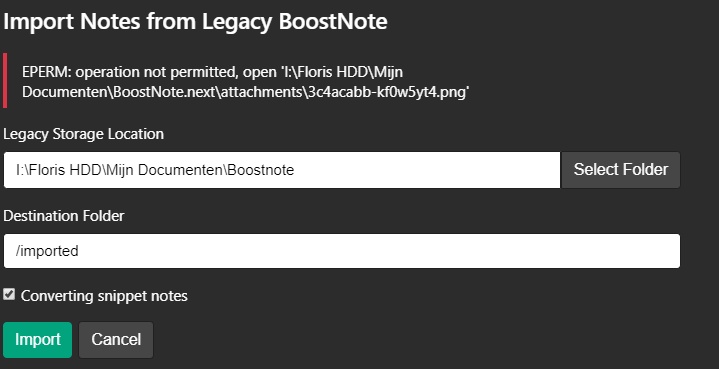
Issues also exist with attachments:
 Flexo013
on 13 Sep 2020
Flexo013
on 13 Sep 2020
I'm also having trouble importing my old notes, but I'm getting a different error: EISDIR: illegal operation on a directory, read.
 ashanan
on 16 Oct 2020
ashanan
on 16 Oct 2020
When trying to import legacy notes, I get the following error:
Cannot read property 'map' of undefined
I've tested the note import both on Ubuntu 18.04 (Linux x64 4.15.0-121-generic) and OSX (Catalina) with the same error.
Current version of BoostNote: 0.10.1
Legacy BoostNote version: 0.15.3
The location where I import the notes as well as where the notes are exported to doesn't seem to matter.
 DenisTome
on 9 Nov 2020
DenisTome
on 9 Nov 2020
when I import it 'works' in that i see the gui creating folders and looping over notes. it overwrites the same note every time and I end up with 1 note in every folder.
legacy 0.16.1
next 0.11.5
 dogfish182
on 4 Dec 2020
dogfish182
on 4 Dec 2020
Related issues
 stevenwchien
·
4Comments
stevenwchien
·
4Comments
 Meiryo7743
·
5Comments
Meiryo7743
·
5Comments
 hkunzhe
·
3Comments
hkunzhe
·
3Comments
 derekantrican
·
4Comments
Flexo013
·
6Comments
derekantrican
·
4Comments
Flexo013
·
6Comments
Most helpful comment
I'm also having trouble importing my old notes, but I'm getting a different error:
EISDIR: illegal operation on a directory, read.