Boostnote.next: Resizing the window causes tags bar to pop out
Current behavior
See the GIF below:
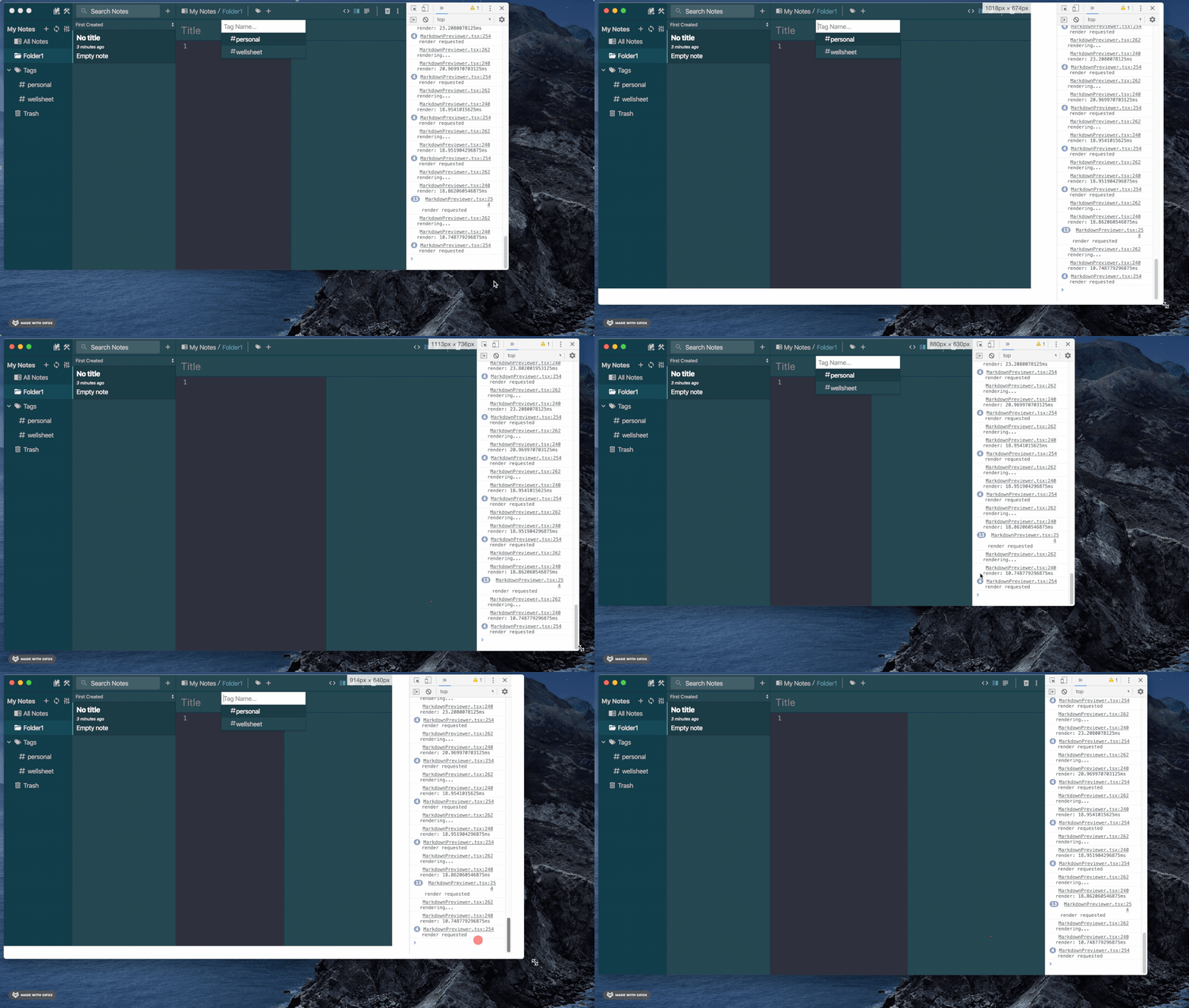
I have been noticing that the tags bar pops out when you resize the window. Not sure if other people are having this problem.
Expected behavior
I would expect the tags bar to not open up when resizing the window.
Steps to reproduce
- Resize the window, either by dragging, or I also use BetterTouchTool, and can hold down a key and drag to resize as well.
Environment
- Boostnote version: 0.7.0
- OS version and name: macOS Catalina Version 10.15.5
 stevenwchien
All 4 comments
Confirmed on Windows 10 as well.
 Flexo013
on 11 Jul 2020
Flexo013
on 11 Jul 2020
same thing happens for me on win10pro x64, no tags are added so a text box with 'Tag Name...' in it just pops up instead.
does not disappear when you let go of the cursor after dragging, but does disappear if you minimise the window and then reopen it again (or click into the window ofc)
ps. i'm curious what the side panel on the right is lol, how did you get that there? :p
 huzibizi
on 22 Jul 2020
huzibizi
on 22 Jul 2020
ps. i'm curious what the side panel on the right is lol, how did you get that there? :p
Yup, right side panel is the developer tools/console tab. On Mac, you can go into View->Toggle Developer Tools, or click option+cmd+I. I'm not that sure how to open it in Windows
stevenwchien
on 22 Jul 2020
Yup, right side panel is the developer tools/console tab. On Mac, you can go into View->Toggle Developer Tools, or click
option+cmd+I. I'm not that sure how to open it in Windows
Ah yeah, the same option is here on Windows and opens developer tools. Thanks! I didn't know that even existed
edit: wow, just noticed the same issue on windows 10, except the tag bar doesn't only just appear when resizing!
Whenever View > Toggle Developer Tools is clicked, the tags bar / text box appears and doesn't go away unless you click inside the actual boostnote window - it doesnt go away and stays the same when you click inside the developer tools section.
not only that, it re-appears whenever you click anywhere inside the developer tools window.
even worse, when you click X and exit out of developer tools, the tag bar appears again as expected, except this time it does not even disappear when clicking inside the boostnote window. you can click anywhere, and the tag bar / text box does not disappear.
the only thing that makes it disappear at that point, is to click inside the tag bar / text box, and then click outside of it, and then it finally disappears.
this issue is way, way more annoying and noticable when developer tools is enabled. hope someone finds a fix for it.
OS: Windows 10 x64. Version 10.0.18363 Build 18363. Text resize in 'display' properties set to 125%.
huzibizi
on 22 Jul 2020
Related issues
 Username77177
·
4Comments
Username77177
·
4Comments
 marilari88
·
3Comments
marilari88
·
3Comments
 jcarr98
·
5Comments
jcarr98
·
5Comments
 triet-truong
·
5Comments
Flexo013
·
4Comments
triet-truong
·
5Comments
Flexo013
·
4Comments