Bookmarks: Feature request: retain bookmark order
Would be nice to have the bookmarks retain the order when syncing with Floccus.
I have my bookmarks somewhat sorted by relative order of the bookmarks. When reviewing the bookmarks on the server I do not see a way to view them without being resorted (desorted).
Want to back this issue? Post a bounty on it! We accept bounties via Bountysource.
 InfamousUser
All 17 comments
A very necessary function for me too. Please add as soon as possible.
 DocSniper
on 10 Jun 2020
DocSniper
on 10 Jun 2020
Does anybody know whether Floccus sends the order to Nextcloud?
 weeman1337
on 18 Jun 2020
weeman1337
on 18 Jun 2020
Yes, the order is stored in nextcloud bookmarks, it's just not displayed or possible to change in the web UI.
 marcelklehr
on 18 Jun 2020
marcelklehr
on 18 Jun 2020
Thanks @marcelklehr . I assume it is the index column of the bookmarks_tree table, right?
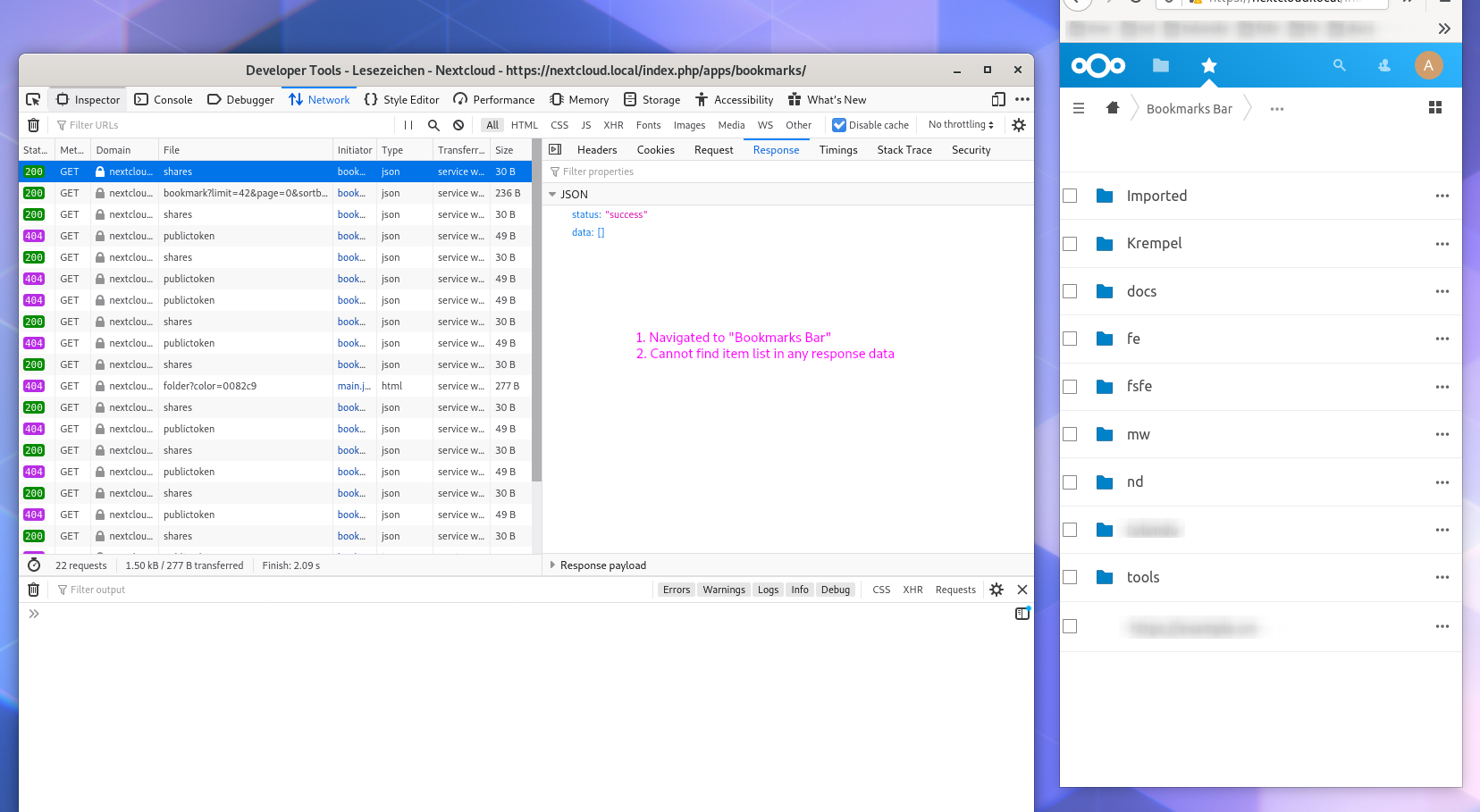
If I click on a folder in the front-end I am not able to find the request and response of the item list. Could you give me a hint?
weeman1337
on 19 Jun 2020
Currently the UI uses two older endpoints, namely bookmark and folder. There is also a childorder endpoint that gives you only the order and the ids without any content fields, and finally, there's the children endpoint that gives you the contents in order. All documented over here: https://nextcloud-bookmarks.readthedocs.io/en/latest/
I've neglected implementing this so far because I felt, if the order was displayed in the UI, it should also be possible to modify it, but implementing that is probably quite a hassle. I'm also happy with just a PR for only displaying in order, should you want to work on this :)
marcelklehr
on 19 Jun 2020
I'm also happy with just a PR for only displaying in order, should you want to work on this :)
Agree. Lets start with this. The current use-case on my side is sync bookmarks between browsers. Bonus: Online access via Nextcloud. But at the moment it is annoying using the web app because I do not find the bookmarks in my bookmark jungle :D
Any opinions about how to name the order option?
- _Original order_
- _Source order_
weeman1337
on 19 Jun 2020
Maybe custom order? :man_shrugging:
marcelklehr
on 19 Jun 2020
I'm also trying to have bookmark sync between browsers, but if they don't sort the same way and it's not possible to change order it's not of use. We need Chrome-like bookmark sync! But I don't want to send my bookmarks to Google.
Would be nice to be able to drag and drop to reorder in the Nextcloud UI.
InfamousUser
on 19 Jun 2020
To be clear: The bookmarks app does store the bookmarks order for syncing. It's just not displayed in the UI, yet.
marcelklehr
on 19 Jun 2020
I tried out the new sorting settings but none of the 4 settings available display the bookmarks in order, all of them resort the bookmarks.
To clarify; I have done a fresh sync and all folders are in the same order for all 4 options, bookmarks inside the folders get reordered depending on the options, but none of the options retains the bookmark orders - for all of them the bookmarks are in different order than in my browser from which I synced them.
InfamousUser
on 8 Aug 2020
@InfamousUser the new sort order feature has not yet been released.
marcelklehr
on 10 Aug 2020
Oh my bad, sorry, don't know how GitHub works.
InfamousUser
on 10 Aug 2020
I just updated to the new version with the original sort order available. Just wanted to say thank you very much for adding this, this makes it perfectly usable for me now! Very helpful!
InfamousUser
on 3 Oct 2020
I did an initial sync of my bookmarks into Nextcloud (merge option) and the original order of the bookmarks has changed.
Folders have mooved before single bookmarks. I want some bookmarks on top level to appear before folders.
So this order should also be preserved.
 sausix
on 8 Feb 2021
sausix
on 8 Feb 2021
I've just opened up bookmarks on Nextcloud and it opened two different sorts when I reselected "custom order".
@sausix It seems that when it first opens, the folders are at the top, then after a while, it resorts. Is that the case for you?
Further, it does not appear that the order is retained after making changes in browser, they stay in the starting position.
InfamousUser
on 8 Feb 2021
@InfamousUser No, I did some restarts and manual syncs.
But after I had manually resorted my bookmarks, they kept the order.
Until the Nextcloud app does not show the correct order and does not allow dragging for resorting, it's a lot of guessing what actually happens.
sausix
on 8 Feb 2021
This is likely a floccus issue, as floccus does not propagate the order information on the initial sync.
marcelklehr
on 10 Feb 2021
Related issues
 kc853
·
3Comments
kc853
·
3Comments
 kaffeeringe
·
6Comments
kaffeeringe
·
6Comments
 lyallp
·
4Comments
lyallp
·
4Comments
 GambaJo
·
5Comments
GambaJo
·
5Comments
 bspire
·
4Comments
bspire
·
4Comments
Most helpful comment
I just updated to the new version with the original sort order available. Just wanted to say thank you very much for adding this, this makes it perfectly usable for me now! Very helpful!