Description
Hi ,
I'm using bolt v1.5 to create slack app with home tab . I need when user mentions my app (ex: @my_app) it replies with an interactive message for list of commands used . I tried to implement app_mention event but it didn't work (the event is not firing ) although i added app_mention:read at Bot Token scopes permissions .
Am i missing something at permissions or i'm using the wrong event ?
Regards ,
Marwa
Describe your issue here.
What type of issue is this? (place an x in one of the [ ])
- [ ] bug
- [ ] enhancement (feature request)
- [x] question
- [ ] documentation related
- [ ] testing related
- [ ] discussion
Requirements (place an x in each of the [ ])
- [x] I've read and understood the Contributing guidelines and have done my best effort to follow them.
- [x] I've read and agree to the Code of Conduct.
- [x] I've searched for any related issues and avoided creating a duplicate issue.
Bug Report
Filling out the following details about bugs will help us solve your issue sooner.
Reproducible in:
package version:
node version:
OS version(s):
Steps to reproduce:
1.
2.
3.
Expected result:
What you expected to happen
Actual result:
What actually happened
Attachments:
Logs, screenshots, screencast, sample project, funny gif, etc.
 MarwaAbuEssa
All 12 comments
@MarwaAbuEssa Hey there 👋Is your app in the channel where it's being mentioned? The app_mentions:read scope only fires when it is in the channel.
 shaydewael
on 24 Feb 2020
shaydewael
on 24 Feb 2020
hi @shaydewael ,
the app is installed in a certain channel and yes i'm trying to mention the app at app's messages tab . is there any other event to use ?
Thanks
MarwaAbuEssa
on 24 Feb 2020
@MarwaAbuEssa It seems that app_mentions:read only allows your app to listen to public channels. To listen to messages within your app's messages tab, you'll have to subscribe to the message.im event.
In Bolt, if you wanted to filter out messages that mention your app, you could write a handler similar to this:
app.message('@APP_ID', ({ context, payload }) => {
  console.log(payload);
});
hi @shaydewael
unfortunate , it didn't work
here is a list of all scopes and permissions added to my app
Bot Token Scopes
- app_mentions:read
- channels:history
- channels:manage
- channels:read
- chat:write
- commands
- groups:history
- im:history
- im:read
- im:write
- links:read
- mpim:history
User Token Scopes
- channels:read
- channels:write
- chat:write
- im:history
- im:read
- im:write
- users:read
- users:write
Thanks a lot for your help
MarwaAbuEssa
on 25 Feb 2020
Hmm that's weird 🤔 What events are you subscribed to (under the Event Subscriptions tab)? I got the code example I posted to work locally
shaydewael
on 25 Feb 2020
HI @shaydewael i know it's weird indeed 😊
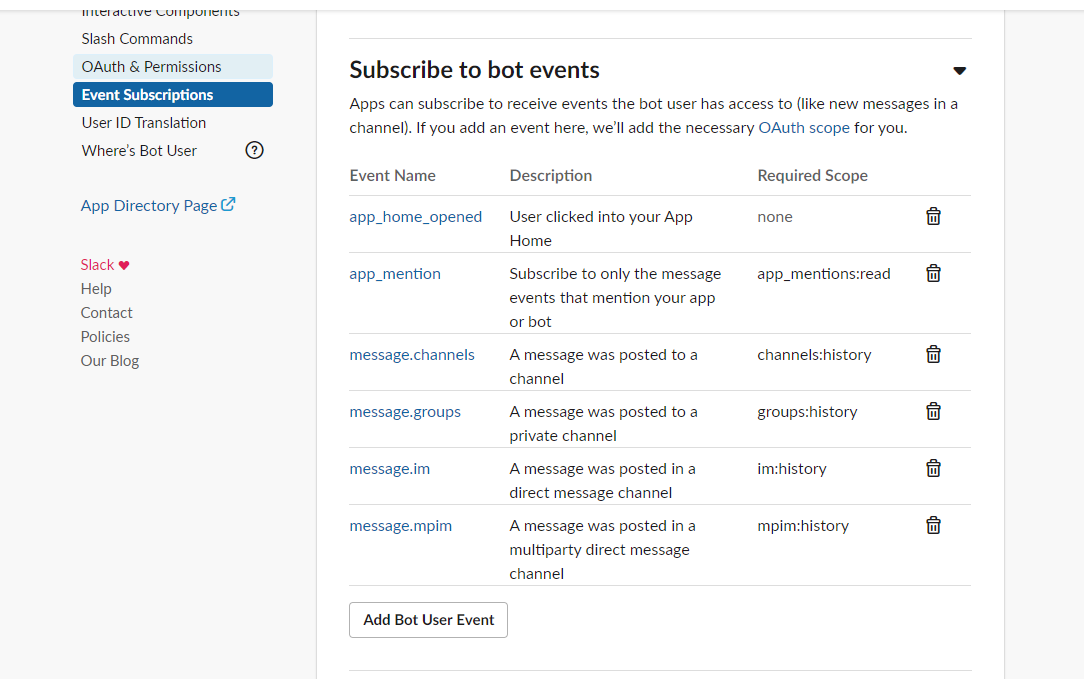
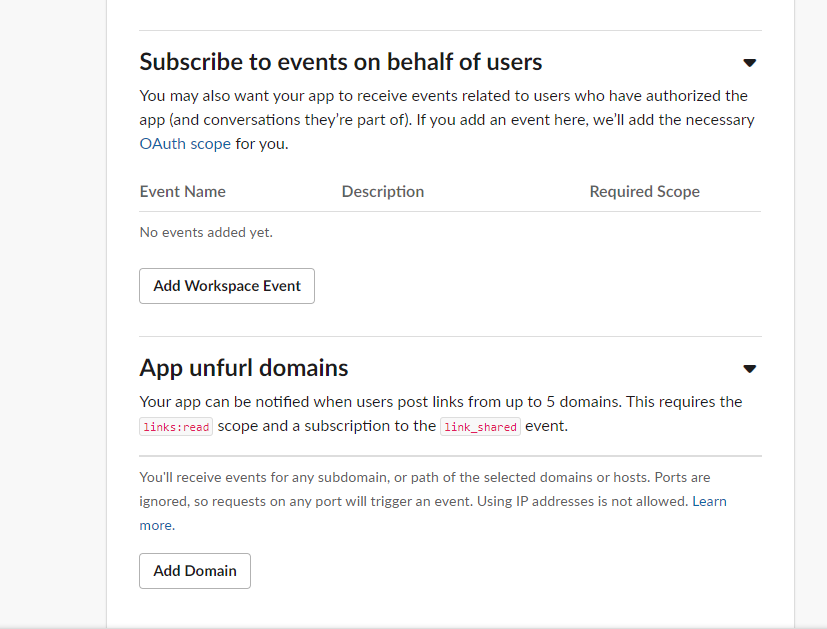
may be because Subscribe to events on behalf of users is empty ?
Thanks in advance
MarwaAbuEssa
on 25 Feb 2020
@MarwaAbuEssa Looks like you're subscribed to the correct events — you shouldn't have to subscribe to any Workspace Events. Is your app receiving any events at all? If not, you may want to double-check your Request URL at the top of that page. Bolt always listens at the /slack/events endpoint, so if my app was hosted at https://sample-app.ngrok.io, my Request URL would be http://sdewael-bolt.ngrok.io/slack/events.
Although if you're adding events, I assume your Request URL is verified and working. Is there any information in the Bolt logs (like errors, or warning messages)?
shaydewael
on 25 Feb 2020
hi @shaydewael ,
yes i'm receiving app_home_opened event which is working perfectly with all event data. also i'm using 3 commands and it is working perfectly .!! .
well the console log at event function (for app mention of app.message) is not logging anything as if it didn't goes into the function at all and also the console is not throws any error . may be i should add try and catch and try it again and kindly send me if you have any news.
Thanks in advance
MarwaAbuEssa
on 26 Feb 2020
@MarwaAbuEssa Adding the following code (a middleware for debug logging) in your app may be helpful. The debug log captures all incoming requests from Slack. You can check if your app is properly configured to receive those events more easily.
app.use(args => {
  const copiedArgs = JSON.parse(JSON.stringify(args));
  copiedArgs.context.botToken = 'xoxb-***';
  if (copiedArgs.context.userToken) {
    copiedArgs.context.userToken = 'xoxp-***';
  }
  copiedArgs.client = {};
  copiedArgs.logger = {};
  args.logger.info(
    "Dumping request data for debugging...\n\n" +
    JSON.stringify(copiedArgs, null, 2) +
    "\n"
  );
  args.next();
});
 seratch
on 26 Feb 2020
seratch
on 26 Feb 2020
hi @seratch ,
Thanks a lot i will add the debugging code and see the results
MarwaAbuEssa
on 26 Feb 2020
hi @shaydewael ,
It worked now !! its my mistake , when you send me the code app.message('@APP_ID', ({ context, payload }) => {
console.log(payload);
}); i was adding @app_name at the param not @app_uniqueid which is the app id actually 😊 i'm so sorry for inconvenience .
hi @seratch , thank you so much for the logger code , i wish i had it long time ago 👍 😊
Thanks a lot for your awesome support .
MarwaAbuEssa
on 27 Feb 2020
Glad you got it working @MarwaAbuEssa 🙌
shaydewael
on 27 Feb 2020
Related issues
 i-break-codes
·
4Comments
i-break-codes
·
4Comments
 aguayov
·
4Comments
aguayov
·
4Comments
 dschinkel
·
4Comments
dschinkel
·
4Comments
 jamesfmac
·
5Comments
jamesfmac
·
5Comments
 erkand-imeri
·
4Comments
erkand-imeri
·
4Comments
Most helpful comment
Glad you got it working @MarwaAbuEssa 🙌