Bolt-js: Show Error Message on Section, not Element
I have a need to show an error message on a section, not the actual dropdowns due to the limitations the Slack API forces on us with Block elements.
Why? Because I have presented to them 3 country dropdowns because I had to split them out due to the frustrating 100 value limitation on a dropdown. It's totally ridiculous.
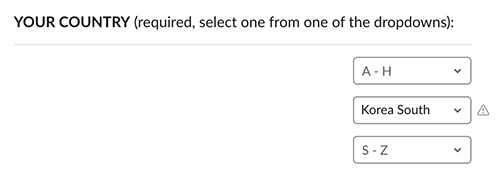
Since I want to make country required, in this case, I tried to check whether they have selected a value in one of the three dropdowns.
If they don't then I need to show an error message not on a specific dropdown but on the section that has some markup which I put right before those dropdowns, as I'm asking them to pick one country dropdown to specify their country.
{
  type: "section",
  block_id: "country_selection", // it apparently did not like this
  text: {
    type: "mrkdwn",
    text: "*YOUR COUNTRY* (required, select one from one of the dropdowns):"
  }
},
But..even worse is that this wacky workaround is furthermore blocked due to Walls with the Slack API:
1) is there a way to make all 3 dropdowns optional _so that_ I can check that they selected an option in only one of the 3 dropdowns? I sure hope so. Because if not I will not be able to use this solution to split up countries into 3 dropdowns.
2) I tried adding a block_id to a section that has mark-up, and tried to use that as a place to set the error to show up if they had not selected an item in one of the 3 dropdowns:
errors['country_selection'] = 'Please select your country'.
But, I got an error saying you can't put a block_id on a section like this.
if I can't show an error from a section rather than a specifically targeted field, How can I get this accomplished in my situation then?
3) Furthermore I am blocked because After I select an option in one of the dropdowns, I get An incoming event was not acknowledged within 3 seconds. Ensure that the ack() argument is called in a listener. I don't want to handle anything when they select something in a dropdown, so why am I getting a post back from Slack after I select something??? I got around this by creating a handler to ack back but it would be nice if I wasn't required to put an action_id on these.
Ultimately, the inability to be able to put all countries in ONE dropdown due to this 100 value limitation is really a big problem with how the Slack API is designed. It's really ridiculous that we can't have a normal dropdown with the Slack API. I could have avoided trying to do all this crazy creation of several dropdowns coupled with having to figure out hacks around validating it etc. if I could simply create a NORMAL country dropdown like any client can out there in the world.
I have nothing but 100% frustration with the Slack API due to the limits on these elements to begin with. And I can't use an external_select because I have a GraphQL endpoint, there's no way I can give you a url to call. And I want to make the call to populate a select myself anyway, I don't want to be going into your website pasting in API urls out of band of my own code! That's just weird!
 dschinkel
All 4 comments
Hi there @dschinkel, thanks for taking the time to write up this issue!
Select menu's 100 option limit:
I can understand how the select menu's 100 option limit can be frustrating. I think your country use-case is a strong example of why Slack should consider supporting more than 100 options.
I've submitted your feedback to the Slack Platform Block Kit team. Thanks for adding more weight to why we should increase the limit 🙇🏻
Recommended approach for a select menu of countries:
I asked around for you and the recommended approach is to use external_select when there are more than 100 options in a select menu. I understand that your architecture may make this more challenging, but the alternative approach of managing multiple select boxes could be difficult and create an odd user experience.
To help you out, I've put together a complete example of using external_select in Bolt JS to retrieve a list of countries. I read the countries from a JSON file but you could retrieve it from GraphQL as well. In the example, the external select filters and returns only the countries that match the typed value - truncating when there are more than 100 results.
➔ Example of using external_select in Bolt JS to retrieve a list of countries
I hope this helps you out!
Question 1
1) is there a way to make all 3 dropdowns optional so that I can check that they selected an option in only one of the 3 dropdowns? I sure hope so. Because if not I will not be able to use this solution to split up countries into 3 dropdowns.
In order to properly display an error message, you will need the block_id of an type: input block. Unfortunately, a type: section block cannot display an error message.
To make it optional, you can add optional: true to the input block. However, input blocks require a label, which may make your user experience a little odd. Your labels may need to be: "Country A-H", "Country I-R", and "Country S-Z".
If you used this approach, you'd need to validate that at least one select menu has a value when the user presses submit:
app.view('view_callback_id_1', async ({ ack, body, view, client }) => {
// Display an error
await ack({
'response_action': 'errors',
'errors': {
'block_id_1': 'This is an error',
}
});
});
You will also want to check if users select countries from multiple select menus. 😖
Question 2
2) I tried adding a block_id to a section that has mark-up, and tried to use that as a place to set the error to show up if they had not selected an item in one of the 3 dropdowns:
errors['country_selection'] = 'Please select your country'.But, I got an error saying you can't put a block_id on a section like this.
if I can't show an error from a section rather than a specifically targeted field, How can I get this accomplished in my situation then?
Please see the answer to.Question 1. You'll need to use an Input Block type for each select menu in order to display an error for a specific select menu.
Example view with multiple input block select menus:
const result = await client.views.open({
// Pass a valid trigger_id within 3 seconds of receiving it
trigger_id: body.trigger_id,
// View payload
view: {
type: 'modal',
callback_id: 'view_callback_id_1',
title: {
type: 'plain_text',
text: 'Modal title'
},
blocks: [
{
type: 'input',
block_id: 'block_id_1',
optional: true,
element: {
action_id: 'country_a_h_action',
type: 'static_select',
placeholder: {
type: 'plain_text',
text: 'Select a country'
},
options: [
{
text: {
type: 'plain_text',
text: 'Afghanistan'
},
value: 'afghanistan'
},
{
text: {
type: 'plain_text',
text: 'Albania'
},
value: 'albania'
}
]
},
label: {
type: 'plain_text',
text: 'Country A-H'
}
},
{
type: 'input',
block_id: 'block_id_2',
optional: true,
element: {
action_id: 'country_i_r_action',
type: 'static_select',
placeholder: {
type: 'plain_text',
text: 'Select a country'
},
options: [
{
text: {
type: 'plain_text',
text: 'Iceland'
},
value: 'iceland'
},
{
text: {
type: 'plain_text',
text: 'India'
},
value: 'india'
}
]
},
label: {
type: 'plain_text',
text: 'Country I-R'
}
}
],
submit: {
type: 'plain_text',
text: 'Submit'
}
}
});
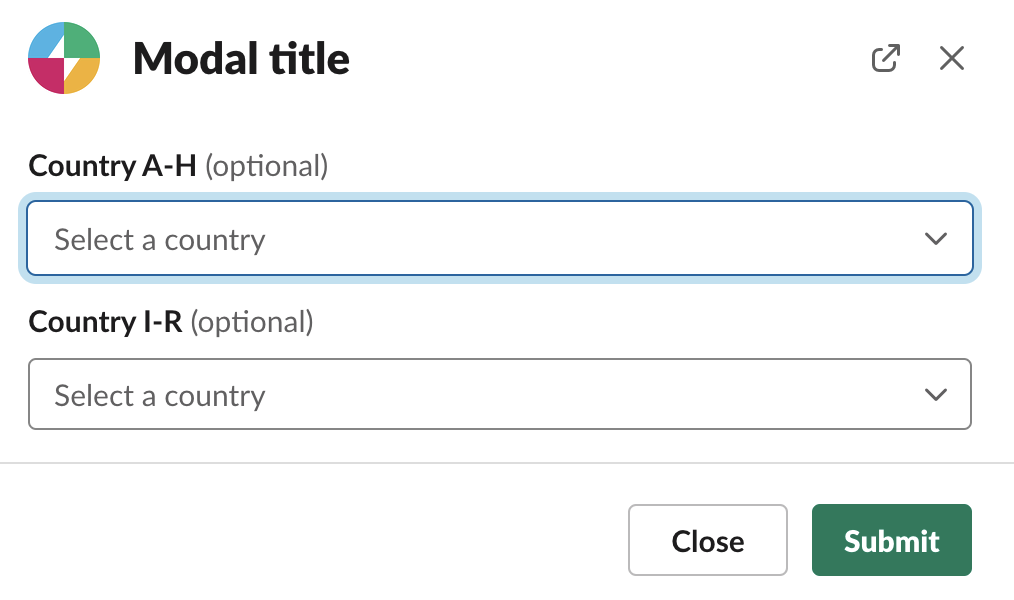
An error might be handled as:
app.view('view_callback_id_1', async ({ ack, body, view, client }) => {
await ack({
'response_action': 'errors',
'errors': {
'block_id_1': 'This is an error',
}
});
});
Question 3
3) Furthermore I am blocked because After I select an option in one of the dropdowns, I get An incoming event was not acknowledged within 3 seconds. Ensure that the ack() argument is called in a listener. I don't want to handle anything when they select something in a dropdown, so why am I getting a post back from Slack after I select something??? I got around this by creating a handler to ack back but it would be nice if I wasn't required to put an action_id on these.
The Slack API requires that we handle each action_id that is defined in Block Kit. For a select menu, when a user selects a value, Slack will send a message to your app to take action. The easiest thing to do is ack() the request to avoid the 3 second timeout error message.
Continuing from the sample code in Question 3, you'd acknowledge the select menu with:
app.action('country_a_h_action', async ({ ack, body, client }) => {
await ack();
});
app.action('country_i_r_action', async ({ ack, body, client }) => {
await ack();
});
I hope this helps point you in the right direction. I'd highly recommend using an external_select. It'll provide a better user experience, easier error handling, and less code overall. 🙂
 mwbrooks
on 13 Nov 2020
mwbrooks
on 13 Nov 2020
🙏
Thanks for answering. I do appreciate the support.
I'm sorry to sound ungrateful, thanks for your efforts above and the examples, but most your answers don't answer my true core pain points though. You are speaking to the choir here on most of it. I understand you are working within the same constraints honestly (which should be an immediate "DING! yea this is bad" to the slack Product Owners on the usability of this API) so 🤷♂️ none of us here should have to use these weird workarounds, even using external_select TBH.
Most of the stuff you showed I implemented already with the exception of external_select because I didn't even attempt to try that route because:
a) there is no way I see to specify a graphQL request. _(see below)_
b) I really do not want to be coding my app like this pasting in urls in your/my app's Administration site. This isn't Salesforce, this is an API folks! We want to be able to code this stuff not have weird one-offs in a portal somewhere.
💻
To make it optional, you can add optional: true to the input block. However, input blocks require a label, which may make your user experience a little odd.
cool. I noticed that you used element instead of accessory though. I am using accessory. I did change to element now and it's better as it allows you to undo a selection.
You'll need to use an Input Block type for each select menu in order to display an error for a specific select menu.
It does not make sense when you have 3 dropdowns to show an error on any of them when they're all optional. It'll only confuse the user thinking that the particular menu has to be selected. My original point was I need to show an error out of bounds on a label somewhere else than the inputs themselves. If I can't do that, this is really amazing to me.
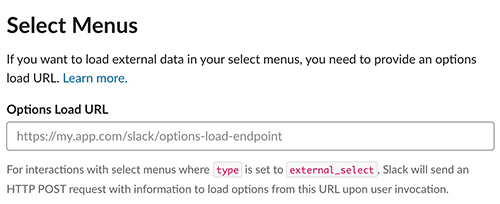
you could retrieve it from GraphQL
how? you have to specify a query with a graphQL request! these are not REST endpoints. There's no way to do that here
👿
And besides I do not want to build my app like this having to add urls like this in the Slack Administration Pages of my app. That's just a bizarre developer experience. I code, I don't want to put all my urls in your Administration pages for my API. I already have done enough of that by having to specify an event url which is fine but having to do anything more than that is totally not a professional experience using an API like this. We want to be able to simply code and fetch our own data and populate just like any normal, sane application.
Lets hope the Slack API team takes my use case serious, I can't be the only one who's tried to have a menu with more than 100 items in it, and who does not want to be creating urls in the Slack API website and just wants to code! This also applies to checkboxes not just select lists, as checkbox lists only allow 10 items which has made me split up those lists as well into this really messed up form because of these unreal limitations.
Can we please make this a real/professional API? Meaning the seemingly randomly decided limits on here are just amateur'ish IMO if you're trying to build an API developers can actually use. Who came up with these shallow limits and why? It makes no sense. If I want my slack form to be longer, that's on me. Preventing us from doing so actually makes the user experience worse.
Conclusion
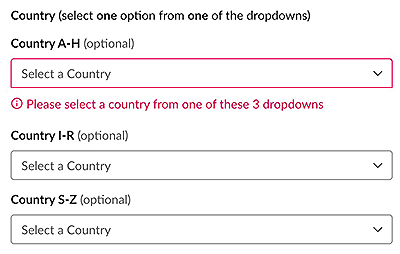
Here's what I ended up with. Totally not ideal but for now it's all I can do with these blockers:
Use Case for Slack App: This form is important. They can open it up from their Home Tab. I'll let existing members of my slack community (and other communities) create a new profile on WeDoTDD.com - so promoting our craft as developers! I'm first starting out letting people create profiles easily while they're already in my slack. Later of course I'll build out a login to my actual site but you can see the power here doing this through existing slack communities.
I'll be doing some screencasts soon on how to Test Drive (TDD) features with Slack as well 😁
☑️
Thanks for submitting my feedback. Lets hope they retrospect on this for real and get back to me on increasing these limits big time on all the list based block elements.
The experience overall has been good, but blockers like this, can totally damage this API's usability and overshadow all the good Slack and you folks have done with the API and Bolt.
Closing this for now. Until those limits are at least tripled on select menus, checkbox lists, etc, I am at a loss honestly and so are the clients of my Slack App. I realize this isn't a full blown SPA, this is a Slack app, but we're not even close to something like an SPA so don't worry. Raise the limits!
dschinkel
on 13 Nov 2020
Hey @dschinkel, thanks for following up and understanding that we're all in the same boat here. ⛵
Feedback on more control over error messages
I'll find the right team to pass your feedback about having more control over _where_ the error message is displayed. To me, it feels like an input group is needed, which would follow the input pattern that Block Kit uses for error messages but give more control over groups of input fields.
Feedback on check box limitations
This also applies to checkboxes not just select lists, as checkbox lists only allow 10 items which has made me split up those lists as well into this really messed up form because of these unreal limitations.
Ha! I actually hit the same limitation yesterday. I'll pass it long with a ➕ from you! 😆
Select menu as an Element or Accessory
cool. I noticed that you used element instead of accessory though. I am using accessory
The element property is required for input blocks. To the best of my knowledge, we can't use an accessory with an input block and error messages can only be displayed on input blocks.
Totally understand that the accessory has a more appropriate UX for your use-case. ➕
Select Menu's Optiona Load URL
how? you have to specify a query with a graphQL request! these are not REST endpoints. There's no way to do that here
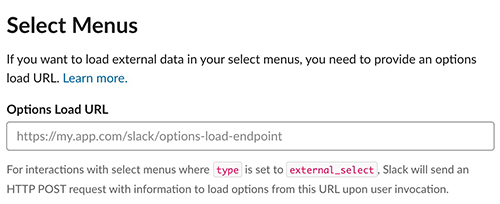
Instead of specifying the graphQL endpoint, you can specify the same Bolt endpoint that you use for Events/Interactivity/etc. By default, it would end in /slack/events such as https://mbrooks.ngrok.io/slack/events for my local development environment.
In your Bolt JS code, you'll respond to the Options Load URL request and within that method you can make a call to graphQL if needed. The implementation would look something like (see source code for the country example:
app.options('external_action', async ({ options, ack }) => {
    // Load the countries from graphQL
    await ack({
      'options': selectMenuOptions
    });
});
We want to be able to simply code and fetch our own data and populate just like any normal, sane application.
I hear ya and I think the above should allow you do that. The only downside is that you need to register another endpoint in the Slack App settings, but Bolt simplifies things by using the same endpoint everywhere.
Current progress on country error messages
Here's what I ended up with. Totally not ideal but for now it's all I can do with these blockers:
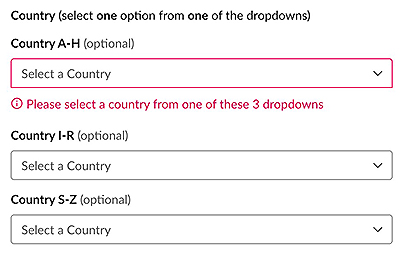
Nice work on pulling that together between yesterday and today! I'd love to hear whether you can use the Options Load URL with your Bolt /slack/events endpoint to use an external_select. Otherwise, it's good to see that you have an implementation going.
mwbrooks
on 13 Nov 2020
Yep already using ngrok, that's the event url I talked about. But thanks for the further clarification.
Cheers! and if you wanna learn TDD join my WeDoTDD.com slack (shameful plug).
https://join.slack.com/t/wedotdd/shared_invite/zt-igrc95ro-qoEWK3HHTbzB3PiGAlo7zA - this link expires in 30 days though, another pain point I've brought up to Slack but seemingly got shot down.
They refuse to re-expose the new unexpired links option for free workspaces that they accidentally pushed to production a couple months ago for us free workspace administrators and now only exposed for paid workspaces which makes me very 😠. I have to keep generating this damn thing every 30 days. They killed slackin and left us without a good option to replace it.
dschinkel
on 13 Nov 2020
Related issues
 malonehedges
·
5Comments
malonehedges
·
5Comments
 kmartin-215
·
5Comments
kmartin-215
·
5Comments
 theomelo
·
3Comments
theomelo
·
3Comments
 johnboxall
·
4Comments
johnboxall
·
4Comments
 i-break-codes
·
4Comments
i-break-codes
·
4Comments
Most helpful comment
Hey @dschinkel, thanks for following up and understanding that we're all in the same boat here. ⛵
Feedback on more control over error messages
I'll find the right team to pass your feedback about having more control over _where_ the error message is displayed. To me, it feels like an input group is needed, which would follow the input pattern that Block Kit uses for error messages but give more control over groups of input fields.
Feedback on check box limitations
Ha! I actually hit the same limitation yesterday. I'll pass it long with a ➕ from you! 😆
Select menu as an Element or Accessory
The
elementproperty is required forinputblocks. To the best of my knowledge, we can't use anaccessorywith aninputblock and error messages can only be displayed oninputblocks.Totally understand that the
accessoryhas a more appropriate UX for your use-case. ➕Select Menu's Optiona Load URL
Instead of specifying the graphQL endpoint, you can specify the same Bolt endpoint that you use for Events/Interactivity/etc. By default, it would end in
/slack/eventssuch ashttps://mbrooks.ngrok.io/slack/eventsfor my local development environment.In your Bolt JS code, you'll respond to the Options Load URL request and within that method you can make a call to graphQL if needed. The implementation would look something like (see source code for the country example:
I hear ya and I think the above should allow you do that. The only downside is that you need to register another endpoint in the Slack App settings, but Bolt simplifies things by using the same endpoint everywhere.
Current progress on country error messages
Nice work on pulling that together between yesterday and today! I'd love to hear whether you can use the Options Load URL with your Bolt
/slack/eventsendpoint to use anexternal_select. Otherwise, it's good to see that you have an implementation going.