Blueprint: Nested menus in dropdown menu setup don't propagate onClicks
Environment
- __Package version(s)__: 3.12.0
- __Browser and OS versions__: Chrome, macOS
Steps to reproduce
- Use this code (codesandbox)
import React, { useState } from "react";
import ReactDOM from "react-dom";

import "@blueprintjs/core/lib/css/blueprint.css";

import {
  Popover,
  Button,
  Menu,
  MenuItem,
  MenuDivider,
  ButtonGroup,
  Position
} from "@blueprintjs/core";

function App() {
  const [theme, setTheme] = useState("light");

  return (
    <div className="App">
      <ButtonGroup minimal>
        <Popover position={Position.BOTTOM_LEFT} minimal>
          <Button minimal text={"file"} />
          <Menu>
            <MenuItem text="New" icon="document" />
            <MenuItem text="Open" icon="folder-shared" />
            <MenuItem text="Close" icon="add-to-folder" />
            <MenuDivider />
            <MenuItem text="Save" icon="floppy-disk" />
            <MenuItem text="Save as..." icon="floppy-disk" />
            <MenuDivider />
            <MenuItem text="Exit" icon="cross" />
          </Menu>
        </Popover>
        <Popover position={Position.BOTTOM_LEFT} minimal>
          <Button minimal text={"edit"} />
          <Menu>
            <MenuItem text="Cut" icon="cut" />
          </Menu>
        </Popover>
        <Popover position={Position.BOTTOM_LEFT} minimal>
          <Button minimal text={"view"} />
          <Menu>
            <MenuItem text="Settings" icon="cog" />
            <MenuItem text="Theme" icon="folder-shared">
              <MenuItem
                text="Dark"
                icon="moon"
                onClick={() => setTheme("dark")}
              />
              <MenuItem
                text="Light"
                icon="flash"
                onClick={() => setTheme("light")}
              />
            </MenuItem>
          </Menu>
        </Popover>
      </ButtonGroup>
      <h1>Theme</h1>
      <h2>{theme}</h2>
    </div>
  );
}

const rootElement = document.getElementById("root");
ReactDOM.render(<App />, rootElement);
- Click View -> Theme -> Dark
(note that theme doesn't change below)
- Click View -> Theme -> Dark (again, and possibly again)
Watch how theme now changes to dark
NOTE: The above also occurs without React's new hooks. It just made this example smaller.
Actual behavior
First (?) click on a nested menu item does not fire onClick, only close the surrounding portal.
Additionally, it seems like opening the menu automatically opens that submenu.
Expected behavior
onClick gets triggered and menu is closed
Possible solution
???
Related issues
This is likely related to #3095, though I've got the codesandbox for checking out, as well as the above snippet.
 rgbkrk
All 6 comments
Some extra notes --
View is clicked here, yet the full submenu comes up.
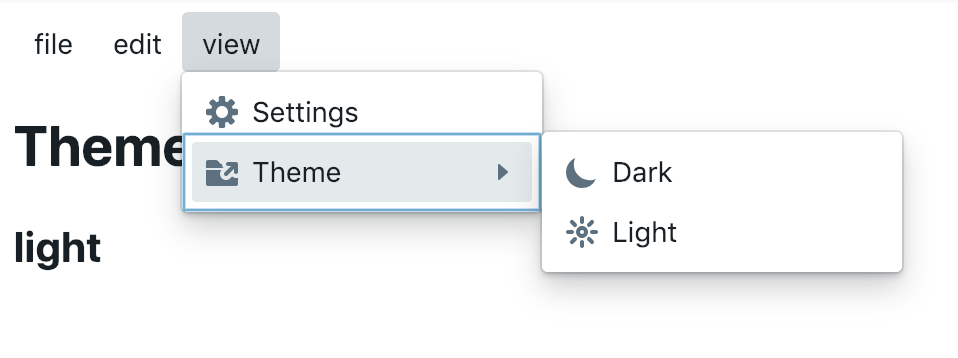
I tried to make a workaround for this in https://codesandbox.io/s/wymn319465 by putting a ButtonGroup inside a Menu, then just using MenuItem to build the submenus. Same bug occurs.
Is there another pattern I should be using @giladgray?
rgbkrk
on 13 Feb 2019
@rgbkrk I found a workaround, and a hint at where the bug is.
In the nested menu item props use tagName={ "button" }
 BenRussert
on 15 Feb 2019
BenRussert
on 15 Feb 2019
I have the same problem. @BenRussert's solution works but the font gets changed to something else. To change it back to the default, add to your CSS file:
button.bp3-menu-item > div {
  font-family: apple-system, "BlinkMacSystemFont", "Segoe UI", "Roboto", "Oxygen", "Ubuntu", "Cantarell", "Open Sans", "Helvetica Neue", "Icons16", sans-serif;
}
 AlexGodard
on 31 Mar 2019
AlexGodard
on 31 Mar 2019
@rgbkrk I found a workaround, and a hint at where the bug is.
In the nested menu item props use
tagName={ "button" }
Can confirm that this workaround works.
Thanks!
 domhaas
on 4 Jun 2019
domhaas
on 4 Jun 2019
Try to add on Popover "autoFocus={false}"
 aniov
on 4 Oct 2019
aniov
on 4 Oct 2019
I am not seeing the bug from the OP in the code sandbox. Clicking the submenu items does change the "theme":
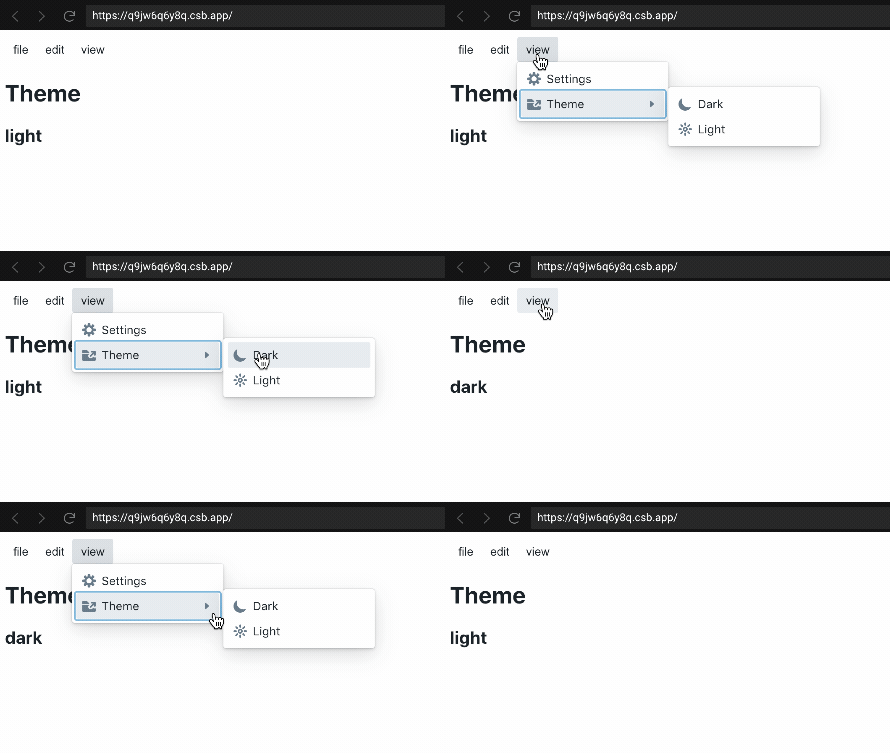
Submenu opening up on its own is likely #2863
 adidahiya
on 23 Mar 2021
adidahiya
on 23 Mar 2021
Related issues
 tomzaku
·
3Comments
tomzaku
·
3Comments
 sighrobot
·
3Comments
sighrobot
·
3Comments
 Goddak
·
3Comments
Goddak
·
3Comments
 vinz243
·
3Comments
vinz243
·
3Comments
 raiju
·
3Comments
raiju
·
3Comments
Most helpful comment
@rgbkrk I found a workaround, and a hint at where the bug is.
In the nested menu item props use
tagName={ "button" }https://codesandbox.io/s/w6yyomoy1w