Blueprint: Popover on position fixed element in wrong place
Hey there,
I have the following code:
                              <Tooltip
                                  // usePortal={false}

                                    position="left"
                                    content="Minimize Tab"
                                  >
                                    <Button
                                      style={{
                                        zIndex: 15002,
                                        position: "fixed",
                                        top: 15,
                                        right: 25
                                      }}
                                      minimal
                                      icon="minimize"
                                      onClick={() => {
                                        togglePanelFullScreen(activePanelId);
                                      }}
                                    />
                                  </Tooltip>
that is producing this strange looking behavoir:
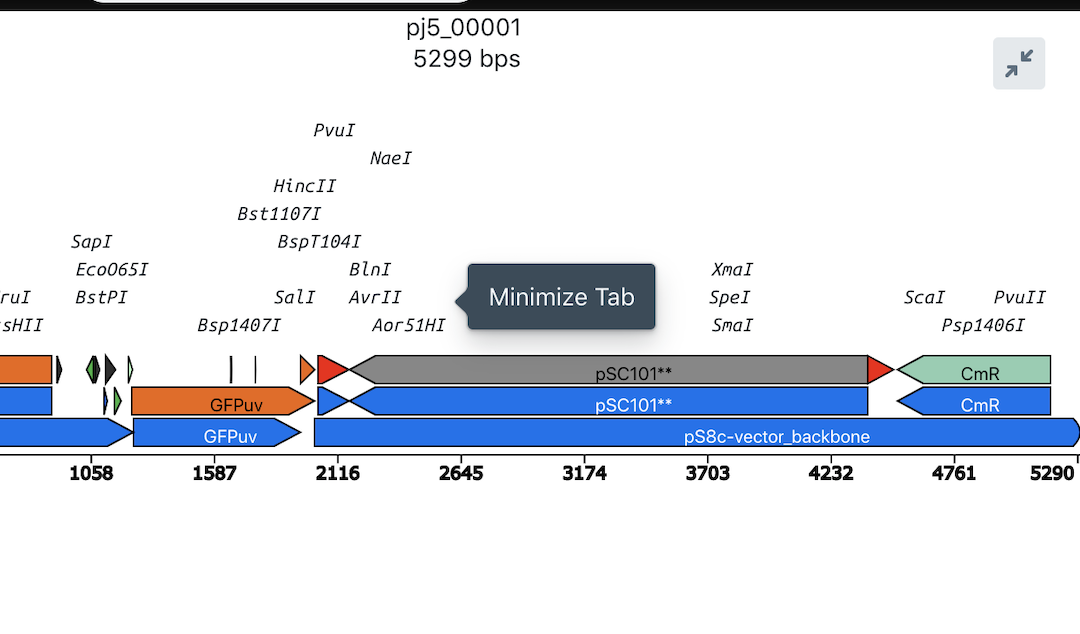
I'm hovering the button in the top right but the popover is coming up in the middle of the screen. I tried using usePortal=false but that doesn't seem to help.
Any ideas?
Thanks!
 tnrich
All 7 comments
@tnrich play with the boundary prop, specifically boundary="viewport". usually solves all problems.
 giladgray
on 11 Dec 2018
giladgray
on 11 Dec 2018
Thanks I'll try that out. I found that wrapping the popover-wrapped element
in a div that is fixed position fixed the problem.
On Tue, Dec 11, 2018, 10:14 AM Gilad Gray <[email protected] wrote:
@tnrich https://github.com/tnrich play with the boundary prop,
specifically boundary="viewport". usually solves all problems.—
You are receiving this because you were mentioned.
Reply to this email directly, view it on GitHub
https://github.com/palantir/blueprint/issues/3224#issuecomment-446304502,
or mute the thread
https://github.com/notifications/unsubscribe-auth/ACmqcUrlT4TD7QSSRnh2U9YvTlChC6Wfks5u3_YKgaJpZM4ZMvTY
.
tnrich
on 12 Dec 2018
Yes sure. That would work for the reason as boundary prop: it affects
Popper's logic for determining scroll parent.
On Tue, Dec 11, 2018, 7:48 PM Thomas Rich notifications@github.com wrote:
Thanks I'll try that out. I found that wrapping the popover-wrapped element
in a div that is fixed position fixed the problem.On Tue, Dec 11, 2018, 10:14 AM Gilad Gray <[email protected] wrote:
@tnrich https://github.com/tnrich play with the boundary prop,
specifically boundary="viewport". usually solves all problems.—
You are receiving this because you were mentioned.
Reply to this email directly, view it on GitHub
<
https://github.com/palantir/blueprint/issues/3224#issuecomment-446304502>,
or mute the thread
<
https://github.com/notifications/unsubscribe-auth/ACmqcUrlT4TD7QSSRnh2U9YvTlChC6Wfks5u3_YKgaJpZM4ZMvTY.
—
You are receiving this because you commented.Reply to this email directly, view it on GitHub
https://github.com/palantir/blueprint/issues/3224#issuecomment-446452145,
or mute the thread
https://github.com/notifications/unsubscribe-auth/AAcXtlgZspzex5midHEttux9eMY2jOkzks5u4HyGgaJpZM4ZMvTY
.
giladgray
on 12 Dec 2018
@tnrich any luck?
giladgray
on 14 Dec 2018
@tnrich play with the
boundaryprop, specificallyboundary="viewport". usually solves all problems.
Thank you very much! I have been trying things for days without effect and when using the boundary={ "viewport" } it solved it perfectly. Thanks for the tip!
 leif-freshx
on 2 Jun 2020
leif-freshx
on 2 Jun 2020
I hit this on an element with Position.RIGHT that was rendering on the left side. Adding this property solved it even though overflow was set:
            modifiers={{
              preventOverflow: { enabled: false },
              hide: { enabled: false },
            }}
 colinmegill
on 12 Aug 2020
colinmegill
on 12 Aug 2020
@colinmegill that sounds like a case for boundary="viewport". if your popover flips unexpectedly, try changing the boundary before you disable modifiers 🤷♂️
giladgray
on 13 Aug 2020
Related issues
 vinz243
·
3Comments
vinz243
·
3Comments
 ernestofreyreg
·
3Comments
ernestofreyreg
·
3Comments
 shahzeb1
·
3Comments
shahzeb1
·
3Comments
 brsanthu
·
3Comments
brsanthu
·
3Comments
 mdebeus
·
3Comments
mdebeus
·
3Comments
Most helpful comment
@tnrich play with the
boundaryprop, specificallyboundary="viewport". usually solves all problems.