Blueprint: Table Scrolling in Firefox doesn't work well
This might be a firefox beta bug, but it might be related to a couple of the other issues I see here.
Bug report
Blueprint v1.31.0
Firefox: 57.0b7 (64-bit)
Steps to reproduce
- Navigate to http://blueprintjs.com/docs/#table-js
- Find a table with a scrollbar
- Click into it and try scrolling with the mouse wheel
I think the table needs to be using the batch mode.
Actual behavior
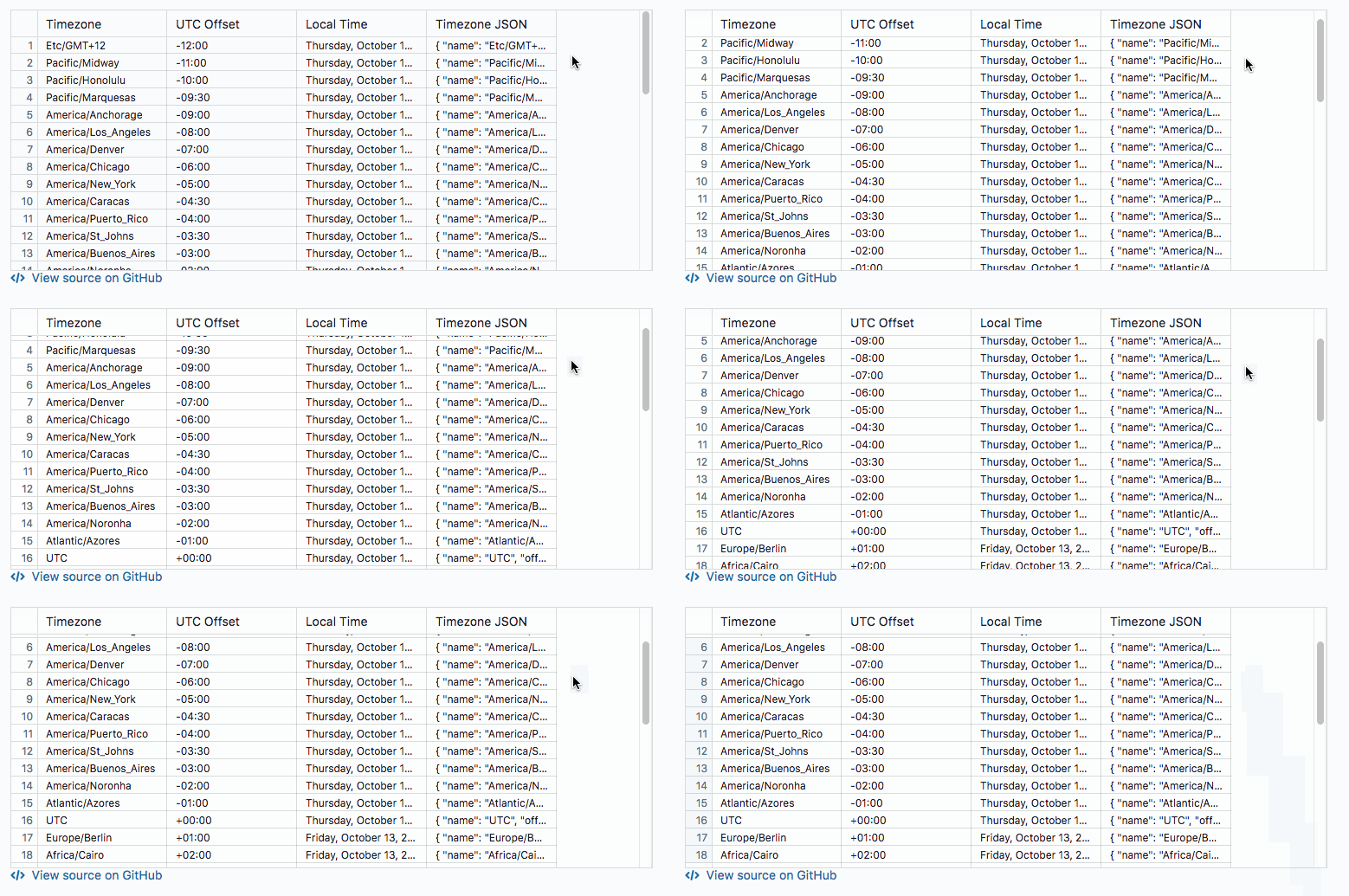
Scrolling is stunted and latches back to the rows.
This is what happens when you scroll down with the mouse:
Expected behavior
Scrolling is not interrupted
 cetra3
All 8 comments
👍 on this, it's really quite nasty experience

 tgreenwatts
on 26 Jan 2018
tgreenwatts
on 26 Jan 2018
we have same problems with firefox scrolling in tables - it is very slow.
 Lojka59
on 27 Mar 2018
Lojka59
on 27 Mar 2018
Just to update: This appears to also be an issue in v2.0.0
cetra3
on 16 Apr 2018
Same problem here : scroll with wheel doesn't work as expected but it work just fine when you use browsers control. Some updates about this ?
 LoiKos
on 4 Jun 2018
LoiKos
on 4 Jun 2018
I am facing the same issue. I am using Firefox 61.0 on Mac.
Using Ant Design for the Table.- antd 3.5.4
Facing issues in both vertical and horizontal scrolling - when using mouse scroll and also the browser scroll bar.
Any updates ?
 bhargaviswami12
on 9 Jul 2018
bhargaviswami12
on 9 Jul 2018
Any updates or leads on how to resolve this would be appreciated.
Thanks.
bhargaviswami12
on 14 Aug 2018
Hi, I have the same problem (on MacOS with Firefox 61 and on Lubuntu with Firefox 59) and I have created the following patched table as a temporary solution to make the BlueprintJS table a bit more usable in Firefox:
export class PatchedTable extends Table {

    constructor(props: ITableProps, context: any) {
        super(props, context);

        // We need to override the original `handleBodyScroll` method with our fixed version.
        (this as any).handleBodyScroll = this._patchedHandleBodyScroll.bind(this);
    }

    // Waiting time between tries
    private readonly WAITING_TIME: number = 40;

    // We need to check sometimes that the component is mounted or not.
    private _ismounted: boolean = false;

    // We need only one running instance to check and update the stored ViewportRect.
    private _lastInProcessEventCame: Date | undefined = undefined;

    public componentDidMount() {
        super.componentDidMount();
        this._ismounted = true;

        // Disabling throttled version of handleWheel and handleMainQuadrantScroll
        // and using handleMainQuadrantScroll instead of handleWheel.
        (this as any).quadrantStackInstance.throttledHandleWheel =
            (this as any).quadrantStackInstance.handleMainQuadrantScroll;

        (this as any).quadrantStackInstance.throttledHandleMainQuadrantScroll =
            (this as any).quadrantStackInstance.handleMainQuadrantScroll;
    }

    public componentWillUnmount() {
        this._ismounted = false;
        super.componentWillUnmount();
    }

    /**
     * We need this promise to delay our tries.
     */
    private readonly _waitingPromise = (value: Rect) => {
        return new Promise<Rect>( (resolve) => setTimeout(() => resolve(value), this.WAITING_TIME) );
    }

    /**
     * We can check the change of the viewportRect and after there is not any other change
     * (the scrolling has been finished) we can update the ViewportRect of the Table.
     */
    private readonly _checkingPromise = async (value: Rect): Promise<Rect> => {
        const viewportRect: Rect = this.locator.getViewportRect();
        const last = this._lastInProcessEventCame;

        if ( this._ismounted && last !== undefined ) {

            if ( Math.abs( new Date().getTime() - last.getTime() ) < this.WAITING_TIME ) {
                // Scrolling is in progress, it hasn't finished yet, so we need to wait a bit...
                return this._waitingPromise( viewportRect ).then( this._checkingPromise );
            } else {
                // Time is OK, we can call the original updateViewportRect method.
                (this as any).updateViewportRect(viewportRect);
            }

        }

        // We can stop the trying now. (No need to wait more.)
        this._lastInProcessEventCame = undefined;
        return value;
    }

    /**
     * Hack to make BluePrintJS table more usable with Firefox.
     * (And to have a bit better performance in other browsers.)
     */
    private _patchedHandleBodyScroll = (event: React.SyntheticEvent<HTMLElement>) => {

        event.stopPropagation();

        if (this.locator != null && !this.state.isLayoutLocked) {

            const initialNextViewportRect = this.locator.getViewportRect();

            // We don't want to start the checking if there is a running instance.
            if ( this._lastInProcessEventCame === undefined ) {
                this._waitingPromise( initialNextViewportRect ).then( this._checkingPromise );
            }

            // We need to refresh the lastInProcessEventCame value every time.
            this._lastInProcessEventCame = new Date();

        }
    }

}
This is not a perfect solution but I will use it until an update arrives. (The scrolling of the row headers and the column headers doesn't work fine with this.)
I think the root problem is somewhere in the tableQuadrantStack.tsx (around the handleWheel and the handleBodyScroll method).
So these are my steps:
- Override the original
handleBodyScrollmethod of the table with my custom version (I have added some delay to wait the end of the scrolling instead of throttling. And I will do theupdateViewportRectcall only after the scrolling has been ended.) - Override the throttled version of the
handleMainQuadrantScrollwith the original method - Override the throttled version of the
handleWheelwith the originalhandleMainQuadrantScrollmethod
This temporary fix works for me with:
- Firefox 61 on MacOS
- Chrome 68 on MacOS
- Firefox 59 on Lubuntu 18.04
- Chromium 65 on Lubuntu 18.04
 ridesz
on 24 Aug 2018
ridesz
on 24 Aug 2018
Any update on this? v3 still suffers from this issue, table scrolling on Firefox is unbearably slow.
 fparga
on 15 Nov 2018
fparga
on 15 Nov 2018
Related issues
 ghost
·
3Comments
ghost
·
3Comments
 tomzaku
·
3Comments
tomzaku
·
3Comments
 westrem
·
3Comments
westrem
·
3Comments
 sighrobot
·
3Comments
tgreenwatts
·
3Comments
sighrobot
·
3Comments
tgreenwatts
·
3Comments
Most helpful comment
Any update on this? v3 still suffers from this issue, table scrolling on Firefox is unbearably slow.