Blueprint: How to apply tabs into react-router-dom
Environment
"react": "^16.4.1",
"@blueprintjs/core": "^3.0.1",
"@blueprintjs/datetime": "^3.0.0",
"@blueprintjs/select": "^3.0.0",
Question
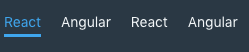
My purpose is only using the menu tab ( not including content) like this picture below. Because the Route do that for me.
My code look like this but it's absolutely not work.
const renderChildTabs = (tabs: ITabProps[] = []) => {
    return tabs.map((tab, key) => (
        <Link to={tab.path} key={key}>
            <Tab id={tab.path} title={tab.title} />
        </Link>
    ))
}
const AppTabView = ({ tabs }: ICreateTabContainerPropsOut) => {
    return (
        <>
            <div>
                <Tab id={v4()}>
                    {renderChildTabs(tabs)}
                </Tab>
                <Body tabs={tabs} />
            </div>
        </>
    )
}
I think the error here cuz the Tab query all the children but don't see Tabs it only show 'Link'. That why it didn't show anything
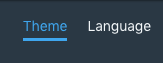
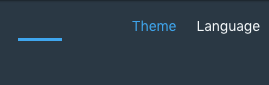
In addition: The panel in the bottom of tab get the position by using id Jquery selector. I think it not good for react. When you resize the page it was broken like this below
Before
After
question
 tomzaku
All 3 comments
@tomzaku in AppTabView you render a <Tab id={v4()}> which I think should be a <Tabs>? gotta put individual Tab children inside a Tabs, not another Tab.
 giladgray
on 17 Aug 2018
giladgray
on 17 Aug 2018
also try putting the Link in the Tab title instead of around it.
<Tab title={<Link ... />} />
giladgray
on 17 Aug 2018
👍2
It's work
    const ListTabView = ({ tabs, match, changeId, selectedId, className }: IListTabPropsIn) => {
    const ListTab = tabs.map((tab, key) => (
        <Tab title={
            <Link to={makeUpdatePath(match.url)(tab.path)} key={key}>
                <div
                    key={tab.path}
                    onClick={() => changeId(tab.path)}
                    className={classnames(
                        'tab',
                        't-color',
                        'p-h-sm',
                        { 'tab--selected': selectedId === tab.path },
                        className,
                    )}
                >
                    {tab.title}
                </div>
            </Link>
        } id={tab.path}/>
    ))
    return (
        <Tabs id={v4()} selectedTabId={selectedId}>
            {ListTab}
        </Tabs>
    )
}
👍1
Was this page helpful?
0 / 5 - 0 ratings
Related issues
 scottfr
·
3Comments
giladgray
·
3Comments
scottfr
·
3Comments
giladgray
·
3Comments
 adidahiya
·
3Comments
adidahiya
·
3Comments
 sighrobot
·
3Comments
sighrobot
·
3Comments
 ernestofreyreg
·
3Comments
ernestofreyreg
·
3Comments
Most helpful comment
also try putting the
Linkin theTab titleinstead of around it.<Tab title={<Link ... />} />