Bludit: Empty Custom tab below the Options button
Describe your problem
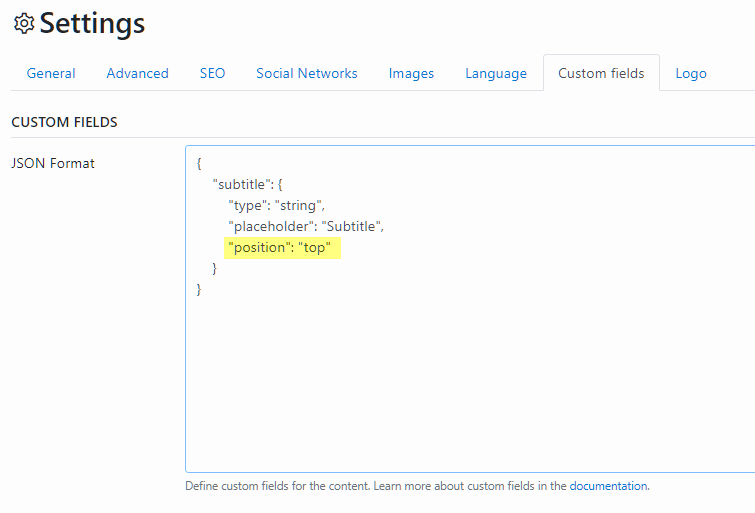
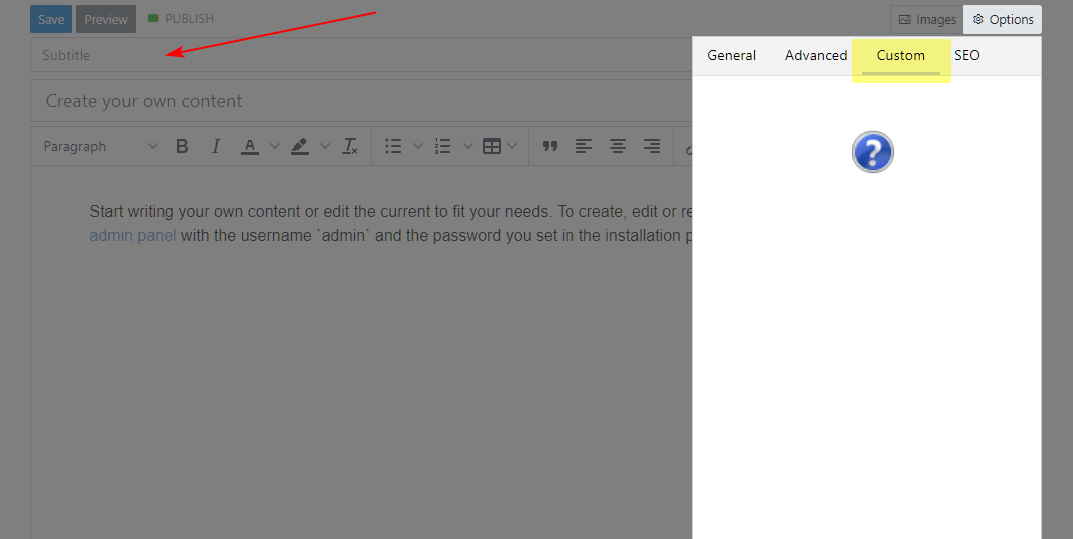
If i have e.g. only a "Subtitle" with a poition top or bottom then an empty Custom tab will be shown on edit- or new content page.
Steps to reproduce the problem
Based on the source code of the edit-content or new-content files, the tab button appears if the custom field in the settings page is not empty.
There is no condition that if this field is displayed in one of the positions, the tab button should not appear.
~
customFields())): ?>
~
Bludit version
version 3.x
PHP version
PHP 7.4.5 (on localhost)
 tompidev
All 6 comments
If i have e.g. only a "Subtitle" with a poition top or bottom then an empty Custom tab will be shown on edit- or new content page.
I do not understand what the problem is. It's a custom or additional field, that can be used in the example for a subtitle. You can modify the theme to show it.
 clickwork-git
on 20 Jun 2020
clickwork-git
on 20 Jun 2020
I guess he only means, that the "Custom" Tab within the Content Sidebar is shown even if it doesn't contain any custom field at all.
As shown in the example: If you set all of your custom fields to the top or bottom position the Sidebar View is also available, but empty, since it only contains custom fields with no position value set at all.
 ghost
on 20 Jun 2020
ghost
on 20 Jun 2020
There was a misunderstanding. I thought with tab the field was ment. Thank you!
I think this tab is not intended (there is a JavaScript error).
clickwork-git
on 20 Jun 2020
I think this tab is not intended (there is a JavaScript error).
No, I checked the source. As mentioned by @JTWebTools the custom fields-area on the sidebar is shown if any "customFields" are available or not without checking the position values of them. There is no additional JavaScript which toggles them.
I guess a good way to filter them is by just offering an additional parameter on the $site->customFields() function and passing them on the respective new-content.php and edit-content.php files, such as
<?php

    public function customFields($position = null)
    {
        $customFields = Sanitize::htmlDecode($this->getField('customFields'));
        $customFields = json_decode($customFields, true);

        if(!empty($customFields) && !empty($position)) {
            $customFields = array_filter($customFields, function($item) use ($position) {
                if($position === "sidebar") {
                    return !isset($item["position"]);
                }
                return $position === $item["position"];
            });
        }

        return  $customFields;
    }
I guess he only means, that the "Custom" Tab within the Content Sidebar is shown even if it doesn't contain any custom field at all.
As shown in the example: If you set all of your custom fields to the
toporbottomposition the Sidebar View is also available, but empty, since it only contains custom fields with nopositionvalue set at all.
Yes, exactly!
I guess a good way to filter them is by just offering an additional parameter on the $site->customFields() function and passing them on the respective new-content.php and edit-content.php files, such as
Thank you, that looks great!
@clickwork-git please add that to the next release!
tompidev
on 20 Jun 2020
There is no additional JavaScript which toggles them.
I have a JavaScript error on the page, but, yes, it's not related to the tab (I presumed it would write the content of the tab). It's not my day...
@clickwork-git please add that to the next release!
@dignajar is the programer. ;-)
clickwork-git
on 20 Jun 2020
Related issues
 JonathanHolvey
·
4Comments
JonathanHolvey
·
4Comments
 xm74
·
6Comments
xm74
·
6Comments
 zongdeiqianxing
·
6Comments
zongdeiqianxing
·
4Comments
zongdeiqianxing
·
6Comments
zongdeiqianxing
·
4Comments
 christasa
·
6Comments
christasa
·
6Comments