Blog-plugin: Category filter (:slug) not working
This (a bit outdated) tutorial explains, how to add a blog:
https://youtu.be/n6gvR0NZ1h8?list=PLfQvk5RK_e-Zim57m_CptCXYlgFT7P_sv&t=407
At around the given timecode, the blog implementation is demonstrated, also, how to use a slug to filter blog categories. Unfortunately, that :slug filtering does not work on categories. (However, it does work in blog posts, as is demonstrated in the video at a later point.)
It is also mentioned in the comments on the youtube page.
Any chance to have a look?
Question
 rowild
All 4 comments
@rowild please post the full blog/category.htm file you have.
 LukeTowers
on 25 Sep 2019
LukeTowers
on 25 Sep 2019
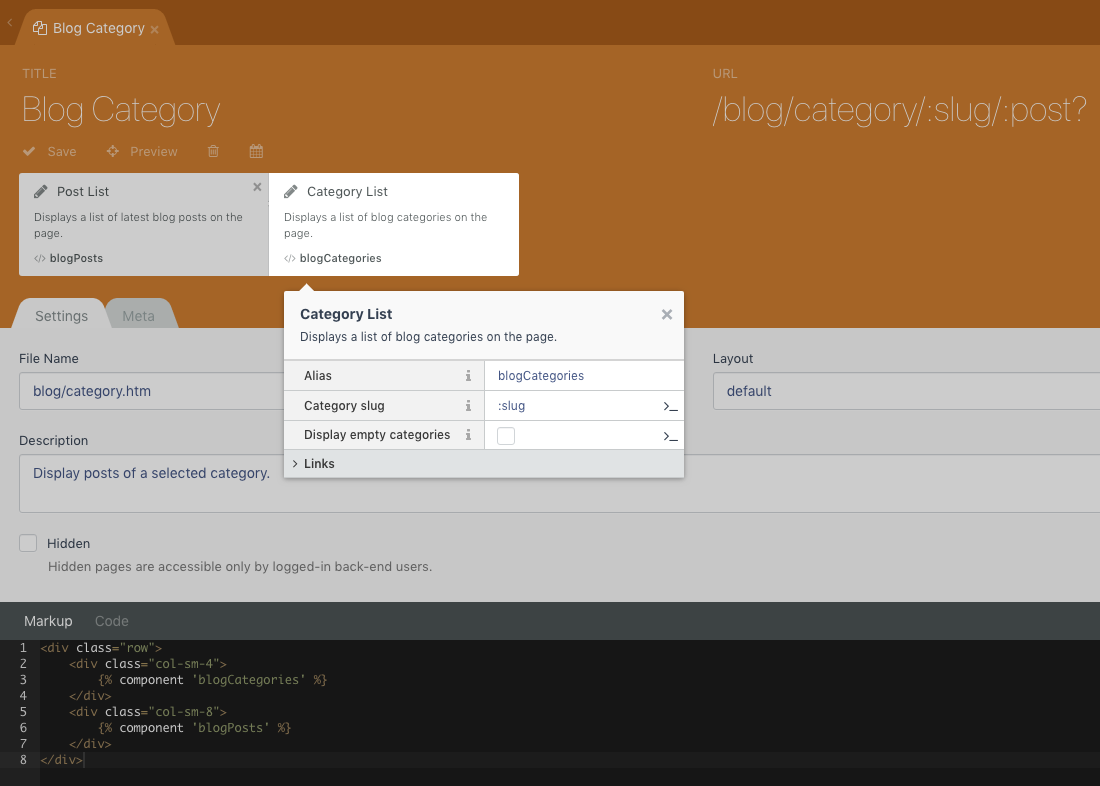
title = "Blog Category"
url = "/blog/category/:slug/:post?"
layout = "default"
description = "Display posts of a selected category."
is_hidden = 0
[blogPosts]
pageNumber = "{{ :page }}"
categoryFilter = ":slug"
postsPerPage = 15
noPostsMessage = "No posts found"
sortOrder = "published_at desc"
categoryPage = "blog/category"
postPage = "blog/post"
[blogCategories]
slug = ":slug"
displayEmpty = 0
categoryPage = "blog/category"
==
<?php
function onEnd()
{
if($this->category) {
$this->page->title = $this->category->name;
}
}
?>
==
<div class="row">
<div class="col-sm-4">
{% component 'blogCategories' %}
</div>
<div class="col-sm-8">
{% component 'blogPosts' %}
</div>
</div>
Thank you!
rowild
on 25 Sep 2019
@rowild should be
title = "Blog Category"
url = "/blog/category/:slug/:page?"
layout = "default"
description = "Display posts of a selected category."
is_hidden = 0

[blogPosts]
pageNumber = "{{ :page }}"
categoryFilter = "{{ :slug }}"
postsPerPage = 15
noPostsMessage = "No posts found"
sortOrder = "published_at desc"
categoryPage = "blog/category"
postPage = "blog/post"

[blogCategories]
slug = "{{ :slug }}"
displayEmpty = 0
categoryPage = "blog/category"
👍2
❤1
WORKING! Excellent! Thank you much!!!
EDIT:
Added this issue to the respective youtube video's comment.
rowild
on 25 Sep 2019
Was this page helpful?
0 / 5 - 0 ratings
Related issues
 mateoprifti
·
3Comments
mateoprifti
·
3Comments
 marcomessa
·
7Comments
marcomessa
·
7Comments
 HugoBossOD
·
5Comments
HugoBossOD
·
5Comments
 petehalverson
·
3Comments
petehalverson
·
3Comments
 m49n
·
4Comments
m49n
·
4Comments
Most helpful comment
@rowild should be