Blog-plugin: Compatibility with Static Pages plugin
Hi, I'm creating a client friendly website and am relying heavily on the Static Pages plugin.
My blog page (the page containing the recent posts with pager and a category list) is also a Static Page, since it contains some fields (a banner, a sidebar) that my client needs to be able to edit. I've got the blog working using a layout containing the components of the blog.
My category page and my single post page are regular pages, since Static Pages do not allow the use of :parameter in the URL field. This I can live with (maybe I'll try to get the content of the parent page and replicate it on the single post / categories page).
The issue is that on my blog overview page (a Static Page), the pagination doesn't work. Anytime I try to use a parameter in the URL, October shows me an error message stating that I've used some illegal characters.
My question is twofold:
- Can I get the blog fully working inside a static page?
- If not, how can I make it so that some fields of the News page are still editable by the client (like a banner, and a sidebar).
Thanks for your advice. Loving every bit of this!
 maartenmachiels
All 10 comments
Static pages do not support URL parameters. You could either code it so that you access the information from a specific static page in your rendering of the blog overview page, or you could add theme settings to change the configuration specific to the blog overview page. http://octobercms.com/docs/themes/development#customization
 LukeTowers
on 24 Jul 2017
LukeTowers
on 24 Jul 2017
Thanks Luke. I've transformed the page into a regular page and the paging works now. I decided to try and work with a specific placeholder Static Page to allow my client to change some fields of the news pages.
I managed to solve it with the below solution. It doesn't look very nice elegant though.
<?php
function onStart() {
    $theme = Cms\Classes\Theme::getEditTheme();
    $pageList = new RainLab\Pages\Classes\PageList($theme);
    $allPages = $pageList->listPages();
    $this['newspage'] = null;
    foreach ($allPages as $pg) {
        if($pg->id == 'news') {
            $this['newsPage'] = $pg;
        }
    }
}
?>
Further on in my page, I can use Twig tags:
{{ newsPage.banner_text | raw }}
What do you think of this solution? Is there a better way to get the info of a specific page?
Thanks again.
maartenmachiels
on 24 Jul 2017
Any update on this? What is the preferred way of getting the details of a specific page?
maartenmachiels
on 28 Jul 2017
That works, although you can get just one page by using RainLab\Pages\Classes\Page::load(\Cms\Classes\Theme::getEditTheme(), 'news.htm');
LukeTowers
on 27 Oct 2017
Thanks op for posting your code.
So whats the right way of dealing with this? I've had the same problem as the OP. Made a CMS page and imported the static page in the layout.htm so I could get it's contents. But now I have a 'dead' static page, and a static page you have to give an url (you can delete it in the code but client can give it one back). So how do you deal with this?
 MiguelDebruyne
on 5 Mar 2019
MiguelDebruyne
on 5 Mar 2019
Hi Miguel, with pleasure. I've done multiple projects with a newspage that at least has one user-editable section. My approach was always to create a placeholder static page for the content that should go on the (regular) news overview page and check the hiddenand hidden in navigation checkboxes, so that this placeholder page is excluded from sitemaps etc...
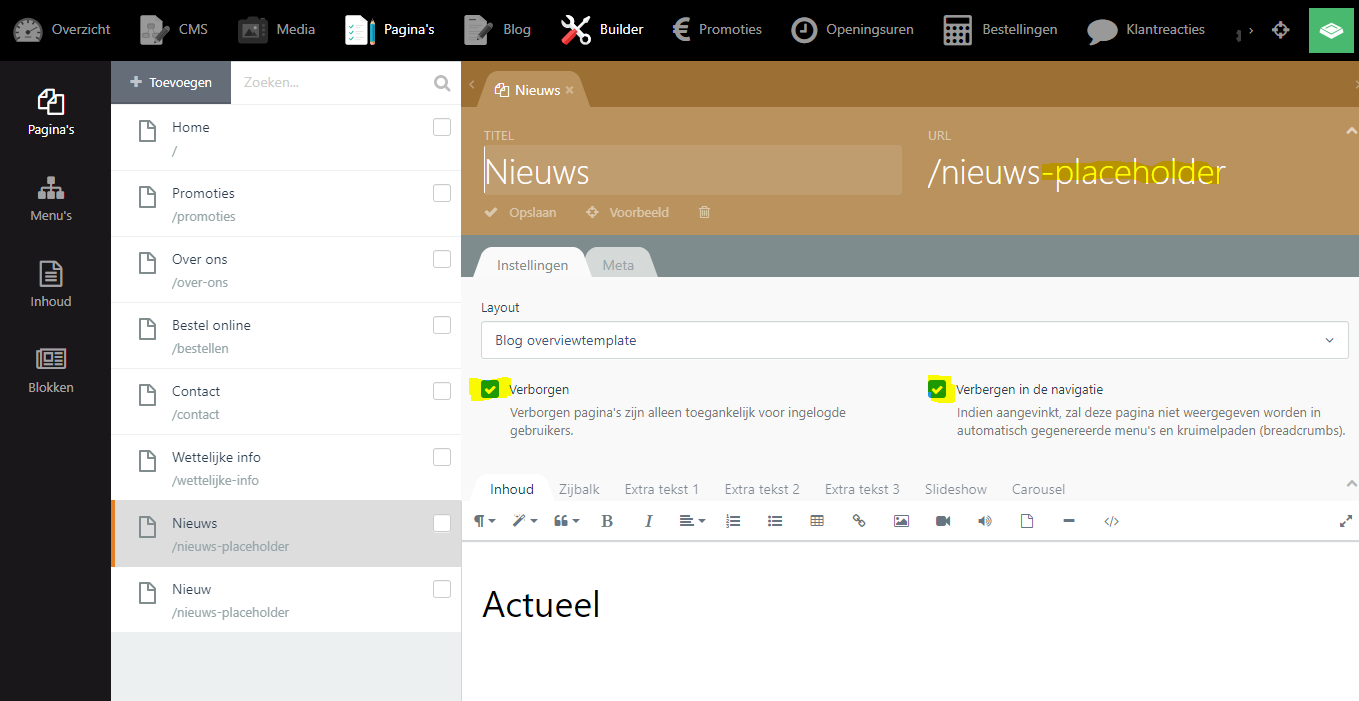
If the user changes the title or url of the static placeholder page, this should not matter, as the content of the placeholder page is extracted via the layout of the regular news page as shown below:
function onStart() {
    $this[newsPlaceholderPage'] = RainLab\Pages\Classes\Page::load(\Cms\Classes\Theme::getEditTheme(), 'nieuws-placeholder.htm');
}
Then in Twig, I can get the values of the newsPlaceholderPage as follows:
{{ newsPlaceholderPage.sidebar | raw }}
The biggest drawback I can see is that the user can uncheck the boxes hidden and hidden in navigation, and they can delete the page. But every system has its quirks...
If you want to see some more code, send me a DM via the contact form of my website. I'd be happy to discuss more.
maartenmachiels
on 5 Mar 2019
Bedankt voor het snelle antwoord! (Thanks for the fast reply)
In the next project I will try to find out how to hide "settings/instellingen" for the client, in most cases they don't need to see or change these things anyway. That's a way to fix that part. Because of the hardcodedness (which I don't like, it feels wrong) if they accidentally change the url the page will be broken.
Unfortunately unchecking these boxes does not invalidate the url, the url xxxx.com/nieuws-placeholder stil exists. I fixed it by addind this code in the layout
if ($this->page->url == '/project-updates-placeholder') {
    return Redirect::to('/');
}
Again, hardcoded which feels like bad practise. But it works. You also do it like that?
MiguelDebruyne
on 5 Mar 2019
Hi Miguel,
Met plezier (my pleasure).
I've just checked for you. The checkboxes hidden and hidden in navigation might give the wrong impression. When you are logged in as an administrator, these hidden statuses are disregarded. Same thing happens with the Blog plugin for example (Blogposts appear even if they are not published, so long as you are logged in as an administrator). Try checking both checkmarks and try visiting the placeholder page with another browser in which you are not logged in (into ANY October CMS instance).
If you can reproduce this, then it would be safe to assume that your redirection snippet might not be necessary. The only usecase I can imagine to redirect, is if the backend user clicks the preview on site button. If you want to go that far, I would advise to find the url of the updates placeholder page via its filename inside your theme folder (it's inside the folder content/static-pages), and to compare the current url to the url (id) of the newsPlaceholderPage and if needed redirect to the correct newsPage. Does that make sense?
maartenmachiels
on 5 Mar 2019
Aah indeed the page is not visible while not logged in, awesome! Didn't know that (first octobercms website). I will do the redirect you're saying though because sooner or later a client is gonna be confused, forgotten what we said and ask questions about why that page is not working as it should. You know clients ;)
I thank you fellow Nerdian!
MiguelDebruyne
on 6 Mar 2019
Seems like a good approach! If I come across a different approach, I will post back here. I've been recently experimenting with changing fields of static pages with boot() in a separate plugin. That might help to prevent deletion of the placeholder pages etc... Nice to know there's another October CMS enthusiast nearby!
maartenmachiels
on 6 Mar 2019
Related issues
 AugmentBLU
·
3Comments
AugmentBLU
·
3Comments
 HitArrowLegend
·
6Comments
HitArrowLegend
·
6Comments
 marcomessa
·
7Comments
marcomessa
·
7Comments
 karnold
·
5Comments
karnold
·
5Comments
 silasrm
·
4Comments
silasrm
·
4Comments