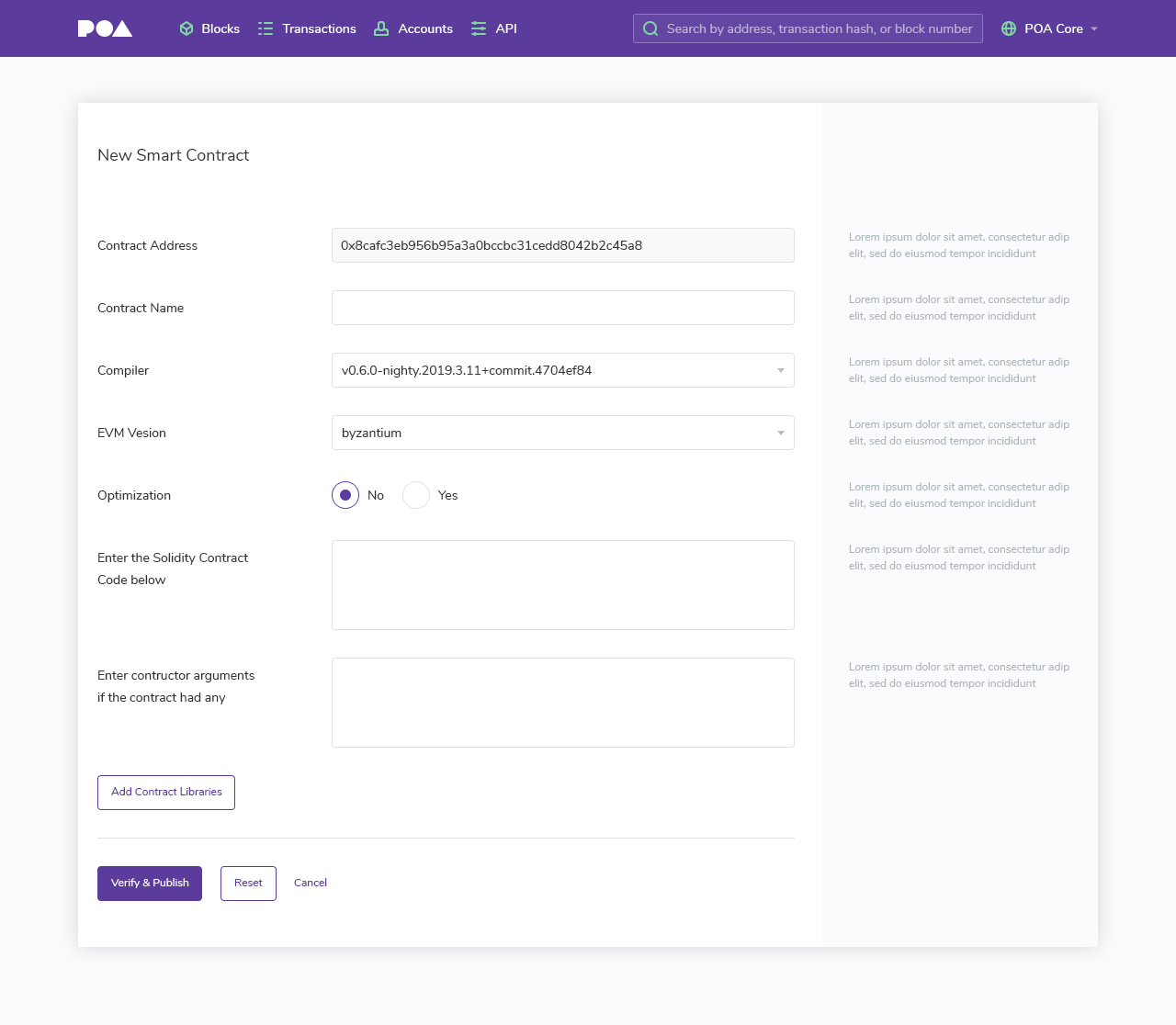
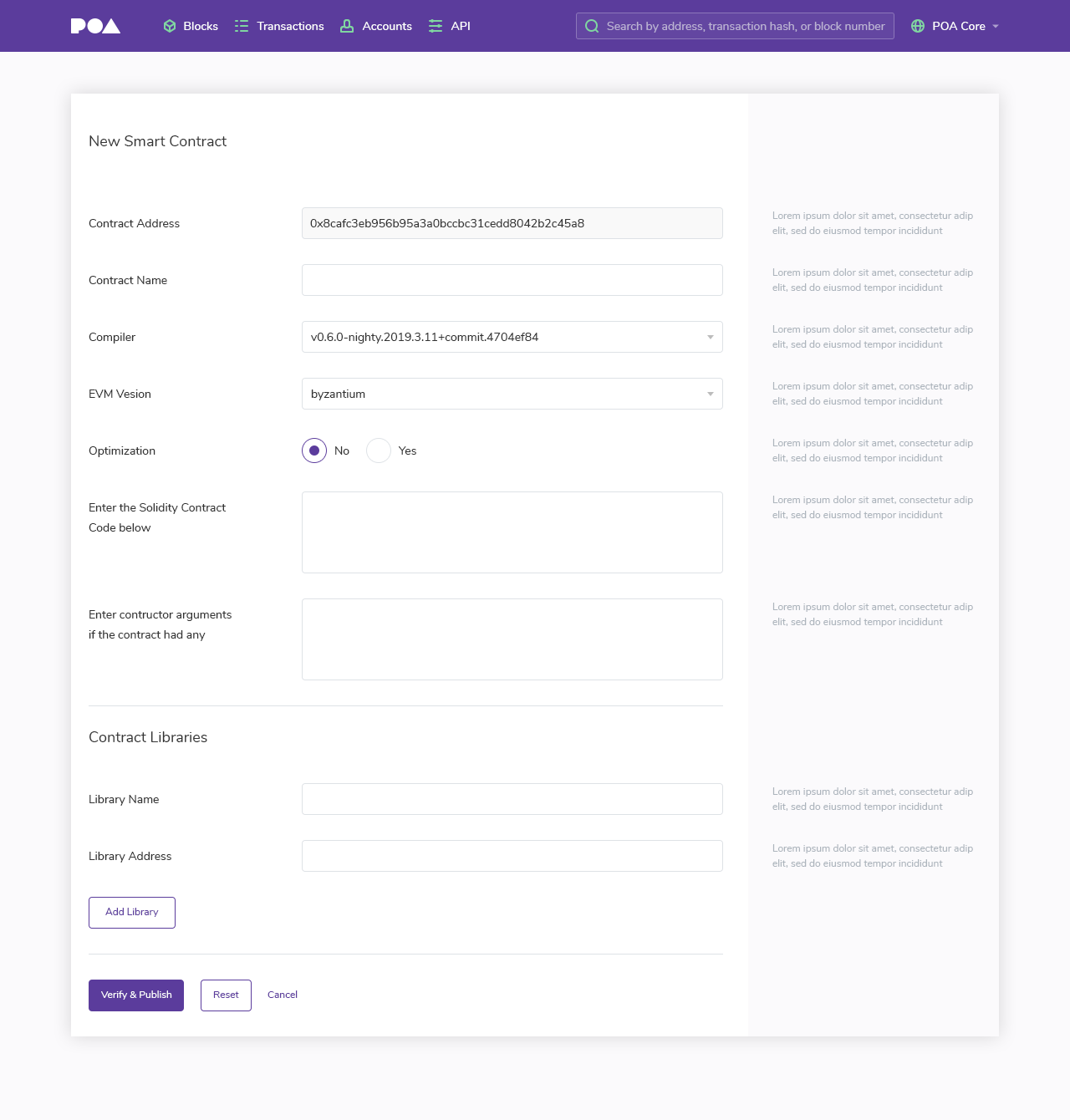
Blockscout: UI changes for "New Smart Contract" page
Zeplin:
https://zpl.io/bzq8QMz
https://zpl.io/VOx04k1
Invision
https://invis.io/G7RGUWGYD2M
Please replace text where "lorem ipsum"
 pashagonchar
All 5 comments
@andogro please provide us tooltips for the fields in the screen
 igorbarinov
on 10 Apr 2019
igorbarinov
on 10 Apr 2019
Here is v1 of tooltips, let me know if any are too long and I will try to shorten. The bold on left is the field value, following is the tooltip text for the right hand side.
_Question: For 5, if Optimization is checked, will we need to collect the # of optimization runs or has this been deprecated?_
New Smart Contract Verification (add Verification)
- Contract Address: The 0x address supplied on contract creation.
- Contract Name: Must match the name specified in the code. For example, in
contract MyContract {..}MyContract is the contract name. - Compiler: The compiler version is specified in
pragma solidity X.X.X. Use the compiler version rather than the nightly build. If using the Solidity compiler, runsolc —versionto check. - EVM Version (currently missing ‘r’): The EVM version the contract is written for. If the bytecode does not match the version, we try to verify using the latest EVM version. EVM version details.
- Optimization: If you enabled optimization during compilation, select yes.
- Enter the Solidity Contract Code (delete below, since it is to the side): We recommend using flattened code. This is necessary if your code utilizes a library or inherits dependencies. Use the POA solidity flattener or the truffle flattener.
- ABI-encoded Constructor Arguments (if required by the contract): Add arguments in ABI hex encoded form. Constructor arguments are written right to left, and will be found at the end of the input created bytecode. They may also be parsed here.
Contract Libraries (if used by the contract)
Library name: A library name called in the .sol file. Multiple libraries (up to 5) may be added for each contract. Click the Add Library button to add an additional one.
Library Address: The 0x library address. This can be found in the generated json file or Truffle output (if using truffle).
 andogro
on 10 Apr 2019
andogro
on 10 Apr 2019
@vbaranov @andogro
Is this a new section?
If it isn't, how can I get there?
 gabitoesmiapodo
on 16 Apr 2019
gabitoesmiapodo
on 16 Apr 2019
@gabitoesmiapodo here is an example on the sokol network:
https://blockscout.com/poa/sokol/address/0x4d45578b70a4a1b850f4519d5a16b89f6f50699a/contract_verifications/new
This page is reached when a new smart contract is created and needs to be verified. In this example, the contract details are here: https://blockscout.com/poa/sokol/address/0x4d45578b70a4a1b850f4519d5a16b89f6f50699a/transactions
When you click on the code tab, you will see the ABI contract creation code and a button to verify and publish. When you click this button, you are taken the to section above to verify the contract.
andogro
on 16 Apr 2019
@andogro
Thank you, I'll look into it.
gabitoesmiapodo
on 17 Apr 2019
Related issues
 ArseniiPetrovich
·
3Comments
ArseniiPetrovich
·
3Comments
 acravenho
·
4Comments
acravenho
·
4Comments
 hadv
·
3Comments
hadv
·
3Comments
 gfreh
·
5Comments
gfreh
·
5Comments
 maratP
·
4Comments
maratP
·
4Comments
Most helpful comment
@gabitoesmiapodo here is an example on the sokol network:
https://blockscout.com/poa/sokol/address/0x4d45578b70a4a1b850f4519d5a16b89f6f50699a/contract_verifications/new
This page is reached when a new smart contract is created and needs to be verified. In this example, the contract details are here: https://blockscout.com/poa/sokol/address/0x4d45578b70a4a1b850f4519d5a16b89f6f50699a/transactions
When you click on the
codetab, you will see the ABI contract creation code and a button to verify and publish. When you click this button, you are taken the to section above to verify the contract.