Blockscout: Add Internal Transaction type to the tile
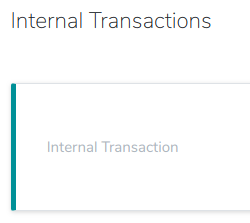
Internal transactions do not currently show the type (call, create, suicide, reward) from the database. This information is vital and should be displayed on the card.
Display the
typeon the left side of the card underInternal Transaction
If the
typeiscall, display thecall_type(delegate call,call)Make the changes on the transaction details page and address page internal transactions tab.
 acravenho
All 10 comments
Issue Status: 1. Open 2. Started 3. Submitted 4. Done
__This issue now has a funding of 50.0 DAI (50.0 USD @ $1.0/DAI) attached to it as part of the Ethereum Community Fund via ECF Web 3.0 Infrastructure Fund fund.__
- If you would like to work on this issue you can 'start work' on the Gitcoin Issue Details page.
- Want to chip in? Add your own contribution here.
- Questions? Checkout Gitcoin Help or the Gitcoin Slack
- $49,193.55 more funded OSS Work available on the Gitcoin Issue Explorer
 gitcoinbot
on 18 Oct 2018
gitcoinbot
on 18 Oct 2018
Issue Status: 1. Open 2. Started 3. Submitted 4. Done
__Work has been started__.
These users each claimed they can complete the work by 7 months, 1 week from now.
Please review their action plans below:
1) lucasnar has been approved to start work.
Action Plan
- Update the InternalTransaction tile partial to include the type information. This information is available in the
InternalTransactionstruct; - Adjust any style that could end up being messed by this addition to the card.
Questions
- Should we state that what we are showing is the type. In other words, should we display
Type: createor justCreateunderInternal Transaction?
- Similarly, when it is an internal transaction of type
call, would we go withCall Type: call, or justCall?
- Similarly, when it is an internal transaction of type
- When it is an internal transaction of type
call, where should we display the call type? Suggestions: we could have a dash separating the type and the call type, or put the call type between brackets.
Learn more on the Gitcoin Issue Details page.
gitcoinbot
on 18 Oct 2018
@Lucasnar, you have been approved to work on this bounty. Please start at your earliest convenience :)
 mkosowsk
on 19 Oct 2018
mkosowsk
on 19 Oct 2018
@acravenho, which option would you choose for displaying the type?
Option 1
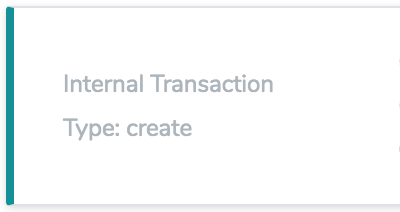
Option 2
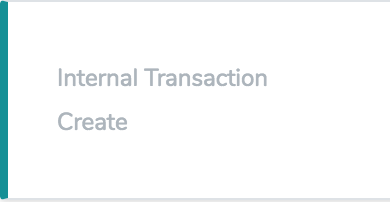
Or maybe you would like another way?
 Lucasnar
on 20 Oct 2018
Lucasnar
on 20 Oct 2018
@Lucasnar I'm thinking option 2 but maybe with some type of highlighting or parenthesis.
acravenho
on 20 Oct 2018
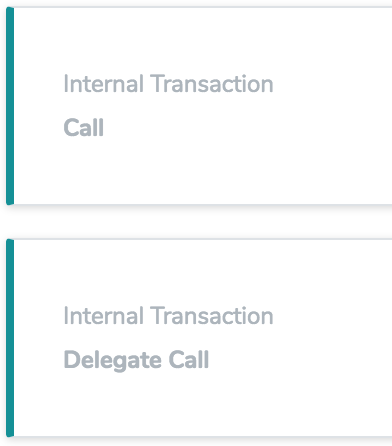
What could the highlighting be? I tried bold text. Here is an example of parenthesis and turning the text bold:
Parenthesis
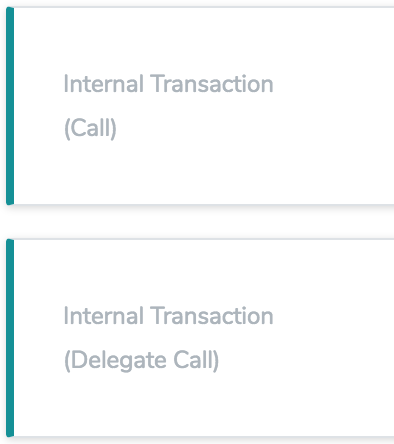
Bold
Lucasnar
on 20 Oct 2018
I like parenthesis :smile:
acravenho
on 20 Oct 2018
Ok! 🙂
I'm going to open a PR later with parenthesis. If you have any other option you'd like to go with, let me know.
Lucasnar
on 20 Oct 2018
Issue Status: 1. Open 2. Started 3. Submitted 4. Done
__Work for 50.0 DAI (50.0 USD @ $1.0/DAI) has been submitted by__:
@mkosowsk please take a look at the submitted work:
- PR by @Lucasnar
- Learn more on the Gitcoin Issue Details page
- Want to chip in? Add your own contribution here.
- Questions? Checkout Gitcoin Help or the Gitcoin Slack
- $50,572.24 more funded OSS Work available on the Gitcoin Issue Explorer
gitcoinbot
on 23 Oct 2018
Issue Status: 1. Open 2. Started 3. Submitted 4. Done
__The funding of 50.0 DAI (50.0 USD @ $1.0/DAI) attached to this issue has been approved & issued to @Lucasnar.__
- Learn more on the Gitcoin Issue Details page
- Questions? Checkout Gitcoin Help or the Gitcoin Slack
- $50,306.08 more funded OSS Work available on the Gitcoin Issue Explorer
gitcoinbot
on 23 Oct 2018
Related issues
 dwalintukan
·
4Comments
dwalintukan
·
4Comments
 pedrouid
·
4Comments
pedrouid
·
4Comments
 zulhfreelancer
·
6Comments
zulhfreelancer
·
6Comments
 SVINCHAIN
·
3Comments
dwalintukan
·
5Comments
SVINCHAIN
·
3Comments
dwalintukan
·
5Comments
Most helpful comment
@Lucasnar, you have been approved to work on this bounty. Please start at your earliest convenience :)