Bloc: Cannot access parent bloc on the same route
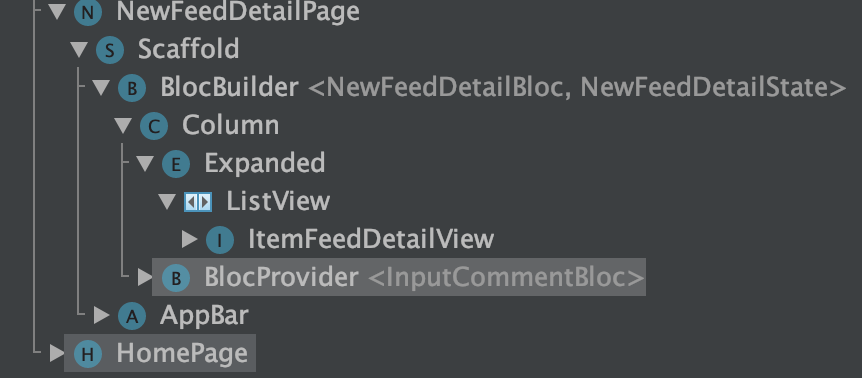
Take a look at the image, I can not access NewFeedDetailBloc from ItemFeedDetailView. I was wondering, whether ListView created a new route for its children, or did I not fully understand the meaning of bloc?
Please explain to me, thank you very much
 MonNguyen2502
All 7 comments
Hi @MonNguyen2502 👋
Thanks for opening an issue!
Are you able to share a link to a sample app which illustrates the problem you’re having? It’s hard to help without seeing any code.
Thanks!
 felangel
on 3 Nov 2019
felangel
on 3 Nov 2019
ok, I will create a new code
MonNguyen2502
on 3 Nov 2019
@felangel
import 'package:flutter/material.dart';
import 'package:flutter_bloc/flutter_bloc.dart';
import 'package:sam_sam/pages/parent_page/parent_page_bloc.dart';

class ParentPage extends StatefulWidget {
  @override
  _ParentPageState createState() => _ParentPageState();
}

class _ParentPageState extends State<ParentPage> {
  ParentPageBloc _bloc;

  @override
  void initState() {
    _bloc = ParentPageBloc();
    super.initState();
  }

  @override
  Widget build(BuildContext context) {
    return Scaffold(
      appBar: AppBar(
        title: Text('Demo Bloc'),
      ),
      body: ListView.builder(
          itemBuilder: (context, index) => ItemWidget(index: index),
          itemCount: 1000),
    );
  }
}

class ItemWidget extends StatelessWidget {
  final int index;

  ItemWidget({this.index});

  @override
  Widget build(BuildContext context) {

    //BlocProvider.of() called with a context that does not contain a Bloc of type ParentPageBloc.
    ParentPageBloc _bloc = BlocProvider.of<ParentPageBloc>(context);
    return ListTile(
      title: Text('$index'),
    );
  }
}
@felangel I still don't really understand it, it seems like a crazy question, but I hope you can explain it to me.
I tried deleting ListView, but all other cases reported the same error. They only work if I use the BlocProvider to wrap the child.
MonNguyen2502
on 3 Nov 2019
You need to use BlocProvider to wrap the child otherwise there is nothing "providing" the bloc.
BlocProvider(
  builder: (context) => MyBloc(),
  child: MyChild(),
)
Then from MyChild or any of MyChild's children you can access MyBloc via
BlocProvider.of<MyBloc>(context);
import 'package:flutter/material.dart';
import 'package:flutter_bloc/flutter_bloc.dart';
import 'package:sam_sam/pages/parent_page/parent_page_bloc.dart';

class ParentPage extends StatelessWidget {
  @override
  Widget build(BuildContext context) {
    return Scaffold(
      appBar: AppBar(
        title: Text('Demo Bloc'),
      ),
      body: BlocProvider(
        builder: (context) => ParentPageBloc(),
        child: ListView.builder(
            itemBuilder: (context, index) => ItemWidget(index: index),
            itemCount: 1000),
      ),
    );
  }
}

class ItemWidget extends StatelessWidget {
  final int index;

  ItemWidget({this.index});

  @override
  Widget build(BuildContext context) {
    ParentPageBloc _bloc = BlocProvider.of<ParentPageBloc>(context);
    return ListTile(
      title: Text('$index'),
    );
  }
}
I would highly recommend going through the bloc access recipe if you haven't already.
Hope that helps 👍
felangel
on 3 Nov 2019
@felangel Thanks for the reply, I often overlook the core @@.
Let me ask one more question. Can I use MultiBloc this way? At Child I do not receive BlocB
                    MultiBlocProvider(
                        providers: [
                          BlocProvider<BlocA>(
                            builder: (context) => BlocA(),
                          BlocProvider.value(value: _blocB),
                        ],
                        child: Child())
No problem! If you’re using MultiBlocProvider you need to make sure you explicitly provide the bloc type:
BlocProvider<BlocB>.value(value: _blocB)
felangel
on 3 Nov 2019
Related issues
 timtraversy
·
3Comments
timtraversy
·
3Comments
 wheel1992
·
3Comments
wheel1992
·
3Comments
 nhwilly
·
3Comments
nhwilly
·
3Comments
 hivesey
·
3Comments
hivesey
·
3Comments
 MahdiPishguy
·
3Comments
MahdiPishguy
·
3Comments