Blitz: Can't use non-js/ts files inside `pages/` folders
What is the problem?
I want to use CSS Modules with Blitz so I followed this guide: https://nextjs.org/docs/basic-features/built-in-css-support. I also installed npm i sass so it supports scss files. Everything seems to work fine except when I'm using CSS Modules in /pages:
app/pages/index.tsx
app/pages/index.module.scss

app/pages/projects/index.tsx
app/pages/projects/index.module.scss
_Note: This error only occurs in /pages, so CSS Modules work perfectly fine in /components_
Steps to Reproduce:
- Create a file:
/app/pages/index.module.scss - Import the file:
import styles from "./index.module.scss" - Add a style to a html element:
<main className={styles.container}> - Get a
Module not founderror.
Versions:
debug: local
debug: pkgPath: /test/node_modules/@blitzjs/cli

macOS Catalina | darwin-x64 | Node: v12.16.1

blitz: 0.8.1 (global)
blitz: 0.8.1 (local)
Supporting Documentation
./pages/index.tsx
Module not found: Can't resolve 'app/pages/index.module.scss' in '/test/.blitz/caches/dev/pages'
Edit from @flybayer
The problem is that our compiler is only using js/ts files inside pages/. We need to change this so that all files inside pages/ get processed. Our conflict detection must also detect conflicts for these files.
 gielcobben
All 11 comments
Hello @gielcobben, thank you so much for reporting this issue!
 0ww
on 4 May 2020
0ww
on 4 May 2020
@gielcobben the problem is that all files inside pages/ must be a React component that will be rendered as a page.
What you are trying to do doesn't work with Next.js.
The solution is to put your scss files in another folder outside of pages/.
Try this, and let us know if it works for you!
 flybayer
on 5 May 2020
flybayer
on 5 May 2020
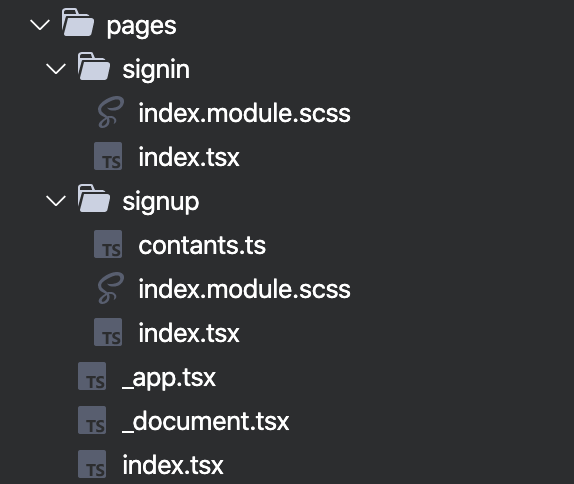
It works perfectly fine in all my next projects. It's just not working properly in a blitz project.
This is my file structure in a next project:
gielcobben
on 5 May 2020
@gielcobben oh wow, I didn't know that would work!
We'll get this fixed
flybayer
on 8 May 2020
I ran into the same issue, I tried to setup Tailwind CSS (following this guide) but got stuck at the step where you can't import the stylesheet in the _app.js file.
I tried to work around it by importing the css file from my layout component (outside of pages) but I got a Next.js "Please move all global CSS imports to pages/_app.tsx" error.
 emgoto
on 23 May 2020
emgoto
on 23 May 2020
@gielcobben @flybayer Just having a look at this now and I think the problem might be that you’re using an older version of Blitz? This seems to have been fixed already. Could you try upgrading to latest? 👍
 merelinguist
on 25 May 2020
merelinguist
on 25 May 2020
@merelinguist I updated to the latest version but keep getting this error:
./pages/signin/index.tsx
Module not found: Can't resolve 'app/users/pages/signin/index.module.scss' in '/Users/giel/Sites/_/opslan/.blitz/caches/dev/pages/signin'
Here is a screenshot of the error in my terminal:

gielcobben
on 25 May 2020
@emgoto tailwind does work with Blitz right now, but just with the css files outside of the pages directory. Look at this example blitz app which has tailwind integrated.
flybayer
on 25 May 2020
@ryardley this would be good to get fixed soon if we can, it keeps affecting people
flybayer
on 5 Jul 2020
I guess the best way to fix this is to leave any non tsx files in pages folder instead of copying them. That way the absolute imports that blitz substitutes will work eg. app/users/pages/signin/index.module.scss I can throw up a fix today.
 ryardley
on 8 Jul 2020
ryardley
on 8 Jul 2020
This has been fixed in 0.16.3!
flybayer
on 8 Jul 2020
Related issues
 MrLeebo
·
5Comments
flybayer
·
4Comments
MrLeebo
·
5Comments
flybayer
·
4Comments
 aaronfulkerson
·
3Comments
aaronfulkerson
·
3Comments
 simonedelmann
·
3Comments
simonedelmann
·
3Comments
 svobik7
·
3Comments
svobik7
·
3Comments