Blitz: Unable to access API endpoints when you deploy to now.sh
What is the problem?
You are unable to access custom API endpoints as serverless functions when you deploy using now
Steps to Reproduce:
- Start a new blitz app
- Create an API endpoint:
// app/api/test.ts
import { BlitzApiRequest, BlitzApiResponse } from "blitz"

export default function test(req: BlitzApiRequest, res: BlitzApiResponse) {
  res.json({
    message: "it worked",
  })
}
- Visit http://localhost:3000/api/test (you should see "it worked")
- Deploy using
now(you'll need to configure the framework as Next.js in your Deployment Settings) - Visit https://_your-app-id_.now.sh/api/test
- :boom:

Versions:
You are using alpha software - if you have any problems, please open an issue here:
  https://github.com/blitz-js/blitz/issues/new/choose

debug: local
debug: pkgPath: /Users/jliberman/celeb-like-me/node_modules/@blitzjs/cli

macOS Catalina | darwin-x64 | Node: v12.16.1

blitz: 0.8.1 (global)
blitz: 0.8.1 (local)
Supporting Documentation
Restrictions for serverless functions in Next.js are documented here:
https://vercel.com/docs/v2/serverless-functions/introduction#creating-serverless-functions
 MrLeebo
All 5 comments
Hey,
I have managed to get this working. Here are the steps I took.
1) Create a new project with blitz new testapp
2) Add file above to ./app/api/test.ts.
3) Install next using npm install --save-dev next. This is required by Vercel if you are going to use the Next.JS preset.
3) Upload to vercel via command line now command. Accepting all defaults. This is just to create the project on Vercel.
4) Add the following to the vercel frontend
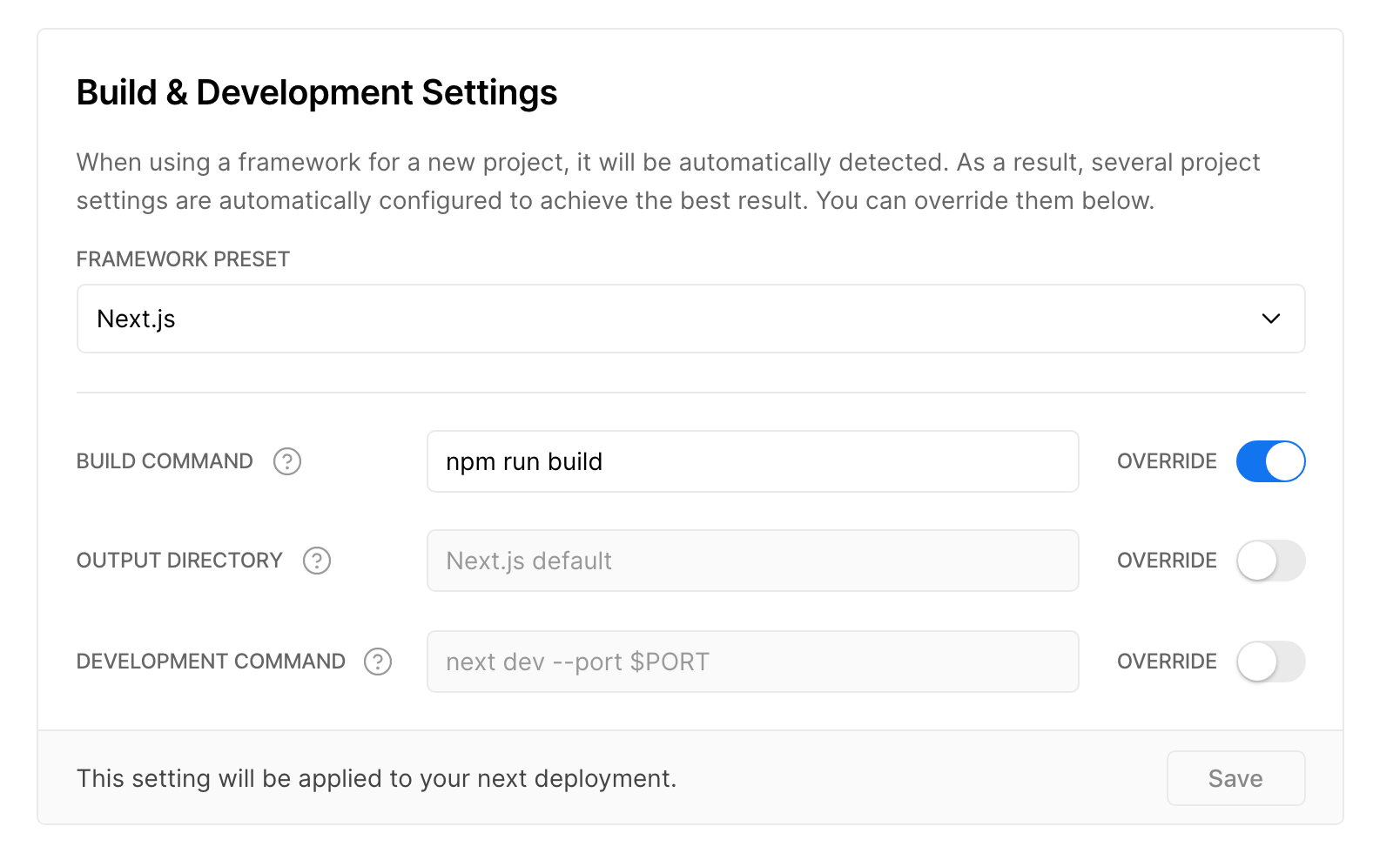
5) Run the now command again (or trigger a rebuild via the front end) to get it to use these new settings.
Visit the site - https://testapp.swapnull.now.sh/api/test
You could probably remove the need to install next by not using the preset and just telling it what folder to use.
My guess is that you are not changing the "build command". If you don't specify one, I think Vercel will use "next build" rather than "npm run build" when you have the preset.
 Swapnull
on 4 May 2020
Swapnull
on 4 May 2020
@Swapnull Thank you very much for submitting a comprehensive solution! We'll close the Issue after we add this tidbit of information in our documentation.
 0ww
on 4 May 2020
0ww
on 4 May 2020
I am self-assigning this task.
0ww
on 4 May 2020
@MrLeebo can you verify that this is simply a deployment config issue?
Fyi, we are adding first class Blitz support to Vercel. PR is pendeng: https://github.com/zeit/now/pull/4219
 flybayer
on 5 May 2020
flybayer
on 5 May 2020
Putting this on hold for no.
0ww
on 5 May 2020
Related issues
 SharadKumar
·
3Comments
flybayer
·
4Comments
SharadKumar
·
3Comments
flybayer
·
4Comments
 yhoiseth
·
3Comments
yhoiseth
·
3Comments
 LoriKarikari
·
4Comments
flybayer
·
3Comments
LoriKarikari
·
4Comments
flybayer
·
3Comments
Most helpful comment
Hey,

I have managed to get this working. Here are the steps I took.
1) Create a new project with
blitz new testapp2) Add file above to
./app/api/test.ts.3) Install next using
npm install --save-dev next. This is required by Vercel if you are going to use the Next.JS preset.3) Upload to vercel via command line
nowcommand. Accepting all defaults. This is just to create the project on Vercel.4) Add the following to the vercel frontend
5) Run the
nowcommand again (or trigger a rebuild via the front end) to get it to use these new settings.Visit the site - https://testapp.swapnull.now.sh/api/test
You could probably remove the need to install next by not using the preset and just telling it what folder to use.
My guess is that you are not changing the "build command". If you don't specify one, I think Vercel will use "next build" rather than "npm run build" when you have the preset.