Blenderproc: [FEATURE]: Calling modules independently from within a script without using a .yaml file
Hi Guys,
Is it possible to call the modules independently within a script, for example I would like to call the renderer module within my own script but without using a .yaml file.
For example I've tried to call the NormalRenderer through a test script that I've created in the src folder similarly to the debug script:
import bpy
import mathutils
import os
import sys

working_dir = os.path.dirname(bpy.context.space_data.text.filepath) + "/../"

if not working_dir in sys.path:
    sys.path.append(working_dir)

# Add path to custom packages inside the blender main directory
if sys.platform == "linux" or sys.platform == "linux2":
    packages_path = os.path.abspath(os.path.join(os.path.dirname(sys.executable), "..", "..", "..", "custom-python-packages"))
elif sys.platform == "darwin":
    packages_path = os.path.abspath(os.path.join(os.path.dirname(sys.executable), "..", "..", "..", "..", "Resources", "custom-python-packages"))
elif sys.platform == "win32":
    packages_path = os.path.abspath(os.path.join(os.path.dirname(sys.executable), "..", "..", "..", "custom-python-packages"))
else:
    raise Exception("This system is not supported yet: {}".format(sys.platform))
sys.path.append(packages_path)

# Delete all loaded models inside src/, as they are cached inside blender
for module in list(sys.modules.keys()):
    if module.startswith("src"):
        print("Module to be deleted: {}".format(module))
        del sys.modules[module]

from src.renderer.NormalRenderer import NormalRenderer

normal_map = NormalRenderer

normal_map.run()
But this doesn't seem to work.
Thanks.
 ttsesm
All 26 comments
Hey,
you are asking for a better python support, we are currently working hard on it. The biggest challenge is to keep the old .yaml files working. We have transferred most of the classes, some writers are still missing and we hope that we can release 2.0.0 in the near future. But be aware that this might still take some time, this is a giant change to the whole code base and we have to make sure that it works as before.
What you can do so far is:
modules = Utility.initialize_modules([{"module": "NormalRenderer"}])
for module in modules:
    module.run()
In the future we will have a nice and clean python API, without these modules ;)
Best,
Max
 themasterlink
on 6 Jul 2021
themasterlink
on 6 Jul 2021
I see, no worries. It sounds promising.
Btw, I've tried your proposal and it seems to work (I had to do a small change in {"module": "renderer.NormalRenderer"}). However, now it complaints about the output directory (I guess for saving the .exr file):
File "/home/ttsesm/Development/BlenderProc_v2/src/../src/utility/Utility.py", line 74, in initialize_modules
    modules.append(module_class(Config(config)))
  File "/home/ttsesm/Development/BlenderProc_v2/src/../src/renderer/NormalRenderer.py", line 21, in __init__
    RendererInterface.__init__(self, config)
  File "/home/ttsesm/Development/BlenderProc_v2/src/../src/renderer/RendererInterface.py", line 138, in __init__
    Module.__init__(self, config)
  File "/home/ttsesm/Development/BlenderProc_v2/src/../src/main/Module.py", line 46, in __init__
    self._default_init()
  File "/home/ttsesm/Development/BlenderProc_v2/src/../src/main/Module.py", line 53, in _default_init
    os.makedirs(self._output_dir, exist_ok=True)
  File "/home/ttsesm/Development/BlenderProc_v2/blender/blender-2.91.0-linux64/2.91/python/lib/python3.7/os.py", line 223, in makedirs
    mkdir(name, mode)
FileNotFoundError: [Errno 2] No such file or directory: ''
Error: Python script failed, check the message in the system console
Can I somehow give this output manually somehow as well?
ttsesm
on 6 Jul 2021
Hey,
of course you can:
config = {"module": "renderer.NormalRenderer", "config": {"output_dir": "/temp/test"}}
This is just the content from the .yaml file.
This should work.
Best,
Max
themasterlink
on 6 Jul 2021
@themasterlink any idea for this:
File "/home/ttsesm/Development/BlenderProc_v2/src/../src/main/Module.py", line 128, in _output_already_registered
    .format(_output["key"], _output["path"], output["key"], output["path"]))
Exception: Can not have two output entries with the same key/path but not same path/key.Original entry's data: key:normals path:/home/ttsesm/Development/BlenderProc_v2/src/../examples/random_room_constructor/temp/normals_%04d.exr, Entry to be registered: key:normals path:normal_%04d.exr
Can it be that you inited it twice? Do you load a .yaml in the beginning or do you init the NormalRendererModule twice?
themasterlink
on 7 Jul 2021
Can it be that you inited it twice? Do you load a .yaml in the beginning or do you init the NormalRendererModule twice?
I do not think so. If you see bellow, I also delete any previously loaded modules (like in the debug script):
import bpy
import mathutils
import os
import sys

from src.utility.Utility import Utility

working_dir = os.path.dirname(bpy.context.space_data.text.filepath) + "/../"

if not working_dir in sys.path:
    sys.path.append(working_dir)

# Add path to custom packages inside the blender main directory
if sys.platform == "linux" or sys.platform == "linux2":
    packages_path = os.path.abspath(os.path.join(os.path.dirname(sys.executable), "..", "..", "..", "custom-python-packages"))
elif sys.platform == "darwin":
    packages_path = os.path.abspath(os.path.join(os.path.dirname(sys.executable), "..", "..", "..", "..", "Resources", "custom-python-packages"))
elif sys.platform == "win32":
    packages_path = os.path.abspath(os.path.join(os.path.dirname(sys.executable), "..", "..", "..", "custom-python-packages"))
else:
    raise Exception("This system is not supported yet: {}".format(sys.platform))
sys.path.append(packages_path)

# Delete all loaded models inside src/, as they are cached inside blender
for module in list(sys.modules.keys()):
    if module.startswith("src"):
        print("Module to be deleted: {}".format(module))
        del sys.modules[module]

#modules = Utility.initialize_modules([{"module": "renderer.NormalRenderer", "config": {"output_dir": "/home/ttsesm/Development/BlenderProc_v2/examples/random_room_constructor/temp/test"}}])
modules = Utility.initialize_modules([
    {
      "module": "renderer.RgbRenderer",
      "config": {
        "samples": 350,
        "render_normals": True,
        "render_distance": True,
        "render_diffuse_color": True,
        "output_dir": "/home/ttsesm/Development/BlenderProc_v2/examples/random_room_constructor/output/"
      }}])
for module in modules:
    module.run()
Hey,
you render the Normals twice.
"render_normals": True,
If you use this you don't need the NormalRenderer anymore.
So I would just remove the NormalRenderer and only use the render_normals option.
Best,
Max
themasterlink
on 7 Jul 2021
Hi @themasterlink,
I do not render the normals twice, if you notice this line is commented. Now I only use the renderer.RgbRender module where I activate the normals together with the depth and diffuse maps.
In any case I've also updated my local repository since I was using an older version of it, so now I do not get any error message. However, I also do not get any rendered output, while in the console output I get the following which seems normal:
#### Start - Initializing module renderer.RgbRenderer ####
Looking in links: /tmp/tmp9xnj9uff
Requirement already satisfied: setuptools in ./2.91/python/lib/python3.7/site-packages (41.2.0)
Requirement already satisfied: pip in ./2.91/python/lib/python3.7/site-packages (21.1.3)
Requirement already satisfied: pip in ./2.91/python/lib/python3.7/site-packages (21.1.3)
#### Finished - Initializing module renderer.RgbRenderer (took 1.341 seconds) ####
Resolution: 512, 512
However, nothing in the output_dir.
ttsesm
on 8 Jul 2021
@themasterlink any idea about what might be doing wrong?
ttsesm
on 12 Jul 2021
Hey @ttsesm,
the renderer doesn't render anything because no keypoints are set. Usually, if you call a camera module beforehand, each camera pose is assigned to a keyframe. In the end the renderer renders once per keyframe, the total number of keyframes is stored in bpy.context.scene.frame_end. As you do not use any modules before, there are no keyframes and therefore nothing is rendered.
To render one frame, you could simply set the bpy.context.scene.frame_end pointer to 1 before calling the renderer module.
bpy.context.scene.frame_end = 1
 cornerfarmer
on 12 Jul 2021
cornerfarmer
on 12 Jul 2021
Hey @ttsesm,
the renderer doesn't render anything because no keypoints are set. Usually, if you call a camera module beforehand, each camera pose is assigned to a keyframe. In the end the renderer renders once per keyframe, the total number of keyframes is stored in
bpy.context.scene.frame_end. As you do not use any modules before, there are no keyframes and therefore nothing is rendered.To render one frame, you could simply set the
bpy.context.scene.frame_endpointer to 1 before calling the renderer module.bpy.context.scene.frame_end = 1
@cornerfarmer interesting, thanks for the clarification. However, strange enough even after setting the bpy.context.scene.frame_end = 1 I am getting no output. Here is the code snippet that I am using:
import bpy
import mathutils
import os
import sys

working_dir = os.path.dirname(bpy.context.space_data.text.filepath) + "/../"

if not working_dir in sys.path:
    sys.path.append(working_dir)

# Add path to custom packages inside the blender main directory
if sys.platform == "linux" or sys.platform == "linux2":
    packages_path = os.path.abspath(os.path.join(os.path.dirname(sys.executable), "..", "..", "..", "custom-python-packages"))
elif sys.platform == "darwin":
    packages_path = os.path.abspath(os.path.join(os.path.dirname(sys.executable), "..", "..", "..", "..", "Resources", "custom-python-packages"))
elif sys.platform == "win32":
    packages_path = os.path.abspath(os.path.join(os.path.dirname(sys.executable), "..", "..", "..", "custom-python-packages"))
else:
    raise Exception("This system is not supported yet: {}".format(sys.platform))
sys.path.append(packages_path)

# Delete all loaded models inside src/, as they are cached inside blender
for module in list(sys.modules.keys()):
    if module.startswith("src"):
        print("Module to be deleted: {}".format(module))
        del sys.modules[module]

from src.utility.Utility import Utility

# Store temp files in the same directory for debugging
temp_dir = "/home/ttsesm/Development/BlenderProc_v3/examples/random_room_constructor/temp"

Utility.temp_dir = Utility.resolve_path(temp_dir)
os.makedirs(Utility.temp_dir, exist_ok=True)

bpy.context.scene.frame_end = 1

modules = Utility.initialize_modules([
    {
      "module": "renderer.RgbRenderer",
      "config": {
        "samples": 350,
        "render_normals": True,
        "render_distance": True,
        "render_diffuse_color": True,
        "output_dir": "/home/ttsesm/Development/BlenderProc_v3/examples/random_room_constructor/output/"
      }}])
for module in modules:
    module.run()
and the output I get in the command prompt:
Module to be deleted: src
Module to be deleted: src.utility
Module to be deleted: src.utility.Utility
Module to be deleted: src.main
Module to be deleted: src.main.GlobalStorage
Module to be deleted: src.utility.Config
Module to be deleted: src.main.Provider
Module to be deleted: src.renderer
Module to be deleted: src.renderer.RgbRenderer
Module to be deleted: src.renderer.RendererInterface
Module to be deleted: src.main.Module
Module to be deleted: src.utility.RendererUtility
Module to be deleted: src.utility.BlenderUtility
Module to be deleted: src.utility.SetupUtility
Module to be deleted: src.utility.WriterUtility
Module to be deleted: src.utility.MathUtility
Module to be deleted: src.utility.CameraUtility
Module to be deleted: src.utility.MaterialLoaderUtility
Module to be deleted: src.provider
Module to be deleted: src.provider.getter
Module to be deleted: src.provider.getter.Material
#### Start - Initializing module renderer.RgbRenderer ####
Looking in links: /tmp/tmp_7cagy6j
Requirement already satisfied: setuptools in ./2.91/python/lib/python3.7/site-packages (41.2.0)
Requirement already satisfied: pip in ./2.91/python/lib/python3.7/site-packages (21.1.3)
Requirement already satisfied: pip in ./2.91/python/lib/python3.7/site-packages (21.1.3)
#### Finished - Initializing module renderer.RgbRenderer (took 1.477 seconds) ####
Resolution: 512, 512
I've tried to include the camera module as well, similarly to the way you do here:
modules = Utility.initialize_modules([
    {
      "module": "camera.CameraSampler",
      "config": {
        "cam_poses": [{
          "number_of_samples": 5,
          "proximity_checks": {
            "min": 1.2
          },
          "location": {
            "provider": "sampler.UpperRegionSampler",
            "min_height": 1.5,
            "max_height": 1.8,
            "to_sample_on": {
              "provider": "getter.Entity",
              "index": 0,
              "conditions": {
                "name": "Floor",
                "type": "MESH"
              }
            }
          },
          "rotation": {
            "value": {
              "provider":"sampler.Uniform3d",
              "max":[1.4217, 0, 6.283185307],
              "min":[1.0, 0, 0]
            }
          },
          "min_interest_score": 0.4,
          "check_if_pose_above_object_list": {
            "provider": "getter.Entity",
            "conditions": {
              "name": "Floor",
              "type": "MESH"
            }
          }
        }]
      }
    },
    {
      "module": "renderer.RgbRenderer",
      "config": {
        "samples": 350,
        "render_normals": True,
        "render_distance": True,
        "render_diffuse_color": True,
        "output_dir": "/home/ttsesm/Development/BlenderProc_v3/examples/random_room_constructor/output/"
      }
    }])
and then I get the following error:
Module to be deleted: src
Module to be deleted: src.utility
Module to be deleted: src.utility.Utility
Module to be deleted: src.main
Module to be deleted: src.main.GlobalStorage
Module to be deleted: src.utility.Config
Module to be deleted: src.main.Provider
Module to be deleted: src.main.InitializerModule
Module to be deleted: src.main.Module
Module to be deleted: src.utility.Initializer
Module to be deleted: src.utility.CameraUtility
Module to be deleted: src.utility.DefaultConfig
Module to be deleted: src.utility.RendererUtility
Module to be deleted: src.utility.BlenderUtility
Module to be deleted: src.utility.SetupUtility
Module to be deleted: src.utility.WriterUtility
Module to be deleted: src.utility.MathUtility
#### Start - Initializing module camera.CameraSampler ####
Looking in links: /tmp/tmpsa0jyzsx
Requirement already satisfied: setuptools in ./2.91/python/lib/python3.7/site-packages (41.2.0)
Requirement already satisfied: pip in ./2.91/python/lib/python3.7/site-packages (21.1.3)
Requirement already satisfied: pip in ./2.91/python/lib/python3.7/site-packages (21.1.3)
#### Finished - Initializing module camera.CameraSampler (took 1.426 seconds) ####
Traceback (most recent call last):
  File "/home/ttsesm/Development/BlenderProc_v3/examples/random_room_constructor/output/room_326/room_326.blend/test.py", line 101, in <module>
  File "/home/ttsesm/Development/BlenderProc_v3/src/../src/utility/Utility.py", line 99, in initialize_modules
    modules.append(module_class(Config(config)))
  File "/home/ttsesm/Development/BlenderProc_v3/src/../src/camera/CameraSampler.py", line 160, in __init__
    CameraInterface.__init__(self, config)
  File "/home/ttsesm/Development/BlenderProc_v3/src/../src/camera/CameraInterface.py", line 171, in __init__
    Module.__init__(self, config)
  File "/home/ttsesm/Development/BlenderProc_v3/src/../src/main/Module.py", line 49, in __init__
    self._default_init()
  File "/home/ttsesm/Development/BlenderProc_v3/src/../src/main/Module.py", line 56, in _default_init
    os.makedirs(self._output_dir, exist_ok=True)
  File "/home/ttsesm/Development/BlenderProc_v3/blender/blender-2.91.0-linux64/2.91/python/lib/python3.7/os.py", line 223, in makedirs
    mkdir(name, mode)
FileNotFoundError: [Errno 2] No such file or directory: ''
Error: Python script failed, check the message in the system console
but I do not really understand to which file or directory this FileNotFoundError: [Errno 2] No such file or directory is referring to.
ttsesm
on 13 Jul 2021
Ah yes, my bad. You also have to set
bpy.context.scene.frame_start = 0
However, rendering takes ages for me, as the default rendering device is the CPU and you don't call the initializer module which changes it to the GPU.
Alternatively, if you want, you can also switch to using the parts of the already available Python API. Take a look at the basic example here which you can run via:
python3 run.py examples/basic/main.py examples/basic/camera_positions examples/basic/scene.obj examples/basic/output
However, keep in mind that this is still under heavy development
cornerfarmer
on 13 Jul 2021
but I do not really understand to which file or directory this
FileNotFoundError: [Errno 2] No such file or directoryis referring to.
Thats referring to the output directory. For completeness you should also set "output_dir" in all module configs (usually that is done in the global settings)
cornerfarmer
on 13 Jul 2021
Ah yes, my bad. You also have to set
bpy.context.scene.frame_end = 0
I guess you mean bpy.context.scene.frame_start = 0 here instead.
However, rendering takes ages for me, as the default rendering device is the CPU and you don't call the initializer module which changes it to the GPU.
Yes, I think I am gonna try calling the initializer module here as well and see if it makes any improvement
Alternatively, if you want, you can also switch to using the parts of the already available Python API. Take a look at the basic example here which you can run via:
python3 run.py examples/basic/main.py examples/basic/camera_positions examples/basic/scene.obj examples/basic/outputHowever, keep in mind that this is still under heavy development
This is really interesting, I would play a bit with it and see what I can manage. Thanks a lot for pointing me to the example.
>
Thats referring to the output directory. For completeness you should also set "output_dir" in all module configs (usually that is done in the global settings)
Hhmm strange, I've tried to set this as a global setting in the module but still I got a complain. I'll check it again and report back if needed.
ttsesm
on 13 Jul 2021
I guess you mean bpy.context.scene.frame_start = 0 here instead.
Yes that is what I meant :D
cornerfarmer
on 13 Jul 2021
Ok as I said, setting also the initializer module as bellow:
modules = Utility.initialize_modules([
    {
      "module": "main.Initializer",
      "config":{
        "global": {
          "output_dir": "/home/ttsesm/Development/BlenderProc_v3/examples/random_room_constructor/output/"
        }
      }
    },
    {
      "module": "renderer.RgbRenderer",
      "config": {
        "samples": 350,
        "render_normals": True,
        "render_distance": True,
        "render_diffuse_color": True,
        "output_dir": "/home/ttsesm/Development/BlenderProc_v3/examples/random_room_constructor/output/"
      }
    }])
gives the FileNotFoundError: [Errno 2] No such file or directory: ' error:
Traceback (most recent call last):
  File "/home/ttsesm/Development/BlenderProc_v3/examples/random_room_constructor/output/room_326/room_326.blend/test.py", line 102, in <module>
  File "/home/ttsesm/Development/BlenderProc_v3/src/../src/utility/Utility.py", line 99, in initialize_modules
    modules.append(module_class(Config(config)))
  File "/home/ttsesm/Development/BlenderProc_v3/src/../src/main/InitializerModule.py", line 37, in __init__
    Module.__init__(self, config)
  File "/home/ttsesm/Development/BlenderProc_v3/src/../src/main/Module.py", line 49, in __init__
    self._default_init()
  File "/home/ttsesm/Development/BlenderProc_v3/src/../src/main/Module.py", line 56, in _default_init
    os.makedirs(self._output_dir, exist_ok=True)
  File "/home/ttsesm/Development/BlenderProc_v3/blender/blender-2.91.0-linux64/2.91/python/lib/python3.7/os.py", line 223, in makedirs
    mkdir(name, mode)
FileNotFoundError: [Errno 2] No such file or directory: ''
Error: Python script failed, check the message in the system console
Ah ok, this error is thrown because you have not set any working_dir in the Utility class. Usually this is done in the Pipeline constructor:
Utility.working_dir = working_dir
If you add this line, it should work.
Also, be aware that the initializer module resets frame_end and clears all objects from the scene. So I would advise to use the API method instead:
Utility.working_dir = working_dir

from src.utility.Initializer import Initializer
Initializer.init(clean_up_scene=False)

bpy.context.scene.frame_start = 0
bpy.context.scene.frame_end = 1

modules = Utility.initialize_modules([
    {
      "module": "renderer.RgbRenderer",
      "config": {
        "samples": 350,
        "render_normals": True,
        "render_distance": True,
        "render_diffuse_color": True,
        "output_dir": "examples/random_room_constructor/output/"
      }
    }])
for module in modules:
    module.run()
Also the initializer creates a new camera which you probably want to comment out: https://github.com/DLR-RM/BlenderProc/blob/main/src/utility/Initializer.py#L79
cornerfarmer
on 13 Jul 2021
Thanks, indeed the above instruction made it work.
Let me see now how I can automatize this for a bunch of .blend files that I have.
ttsesm
on 14 Jul 2021
Hi guys, another question that came while I was further playing with the modules above is how to render exactly what the camera sees. What I mean is that the camera is already set to a location (with the default let's say settings) as you can see:
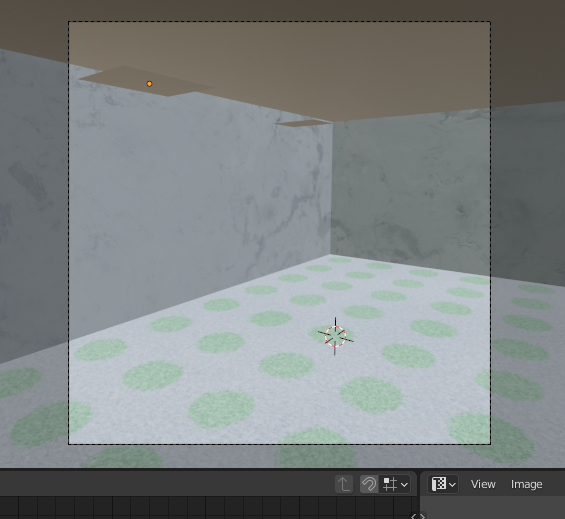
but then the rendering is a bit different:
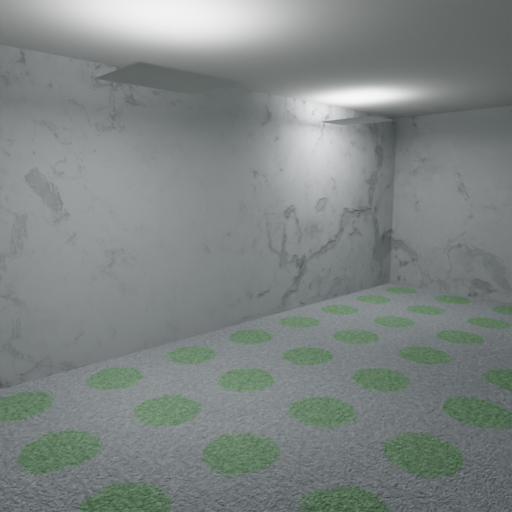
It seems like, it kind of shifted on the left for some reason.
I've tried the following initialization:
from src.utility.CameraUtility import CameraUtility
# define the camera intrinsics
CameraUtility.set_intrinsics_from_blender_params(1, 512, 512, lens_unit="FOV")
but it did not make any difference.
ttsesm
on 22 Jul 2021
Hey @ttsesm,
I cannot reproduce this behaviour. Can you please post again your script and the changes you made?
cornerfarmer
on 22 Jul 2021
Hey @ttsesm,
I cannot reproduce this behaviour. Can you please post again your script and the changes you made?
The script I am using is the following:
import bpy
import mathutils
import os
import sys

working_dir = os.path.dirname(bpy.context.space_data.text.filepath) + "/../"

if not working_dir in sys.path:
    sys.path.append(working_dir)

# Add path to custom packages inside the blender main directory
if sys.platform == "linux" or sys.platform == "linux2":
    packages_path = os.path.abspath(os.path.join(os.path.dirname(sys.executable), "..", "..", "..", "custom-python-packages"))
elif sys.platform == "darwin":
    packages_path = os.path.abspath(os.path.join(os.path.dirname(sys.executable), "..", "..", "..", "..", "Resources", "custom-python-packages"))
elif sys.platform == "win32":
    packages_path = os.path.abspath(os.path.join(os.path.dirname(sys.executable), "..", "..", "..", "custom-python-packages"))
else:
    raise Exception("This system is not supported yet: {}".format(sys.platform))
sys.path.append(packages_path)

# Delete all loaded models inside src/, as they are cached inside blender
for module in list(sys.modules.keys()):
    if module.startswith("src"):
        print("Module to be deleted: {}".format(module))
        del sys.modules[module]

from src.utility.Utility import Utility
from src.utility.Initializer import Initializer
Initializer.init(clean_up_scene=False)


from src.utility.CameraUtility import CameraUtility
# define the camera intrinsics
CameraUtility.set_intrinsics_from_blender_params(1, 512, 512, lens_unit="FOV")

print(CameraUtility.get_intrinsics_as_K_matrix())

# Store temp files in the same directory for debugging
working_dir = "/home/ttsesm/Development/BlenderProc_v3/examples/random_room_constructor/output/"
temp_dir = "/home/ttsesm/Development/BlenderProc_v3/examples/random_room_constructor/temp"

Utility.working_dir = working_dir
Utility.temp_dir = Utility.resolve_path(temp_dir)
os.makedirs(Utility.temp_dir, exist_ok=True)

bpy.context.scene.frame_start = 0
bpy.context.scene.frame_end = 1

modules = Utility.initialize_modules([
    {
      "module": "renderer.RgbRenderer",
      "config": {
        "samples": 350,
        "render_normals": True,
        "render_distance": True,
        "render_diffuse_color": True,
        "output_dir": "/home/ttsesm/Development/BlenderProc_v3/examples/random_room_constructor/output/",
      }
    },
    {
      "module": "writer.Hdf5Writer",
      "config": {
        "postprocessing_modules": {
          "distance": [
            {
              "module": "postprocessing.TrimRedundantChannels",
            }
          ]
        }
      }
    }
    ])
for module in modules:
    module.run()
and in the src.utility.Initializer I have commented the create camera setup lines. The changes are related to the camera module but they should not be necessary anyways since the renderer should be rendering what the camera sees.
ttsesm
on 22 Jul 2021
Hey @ttsesm,
I just tested your code together with the default scene. And there it works:


So it probably has something to do with your scene. If you want you can share it here, then I am gonna take a look at it.
Apart from that, you can check if you have any keyframes on your camera and if you have rendered the same frames (BP renders frame 0).
cornerfarmer
on 24 Jul 2021
Hhmm, I see. Well find in the link the .blend file and the scene that I am using. As far as I see I do not have explicit settings or something.
ttsesm
on 25 Jul 2021
Alright, as I suspected, the camera has keypoints for the first five frames (you can see that by switching to the Timeline window and selecting the camera):
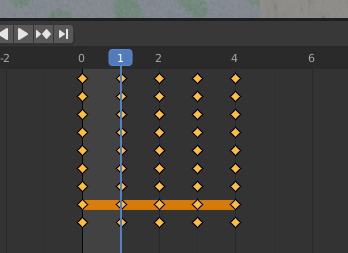
BlenderProc rendered frame 0 while you rendered frame 1. Thats why outcomes differ. You can change the current frame by moving the blue slider.
cornerfarmer
on 25 Jul 2021
I see, indeed you were right.
Well I learned something new today.
Thanks a lot.
ttsesm
on 26 Jul 2021
Related issues
 elientumba2019
·
4Comments
elientumba2019
·
4Comments
 ggaziv
·
3Comments
ggaziv
·
3Comments
 albertotono
·
3Comments
albertotono
·
3Comments
 Lotfi-MERAD
·
3Comments
Lotfi-MERAD
·
3Comments
 soans1994
·
4Comments
soans1994
·
4Comments