Blenderproc: Annotate a single object within a scene
Hi all,
let's assume i have a .blend scene with several object inside.
If i set the category_id property for each object, i can run coco annotation with no problem. Each object get labelled and segmented properly.
My question is: what if i need only a reduce set of mesh to be labelled?
If i set category_id only to the mesh of interest, an exception is trown because the other objects don't have the category_id.
How can i overcome this?
This is the scene:
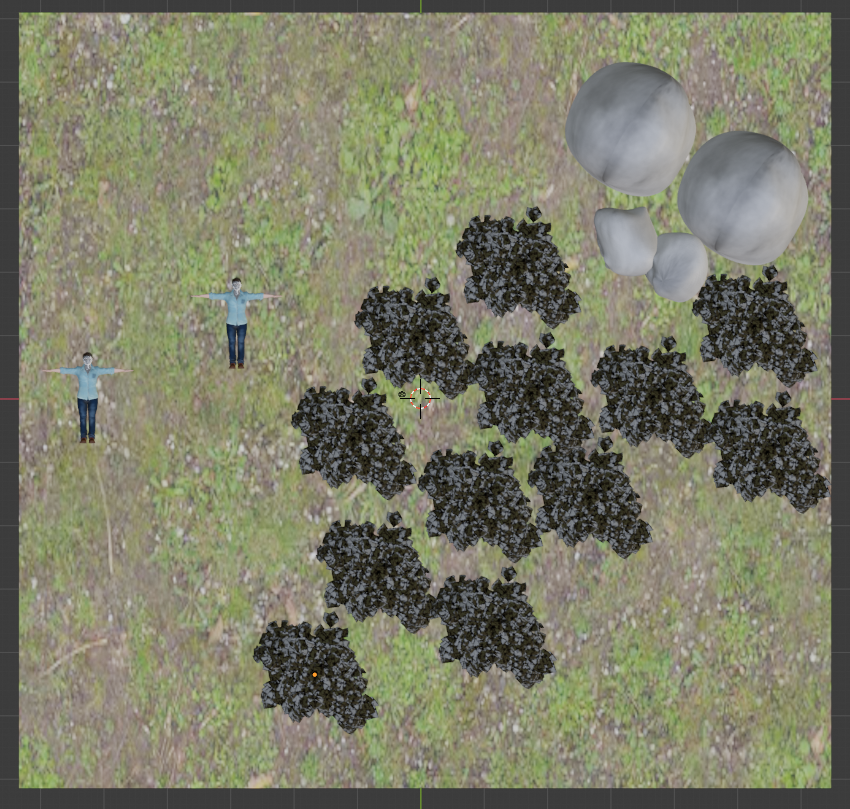
I need only the lying people to be labelled, i don't care about tree, rocks or ground.
I can provide more information if needed.
Thanks in advance
 lodm94
All 11 comments
Hey,
there are different solutions to your problem:
- Assuming you only need one class for all unlabeled objects then you could use the default option:
- If you want to set the
category_idmanually per object, while loading them, you can use theadd_propertiesoption:
- Lastly, if you want to do it during the execution you can use the
EntityManipulator:
To better understand the EntityManipulator check out this example and the documentation.
I hope this helps.
Best,
Max
 themasterlink
on 9 Jun 2021
themasterlink
on 9 Jun 2021
Hi @themasterlink thanks for reply. I will take a look. But at first glance i am not sure this cover my need: in all the three example you provide, each object in the scene will be annotated. My wish is to set the category_id (manually, automatically, i don't care) only to one object. In other worlds, i would like to run coco annotation without setting category_id for trees, rocks and so on. Just people.
lodm94
on 9 Jun 2021
Hey,
yes that is possible, you should look at the example for the EntityManipulator, you have to select the people with a selector and then you can set any category you want:
yaml
    "module": "manipulators.EntityManipulator",
    "config": {
      "selector": {
       "provider": "getter.Entity",
       "conditions": {
          "name": '.*people.*'  # select your people based on their name
        }
      },
      "cp_category_id": 5  # this will be the new category for the people objects
    }
Best,
Max
themasterlink
on 9 Jun 2021
Hello,
I think what @lodm94 wants to ask is if it it possible to ignore some objects in the scene and only annotate the object of interest.
I have a similar problem. I added distractor objects into my scene so that the neural net gets more robust. I gave my Objects of interest the right category_id but you are not able to run the program except every mesh in the scene has a category_id and therefor being annotated as well.
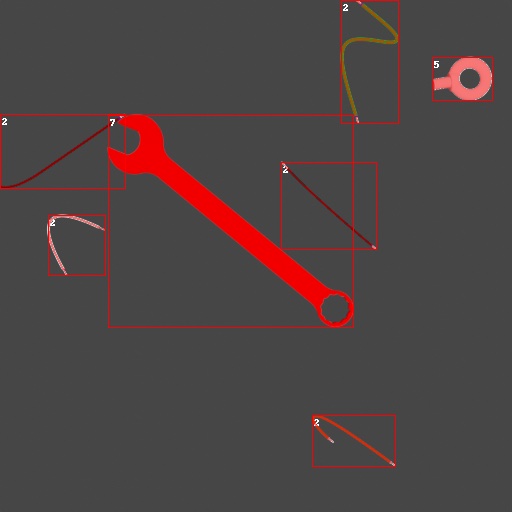
This is my result so far but as you can see the wrench and the hook also have annotations on them but this is not intended.
Can this problem be solved? Thank you very much! :)
P.S. is it possible to not only give them an id but also assign names (e.g. Electrical Wire)
 SchmidtiT
on 10 Jun 2021
SchmidtiT
on 10 Jun 2021
At the moment it is necessary to give every object a valid category id (we are thinking about removing this constraint in the furture).
However, to remove the annotations of objects you could simply set their category_id to 0, which is the same category id also the background has. In this way their annotations are skipped when generating the coco annotations.
For example, to remove the annotations of all objects except the monkey head in the coco_annotations example, you just need to alter the config in the following way:
{
      "module": "loader.BlendLoader",
      "config": {
        "path": "<args:1>",
        "add_properties": {
          "cp_category_id": "0"
        }
      }
    },
    {
      "module": "manipulators.EntityManipulator",
      "config": {
        "selector": {
          "provider": "getter.Entity",
          "conditions": {
            "name": 'Suzanne'
          }
        },
        "cp_category_id": 1
      }
    },
In this way we will set the category id of all imported objects to zero first and then set only the one of the monkey head to 1.
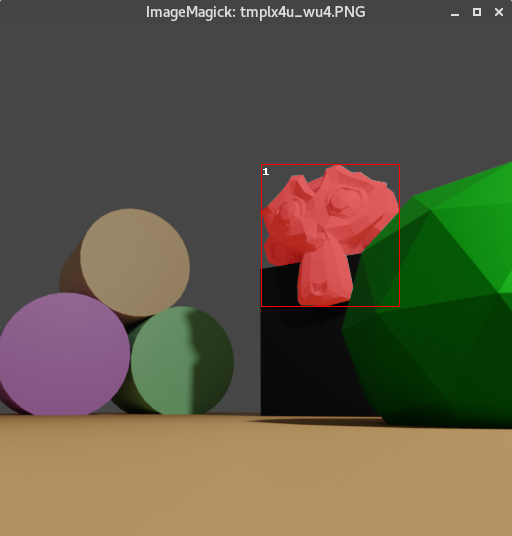
 cornerfarmer
on 10 Jun 2021
cornerfarmer
on 10 Jun 2021
Hello,
I think what @lodm94 wants to ask is if it it possible to ignore some objects in the scene and only annotate the object of interest.
Thanks @SchmidtiT that is EXACTLY what i meant!!! Big up for you to made it clearly!!
However, to remove the annotations of objects you could simply set their category_id to
0, which is the same category id also the background has. In this way their annotations are skipped when generating the coco annotations.
Thank you too @cornerfarmer this tip is quite interesting for me, i will use this to move around that exception.
At the moment it is necessary to give every object a valid category id (we are thinking about removing this constraint in the furture).
Loud and clear. IMHO you should. I am not a 3D artist, i barely manage to use Blender. Often i use to search for free 3D scenes that can suit my need and try to render images with that. Often i find complex scenarios with tons of mesh in it where i use to put an object of interest wich i need to be labelled. In this case to run coco annotations i need to set all the category_id properties to 0, wich could or could be not possible.
I am not complaining, just giving my point of view.
Thanks for all your work.
Cheers
lodm94
on 10 Jun 2021
@cornerfarmer Thank you very much for your answer that really helps a lot! :)
There is one more question from my side. How can I rename the category_id to a full name (e.g Wire)? I have seen it in the coco_annotations example that it is possible but I was not able to do it by my self...
SchmidtiT
on 10 Jun 2021
Loud and clear. IMHO you should. I am not a 3D artist, i barely manage to use Blender. Often i use to search for free 3D scenes that can suit my need and try to render images with that. Often i find complex scenarios with tons of mesh in it where i use to put an object of interest wich i need to be labelled. In this case to run coco annotations i need to set all the category_id properties to 0, wich could or could be not possible.
One thing here, if you use the default option, everything which is not labeled will get class 0 and will be ignored in the coco annotations, class here is the "category_id" tag.
themasterlink
on 10 Jun 2021
@SchmidtiT the image in the examples directory is from a previous BlenderProc version and probably from instance segmentation. In the current version, setting a name for a category_id is not possible without changing the code.
So there are two possibilities for you at the moment:
- One thing you could always do is adjust the coco_annotations.json file afterwards. There you can go over the
categoriesand change thenamefields. Afterwards, the visualization tool should also print them correctly. - If you only want to show the object names there, you can do this by adding
"name"to yourSegMapRenderer"map_by"config:
{
      "module": "renderer.SegMapRenderer",
      "config": {
        "map_by": ["instance", "class", "name"]
      }
},
And then change line 138 of the coco annotations writer to
'name': inst["name"]
We are thinking about a better way to this in the future.
cornerfarmer
on 10 Jun 2021
1. One thing you could always do is adjust the coco_annotations.json file afterwards. There you can go over the `categories` and change the `name` fields. Afterwards, the visualization tool should also print them correctly.
@SchmidtiT Postprocessing of the annotations json file should be fast and efficient enough.
 ideas-man
on 10 Jun 2021
ideas-man
on 10 Jun 2021
Alright thank you guys!
I guess I will adjust the .json file then :)
SchmidtiT
on 11 Jun 2021
Related issues
 shreeramsigdel77
·
4Comments
shreeramsigdel77
·
4Comments
 b-yogesh
·
5Comments
b-yogesh
·
5Comments
 soans1994
·
4Comments
soans1994
·
4Comments
 mikkeljakobsen
·
6Comments
mikkeljakobsen
·
6Comments
 Lotfi-MERAD
·
3Comments
Lotfi-MERAD
·
3Comments
Most helpful comment
One thing here, if you use the default option, everything which is not labeled will get class 0 and will be ignored in the coco annotations, class here is the
"category_id"tag.https://github.com/DLR-RM/BlenderProc/blob/8bc933868c2284982ad2aa091358429c02d8842d/examples/rock_essentials/config.yaml#L224-L228