Blenderproc: Generating synthetic dataset for training on Mask R-CNN
I would like to train Mask R-CNN to recognize a specific object based on a 3D model. I want to produce a synthetic dataset similar to the output of "bop_object_on_surface_sampling" example. But I need to include my own 3D model and produce ground truth masks for Mask R-CNN training, and I'm not sure how to do that. Can you guide me in the right direction?
Best regards, Mikkel
 mikkeljakobsen
All 6 comments
Hello Mikkel,
that sounds like something, which you can easily do with BlenderProc.
First, I would always recommend starting with the basic example. There you learn how a simple scene is loaded and how the rendering process in general works.
Then you can check out different in-depth tutorials on camera sampling or light sampling.
After you have done these, you should have understood how our module structure works in principle and how to use the ObjectLoader. So, now you can use the ObjectLoader to load your own 3D model. But make sure the data type is supported. Any additional information can you get by checking the documentation of the ObjectLoader, which you can find at the top of the class in the source code.
After loading your model and sampling some cameras, you just need to add the necessary writers. Depending on the format, we offer different writers. I assume you will use the CocoAnnotationsWriter, there is an example for that, too.
Best,
Max
 themasterlink
on 31 Aug 2020
themasterlink
on 31 Aug 2020
Thanks for your help Max. I managed to use the example from "bop_object_on_surface_sampling" to create scenes with my custom 3D object mixed with random objects from the LineMod dataset. I tried to use the CocoAnnotationsWriter, but I struggle to make segmentation masks for my custom object (blue box).
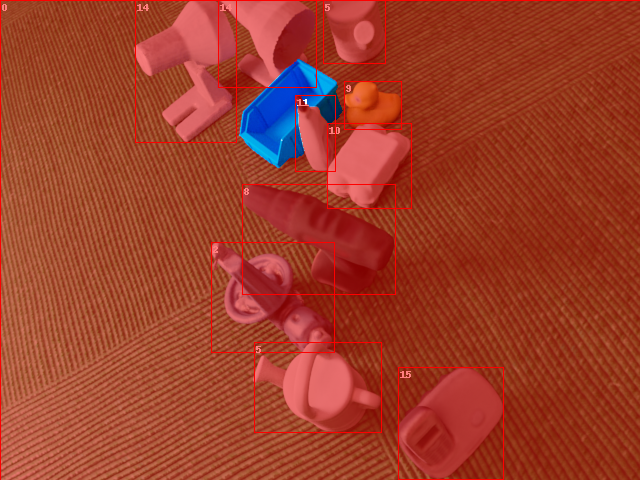
Tried to add category_id property in the object loader
"add_properties": {"cp_category_id": 20}
I also tried to import the .obj file to a .blend scene and adding the property there as in the CocoAnnotation example. But no success.
Can you explain me how to do it correctly?
Best regards, Mikkel
mikkeljakobsen
on 1 Sep 2020
Adding "add_properties": {"cp_category_id": 20} to loader is supposed to be the way to go...
Maybe sharing your config file and the segmentation output here would help us notice what is missing.
 MohmadAyman
on 1 Sep 2020
MohmadAyman
on 1 Sep 2020
I tried to change the order of loading the objects. Now my custom object is correctly labelled, but the first loaded object is not
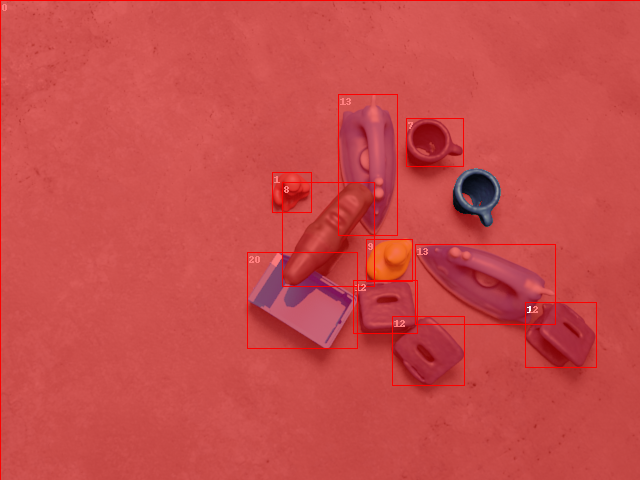
Maybe there's something missing in the way I use the CoccoAnnotationsWriter? Here is my config-file:
`
Args:
{
"version": 3,
"setup": {
"blender_install_path": "/home_local/
"pip": [
"h5py",
"scikit-image",
"pypng==0.0.20",
"scipy==1.2.2"
]
},
"modules": [
{
"module": "main.Initializer",
"config": {
"global": {
"output_dir": "
"sys_paths": ["
}
}
},
{
  "module": "loader.BopLoader",
  "config": {
    "bop_dataset_path": "<args:1>/lm",
    "model_type": "",
    "mm2m": True,
    "sample_objects": True,
    "num_of_objs_to_sample": 10,
    "add_properties": {
      "cp_physics": True
    },
    "cf_set_shading": "SMOOTH"
  }
},
{
  "module": "loader.ObjectLoader",
  "config": {
    "path": "<args:0>",
"add_properties": {
  "cp_physics": True,
  "cp_category_id": 20
  }
  }
},
{
  "module": "manipulators.WorldManipulator",
  "config": {
    "cf_set_world_category_id": 0  # this sets the worlds background category id to 0
  }
},
{
  "module": "manipulators.MaterialManipulator",
  "config": {
    "selector": {
      "provider": "getter.Material",
      "conditions": [
      {
        #"name": "bop_lm_vertex_col_material.*"
        "name": "material.*"
      }
      ]
    },
    "cf_set_specular": {
      "provider": "sampler.Value",
      "type": "float",
      "min": 0.0,
      "max": 1.0
    },
    "cf_set_roughness": {
      "provider": "sampler.Value",
      "type": "float",
      "min": 0.0,
      "max": 1.0
    }
  }
},
{
  "module": "constructor.BasicMeshInitializer",
  "config": {
    "meshes_to_add": [
    {
      "type": "plane",
      "name": "ground_plane0",
      "scale": [2, 2, 1]
    },
    {
      "type": "plane",
      "name": "ground_plane1",
      "scale": [2, 2, 1],
      "location": [0, -2, 2],
      "rotation": [-1.570796, 0, 0] # switch the sign to turn the normals to the outside
    },
    {
      "type": "plane",
      "name": "ground_plane2",
      "scale": [2, 2, 1],
      "location": [0, 2, 2],
      "rotation": [1.570796, 0, 0]
    },
    {
      "type": "plane",
      "name": "ground_plane4",
      "scale": [2, 2, 1],
      "location": [2, 0, 2],
      "rotation": [0, -1.570796, 0]
    },
    {
      "type": "plane",
      "name": "ground_plane5",
      "scale": [2, 2, 1],
      "location": [-2, 0, 2],
      "rotation": [0, 1.570796, 0]
    },
    {
      "type": "plane",
      "name": "light_plane",
      "location": [0, 0, 10],
      "scale": [3, 3, 1]
    }
    ]
  }
},
{
  "module": "manipulators.EntityManipulator",
  "config": {
    "selector": {
      "provider": "getter.Entity",
      "conditions": {
        "name": '.*plane.*'
      }
    },
    "cp_physics": False
  }
},

{
  "module": "manipulators.MaterialManipulator",
  "config": {
    "selector": {
      "provider": "getter.Material",
      "conditions": {
        "name": "light_plane_material"
      }
    },
    "cf_switch_to_emission_shader": {
      "color": {
        "provider": "sampler.Color",
        "min": [0.5, 0.5, 0.5, 1.0],
        "max": [1.0, 1.0, 1.0, 1.0]
      },
      "strength": {
        "provider": "sampler.Value",
        "type": "float",
        "min": 3,
        "max": 6
      }
    }
  }
},
{
  "module": "loader.CCMaterialLoader",
  "config": {
    "folder_path": "<args:3>"
  }
},
{
  "module": "manipulators.EntityManipulator",
  "config": {
    "selector": {
      "provider": "getter.Entity",
      "conditions": {
        "name": "ground_plane.*"
      }
    },
    "mode": "once_for_all",
    "cf_randomize_materials": {
      "randomization_level": 1,
      "materials_to_replace_with": {
        "provider": "getter.Material",
        "random_samples": 1,
        "conditions": {
          "cp_is_cc_texture": True
        }
      }
    }
  }
},
{
  "module": "object.OnSurfaceSampler",
  "config": {
    "objects_to_sample": {
      "provider": "getter.Entity",
      "conditions": {
        "cp_physics": True
      }
    },
    "surface": {
      "provider": "getter.Entity",
      "index": 0,
      "conditions": {
        "name": "ground_plane0"
      }
    },
    "pos_sampler": {
      "provider": "sampler.UpperRegionSampler",
      "to_sample_on": {
        "provider": "getter.Entity",
        "index": 0,
        "conditions": {
          "name": "ground_plane0"
        }
      },
      "min_height": 1,
      "max_height": 4,
      "face_sample_range": [0.4, 0.6],
      "use_ray_trace_check": False,
    },
    "min_distance": 0.01,
    "max_distance": 0.20,
    "rot_sampler": {
      "provider": "sampler.Uniform3d",
      "min": [0, 0, 0],
      "max": [0, 0, 6.28]
    }
  }
},


{
  "module": "lighting.LightSampler",
  "config": {
    "lights": [
    {
      "location": {
        "provider": "sampler.Shell",
        "center": [0, 0, 0],
        "radius_min": 1, # now depends on the bottom area of the box
        "radius_max": 1.5, # this one too
        "elevation_min": 5,
        "elevation_max": 89,
        "uniform_elevation": True
      },
      "color": {
        "provider": "sampler.Color",
        "min": [0.5, 0.5, 0.5, 1.0],
        "max": [1.0, 1.0, 1.0, 1.0]
      },
      "type": "POINT",
      "energy": 200
    }
    ]
  }
},
{
  "module": "camera.CameraSampler",
  "config": {
    "cam_poses": [
    {
      "proximity_checks": {
        "min": 0.3
      },
      "excluded_objs_in_proximity_check":  {
        "provider": "getter.Entity",
        "conditions": {
          "name": "ground_plane.*",
          "type": "MESH"
        }
      },
      "number_of_samples": 1,
      "location": {
        "provider": "sampler.Shell",
        "center": [0, 0, 0],
        "radius_min": 0.61,
        "radius_max": 1.24,
        "elevation_min": 5,
        "elevation_max": 89,
        "uniform_elevation": True
      },
    "rotation": {
      "format": "look_at",
      "value": {
        "provider": "getter.POI"
      },
        "inplane_rot": {
          "provider": "sampler.Value",
          "type": "float",
          "min": -0.7854,
          "max": 0.7854
        }
      }
    }
    ]
  }
},
{
  "module": "renderer.RgbRenderer",
  "config": {
    "output_key": "colors"
  }
},
{
  "module": "renderer.SegMapRenderer",
  "config": {
    "map_by": ["instance", "class"],
    "default_values": {"class": 0}
  }
},
{
  "module": "writer.CocoAnnotationsWriter",
  "config": {
  }
}
]
}
`
mikkeljakobsen
on 2 Sep 2020
Hey Mikkel,
thanks for sharing your config! Using that I think I found the reason behind your issue.
At the moment the coco writer discards the first object instance, as this usually is the background. However, in your case the background is not visible in the images and therefore the first object instance gets removed.
This should not happen, we gonna fix this in the next version.
For now as a workaround you circumvent this issue by replacing line 28 from https://github.com/DLR-RM/BlenderProc/blob/master/src/utility/CocoUtility.py#L28 with:
for inst in inst_attribute_maps:
Afterwards, all objects should appear in the coco annotations. Sorry again for the inconvenience, let me know if you experience any further issues
 cornerfarmer
on 2 Sep 2020
cornerfarmer
on 2 Sep 2020
Hey Mikkel,
thanks for sharing your config! Using that I think I found the reason behind your issue.
At the moment the coco writer discards the first object instance, as this usually is the background. However, in your case the background is not visible in the images and therefore the first object instance gets removed.
This should not happen, we gonna fix this in the next version.For now as a workaround you circumvent this issue by replacing line 28 from https://github.com/DLR-RM/BlenderProc/blob/master/src/utility/CocoUtility.py#L28 with:
for inst in inst_attribute_maps:Afterwards, all objects should appear in the coco annotations. Sorry again for the inconvenience, let me know if you experience any further issues
Thank you very much! I changed the following lines:
for inst in inst_attribute_maps:
    if int(inst["category_id"]) == 0: # do not label background class
        continue
And now all objects get labelled correctly and background instances (category_id=0) get ignored.
mikkeljakobsen
on 2 Sep 2020
Related issues
 ttsesm
·
3Comments
ttsesm
·
3Comments
 eugval
·
3Comments
eugval
·
3Comments
 shreeramsigdel77
·
4Comments
shreeramsigdel77
·
4Comments
 manuelli
·
3Comments
manuelli
·
3Comments
 soans1994
·
3Comments
soans1994
·
3Comments
Most helpful comment
Hey Mikkel,
thanks for sharing your config! Using that I think I found the reason behind your issue.
At the moment the coco writer discards the first object instance, as this usually is the background. However, in your case the background is not visible in the images and therefore the first object instance gets removed.
This should not happen, we gonna fix this in the next version.
For now as a workaround you circumvent this issue by replacing line 28 from https://github.com/DLR-RM/BlenderProc/blob/master/src/utility/CocoUtility.py#L28 with:
Afterwards, all objects should appear in the coco annotations. Sorry again for the inconvenience, let me know if you experience any further issues