Blenderproc: property float texture_u
Dear Drs.
In BopLoader.py file,
python
 new_file_ply_content = new_file_ply_content.replace("property float texture_u",
                                                                            "property float s")
 new_file_ply_content = new_file_ply_content.replace("property float texture_v",
                                                                            "property float t")
why need to replace these two values?
We have a problem.
python
                    with open(model_path, "r") as file:
                        new_file_ply_content = file.read()
This function cannot open our ply file since this file's encoding mode is None. Already tried many methods, but still cannot solve this issue. Actually, our ply file can be opened by meshlab, everything is ok. So could you help us? Thanks a lot.
 jingweirobot
All 37 comments
Hey,
could you provide your .ply file so that we can have a look at it?
Best regards,
Max
 themasterlink
on 10 May 2021
themasterlink
on 10 May 2021
Dear Max
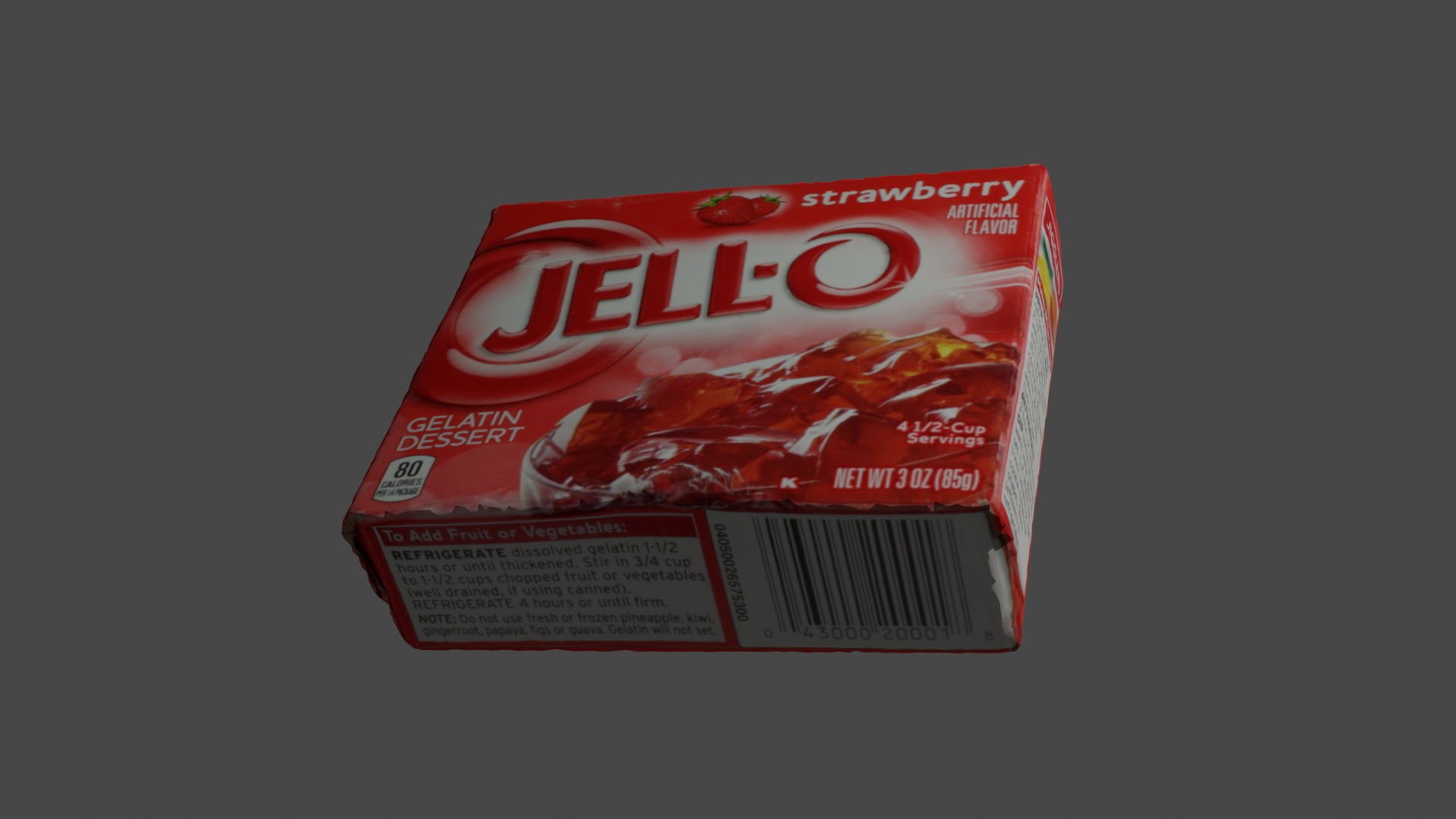
Please check the files attached via dropbox. obj_000008.ply and obj_000008.png. Thanks a lot.
https://www.dropbox.com/s/uswmq6r5anro1ks/obj_000008.ply?dl=0
https://www.dropbox.com/s/evl7xr22bibl6jj/obj_000008.png?dl=0
Best,
John
jingweirobot
on 11 May 2021
Hey John,
the problem has nothing do to with BlenderProc but everything to do with how blender loads .ply files. The main problem is this one line here:
comment TextureFile obj_000008.png
As you can already see .ply does not fully support using a texture, which means not every library implements this feature.
But, there is an easy fix to all your problems, convert the .ply files to .obj. I just tested it with osgconv:
osgconv obj_000008.ply obj_000008.obj
These files blender can handle and therefore also BlenderProc, for loading such a file please use the ObjectLoaderModule :)
Best,
Max
themasterlink
on 11 May 2021
@themasterlink Thanks a lot for your help. We can able to convert ply to obj. but how could we use ObjectLoaderModule? I found the boploader.py had been moved to utility folder.
File "/home/jingwei/Downloads/BlenderProc-main/src/run.py", line 40, in
pipeline.run()
File "./src/main/Pipeline.py", line 87, in run
module.run()
File "./src/loader/BopLoaderModule.py", line 107, in run
mm2m=self.config.get_bool("mm2m", False)
File "./src/utility/loader/BopLoader.py", line 117, in load
cur_obj = BopLoader._load_mesh(random_id, model_p, bop_dataset_name, has_external_texture, temp_dir, allow_duplication, scale)
File "./src/utility/loader/BopLoader.py", line 285, in _load_mesh
new_file_ply_content = file.read()
File "/home/jingwei/blender/blender-2.91.0-linux64/2.91/python/lib/python3.7/codecs.py", line 322, in decode
(result, consumed) = self._buffer_decode(data, self.errors, final)
UnicodeDecodeError: 'utf-8' codec can't decode byte 0xcf in position 436: invalid continuation byte
jingweirobot
on 11 May 2021
Hey,
please make yourself familiar with the basic example: https://github.com/DLR-RM/BlenderProc/tree/main/examples/basic
It explains how to use the ObjectLoaderModule:
    {
      "module": "loader.ObjectLoader",
      "config": {
        "path": "<args:1>"
      }
    },
You can then start BlenderProc:
python run.py examples/basic/config.yaml examples/basic/camera_positions obj_000008.obj examples/basic/output
Now you would just need to change the path.
If you share your config file, I can help you further.
Best,
Max
themasterlink
on 11 May 2021
@themasterlink Thanks a lot.
We are using the previous version of blenderproc. Actually, we were able to generate data using this blenderproc. But the ply files have been changed. Currently, it is not ok for the blenderproc.
python run.py examples/bop_challenge/config_ycbv_random.yaml /home/jw/Downloads/bop_ycb_dataset ycbv /home/jw/bop_toolkit /home/jw/BlenderProc/resources/cctextures /home/jw/Downloads/bop_ycb_dataset
# Args: <path_to_bop_data> <bop_datset_name> <bop_toolkit_path> <path_to_cc_textures> <output_dir>
{
  "version": 3,
  "setup": {
    "blender_install_path": "/home_local/<env:USER>/blender/",
    "pip": [
      "h5py",
      "scikit-image",
      "pypng==0.0.20",
      "scipy==1.2.2",
      "matplotlib==2.2.4"
    ]
  },
  "modules": [

    {
      "module": "main.Initializer",
      "config": {
        "global": {
          "output_dir": "<args:4>",    ### /home/jw/Downloads/bop_ycb_dataset
          "sys_paths": ["<args:2>"]    ### /home/jw/bop_toolkit
        }
      }
    },


    {
      "module": "loader.BopLoader",
      "config": {
        "bop_dataset_path": "<args:0>/<args:1>", ### args:0 /home/jw/Downloads/bop_ycb_dataset; args:1  ycbv
        "model_type": "",
        "mm2m": True,
        "sample_objects": True,
        "num_of_objs_to_sample": 21,
        "obj_instances_limit": 1,   ### original 1
        "add_properties": {
          "cp_physics": True
        },
        "cf_set_shading": "SMOOTH"
      }
    },
    {
      "module": "manipulators.MaterialManipulator",
      "config": {
        "selector": {
          "provider": "getter.Material",
          "conditions": [
          {
            "name": "bop_ycbv_vertex_col_material.*"     ### "name": "bop_tless_vertex_col_material.*"
          }
          ]
        },
        "cf_set_base_color": {
          "provider": "sampler.Color",
          "grey": True,
          "min": [0.1, 0.1, 0.1, 1.0],
          "max": [0.9, 0.9, 0.9, 1.0]
        }
      }
    },
    {
      "module": "manipulators.MaterialManipulator",
      "config": {
        "selector": {
          "provider": "getter.Material",
          "conditions": [
          {
            "name": "bop_ycbv_vertex_col_material.*"   ### "name": "bop_tless_vertex_col_material.*"
          },
          {
            "name": "bop_<args:1>_vertex_col_material.*"
          }
          ]
        },
        "cf_set_specular": {
          "provider": "sampler.Value",
          "type": "float",
          "min": 0.0,
          "max": 1.0
        },
        "cf_set_roughness": {
          "provider": "sampler.Value",
          "type": "float",
          "min": 0.0,
          "max": 1.0
        }
      }
    },
    {
      "module": "constructor.BasicMeshInitializer",
      "config": {
        "meshes_to_add": [
        {
          "type": "plane",
          "name": "ground_plane0",
          "scale": [2, 2, 1]
        },
        {
          "type": "plane",
          "name": "ground_plane1",
          "scale": [2, 2, 1],
          "location": [0, -2, 2],
          "rotation": [-1.570796, 0, 0] # switch the sign to turn the normals to the outside
        },
        {
          "type": "plane",
          "name": "ground_plane2",
          "scale": [2, 2, 1],
          "location": [0, 2, 2],
          "rotation": [1.570796, 0, 0]
        },
        {
          "type": "plane",
          "name": "ground_plane4",
          "scale": [2, 2, 1],
          "location": [2, 0, 2],
          "rotation": [0, -1.570796, 0]
        },
        {
          "type": "plane",
          "name": "ground_plane5",
          "scale": [2, 2, 1],
          "location": [-2, 0, 2],
          "rotation": [0, 1.570796, 0]
        },
        {
          "type": "plane",
          "name": "light_plane",
          "location": [0, 0, 10],
          "scale": [3, 3, 1]
        }
        ]
      }
    },
    {
      "module": "manipulators.EntityManipulator",
      "config": {
        "selector": {
          "provider": "getter.Entity",
          "conditions": {
            "name": '.*plane.*'
          }
        },
        "cp_physics": False,
        "cp_category_id": 333
      }
    },
    {
      "module": "manipulators.MaterialManipulator",
      "config": {
        "selector": {
          "provider": "getter.Material",
          "conditions": {
            "name": "light_plane_material"
          }
        },
        "cf_switch_to_emission_shader": {
          "color": {
            "provider": "sampler.Color",
            "min": [0.5, 0.5, 0.5, 1.0],
            "max": [1.0, 1.0, 1.0, 1.0]
          },
          "strength": {
            "provider": "sampler.Value",
            "type": "float",
            "min": 3,
            "max": 6
          }
        }
      }
    },
    {
      "module": "loader.CCMaterialLoader",
      "config": {
        "folder_path": "<args:3>"
      }
    },
    {
      "module": "manipulators.EntityManipulator",
      "config": {
        "selector": {
          "provider": "getter.Entity",
          "conditions": {
            "name": "ground_plane.*"
          }
        },
        "mode": "once_for_all",
        "cf_randomize_materials": {
          "randomization_level": 1,
          "materials_to_replace_with": {
            "provider": "getter.Material",
            "random_samples": 1,
            "conditions": {
              "cp_is_cc_texture": True
            }
          }
        }
      }
    },
    {
      "module": "object.ObjectPoseSampler",
      "config": {
        "objects_to_sample": {
          "provider": "getter.Entity",
          "conditions": {
            "cp_physics": True
          }
        },
        "pos_sampler": {
          "provider":"sampler.Uniform3d",
          "min": {
            "provider": "sampler.Uniform3d",
            "min": [-0.3, -0.3, 0.0],
            "max": [-0.2, -0.2, 0.0]
          },
          "max": {
            "provider": "sampler.Uniform3d",
            "min": [0.2, 0.2, 0.4],
            "max": [0.3, 0.3, 0.6]
          }
        },
        "rot_sampler":{
          "provider":"sampler.UniformSO3"
        }
      }
    },
    {
      "module": "object.PhysicsPositioning",
      "config": {
        "min_simulation_time": 3,
        "max_simulation_time": 10,
        "check_object_interval": 1,
        "solver_iters": 25,
        "substeps_per_frame": 20,
        "friction": 100.0,
        "linear_damping": 0.99,
        "angular_damping": 0.99,
        "objs_with_box_collision_shape": {
          "provider": "getter.Entity",
          "conditions": {
            "name": "ground_plane.*"
          }
        }
      }
    },
    {
      "module": "lighting.LightSampler",
      "config": {
        "lights": [
        {
          "location": {
            "provider": "sampler.Shell",
            "center": [0, 0, 0],
            "radius_min": 1, # now depends on the bottom area of the box
            "radius_max": 1.5, # this one too
            "elevation_min": 5,
            "elevation_max": 89,
            "uniform_elevation": True
          },
          "color": {
            "provider": "sampler.Color",
            "min": [0.5, 0.5, 0.5, 1.0],
            "max": [1.0, 1.0, 1.0, 1.0]
          },
          "type": "POINT",
          "energy": 200
        }
        ]
      }
    },
    {
      "module": "camera.CameraSampler",
      "config": {
        "cam_poses": [
        {
          "proximity_checks": {
            "min": 0.3
          },
          "excluded_objs_in_proximity_check":  {
            "provider": "getter.Entity",
            "conditions": {
              "name": "ground_plane.*",
              "type": "MESH"
            }
          },                              ############# setting some configurations
          "number_of_samples": 1,     #### original 25
          "location": {
            "provider": "sampler.Shell",
            "center": [0, 0, 0],
            "radius_min": 0.61,          ###  0.61
            "radius_max": 1.2,          ###  1.24
            "elevation_min": 60,       ### 5
            "elevation_max": 89,      ### 89
            "uniform_elevation": True
          },
          "rotation": {
            "format": "look_at",
            "value": {
              "provider": "getter.POI",
              "selector": {
                "provider": "getter.Entity",
                "conditions": {
                  "type": "MESH",
                  "cp_bop_dataset_name": "<args:1>",
                },
                "random_samples": 15
              }
            },
            "inplane_rot": {
              "provider": "sampler.Value",
              "type": "float",
              "min": -3.14159,
              "max": 3.14159
            }
          }
        }
        ]
      }
    },

    {
      "module": "renderer.RgbRenderer",   ### render rgb and depth images
      "config": {
        "samples": 50,
        "render_distance": True,   ### True
        "image_type": "PNG"                                     #### JPEG ---- png
      }
    },
        ### changing file name and format.
    {   #### set the number of images in each sub-folder  the current value 1000
      "module": "writer.BopWriter",                        ### save everything  image, depth, json files
      "config": {
        "dataset": "<args:1>",    ### <bop_datset_name>
        "append_to_existing_output": True,
        "postprocessing_modules": {
          "distance": [
            {"module": "postprocessing.Dist2Depth"}
          ]
        }
      }
    }
  ]
}
Actually, the main issue is, maybe, that blenderproc cannot be able to deal with ply files that are not ASCII encoding type or are not from meshlab. The ply files from meshlab have texture_u and texture_v values.
from boploader.py
if cur_obj is None:
if has_external_texture:
if os.path.exists(model_path):
new_file_ply_content = ""
with open(model_path, "r") as file:
new_file_ply_content = file.read()
texture_pos = new_file_ply_content.find("comment TextureFile ") + len("comment TextureFile ")
texture_file_name = new_file_ply_content[texture_pos:
new_file_ply_content.find("\n", texture_pos)]
texture_file_path = os.path.join(os.path.dirname(model_path), texture_file_name)
new_file_ply_content = new_file_ply_content.replace("property float texture_u",
"property float s")
new_file_ply_content = new_file_ply_content.replace("property float texture_v",
"property float t")
jingweirobot
on 11 May 2021
Hey,
you are using the BOP example, if that is required than you need to bring your data in the BOP data format:
https://github.com/thodan/bop_toolkit/blob/master/docs/bop_datasets_format.md#3d-object-models
If you have trouble with that please open an issue in that repository, if you have any further issues relating to BlenderProc you can open them here.
Best,
Max
themasterlink
on 11 May 2021
@themasterlink Thanks a lot.
Actually, in that repo of bop_toolkit, the coordinate frames of some objects(ply files) are not normal to the world space. We corrected them using meshlab. But blenderproc cannot process them.
jingweirobot
on 11 May 2021
The following function can be replaced? blenderproc cannot be able to deal with ply files that are not ASCII encoding type or are not from meshlab. The ply files from meshlab have texture_u and texture_v values.
from boploader.py
if cur_obj is None:
if has_external_texture:
if os.path.exists(model_path):
new_file_ply_content = ""
with open(model_path, "r") as file:
new_file_ply_content = file.read()
texture_pos = new_file_ply_content.find("comment TextureFile ") + len("comment TextureFile ")
texture_file_name = new_file_ply_content[texture_pos:
new_file_ply_content.find("\n", texture_pos)]
texture_file_path = os.path.join(os.path.dirname(model_path), texture_file_name)
new_file_ply_content = new_file_ply_content.replace("property float texture_u",
"property float s")
new_file_ply_content = new_file_ply_content.replace("property float texture_v",
"property float t")
jingweirobot
on 11 May 2021
You have to bring them into the BOP format, if they are not in the BOP format the BOPLoader won't work.
But, we can't help you with changing your data into the BOP format, as we are not the creators behind that.
themasterlink
on 11 May 2021
The following function can be replaced?
I would not advise to change the BOPLoader, else you will loose any possibility of comparing it to the BOP results.
themasterlink
on 11 May 2021
Thanks a lot. We are not experts in 3D model. Just using the existing functions to deal with something.
jingweirobot
on 11 May 2021
I have sadly no idea, about the BOP format, we only support the loading of the models. We have not designed it either and I personally don't like the .ply format, because too many things are not properly documented and every loader does it differently.
If you don't need the BOP Writer you can simply use the ObjectLoader as shown in the basic example.
themasterlink
on 11 May 2021
As mentioned above, using obj_000008.ply obj_000008.obj, so do you have any suggestion to load .obj file so that boploader can load file and texture? Thanks a lot
jingweirobot
on 11 May 2021
Maybe, we start at the top, what exactly do you want to do with the images and what kind of images do you want to produce?
themasterlink
on 11 May 2021
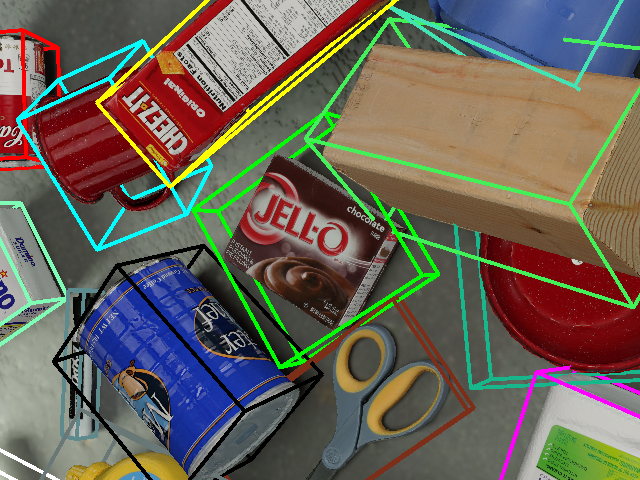
We are developing an algorithm of estimating object pose. Thanks
The bounding box represents the gts. Actually, you see, J-O box is not correct.
jingweirobot
on 11 May 2021
if the coordinate frames of objects of the ply files in ycb-video dataset are not vertical to the world frame, some gts are not correct.
jingweirobot
on 11 May 2021
@MartinSmeyer maybe you can help here more?
themasterlink
on 11 May 2021
@jingweirobot
Sorry for intervening, but it seems like there are only two ways for you to proceed, and both were already mentioned.
- If you have to stick to BOP format, then use the
BopLoaderModule.pybut avoid modifying it so you can still compare results. Here you will have to bring your source model files into a supported format. OR if you need the majority of theBopLoaderModule.pyfunctionality but don't really care about comparability of the results, then play around with the loading part itself, maybe process source.plyinto.obj+.mtlpairs while taking care of the ground truths. - If you don't really need a
BopLoaderModule.py, then switch to anObjectLoaderModule.py. Start with simply replacing theBopLoaderModule.pywith anObjectLoaderModule.pyin the config, processing source.plyinto.obj, and build up from there. If you need some partial functionality from theBopLoaderModule.py, then you will have to transfer/re-implement it yourself in your customObjectLoaderModule.pyversion.
We are not experts in 3D model
We are developing an algorithm of estimating object pose
I am afraid the main problem hides here, there is no avoiding being exposed to the intricacies and peculiarities of different 3D formats, especially the crappier ones.
 ideas-man
on 11 May 2021
ideas-man
on 11 May 2021
@ideas-man @themasterlink Thanks a lot for your suggestions.
Actually, most of the existing methods use ycb-video dataset to a comparison platform, but that dataset has correct gt, as far as I know. But if using blenderproc to generate some images from 21 objects in ycb-video dataset, someone may get some wrong gts. Actually, we used the ply files downloaded from bop_toolkit previously. I think this is a common issue, maybe.
jingweirobot
on 11 May 2021
@themasterlink @ideas-man So dear guys, if you have good ideas or solutions, please let me know. Thanks a lot.
jingweirobot
on 11 May 2021
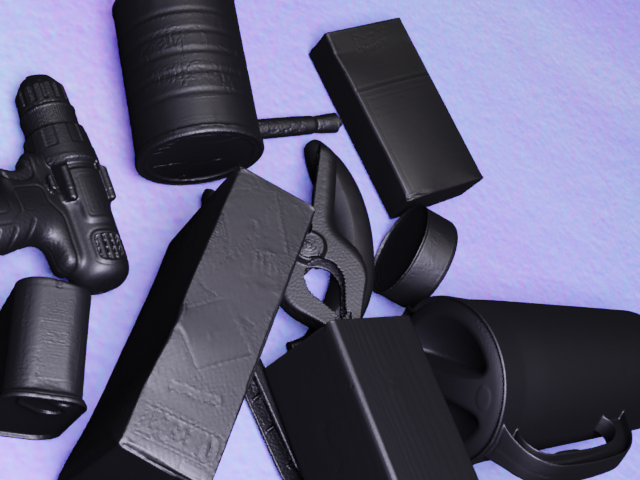
I use ObjectLoaderModule.py to load the ply file. It is still not ok. Without textures
jingweirobot
on 11 May 2021
As I said, you need to convert them to .obj first. Your .ply files are broken and can not be read by blender.
themasterlink
on 11 May 2021
I use ObjectLoaderModule.py to load the ply file. It is still not ok. Without textures
Please, read the options we relayed above carefully.
... But, there is an easy fix to all your problems, convert the .ply files to .obj. I just tested it with osgconv. These files blender can handle and therefore also BlenderProc, for loading such a file please use the ObjectLoaderModule :) ....
... maybe process process source meshes into.obj+.mtl...
ideas-man
on 11 May 2021
@ideas-man thanks a lot for your information. I have tried this method, as mentioned above. Actually, it is not available.
jingweirobot
on 11 May 2021
As I said, you need to convert them to .obj first. Your .ply files are broken and can not be read by blender.
Actually, I can read the modified ply file. The main issue is without the texture.
I use ObjectLoaderModule.py to load the ply file. It is still not ok. Without textures
Please, read the options we relayed above carefully.
... But, there is an easy fix to all your problems, convert the .ply files to .obj. I just tested it with osgconv. These files blender can handle and therefore also BlenderProc, for loading such a file please use the ObjectLoaderModule :) ....
... maybe process process source meshes into.obj+.mtl...
Still does not have texture.
jingweirobot
on 11 May 2021
The problem has nothing do to with BlenderProc but everything to do with how blender loads .ply files. The main problem is this one line here:
comment TextureFile obj_000008.png
As you can already see .ply does not fully support using a texture, which means not every library implements this feature.
But, there is an easy fix to all your problems, convert the .ply files to .obj. I just tested it with osgconv:
osgconv obj_000008.ply obj_000008.obj
These files blender can handle and therefore also BlenderProc, for loading such a file please use the ObjectLoader :)
Best,
Max
themasterlink
on 11 May 2021
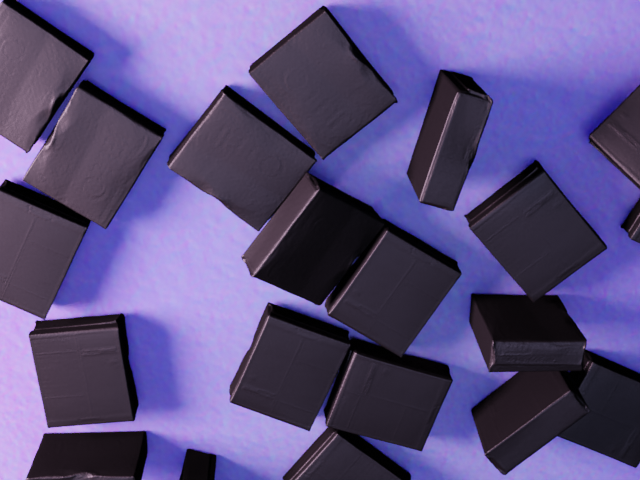
using osgconv to convert format, some information is losing. This is the result.
Thanks a lot.
jingweirobot
on 11 May 2021
Actually, I can read the modified ply file. The main issue is without the texture.
It is not about "reading" per se. Please, read the instructions relayed above carefully. .ply -> .obj conversion which leads to working textures is possible as proved by @themasterlink. If conversion itself is not working for you locally, then it has nothing to do with BlenderProc, especially if you are loading respective files in a wrong way.
P.S.:
Inspect processed .obj objects individually in Blender first before using them in BlenderProc pipeline to verify textures being visible, then load them in the new isolated pipeline that has only an ObjectLoaderModule.py using a BlenderProc debug mode (see respective example).
Everything else which is required for your current pipeline to allow loading .obj exactly how you want them is up to you. As I relayed prior, you have two main paths: changing the loading part of the BopLoaderModule.py, or building on top of the ObjectLoaderModule.py.
ideas-man
on 11 May 2021
Many thanks to guys.
1, when i use meshlab to open the obj file converted from ply file, it doesnot show texture,
Could you help me check it?
2, i changed the config yaml to objectloadmodule, i got the above result.
Later i will try again
jingweirobot
on 11 May 2021
You can check with osgviewer or you can import the object in blender, how to import objects in blender there are tutorials on youtube for this.
That means your .obj file was not correct. Maybe you removed the .jpg file maybe you moved the .obj file after it was created and forgot the .mtl file.
themasterlink
on 11 May 2021
I think there is a misunderstanding.
I used "osgconv obj_000008.ply obj_000008.obj" to generate obj_000008.obj + obj_000008.mtl; when I use meshlab to open obj_000008.obj, the GUI just shows the object without texture.
In this repo, which function is used in importing .mtl file?
jingweirobot
on 11 May 2021
- when I use meshlab
As I said:
Inspect processed .obj objects individually in Blender first before using them in BlenderProc pipeline
And as @themasterlink said, make sure you have both .mtl and .jpg files.
2.
Make sure conversion works first. Mind that we do not provide technical support for meshlab.
ideas-man
on 11 May 2021
thanks a lot @ideas-man I have all the files .mtl, .jpg, .obj.
Ok.
Many thanks to you and themasterlink for helping us to try this issue.
jingweirobot
on 11 May 2021
@themasterlink @ideas-man hey guys, I solved this issue. Actually, the coordinates of the models in ply files are not orthogonal to the world space, which results in an issue that some gts of datasets generated by blenderproc(ycb-video) are not correct. I have solved this issue. I used meshlab to adjust the directions of obj files from and directly import obj files by modifying some functions in boploader.ply. So if someone meets the same issue, please let me know. Many thanks to you for trying your best to help me.
jingweirobot
on 13 May 2021
@jingweirobot Hi.
Glad you found a solution!
ideas-man
on 13 May 2021
Related issues
 soans1994
·
5Comments
soans1994
·
5Comments
 luigifaticoso
·
4Comments
luigifaticoso
·
4Comments
 ttsesm
·
3Comments
ttsesm
·
3Comments
 b-yogesh
·
5Comments
b-yogesh
·
5Comments
 matemato
·
4Comments
matemato
·
4Comments
Most helpful comment
@jingweirobot
Sorry for intervening, but it seems like there are only two ways for you to proceed, and both were already mentioned.
BopLoaderModule.pybut avoid modifying it so you can still compare results. Here you will have to bring your source model files into a supported format. OR if you need the majority of theBopLoaderModule.pyfunctionality but don't really care about comparability of the results, then play around with the loading part itself, maybe process source.plyinto.obj+.mtlpairs while taking care of the ground truths.BopLoaderModule.py, then switch to anObjectLoaderModule.py. Start with simply replacing theBopLoaderModule.pywith anObjectLoaderModule.pyin the config, processing source.plyinto.obj, and build up from there. If you need some partial functionality from theBopLoaderModule.py, then you will have to transfer/re-implement it yourself in your customObjectLoaderModule.pyversion.I am afraid the main problem hides here, there is no avoiding being exposed to the intricacies and peculiarities of different 3D formats, especially the crappier ones.