Hello! Can you tell me where is the "bop_tless_vertex_col_material.*" ? And If I want to render the glass material for my own model, where do I import the material from?
Thank you for your project!
I'm looking forward to your reply!
 Xiaflowers
All 3 comments
Hi,
this is just the material name belonging to the tless objects. It is loaded from the ply vertex colors and meant to be randomized.
For glass set transmission to 1:
"cf_set_transmission": 1.0
 MartinSmeyer
on 15 Mar 2021
MartinSmeyer
on 15 Mar 2021
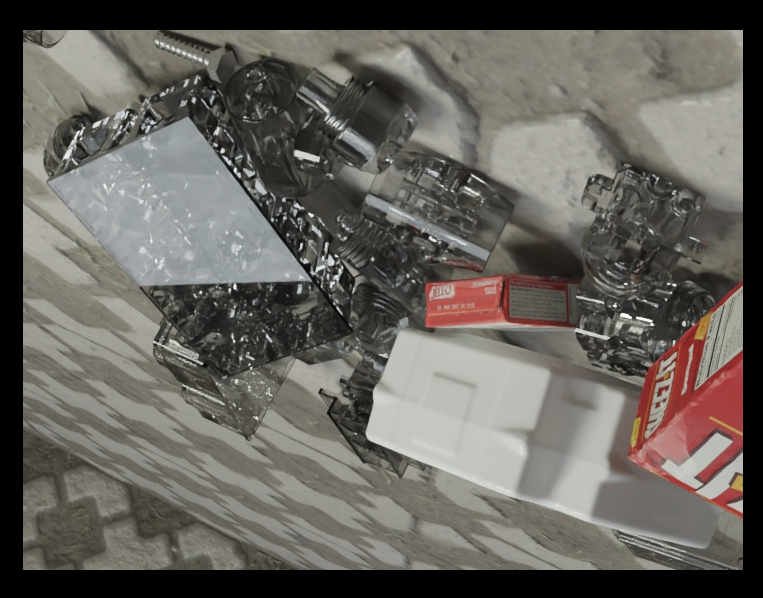
Okay so the answer is a bit more complicated. Rendering glass also requires you to reparameterize the renderer to make more light bounces. So in the RgbRenderer config set:
        "max_bounces": 100,
        "transmission_bounces": 100,
        "transparency_bounces": 100,
        "glossy_bounces": 100,
        "volume_bounces": 100,
If you are starting with the BOP examples, also comment out all other material manipulations. e.g. cf_set_specular, cf_set_roughness, cf_set_base_color. Also comment out this line to avoid setting the vertex color:
After these changes you get this:
MartinSmeyer
on 15 Mar 2021
oh, thank you very much, your reply is very helpful to me!
Xiaflowers
on 24 Mar 2021
Related issues
 soans1994
·
3Comments
soans1994
·
3Comments
 eugval
·
3Comments
eugval
·
3Comments
 manuelli
·
3Comments
manuelli
·
3Comments
 wangg12
·
3Comments
wangg12
·
3Comments
 b-yogesh
·
5Comments
b-yogesh
·
5Comments
Most helpful comment
Okay so the answer is a bit more complicated. Rendering glass also requires you to reparameterize the renderer to make more light bounces. So in the RgbRenderer config set:
If you are starting with the BOP examples, also comment out all other material manipulations. e.g.
cf_set_specular,cf_set_roughness,cf_set_base_color. Also comment out this line to avoid setting the vertex color:https://github.com/DLR-RM/BlenderProc/blob/fe5ea258acb9e3ec11e0d4c6f380321e01c4e751/src/utility/loader/BopLoader.py#L312
After these changes you get this: