Blenderproc: Questions regarding the random room constructor
I am trying to use the random room constructor, and I would like to ask some questions regarding how it works. I've skipped through the documentation and the corresponding parameters:
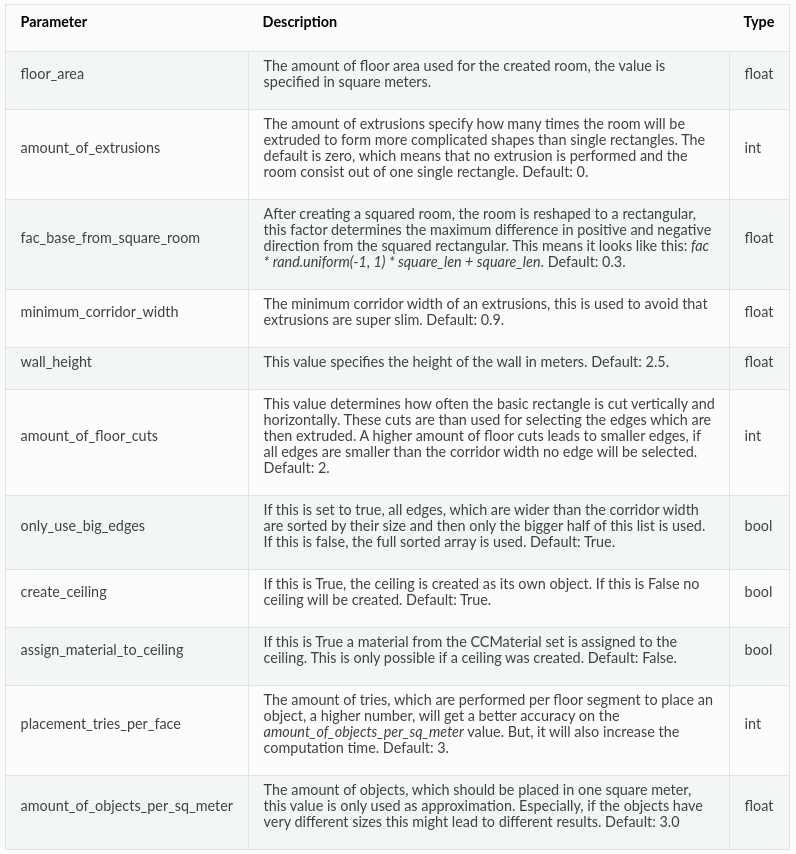
and I have specified the following config file:
{
      "module": "constructor.RandomRoomConstructor",
      "config": {
        "floor_area": 25,
        "wall_height": 2.8,
        "amount_of_extrusions": 0,
        "used_loader_config": [
          {
            "module": "loader.IKEALoader",
            "config": {
              "category": ["bed", "chair", "desk", "bookshelf"]
            },
            "amount_of_repetitions": 1
          },
        ]
      }
    }
- My first question is how the
amount_of_repetitionsvariable works, because from the documentation I understood that you specify the number of objects to be located in the room from the given categories. But in my case with the above config I am getting multiple objects of the same category:
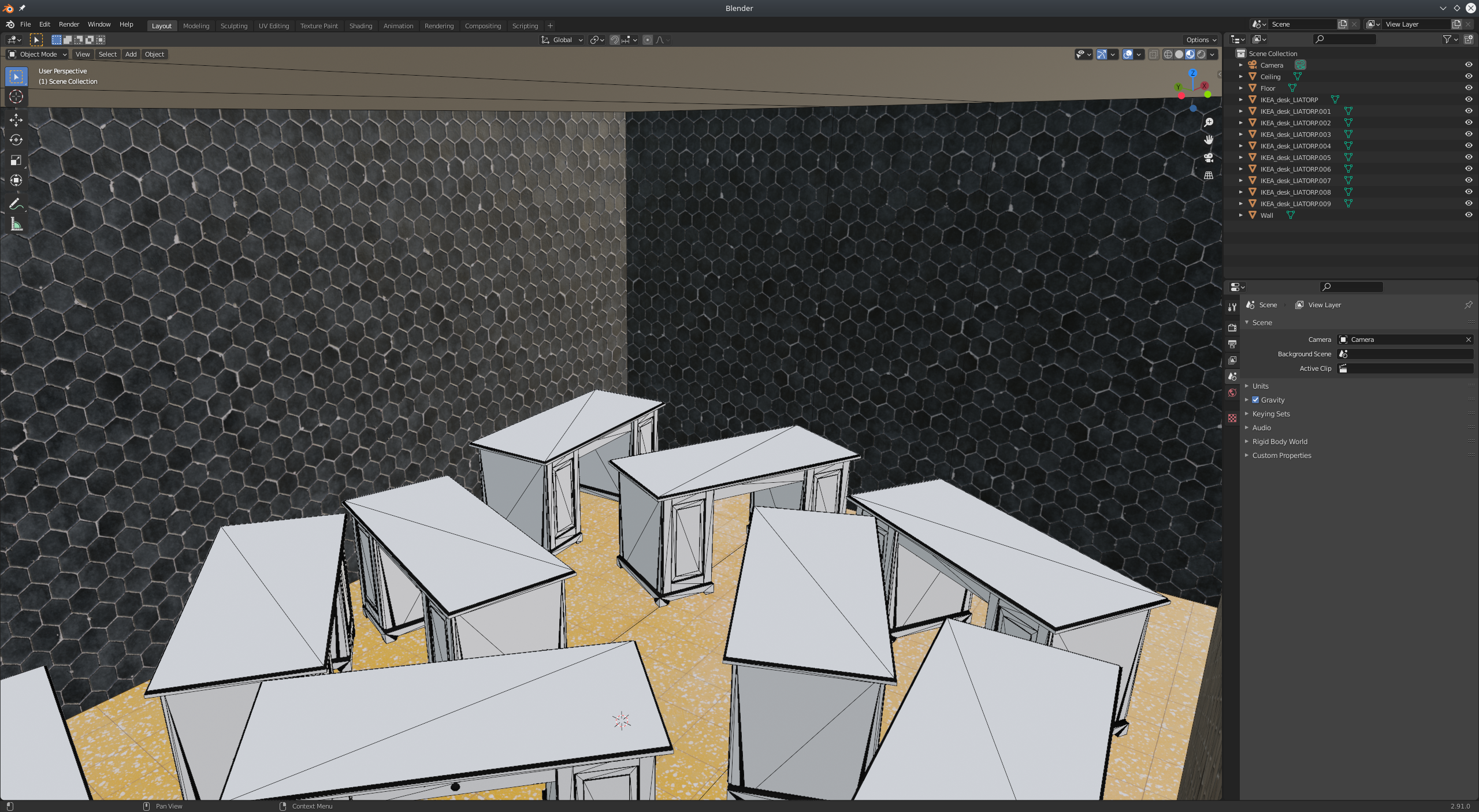
while I would expect to get either one object from each specified category or only one object randomly selected from the given categories or if you have only one category given then one object only from this category.
Is it possible to add an object (from the datasets) as a light source other than the ceiling or create a new object, e.g. a plane at the height of the ceiling and set it to be a light source (possibly with the
BasicMeshInitializer?). If yes, would be possible to provide an example.Is it possible to decimate/subdivide the
wall,floorandceilingobjects to smaller, multiple faces directly through the config file?
Thanks.
 ttsesm
All 11 comments
Regarding question number 3. I've tried to create a function either using ops or bmesh:
def subdivide_objects():
    bpy.ops.object.select_all(action='DESELECT') # Deselect all objects

    for o in ("Wall", "Ceiling", "Floor"):
       obj = bpy.context.scene.objects.get(o)
       bpy.context.view_layer.objects.active = obj
       if obj: obj.select_set(True)

    # Get into edit mode
    bpy.ops.object.mode_set(mode="EDIT")

    # Make sure normals are pointing inwards, since sometimes for these objects are not
    bpy.ops.mesh.select_all(action='SELECT') # select all faces from the selected/active objects
    bpy.ops.mesh.normals_make_consistent(inside=True) # flip normals

    # Subdivide faces
    bpy.ops.mesh.subdivide(number_cuts=8)

    # Return back to object mode
    bpy.ops.object.mode_set(mode="OBJECT")
def subdivide_objects():
        obs = [o for o in bpy.data.objects
            if o.type == 'MESH' and (o.name == "Wall" or o.name == "Ceiling" or o.name == "Floor")]

        for obj in obs:
            me = obj.data
            # New bmesh
            bm = bmesh.new()
            # load the mesh
            bm.from_mesh(me)

            bmesh.ops.subdivide_edges(bm, edges=bm.edges, cuts=8, use_grid_fill=True)

            # Write back to the mesh
            bm.to_mesh(me)
            me.update()
but what I've noticed is that for some part of the plane the subdivision is not happening:
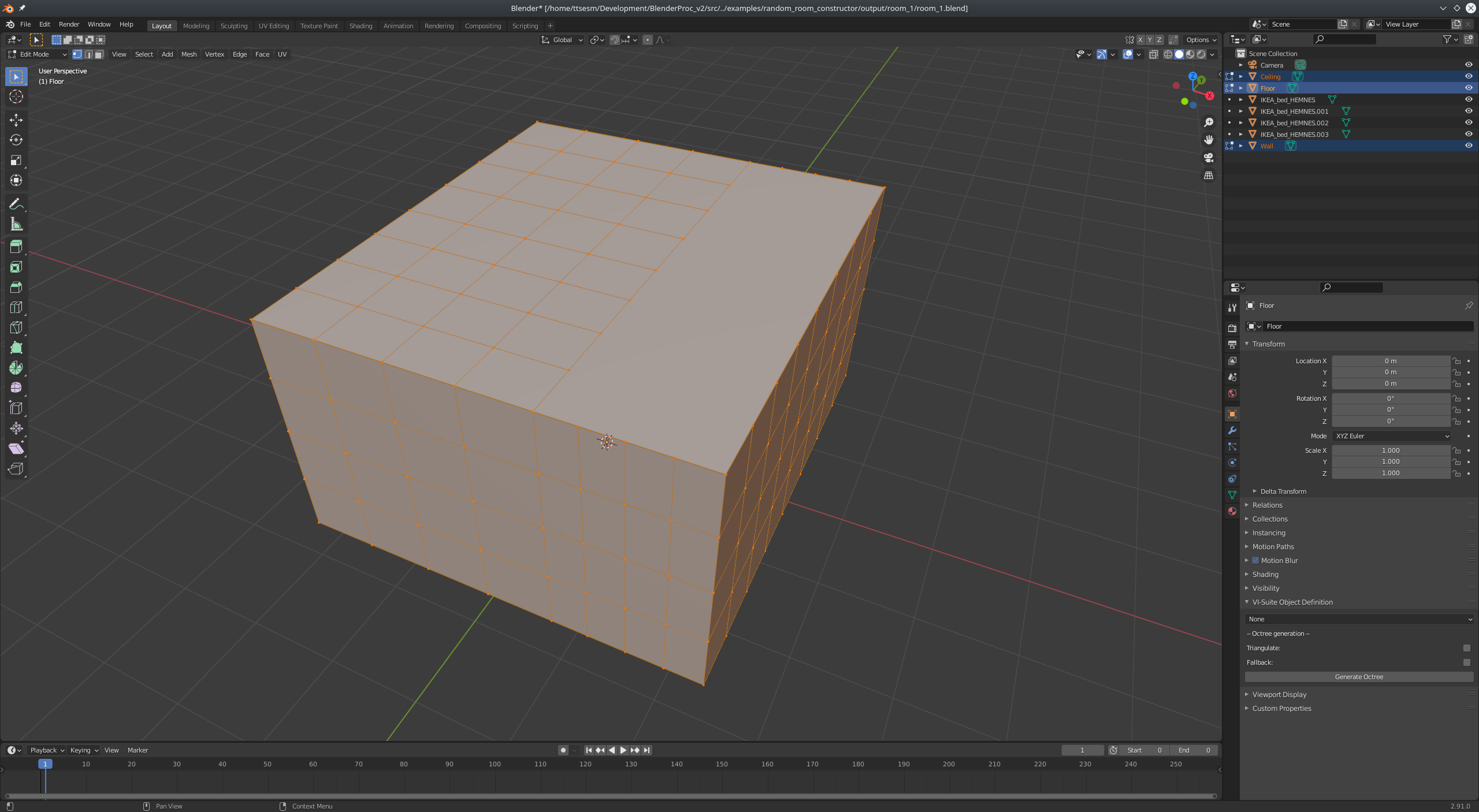

I do not understand why is that happening though.
ttsesm
on 5 Jan 2021
Another issue that I've noticed is that since I want to randomly create multiple rooms for some parameter combinations it fails to successfully create the room. E.g.
{
      "module": "constructor.RandomRoomConstructor",
      "config": {
        "floor_area": 78,
        "wall_height": 2.8,
        "amount_of_extrusions": 1,
        "used_loader_config": [
          {
            "module": "loader.IKEALoader",
            "config": {
              "category": ["bed", "chair", "desk", "bookshelf"]
            },
            "amount_of_repetitions": 1
          },
        ]
      }
    }
or
{
      "module": "constructor.RandomRoomConstructor",
      "config": {
        "floor_area": 69,
        "wall_height": 2.8,
        "amount_of_extrusions": 5,
        "used_loader_config": [
          {
            "module": "loader.IKEALoader",
            "config": {
              "category": ["bed", "chair", "desk", "bookshelf"]
            },
            "amount_of_repetitions": 1
          },
        ]
      }
    }
Both above combinations are giving the following error:
Traceback (most recent call last):
  File "/home/ttsesm/Development/BlenderProc/src/../examples/random_room_constructor/output/room_0/room_0.blend/room_generator.py", line 134, in <module>
  File "/home/ttsesm/Development/BlenderProc/src/../src/main/Pipeline.py", line 104, in run
    module.run()
  File "/home/ttsesm/Development/BlenderProc/src/../src/constructor/RandomRoomConstructor.py", line 527, in run
    self.construct_random_room()
  File "/home/ttsesm/Development/BlenderProc/src/../src/constructor/RandomRoomConstructor.py", line 444, in construct_random_room
    bpy.ops.mesh.separate(type='SELECTED')
  File "/home/ttsesm/Development/BlenderProc/blender/blender-2.91.0-linux64/2.91/scripts/modules/bpy/ops.py", line 132, in __call__
    ret = _op_call(self.idname_py(), None, kw)
RuntimeError: Error: Nothing selected

Error: Python script failed, check the message in the system console
Hey @ttsesm,
regarding your questions:
- You seem to have confused something here.
amount_of_repetitionsis not an option of the RandomRoomConstructor, but instead is a general option available to every module. It simply can be used to repeat the same module multiple times without copying the whole config block. So as you set it1, it has no effect. If you would set it to2it would be equivalent to duplicating the IKEA loader. This would have the effect that two ikea objects from the specified categories were sampled. However this has nothing to do with the number of object instances sampled. You can use the optionamount_of_objects_per_sq_meterto control this number. - Yes this is easily possible (see e.q. one of the bop examples). It should look something like this:
    {
      "module": "constructor.BasicMeshInitializer",
      "config": {
        "meshes_to_add": [
        {
          "type": "plane",
          "name": "light_plane",
          "location": [0, 0, 10],
          "scale": [3, 3, 1]
        }]
      }
    },
    {
      "module": "manipulators.MaterialManipulator",
      "config": {
        "selector": {
          "provider": "getter.Material",
          "conditions": {
            "name": "light_plane_material"
          }
        },
        "cf_switch_to_emission_shader": {
          "color":  [1.0, 1.0, 1.0, 1.0 ],
          "strength": 10
        }
      }
    },
- I tested both of the subdivide functions you provided and they both worked for me. Maybe you can try it out again. Where in the pipeline did you execute the subdivide code exactly?
- Thanks for pointing that out, thats actually a bug caused by rounding errors. We gonna fix this in the next version. For now as a workaround, you can fix that by replacing line 440 in the RandomRoomConstructor with:
if ((e.verts[0].co + e.verts[1].co) * 0.5)[2] >= self.wall_height - 1e-3:
 cornerfarmer
on 7 Jan 2021
cornerfarmer
on 7 Jan 2021
Hi Dominik,
Thanks for the feedback. Please find below my responces:
- I see, but then the
amount_of_repetitionsshould be equivalent to the given categories? I still do not understand how it works. For example I gave the value 4 which is equivalent to the categories that I have but still I only get chairs, while I would expect beds, chairs, desks and bookshelfs. See image below:
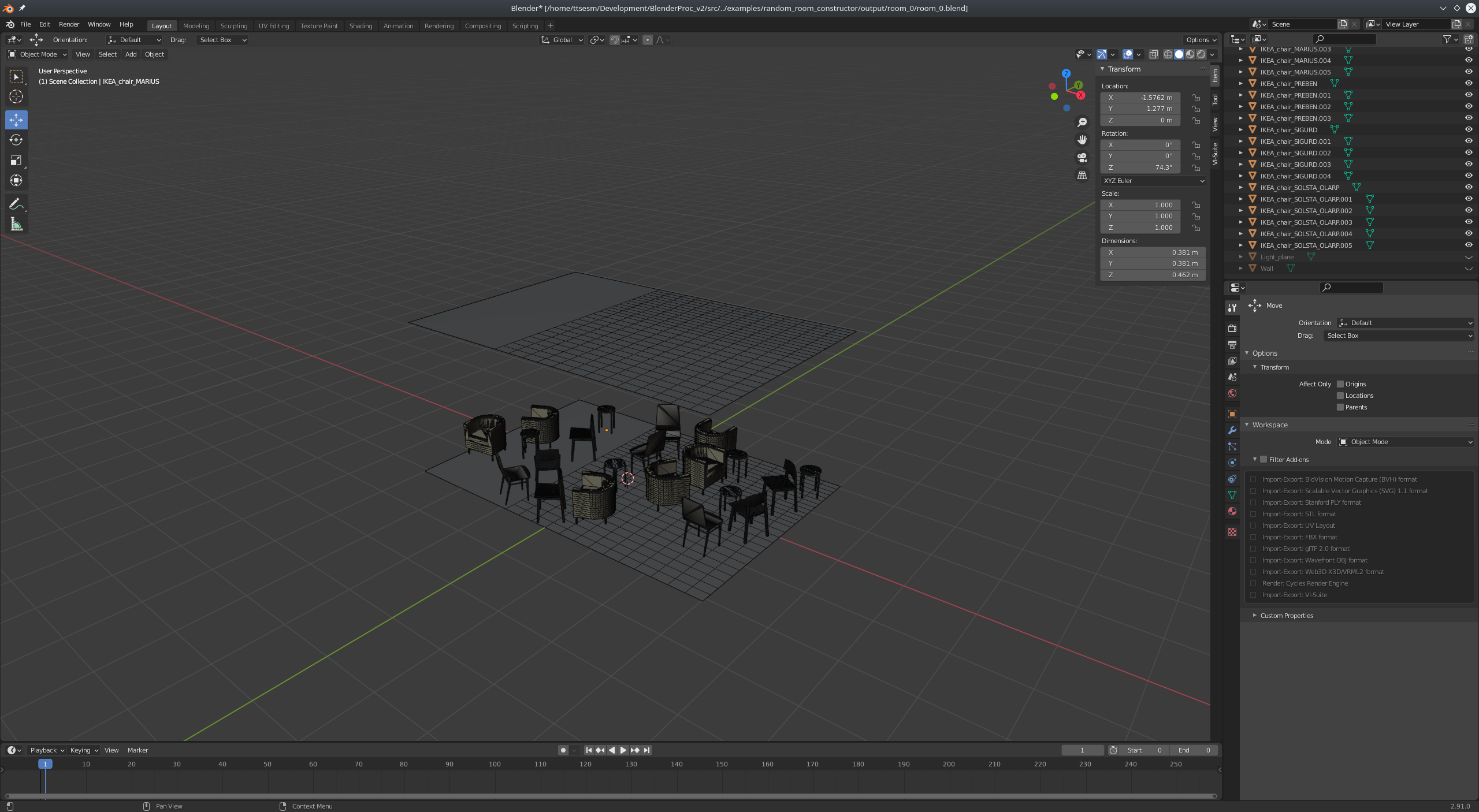
with the following config:
    {
      "module": "constructor.RandomRoomConstructor",
      "config": {
        "floor_area": "<args:1>", #25,
        "wall_height": "<args:2>", #2.8,
        "amount_of_extrusions": "<args:3>", #0,
        "assign_material_to_ceiling": True,
        "placement_tries_per_face": 5,
        "amount_of_objects_per_sq_meter": 1.0,
        "used_loader_config": [
          {
            "module": "loader.IKEALoader",
            "config": {
              "category": ["bed", "chair", "desk", "bookshelf"]
            },
            "amount_of_repetitions": 4
          },
        ]
      }
    }
Also the parameter amount_of_objects_per_sq_meter I would say that is not that perfect since you cannot get less objects than approx. the square meters of the floor. Meaning that if I set the floor area to 25 and set the parameter to 1.0 (as in the above example) then more or less I will get one object per square meter (at least this is also what I see in practice here). Ideally I think it would be better to be able to specify how many objects you want. Anyways, these are some ideas.
- Thanks this worked nicely, also in my case I've set the plane to be emitting light by using the lighting module:
    {
      "module": "lighting.SurfaceLighting",
      "config": {
        "selector": {
          "provider": "getter.Entity",
          "conditions": {
            "name": "Light_plane"
          },
          "emission_strength": 4.0
        }
      }
    }
Ideally it would be nice if someone could specify the number (or give how many light sources wants to have in the room, with size, position, intensity, etc) automatically from the config file based on the extrusions of the room and the square meters but this might be too complicated to be implemented for now.
- That's the point some times it works some other it doesn't and this is for specific parts of the floor/ceiling (and always is in the same place for both, see image below) with the wall it seems to work fine.
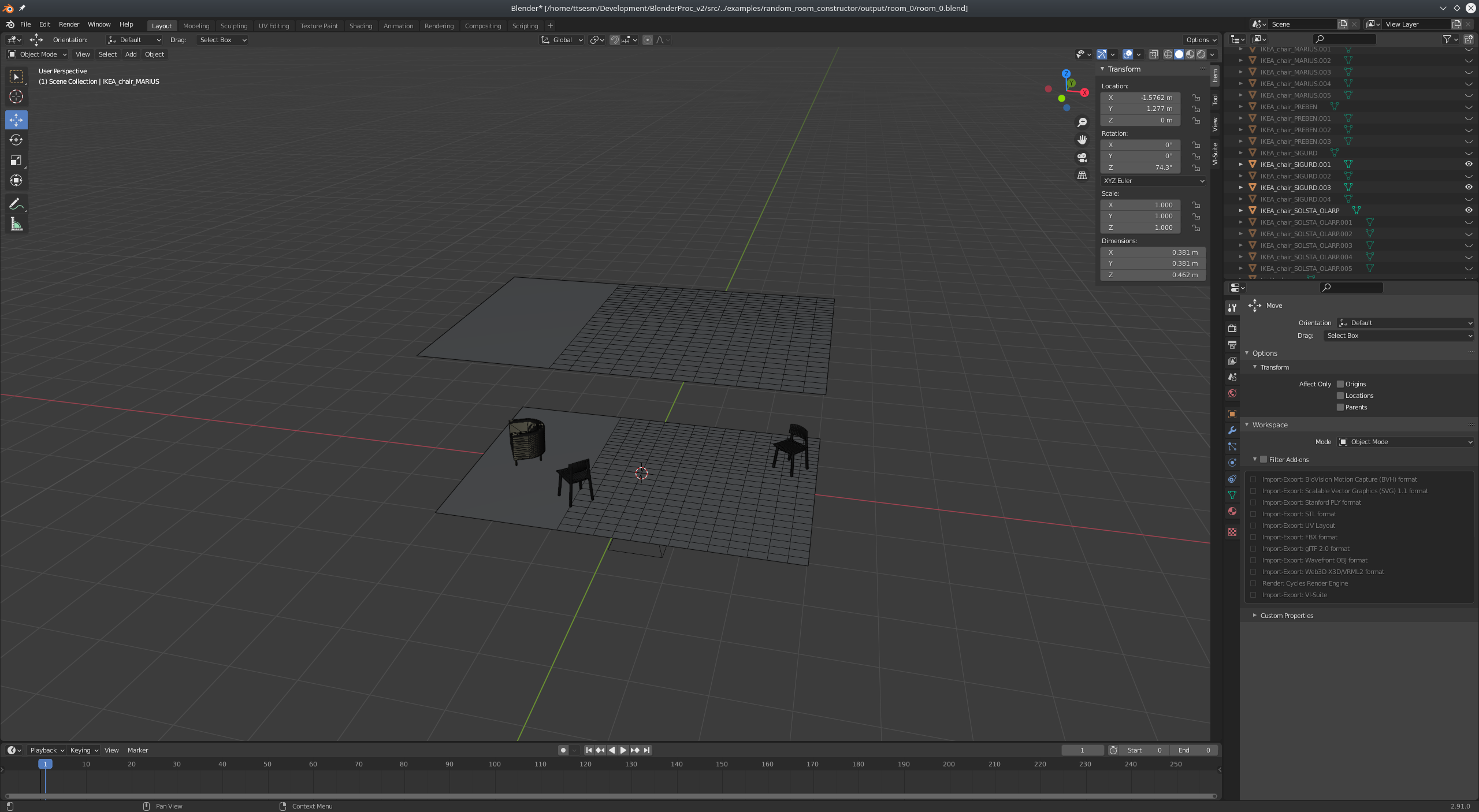
I am using the debug script so I apply the function after the pipeline:
 try:
            # In this debug case the rendering is avoided, everything is executed except the final render step
            # For the RgbRenderer the undo is avoided to have a direct way of rendering in debug
            pipeline = Pipeline(config_path, args, working_dir, temp_dir, avoid_rendering=False)
            pipeline.run()

            subdivide_objects()
finally:
...
...
...
- Thanks
ttsesm
on 8 Jan 2021
Also another question is it possible to set a custom material to ceiling? If I use the "assign_material_to_ceiling": True parameter it gives a texture material to it, if I set it to False it does not give any material but I would like to give it a base material of color white. However, if I check on the material manipulator module you cannot specify the object name but only the material name which apparently I am not aware beforehand:
{
  "module": "manipulators.MaterialManipulator",
  "config": {
    "selector": {
      "provider": "getter.Material",
      "conditions": {
        "name": ".*material.*"
      }
    },
    "cf_set_base_color": [1, 1, 1, 1]
  }
}
Hey,
I have written that particular module and I help you using it. However, there is a lot going on in this one issue.
Let's go through it one by one if I miss something please say so.
I see, but then the
amount_of_repetitionsshould be equivalent to the given categories? I still do not understand how it works.
The amount_of_repetitions just repeats this same module with the same config several times. Each run loads one object of the given categories. In your example you loaded four different IKEA objects, it seems there are 3 chairs and one small table loaded. These are random if you want a bigger variety increase the number of loaded objects. It will always try to place the biggest objects first, but it can happen that objects are not placed because not a suitable position was sampled.
amount_of_objects_per_sq_meterI would say that is not that perfect
Oh, I agree. But I couldn't come with a better solution, before my Christmas holiday began ;) So, if you have a better idea of sampling objects on a plane, I would love to see a PR on it :)
Ideally it would be nice if someone could specify the number (or give how many light sources wants to have in the room, with size, position, intensity, etc) automatically from the config file based on the extrusions of the room and the square meters but this might be too complicated to be implemented for now.
That is quite simple, you could use the functionality we use to check if the camera is above an object, here the object would be the floor.
- That's the point some times it works some other it doesn't and this is for specific parts of the floor/ceiling (and always is in the same place for both, see image below) with the wall it seems to work fine.
As, this is a really complex module. I have tried my best to catch as many corner cases as possible. But if it works 95% of the time I am already happy. If you are scared of failing too much, than you can reduce the amount of extrusions, they cause the most problems :D
I hope this helped.
PS: Please keep in mind that a constructed scene, should be used for a few images. But if you want to create a big amount of images, you have to keep reruning the BlenderProc pipeline.
Max
 themasterlink
on 8 Jan 2021
themasterlink
on 8 Jan 2021
Hey,
I have written that particular module and I help you using it. However, there is a lot going on in this one issue.
Hi Max,
Thank you for your feedback. Yes, I was trying to skip through the code (quick look though since I am on a deadline) and indeed it seems a bit complicated but I am glad that you have it included in the framework, I think it is gonna be useful especially if it gets optimized by the time.
The
amount_of_repetitionsjust repeats this same module with the same config several times. Each run loads one object of the given categories. In your example you loaded four different IKEA objects, it seems there are 3 chairs and one small table loaded. These are random if you want a bigger variety increase the number of loaded objects. It will always try to place the biggest objects first, but it can happen that objects are not placed because not a suitable position was sampled.
Ok, good to know this makes sense as an explanation.
amount_of_objects_per_sq_meterI would say that is not that perfectOh, I agree. But I couldn't come with a better solution, before my Christmas holiday began ;) So, if you have a better idea of sampling objects on a plane, I would love to see a PR on it :)
No worries (I hope you enjoyed your Christmas holidays :-)). Here I would say that you could add an extra parameter where the user could specify in the config how many objects wants in the room independent of the floor area and if the area is not enough you just add as many objects as it is possible. Or use the one you have now where it tries to fit as many objects as the floor area can take. This is actually an interesting project since in principle you could expand it so that the objects are not randomly put in the scene but they try to follow some structural pattern like chairs in front of desks, or the back side of the desk next to the wall etc. but this is really abstract. This actually it could be only by itself a Phd project :p. Anyways I will see if I can find some time to contribute something.
Ideally it would be nice if someone could specify the number (or give how many light sources wants to have in the room, with size, position, intensity, etc) automatically from the config file based on the extrusions of the room and the square meters but this might be too complicated to be implemented for now.
That is quite simple, you could use the functionality we use to check if the camera is above an object, here the object would be the floor.
Can you do that with the config file? If yes can you give an example of randomly putting some light sources. I am not sure whether you got my point correctly. What I am saying is to randomly put some base objects (e.g. cube, plane, sphere) as light sources in the space. Right now you need to specify manually each object (i.e. type, position, size/scale, intensity, etc).
- That's the point some times it works some other it doesn't and this is for specific parts of the floor/ceiling (and always is in the same place for both, see image below) with the wall it seems to work fine.
As, this is a really complex module. I have tried my best to catch as many corner cases as possible. But if it works 95% of the time I am already happy. If you are scared of failing too much, than you can reduce the amount of extrusions, they cause the most problems :D
Actually I am getting this problem with zero extrusions. I think it is related with the initial cuts that you are applying. For example why with zero extrusions there are these two cuts in the floor and ceiling planes before I apply any subdivision:
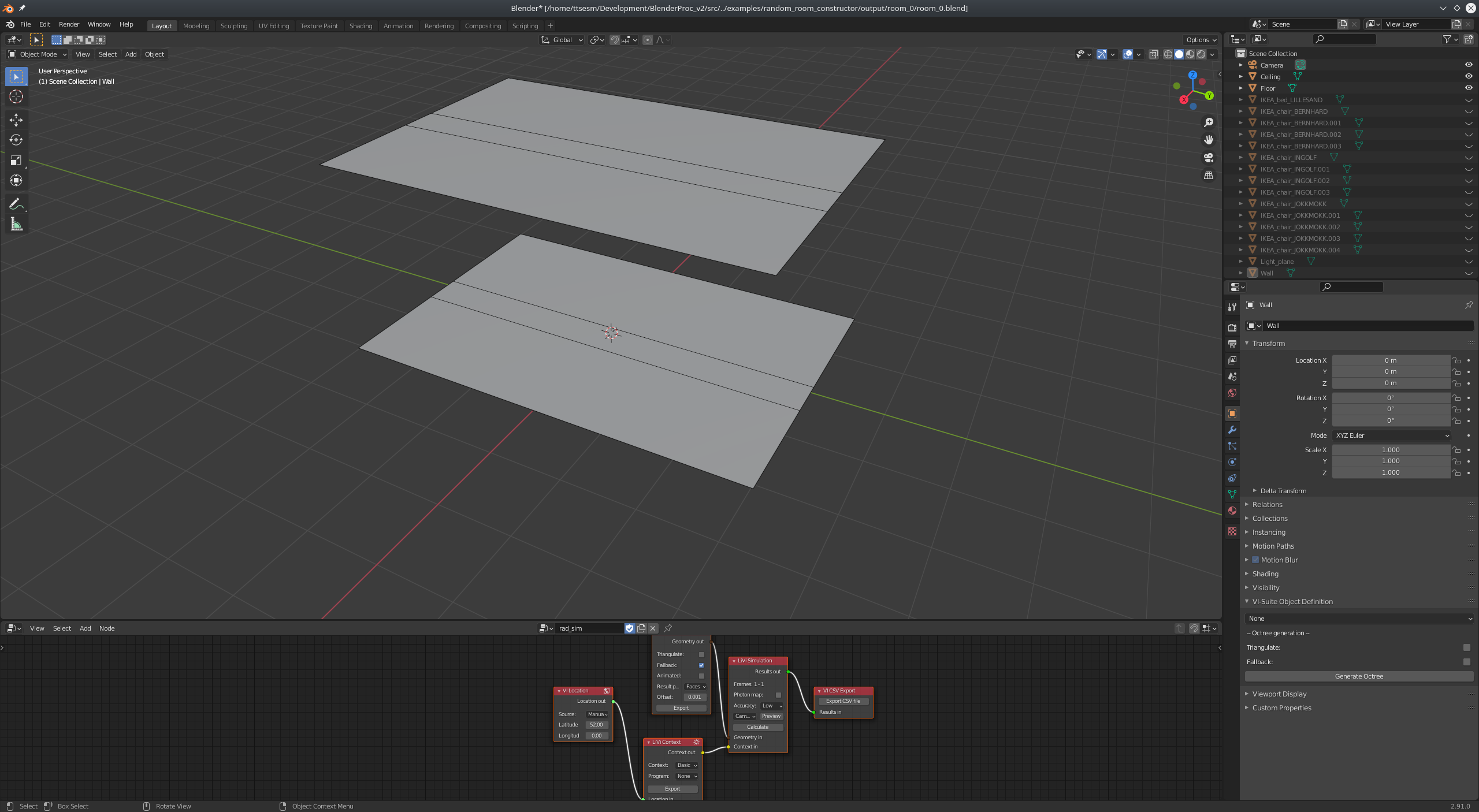
I would expect to have just two uniform planes instead since there are no extrusions. For now, this is for me the most important problem that I need to figure out why is happening and how to solve.
I hope this helped.
PS: Please keep in mind that a constructed scene, should be used for a few images. But if you want to create a big amount of images, you have to keep reruning the BlenderProc pipeline.
I am not actually rendering any images, I am using the constructed rooms to apply lighting simulations based on the Vi-Suite addon, but the BlenderProc framework is quite useful for constructing my rooms ;-).
Also regarding my question about setting the material to the ceiling, is it possible with materialManipulator or not really?
Theo
ttsesm
on 8 Jan 2021
Hey,
This is actually an interesting project since in principle you could expand it so that the objects are not randomly put in the scene but they try to follow some structural pattern like chairs in front of desks, or the back side of the desk next to the wall etc. but this is really abstract. This actually it could be only by itself a Phd project :p. Anyways I will see if I can find some time to contribute something.
We are working on something like this too ;) But that is far from done, let's see how it goes.
What I am saying is to randomly put some base objects (e.g. cube, plane, sphere) as light sources in the space. Right now you need to specify manually each object (i.e. type, position, size/scale, intensity, etc).
Ah, you want random shapes which have an material which emits light. So for placing objects, you could use the UpperRegionSampler on the Floor object. That might be an idea, an then you set a certain height range in which the objects should be sampled.
As, always if you want something really specific, maybe just write your own module. It is not that hard and by doing it you will better learn how our modules work ;)
I would expect to have just two uniform planes instead since there are no extrusions. For now, this is for me the most important problem that I need to figure out why is happening and how to solve.
I would expect that, too ;) But why does this cause problems? Ah, because you don't use them for rendering. I see :D
Just change the amount_of_floor_cuts to zero. That should fix it.
Also regarding my question about setting the material to the ceiling, is it possible with materialManipulator or not really?
In this line the material for the ceiling is set. If you select a different material or create your own beforehand, you can use that. Does this work for you?
PS: Never be afraid of mutilating our modules for your purposes ;)
Best,
Max
themasterlink
on 9 Jan 2021
Closed, because all questions have been answered. If not please open a new issue with a new question :)
themasterlink
on 18 Jan 2021
Closed, because all questions have been answered. If not please open a new issue with a new question :)
Sure Max, no worries. I just wanted to add that the problem with the subdivision is related with the duplicate vertices which someone can get rid off with the bpy.ops.mesh.remove_doubles(threshold = 0.05) operator in edit mode, check on this thread that I have opened in blender stackexchange. So my guess is that when you are applying the cuts you are leaving duplicate vertices which cause this issue, didn't check it thoroughly though.
Moreover, for a more efficient (at least it seems to be) script for creating random extruded rooms you might want to check on this thread that I've opened in blender stackexchange. It might be useful to update the module if you think so.
Thanks.
Best,
Theo
ttsesm
on 18 Jan 2021
Hey Theo,
that seems interesting. As always if you improve a module, we would be delighted if you open a PR and integrate it back into the repo. So that everyone can enjoy it :)
Best,
Max
themasterlink
on 18 Jan 2021
Related issues
 Lotfi-MERAD
·
3Comments
Lotfi-MERAD
·
3Comments
 b-yogesh
·
5Comments
b-yogesh
·
5Comments
 elientumba2019
·
4Comments
elientumba2019
·
4Comments
 albertotono
·
3Comments
albertotono
·
3Comments
 ggaziv
·
3Comments
ggaziv
·
3Comments
Most helpful comment
Hey,
I have written that particular module and I help you using it. However, there is a lot going on in this one issue.
Let's go through it one by one if I miss something please say so.
The
amount_of_repetitionsjust repeats this same module with the same config several times. Each run loads one object of the given categories. In your example you loaded four different IKEA objects, it seems there are 3 chairs and one small table loaded. These are random if you want a bigger variety increase the number of loaded objects. It will always try to place the biggest objects first, but it can happen that objects are not placed because not a suitable position was sampled.Oh, I agree. But I couldn't come with a better solution, before my Christmas holiday began ;) So, if you have a better idea of sampling objects on a plane, I would love to see a PR on it :)
That is quite simple, you could use the functionality we use to check if the camera is above an object, here the object would be the floor.
As, this is a really complex module. I have tried my best to catch as many corner cases as possible. But if it works 95% of the time I am already happy. If you are scared of failing too much, than you can reduce the amount of extrusions, they cause the most problems :D
I hope this helped.
PS: Please keep in mind that a constructed scene, should be used for a few images. But if you want to create a big amount of images, you have to keep reruning the BlenderProc pipeline.
Max