Blenderproc: Strange behavior of BlendLoader
Hi, I want to load a blender object and render it, here is how it looks like in blender shading:

However, when I use blenderproc, the tires are broken:

I can see one tire wrongly place inside the car (near the front window), and don't have idea where are the others. Anyway, it seems that the structure is broken. I think the scene is as simple as the .blend file in coco_annotation since it only contains one collection and few objects.
Can you help me figure out where the problem is? The .blend file and the config are as follows:
# Args: <output_dir> <.blend file>
{
  "version": 3,
  "setup": {
    "blender_install_path": "/home_local/<env:USER>/blender/",
    "pip": [
      "h5py",
      "scikit-image",
      "pypng==0.0.20",
      "scipy==1.2.2"
    ]
  },
  "modules": [
    {
      "module": "main.Initializer",
      "config": {
        "global": {
          "output_dir": "<args:0>",
        }
      }
    },
    {
      "module": "loader.BlendLoader",
      "config": {
        "path": "<args:1>",
        "load_from": "/Object",
      }
    },
    {
      "module": "manipulators.EntityManipulator",
      "config": {
        "selector": {
          "provider": "getter.Entity",
          "conditions": {
            "type": "MESH"  # this guarantees that the object is a mesh, and not for example a camera
          }
        },
        "matrix_world":
            [[1, 0, 0, 0.5],
             [0, 1, 0, 0],
             [0, 0, 1, 0],
             [0, 0, 0, 1]],
        "scale": [1, 1, 1] # Scale 3D model from mm to m
      },
    },
    {
      "module": "lighting.LightLoader",
      "config": {
        "lights": [
          {
            "type": "POINT",
            "location": [14, 10, 10],
            "energy": 100000
          }
        ]
      }
    },
    {
      "module": "camera.CameraLoader",
      "config": {
        "path": "examples/coco_annotations/camera_positions",
        "file_format": "location rotation/value",
        "default_cam_param": {
          "fov": 1
        }
      }
    },
    {
      "module": "renderer.RgbRenderer",
      "config": {
        "samples": 150,
        "transparent_background": True,
        "render_distance": True,
        "image_type": "PNG"
      }
    },
    {
      "module": "writer.BopWriter",
      "config": {
        "append_to_existing_output": True,
        "ignore_dist_thres": 10000,
        "postprocessing_modules": {
          "distance": [
            {"module": "postprocessing.Dist2Depth"}
          ]
        }
      }
    }
  ]
}
Update:
If I remove the "manipulators.EntityManipulator" module, the model structure looks good:

So it means the "manipulators.EntityManipulator" doesn't apply the correct transformation to all objects?
Or, does it apply the transformation in their local coordinates respectively, instead of considering them as a whole group? If so, how can I group the objects together?
 kwea123
All 30 comments
On the other hand, some other files don't have this problem:

kwea123
on 10 Dec 2020
Also, sometimes it yields this error:
ERROR (bke.modifier): /home/sources/buildbot-worker-linux_centos7/linux_291/blender.git/source/blender/blenkernel/intern/modifier.c:409 BKE_modifier_set_error: Source or destination object has a high polygon count, computation might be slow
Don't know if it's just a warning or really an error (skipping mesh?)
kwea123
on 10 Dec 2020
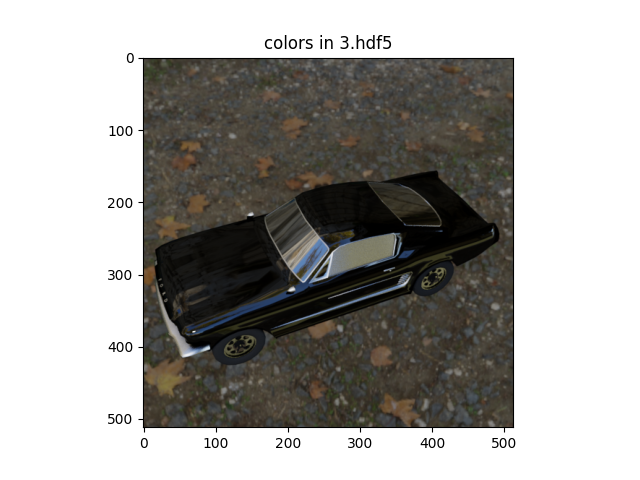
Ah I found out the problem. We already implement a solution to this in the upcoming 1.8.0 version ;)
The problem is that, the objects you load already have a transformation before you transform them again, which then leads to resetting the transformation used before and moving them to the center. Our fix will use the translation on the mesh directly and move the origin to the world origin, then you can apply and kind of transform on top of it.
Resulting in this:
@kwea123 You ran into a lot of problems, sorry about your poor experience so far with BlenderProc. We will continue with trying to abolish as many problems as possible.
 themasterlink
on 10 Dec 2020
themasterlink
on 10 Dec 2020
@themasterlink Hi, thanks a lot! I really appreciate your prompt response! Looking forward to the update :)
In your result, it seems that you successfully integrated the environment map as well (from the reflection of the glass)?
kwea123
on 10 Dec 2020
Ups, spoilered a feature there ;) You will have to wait till we release it we are currently bug hunting. So that you don't have to.
themasterlink
on 10 Dec 2020
You can now use this function apply_transformation_to_objects here to fix that.
That should solve the problem.
themasterlink
on 11 Dec 2020
Thanks for the feature update. Do you mind providing the config file for this image?
Ah I found out the problem. We already implement a solution to this in the upcoming 1.8.0 version ;)
The problem is that, the objects you load already have a transformation before you transform them again, which then leads to resetting the transformation used before and moving them to the center. Our fix will use the translation on the mesh directly and move the origin to the world origin, then you can apply and kind of transform on top of it.
Resulting in this:
@kwea123 You ran into a lot of problems, sorry about your poor experience so far with BlenderProc. We will continue with trying to abolish as many problems as possible.
kwea123
on 14 Dec 2020
It is already included, I just used your file in the haven example:
python run.py examples/haven_dataset/config.yaml resources/haven/models/ArmChair_01/ArmChair_01.blend resources/haven examples/haven_dataset/output
Please use the download script for haven before doing that.
themasterlink
on 14 Dec 2020
If the scene contains "Text" objects, it will yield the following error:
#### Start - Running module BlendLoader ####
Error: Font's can only have scale applied: "Text"
Error: Font's can only have scale applied: "Text"
#### Finished - Running module BlendLoader (took 0.033 seconds) ####
#### Finished - Running blender pipeline (took 0.067 seconds) ####
Traceback (most recent call last):
  File "/home/kwea123/workspace/BlenderProc/src/run.py", line 40, in <module>
    pipeline.run()
  File "./src/main/Pipeline.py", line 86, in run
    module.run()
  File "./src/loader/BlendLoader.py", line 100, in run
    self._set_properties(newly_loaded_objects)
  File "./src/loader/LoaderInterface.py", line 59, in _set_properties
    LoaderInterface.apply_transformation_to_objects(objects)
  File "./src/loader/LoaderInterface.py", line 73, in apply_transformation_to_objects
    bpy.ops.object.transform_apply(location=True, rotation=True, scale=True)
  File "/home/kwea123/blender/blender-2.91.0-linux64/2.91/scripts/modules/bpy/ops.py", line 132, in __call__
    ret = _op_call(self.idname_py(), None, kw)
RuntimeError: Error: Font's can only have scale applied: "Text"
Maybe there is need to distinguish the object type in the following loop:
https://github.com/DLR-RM/BlenderProc/blob/3da3955af833083d488a1bfd251c1c7c0da263a2/src/loader/LoaderInterface.py#L70-L74
like this:
for obj in objects:
            obj.select_set(True)
            bpy.context.view_layer.objects.active = obj
            if obj.type=='FONT':
                bpy.ops.object.transform_apply(location=False, rotation=False, scale=True)
            else:
                bpy.ops.object.transform_apply(location=True, rotation=True, scale=True)
            obj.select_set(False)
Don't know if other types requires other ifs or not.
Another error, when the object contains animation, the structure still breaks after this update. I did some research and found that it is required to remove the animation to keep the good structure: obj.animation_data_clear() after obj.select_set(True).
kwea123
on 15 Dec 2020
That is interesting.
However, we currently do not support animate objects or fonts for that matter. And if we would add support for them we would have to check all existing code, how it would cope with that and not only one single function.
So for now, we will keep the "FONT" type and animation out of the supported features. This might change in the feature.
PS: The obj.animation_data_clear() seems like a good idea, and I would also recommend just removing all "FONT" objects, to avoid further problems.
themasterlink
on 15 Dec 2020
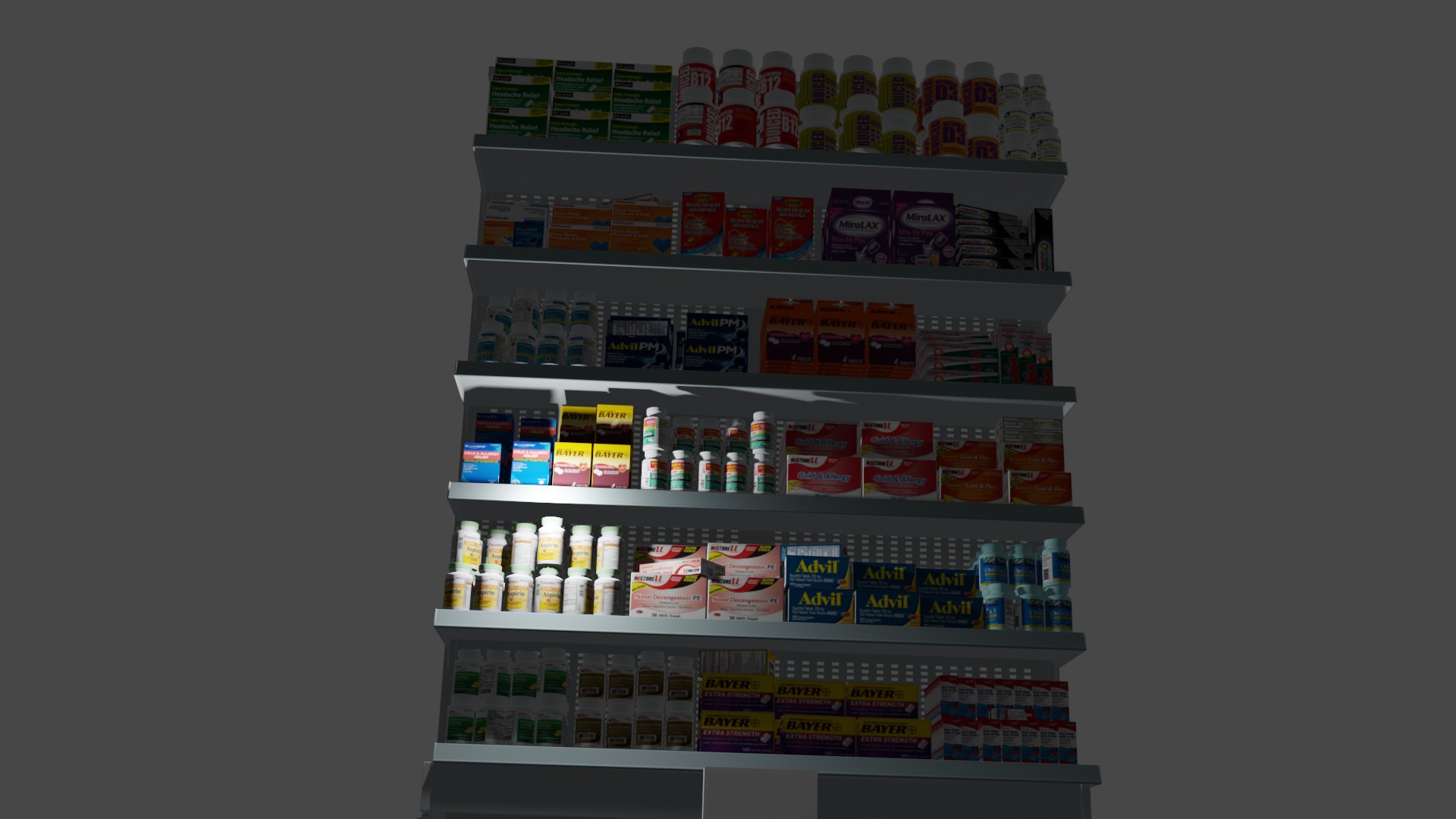
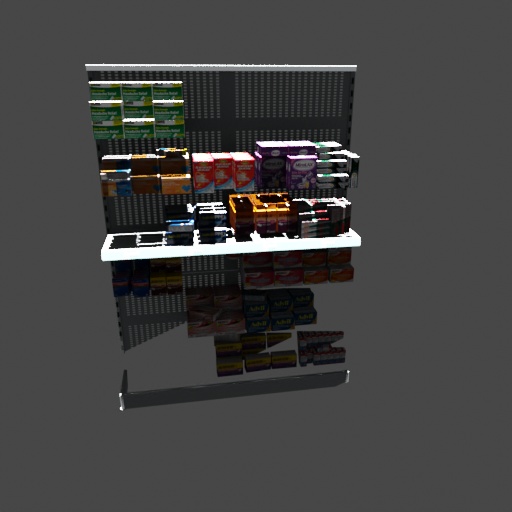
I think I have the same issue with a different blend file but I'm new to this. Do you have an example of how to use apply_transformation_to_objects?
This is the rendering from blender.....
and this is from RgbRenderer....
 colbyduke
on 11 Feb 2021
colbyduke
on 11 Feb 2021
Could you please provide your config you used?
themasterlink
on 11 Feb 2021
# Args: <cam_file> <obj_file> <output_dir>
{
  "version": 3,
  "setup": {
    "blender_install_path": "/Applications",
    "pip": [
      "h5py",
      "scikit-image"
    ]
  },
  "modules": [
    {
      "module": "main.Initializer",
      "config": {
        "global": {
          "output_dir": "<args:2>"
        }
      }
    },
    {
      "module": "loader.BlendLoader",
      "config": {
        "path": "<args:1>",
        "load_from": "/Object",  # load all objects from the scene file
      }
    },
    {
      "module": "manipulators.WorldManipulator",
      "config": {
        "cf_set_world_category_id": 0  # this sets the worlds background category id to 0
      }
    },
    {
      "module": "lighting.LightLoader",
      "config": {
        "lights": [
          {
            "type": "SUN",
            "location": [10,10,50],
            "energy": 500
          }
        ]
      }
    },
    {
      "module": "camera.CameraLoader",
      "config": {
        "intrinsics": {
          "fov": 1,
          "resolution_x": 512,
          "resolution_y": 512,
        }
      }
    },
    {
      "module": "camera.CameraSampler",
      "config": {
        "cam_poses": [
          {
            "number_of_samples": 1,
            "location": {
              "provider":"sampler.Uniform3d",
              "max":[100, 850, 300],
              "min":[100, 850, 300]
            },
            "rotation": {
              "format": "look_at",
              "value": {
                "provider": "getter.POI"
              },
              "inplane_rot": {
                "provider": "sampler.Value",
                "type": "float",
                "min": 0,
                "max": 0
              }
            }
          }
        ]
      }
    },
    {
      "module": "renderer.RgbRenderer",
      "config": {
        "output_key": "colors",
        "image_type": "JPEG"
      }
    },
    {
      "module": "renderer.SegMapRenderer",
      "config": {
        "map_by": ["instance", "class"]
      }
    },
    {
      "module": "writer.CocoAnnotationsWriter",
      "config": {
      }
    }
  ]
}
https://dlr-rm.github.io/BlenderProc/src.loader.LoaderInterface.html
There you can see that you need to add the custom function in the loader:
    {
      "module": "loader.BlendLoader",
      "config": {
        "path": "<args:1>",
        "load_from": "/Object",  # load all objects from the scene file
        "cf_apply_transformation": True,
      }
    },
Does this help?
themasterlink
on 11 Feb 2021
Nope, I get the same thing with that.
colbyduke
on 11 Feb 2021
Could you upload the .blend file then I can have a look.
themasterlink
on 11 Feb 2021
sample.blend.zip
Here ya go... Thanks!
colbyduke
on 11 Feb 2021
I can confirm, there is something weird, going on. I think it has something to do with how you all your elements are saved in your file. I already tried removing the parents structure and convert everything to a mesh, but that didn't help much. I keep you posted.
themasterlink
on 11 Feb 2021
@themasterlink and @colbyduke: I experience the same issue with my blend file when having a parent-structure in the model.
I could "solve" it by joining the parents/childs to one object. However, it would be necessary to keep them as single objects in order to manipulte them independently.
I appreciate your help and attached the blend file that did not work properly
 CreateInsaneStuff
on 14 Feb 2021
CreateInsaneStuff
on 14 Feb 2021
Hey,
Thanks for the example! We are currently investigating on how to improve the loading of .blend files and we are rewriting the BlenderLoader for that. I hope that we can provide a better solution soon.
Best,
Max
themasterlink
on 15 Feb 2021
sample.blend.zip
Thank you so much for your help. Somebody that knows way more about blender than I do worked it over and got it to work properly. It sounds like you have it handled but in case it helps, here's the file I'm using now that is working.
Thanks again....
colbyduke
on 16 Feb 2021
Great, thanks. But, we already rewrote the BlendLoader, we will change everything accordingly and test it and then make a new release, this might take a few days.
themasterlink
on 16 Feb 2021
@themasterlink while helping out colbyduke on his blender issue I was reviewing the high memory usage with that shelf scene. and tracked it back to the use of bpy.ops.wm.append when adding it to the blenderproc scene. is there any reason not to use bpy.ops.wm.link as apposed to append. link doesn't make hard copies so the textures are loaded only once and not for each instance.
 strut79
on 19 Feb 2021
strut79
on 19 Feb 2021
Hey,
using bpy.ops.wm.link avoids reloading, but it also makes it impossible to change the objects, which is sadly not that great.
For us this was more important, than speed during the loading.
But, if you don't plan on changing them you can just change these few lines. Be aware that we redesigned this already and will publish a new version soonish.
Best,
Max
themasterlink
on 19 Feb 2021
Ah that makes sense. yeah I haven't tried manipulating textures and such yet. but I can see that may cause issues.
we are awaiting your updates to this loader in hopes not to have to recreate scenes for them to load in future.
strut79
on 19 Feb 2021
@themasterlink This is a little off topic but I have a quick question. Is it possible to use the CameraSampler with the HavenEnvironmentLoader so that I get a different background on each image?
Thanks
colbyduke
on 22 Feb 2021
Is it possible to use the CameraSampler with the HavenEnvironmentLoader so that I get a different background on each image?
Right now the background image is not key frame able. That is what you mean. Usually, if you want to change the scene, you just restart BlenderProc. So you load one scene (that one is static), then you take a few images of it (3-20) depending on how big it is and then you restart BlenderProc and create a new scene and you do that over and over and over until you have enough images. :) Does this help you?
themasterlink
on 22 Feb 2021
Yes. Thanks.
colbyduke
on 22 Feb 2021
We have release 1.10.0, which change the BlendLoader completely now it should be possible to use it in your scenes.
If not open a new issue with a detailed explanation of what is wrong.
themasterlink
on 24 Feb 2021
@themasterlink just wanted to comment the new loader is working amazing. so much faster now thank you for you work on this.
strut79
on 24 Feb 2021
Related issues
 soans1994
·
5Comments
soans1994
·
5Comments
 hummat
·
5Comments
hummat
·
5Comments
 manuelli
·
3Comments
manuelli
·
3Comments
 albertotono
·
3Comments
albertotono
·
3Comments
 ttsesm
·
3Comments
ttsesm
·
3Comments
Most helpful comment
@themasterlink just wanted to comment the new loader is working amazing. so much faster now thank you for you work on this.