Blazorise: Nested layouts generate multiple <main> tags
When using a nested Layout you will get multiple main elements. Which is not html complaint:
https://www.w3schools.com/TAgs/tag_main.asp
Note: There must not be more than one
<main>element in a document. The<main>element must NOT be a descendant of an<article>,<aside>,<footer>,<header>, or<nav>element.
So maybe the LayoutContent should get a IsMain parameter
 njannink
All 12 comments
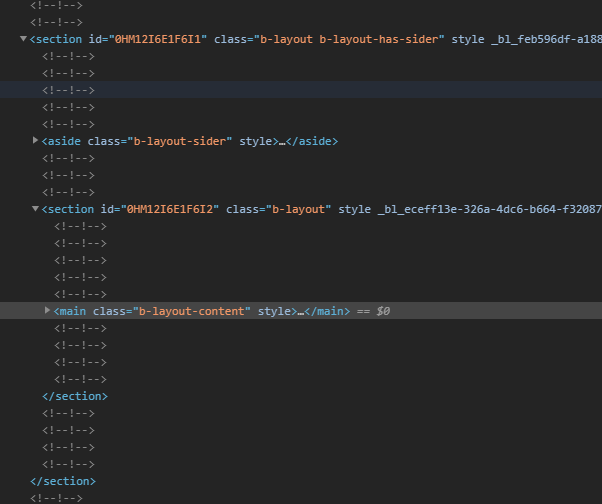
I also wonder if the <section> elements are semantically correct:
njannink
on 7 Jul 2020
The structure of this has been heavily borrowed from Ant Design, who use the same HTML tags (as seen here in the browsers dev tools).
You should only ever be using one LayoutCotnent.
The main container Layout tags are meant to be used for grouping. They are like building blocks to provide you with a variety of different app layout configurations, they aren't intended to be used outside the scope of a MainLayout page.
 MitchellNZ
on 7 Jul 2020
MitchellNZ
on 7 Jul 2020
ok we should make that clean in the documentation or somehow otherwise check. I had to strip everything down to the most basic to get scrolling working correctly. The scrollbar was on an inner div instead of on the document body.
njannink
on 7 Jul 2020
Could you please show an example of how you were trying to use it?
Or what you were wanting it to achieve?
The scrollbar was on an inner div instead of on the document body.
This is by design for LayoutContent, in order to have complicated combinations of fixed headers/footers/sidebar.
It is quite common (for example, Azure DevOps does similar), another reason why Layout components are important to only be used for main layout setup :)
ok we should make that clear in the documentation
This is a good idea, I will make sure this is clear!
MitchellNZ
on 7 Jul 2020
The code that was giving me issues more or less came down to this:
<Layout>
    <Layout Sider="true">
        <LayoutSider>
            <LayoutSiderContent>...</LayoutSiderContent>
        </LayoutSider>
        <Layout>
            <LayoutContent>
                @Body
            </LayoutContent>
        </Layout>
    </Layout>
</Layout>

@Body is
<Layout>
    <LayoutHeader Fixed="true">...</LayoutHeader>
    <LayoutContent>...</LayoutContent>
</Layout>
This resolved my inner scrollbars and sizing issues.
<div class="b-layout b-layout-has-sider">
    <LayoutSider>
        <LayoutSiderContent>...</LayoutSiderContent>
    </LayoutSider>
    <main class="w-100 b-layout">
        @Body
    </main>
</div>

@Body is
<Layout>
    <LayoutHeader Fixed="true">....</LayoutHeader>
    <div class="d-flex">....</div>
</Layout
Also this javascript code works fine now and that didnt work with the initial setup, because of the inner scrollbars
scrollToEnd() {
    window.scrollTo(0, document.body.scrollHeight);
 }
All the Layout elements are translated into divs, mains and sections so I really couldnt make it work. This generates a much simpler semantically correct html tree
njannink
on 8 Jul 2020
Looking at your comments it makes sense to not use the layout components outside the MainLayout page. Tomorrow I will give it another look to improve my code. But the html sections generated by the layout components don't really make sense to me tbh.
By looks of it those are more semantically intended for organizing you main content:
- https://www.w3schools.com/html/html5_semantic_elements.asp
- https://developer.mozilla.org/en-US/docs/Web/HTML/Element/section
Do not use the
<section>element as a generic container; this is what<div>is for, especially when the sectioning is only for styling purposes. A rule of thumb is that a section should logically appear in the outline of a document.
njannink
on 8 Jul 2020
Oh I see. As mentioned, I will make the documentation clearer on this usage!
Also, the Layout component should only be used inside the other Layout components (not inside the LayoutContent like you have).
As for your example, I have modified it a bit to achieve what I think you're after:
<Layout Sider="true">
    <LayoutSider>
        <LayoutSiderContent>...</LayoutSiderContent>
    </LayoutSider>
    <Layout>
    <LayoutHeader Fixed="true">....</LayoutHeader>
        <LayoutContent>
            @Body
        </LayoutContent>
    </Layout>
</Layout>

@Body - moved LayoutHeader, has no reference to layouts
As mentioned in #1038, if you are after a more complicated page layout with the LayoutHeader to appear above the sidebar, use this (only works in latest MyGet preview release 0.9.2-preview2):
<Layout>
    <LayoutHeader Fixed="true">
        <Bar>...</Bar>
    </LayoutHeader>
    <Layout Sider="true">
        <LayoutSider>
            <LayoutSiderContent>
                <Bar Mode="BarMode.VerticalInline">...</Bar>
            </LayoutSiderContent>
        </LayoutSider>
        <Layout>
            <LayoutContent>
                @Body
            </LayoutContent>
        </Layout>
    </Layout>
</Layout>
As for the section vs div, I am impartial to this. As mentioned, it was modeled off Ant Design to influence this decision.
But I am happy to change it if we think it will affect things!
@stsrki thoughts on changing this?
MitchellNZ
on 8 Jul 2020
I'm fine with going with div for outer elements and only add section and main where they belong. As long as it's just semantic and will not break anything.
@MitchellNZ I think you already added something in the last PR to detect if the Layout is the root container. You can go with similar approach on this. On as side note, #1101 would be great for this, but that is something for future work.
 stsrki
on 8 Jul 2020
stsrki
on 8 Jul 2020
@MitchellNZ our header is different per page. Not only the text, but like the whole thing. And eg the homepage has no header at all. But I will solve this without making use of the Layout components and only use the layout stuff on the MainLayout component
njannink
on 8 Jul 2020
After I moved out the Layout component out of the @Body part I got it working correctly using the following layout setup. Also scrolling is working fine:
<Layout Sider="true">
    <LayoutSider>
        <LayoutSiderContent>...</LayoutSiderContent>
    </LayoutSider>
    <LayoutContent>@Body</LayoutContent>
</Layout>
@njannink Great to hear!
our header is different per page. Not only the text, but like the whole thing.
Ohh I see! I plan to create a component in Blazorise that will allow this to be easier in the future.
Again, modeled off the Affix Ant Design component.
I use it in other projects to do exactly what you are describing (customizable, fixed header thats different for each page).
MitchellNZ
on 8 Jul 2020
Related issues
 sroy2020
·
5Comments
njannink
·
4Comments
sroy2020
·
5Comments
njannink
·
4Comments
 tarafdarmansour
·
3Comments
tarafdarmansour
·
3Comments
 brettwinters
·
4Comments
brettwinters
·
4Comments
 danielheddelin
·
5Comments
danielheddelin
·
5Comments
Most helpful comment
@njannink Great to hear!
Ohh I see! I plan to create a component in Blazorise that will allow this to be easier in the future.
Again, modeled off the
AffixAnt Design component.I use it in other projects to do exactly what you are describing (customizable, fixed header thats different for each page).