Blazorise: Validations.ClearAll() Fails to clear validations for second field
Hello
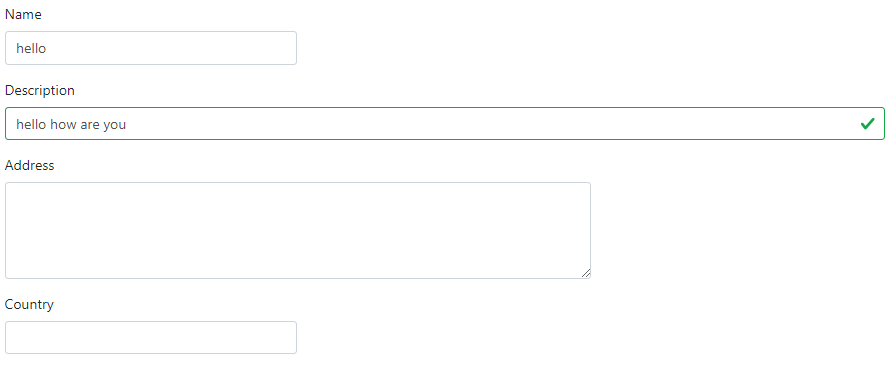
I also encountered this issue also #186 (I have another issue where the validation handler ValidatorEventArgs e.Value seems to use the wrong (ie previous model value when navigating to a new record) value to validate which I will raise separately - but I think it's related)
<Validations @ref="validations" @ref:suppressField Mode="ValidationMode.Manual">
    <Validation Validator="ValidateName">
        <Field>
            <FieldLabel>Name</FieldLabel>
                <TextEdit Text="@Organisation.Name">
                    <ValidationError></ValidationError>
                </TextEdit>
        </Field>
    </Validation>

    <Validation Validator="ValidateDescription">
        <Field>
            <FieldLabel>Description</FieldLabel>
                <TextEdit Text="@Organisation.Description">
                    <ValidationError></ValidationError>
                 </TextEdit>
        </Field>
    </Validation>

    <Validation Validator="ValidateAddress">
         <Field>
             <FieldLabel>Address</FieldLabel>
            <MemoEdit Class="col-sm-12 col-md-10 col-lg-8" Rows="4" MaxLength="100">
                <ValidationError></ValidationError>
            </MemoEdit>
         </Field>
    </Validation>
</Validations>

@code {
    protected override void OnParametersSet()
    {
        Logger.LogDebug("OnParametersSet, validations.ClearAll()");
        validations?.ClearAll();
    }

   //repeated for others
    void ValidateName(ValidatorEventArgs e){
        e.Status = ValidationStatus.Success;
    }

    void Save(){
        validations.ValidateAll();
        //save here
        //don't call validations.ClearAll();
    }


}
How to repeat issue:
(1) Save() and don't validations.ClearAll()
(2) Navigate to the same page (with different parameters - so OnParametersSet() is called (verified / also that validations != null) and try to `validations?.ClearAll();
Result : the second (2) (not sure why the second) field continues to show the validation
 brettwinters
All 4 comments
I cannot reproduce the error. Can you please provide me with the full _non-working_ code example?
Also there are some guidelines you need to follow as I see it from your current example. Validation messages should be inside of Feedback as stated in the documentation.
<Validation Validator="@ValidationRule.IsNotEmpty">
    <TextEdit Placeholder="First and last name">
        <Feedback>
            <ValidationError>Enter full name!</ValidationError>
        </Feedback>
    </TextEdit>
</Validation>
PS.
Not directly related to your problem but you can use ColumnSize on Field instead of Class on MemoEdit. I know it's tempting to use class names directly but I generally not recommend it. Just a friendly advice.
 stsrki
on 3 Sep 2019
stsrki
on 3 Sep 2019
Attached an example:
ProductEdit.txt
(changed ext to "txt" because github won't allow .razor files)
Steps to reproduce
(1) Navigate to "/product/one"
(2) fill in fields, leaving one or more empty
(3) Press "validate" button
(4) Note validation error messages
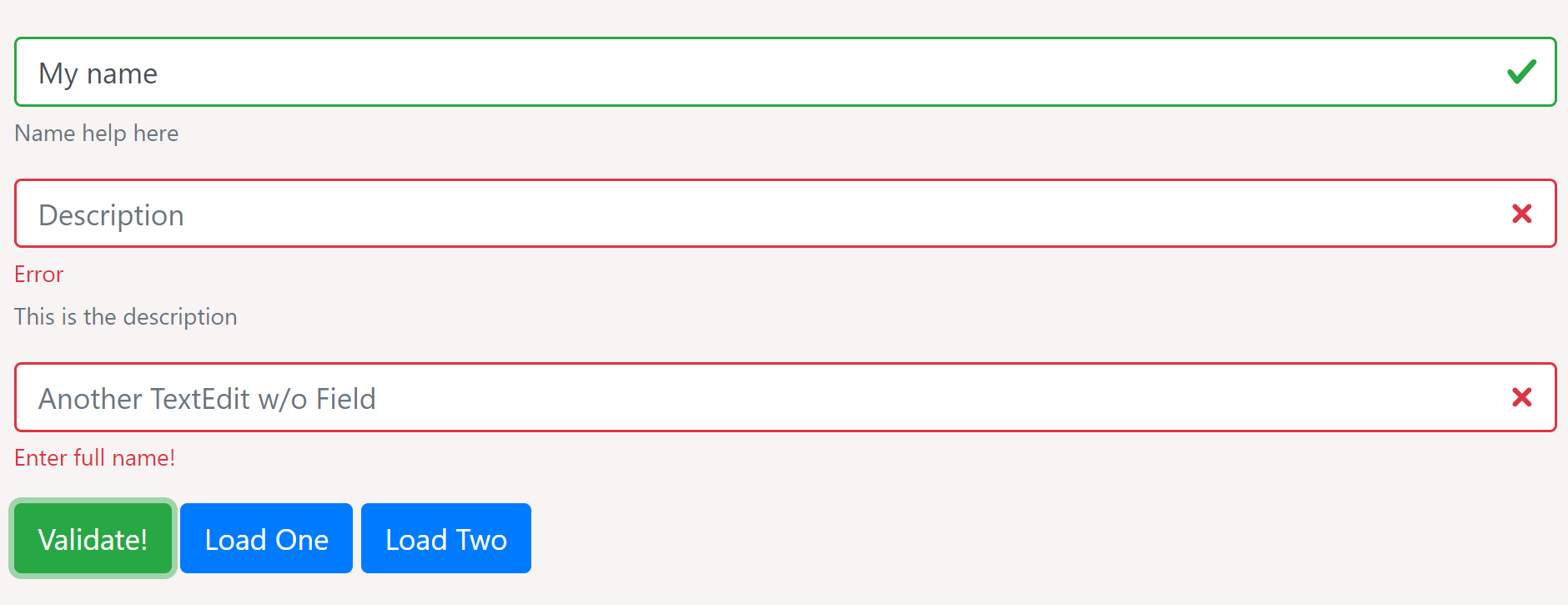
(5) Navigate to another record by pressing say "Load Two"
(6) Note Console output showing that OnParamatersSet() is called with new parameter and that validations.ClearAll() is called

(7) But note that classes still present on previously un-validated fields

although I note that the <div class="invalid-feedback">
Enter full name!</div> is removed, but the is-invalid class is still there on the input)

Noted your comment about Feedback - sorry must have missed that. What does the feedback do (seems to work the same w and w/o it)
brettwinters
on 4 Sep 2019
I will later try to reproduce error based on your example.
Regarding the Feedback element. It's used as a placeholder for error message(s) when building the html structure. You're using bootstrap so it's just a matter of coincidence that it's working for you. Other css like Bulma have different html structure for input fields so that's why the Feedback is important. To have a placeholder for error messages.
stsrki
on 4 Sep 2019
Fixed! It will be in released in 0.8.5
stsrki
on 9 Sep 2019
Related issues
 satwo
·
5Comments
satwo
·
5Comments
 tamunaKap
·
6Comments
tamunaKap
·
6Comments
 hybrid2102
·
3Comments
stsrki
·
3Comments
hybrid2102
·
3Comments
stsrki
·
3Comments
 Andy74
·
4Comments
Andy74
·
4Comments