Bisq: Memory Leak - Ubuntu 18.04 LTS
For the last couple of months Bisq has become unusable. Upon load, memory consumption increases until it hits 100% (32GB!) of RAM and the application crashes. This is true for all versions from 0.9.8 to 1.1.5.
I have tried installing Oracle Java 8 and 12, as well as using OpenJDK 8 and 11 but none of these have any effect. Have also tried removing the Bisq directory and starting afresh but with no joy.
Things were working well previously so assuming maybe an OS package update somewhere.
Strange issue. Any help appreciated.
OS: Using Ubuntu 18.04 LTS
RAM: 32GB
-- BVS
 bettyvschmartz
All 17 comments
I have no idea what may be causing this but is this an old wallet? If so it may be worth it moving into a new directory with a new fresh wallet.
I have an old laptop with 8GB RAM and old Intel CPU and both my local Bitcoin node and Bisq running don't go over 2GB.
 huey735
on 23 Aug 2019
huey735
on 23 Aug 2019
can you please create a memory dump? https://www.baeldung.com/java-heap-dump-capture
 christophsturm
on 23 Aug 2019
christophsturm
on 23 Aug 2019
No problem. I am using VisualVM; what specifically would you like from the memory dump as aware this could contain sensitive information or private keys?
--- BVS
bettyvschmartz
on 27 Aug 2019
You could just create a memory snapshot with visualvm and take a screenshot of it
christophsturm
on 27 Aug 2019
What is strange @christophsturm is that the Bisq process only consumes just over 1GB but the system memory whilst running is fully consumed. As soon as Bisq is closed the RAM usage return to normal or Bisq exits firstly (probably out of memory error). See below:
_Total Memory Usage_
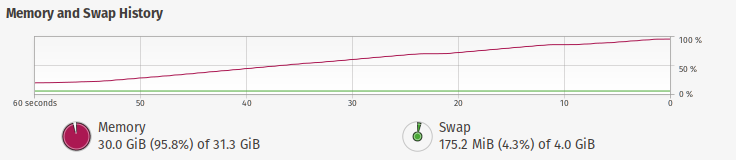
_Bisq Memory Usage_

_VisualVM:_

No other processes are using any significant amount of memory.
-- BVS
bettyvschmartz
on 27 Aug 2019
It looks like it is something relating to the local environment as have just installed on another machine with same OS and updates, and RAM usage is bound at just over 5GBs. Still quite a lot with only Bisq running but is working fine.
Any ideas? I have moved and recreated the Bisq directory .local/share/Bisq and that had no positive effect. Do I need to purge and reinstall? Will backing up the Bisq directory maintain trade history and keys?
-- BVS
bettyvschmartz
on 27 Aug 2019
Will backing up the Bisq directory maintain trade history and keys?
Yes
(5GB RAM for Bisq is indeed quite a lot. It's 2.4GB on my Debian (which seems already a bit more than usually)).
 ghost
on 28 Aug 2019
ghost
on 28 Aug 2019
What is strange @christophsturm is that the Bisq process only consumes just over 1GB but the system memory whilst running is fully consumed. As soon as Bisq is closed the RAM usage return to normal or Bisq exits firstly (probably out of memory error). See below:
On my Ubuntu 18.04 machine, setting
_JAVA_OPTIONS="-Xmx512m"fixed a similar problem.
 peterzen
on 16 Sep 2019
peterzen
on 16 Sep 2019
@sapientsaxonsaboo you say that the Bisq application itself does not 1GB, which part of your system does consume the other 29GB?
you can use a tool like top or htop in your terminal if the system monitor of ubuntu does not give up the information easily...
 freimair
on 19 Sep 2019
freimair
on 19 Sep 2019
I am having the same issue after upgrading to Debian Sid (from Buster).
The workaround for me is to minimize bisq's window and wait until is fully loaded, then it is usable. Otherwise the whole system goes completely unresponsive.
Here you can see an example on how memory behaves: vmstat 5
procs -----------memory---------- ---swap-- -----io---- -system-- ------cpu-----
 r  b   swpd   free   buff  cache   si   so    bi    bo   in   cs us sy id wa st
 1  0 582984 3922044  86160 5441084    0    0     0   103 19253 7073  5  4 92  0  0
 0  0 582984 3969140  86176 5441132    0    0     0    69 1835 7434  5  3 93  0  0
 0  0 582976 9409452  86216 1467232    2    0   483   136 14122 7458  6  4 90  0  0
 0  0 582976 9404516  86224 1467012    1    0     1    80  463 1254  1  1 99  0  0
 0  0 582976 9407848  86232 1467060    0    0     0   103  461 1403  1  0 99  0  0
 8  0 582976 9043000  86368 1405120    0    0    80    46 3595 12017 26  2 72  0  0
 2  0 582976 8193360  86456 1570360    0    0     2 10068 60387 80821 52  8 39  0  0
 5  4 1419752 3958332  79168 3890740    0 167355     0 179066 1142299 167480  6 31 54  9  0
13  0 2169440 1148488  73592 5800880    0 149939   104 149944 1028659 125403 16 33 45  7  0
 3  6 3548608 802024  11004 7048672    0 275832    82 275919 1194017 347633  5 40 42 13  0
14 28 5129344 496640    428 7070680    0 316146 12378 316174 590911 408050  2 30 17 50  0
 1 21 6154044 415248   2284 6356500   22 205298 13458 205313 140615 481873  1 37 11 50  0
 5  0 6147388 701004   6840 6624784  328    0 12242    92 110070 44160 23 13 31 33  0
11  2 6998836 365780   6880 7445344   56 170467  1295 170694 639431 145056  9 32 45 14  0
 3 20 8310704 322716    600 7152348  457 263962 15978 263998 404127 383996  3 31 12 54  0
 4 13 8310692 173084    188 8525572  328  847 168054   981 525077 35279  7 31 30 32  0
 3  0 1079164 6937768   5772 2998892 1375  386 404134   544 19297 39995  3 20 22 55  0
 0  0 1065112 9519580   5948 421452  205    0  2209     0  811 2694  1  1 98  0  0
 0  0 1063464 9507360   5968 431976  418    0  2702    88  741 2508  1  1 98  0  0
 0  0 1063144 9503596   5976 434100   76    0   430    11  370  862  0  0 99  0  0
Just looking at the swap usage you can see when exactly bisq was running (and dying).
 pabpas
on 27 Oct 2019
pabpas
on 27 Oct 2019
I am having the same issue after upgrading to Debian Sid (from Buster).
The workaround for me is to minimize bisq's window and wait until is fully loaded, then it is usable. Otherwise the whole system goes completely unresponsive.
Have you tried setting _JAVA_OPTIONS="-Xmx512m" ?
peterzen
on 28 Oct 2019
Have you tried setting
_JAVA_OPTIONS="-Xmx512m"?
Yes, but it doesn't help. Either it will show the same behaviour or it will crash bisq.
pabpas
on 28 Oct 2019
I have tried to narrow down the problem and the culprit seems to be the amdgpu kernel module.
Same system but using Intel IGP instead of a RX480 and everything runs as it should.
I have been able also to replicate the bug using Fedora Live.
The workaround mentioned before (minimizing until fully loaded) worked but the bug will randomly be triggered so now I am running Bisq on a VM.
pabpas
on 21 Nov 2019
I have tried to narrow down the problem and the culprit seems to be the amdgpu kernel module.
Same system but using Intel IGP instead of a RX480 and everything runs as it should.
I have been able also to replicate the bug using Fedora Live.
The workaround mentioned before (minimizing until fully loaded) worked but the bug will randomly be triggered so now I am running Bisq on a VM.
I believe this is also related to amdgpu (which I am also running). I can minimize bisq and restore it and it stops & starts consuming RAM when gui is visible and stops when minimized.
 HiDef888
on 24 Nov 2019
HiDef888
on 24 Nov 2019
I would just like to add my comment here that I am also using an AMDGPU (RX590) on a Ryzen 2700x with 32GB RAM and was looking for someone else mentioning the above problem. I have a 5 year old laptop with intel integrated graphics that runs bisq fine but my main desktop with the AMDGPU cannot handle bisq. Upon opening it immediately goes to 100% CPU and RAM consumption and crashed all my browser windows and other apps until the process is killed.
 adrubesh
on 29 Dec 2019
adrubesh
on 29 Dec 2019
Related to: #3128, #3657, #3918, #3917, #3787, #3786, #3686, #3677, #3343
 ripcurlx
on 18 Feb 2020
ripcurlx
on 18 Feb 2020
Can you try out the recommendations at https://github.com/bisq-network/bisq/issues/3918#issuecomment-607198677 ?
 chimp1984
on 13 Aug 2020
chimp1984
on 13 Aug 2020
Related issues
 julianknutsen
·
3Comments
julianknutsen
·
3Comments
 svpi11
·
6Comments
svpi11
·
6Comments
 21isenough
·
5Comments
21isenough
·
5Comments
 cbeams
·
4Comments
cbeams
·
4Comments
 devinbileck
·
5Comments
devinbileck
·
5Comments
Most helpful comment
I have tried to narrow down the problem and the culprit seems to be the amdgpu kernel module.
Same system but using Intel IGP instead of a RX480 and everything runs as it should.
I have been able also to replicate the bug using Fedora Live.
The workaround mentioned before (minimizing until fully loaded) worked but the bug will randomly be triggered so now I am running Bisq on a VM.