Before doing the PR I wanted to share the current UI and text string for the mobile notifications integration in Bisq.
There are different notification types:
- My offer gets taken
- Trade state change (e.g. peer clicked payment sent button )
- Dispute messages (no content of msg, just notification that a new dispute msg arrived)
- Market alerts (if offer matching criteria gets published in offerbook)
- Price alerts (if price is above or below my trigger prices)
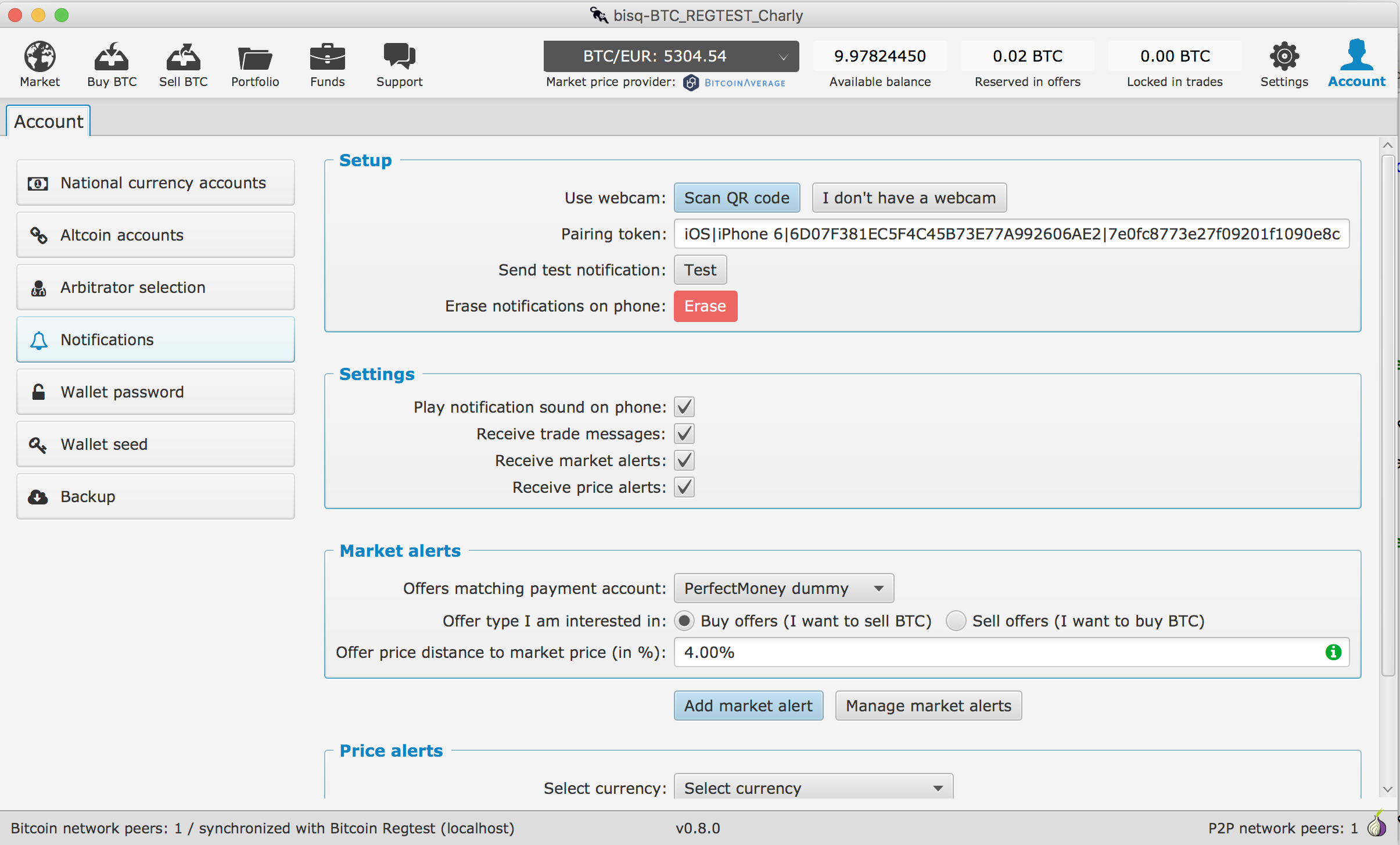
Market alerts are set up by payment methods, offer type (buy/sell) and trigger price in % (market based offer price). The offer type is the opposite of what the user is interested in, e.g. if I want to buy BTC I am interested in sell offers. If anyone has suggestions for UI improvements here, please share, its a common problem how to deal with that.
The trigger price is in % and independent if offer use % or fixed price. The alert gets triggered if any offer matching my payment account, offer type and price is broadcasted. You get only once an alert but if an offer is edited with a diff. price you will get it again if it is in the price target. The prices for fiat and altcoins are in diff. direction (e.g. if fiat is higher its better for seller, if altcoin is higher its better for buyer). So there is a bit of complexity how to display that all....
I am not happy with the wording for explaining the triggering price for the market price alert.
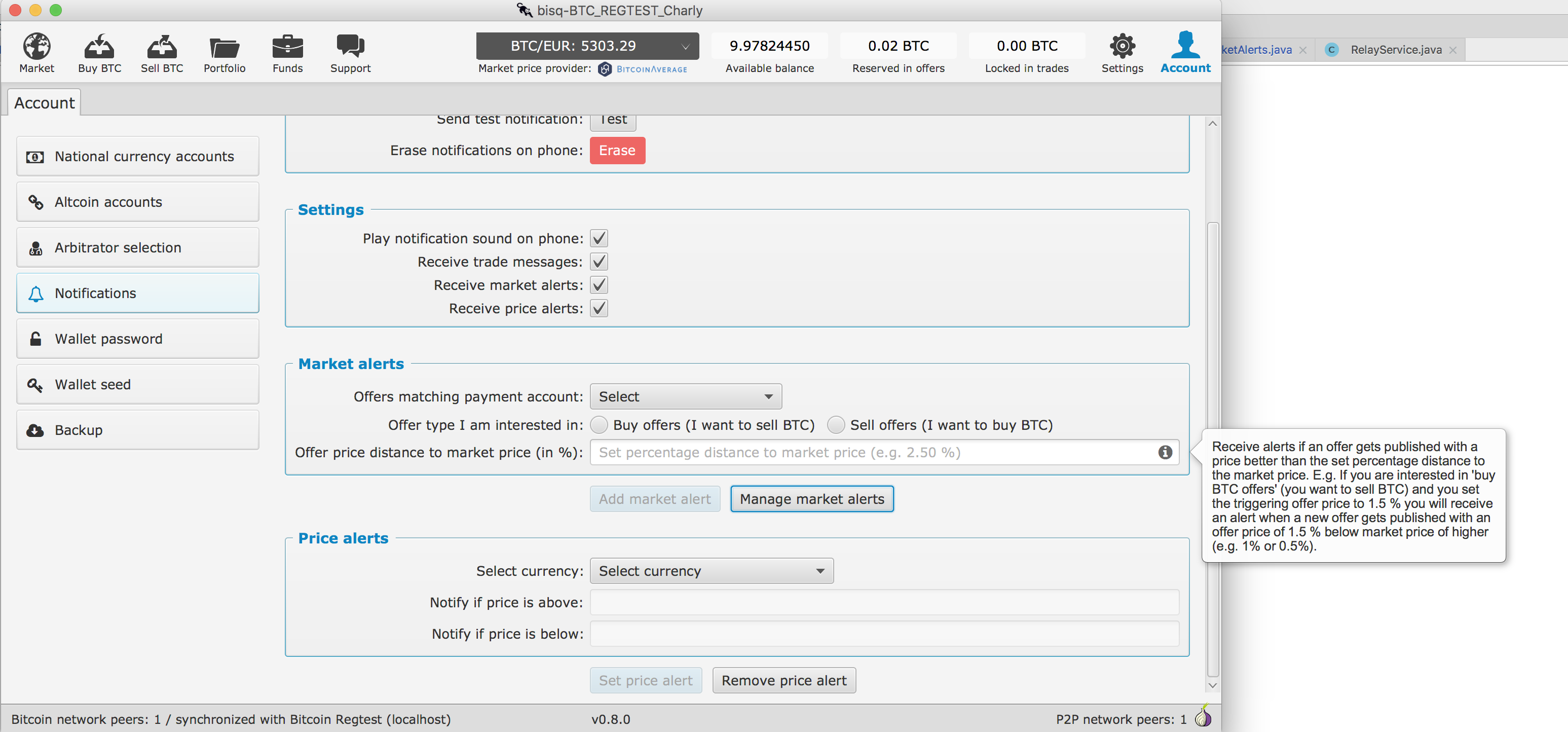
Here is the text I use now (displayed on rollover at info icon):
Receive alerts if an offer gets published with a price better than the set percentage distance to the market price. E.g. If you are interested in 'buy BTC offers' (you want to sell BTC) and you set the triggering offer price to 1.5 % you will receive an alert when a new offer gets published with an offer price of 1.5 % below market price of higher (e.g. 1% or 0.5%).
The label and prompt text for the trigger price is also not really good:
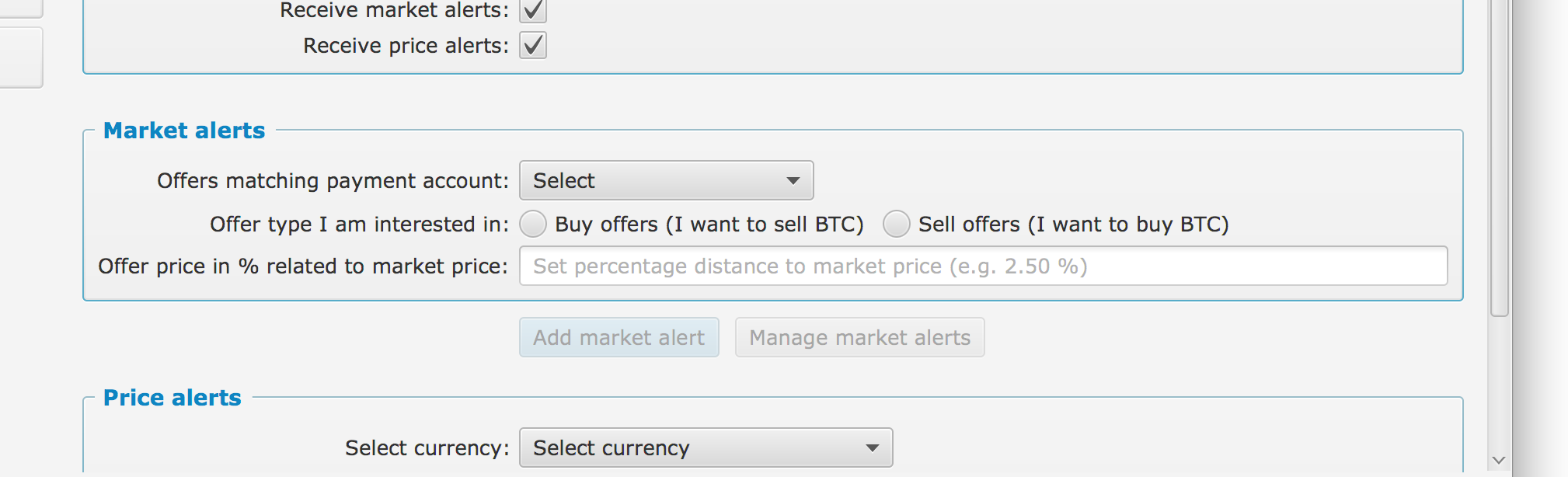
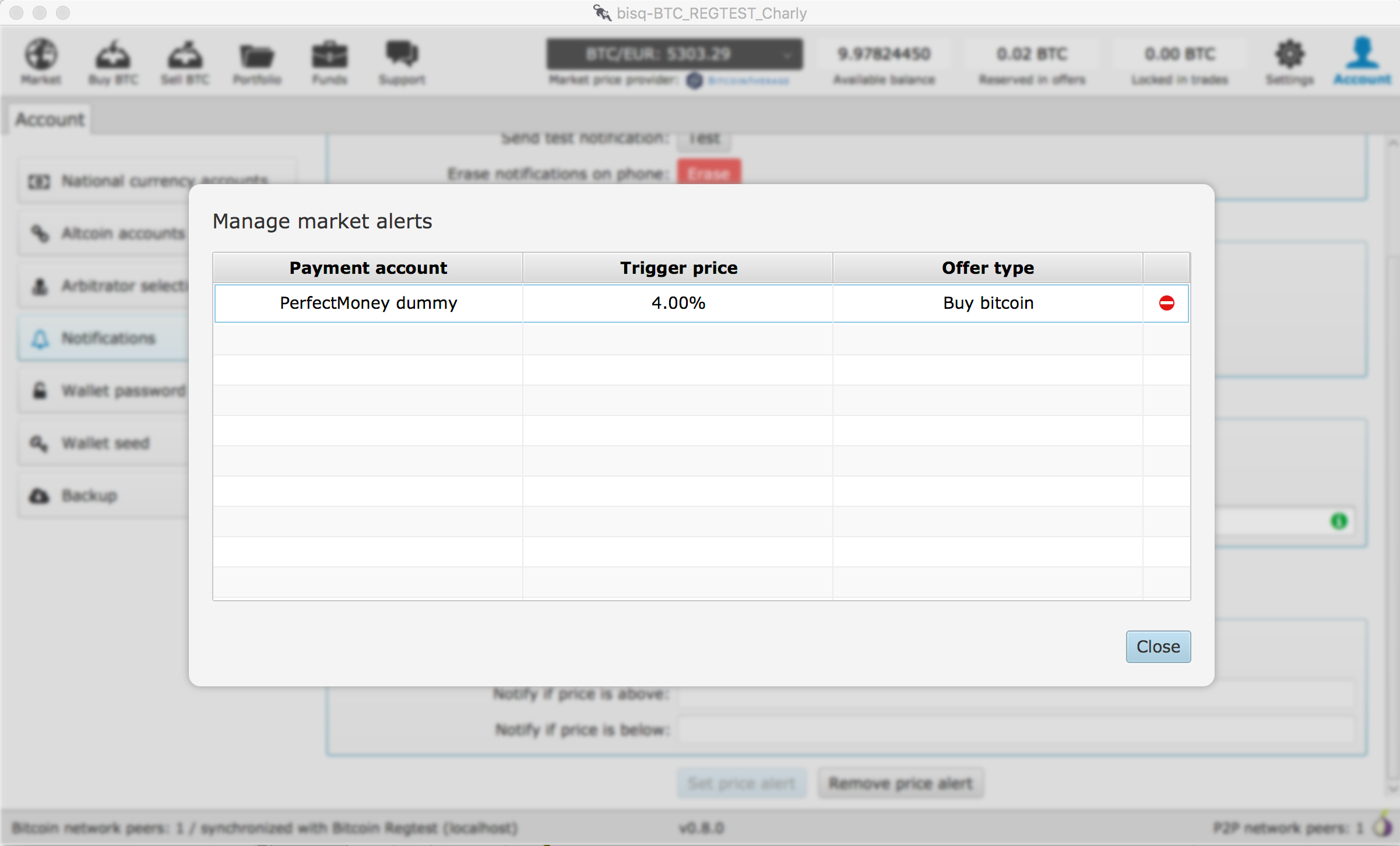
Here are screenshots of the relevant market price alert screens:
 ManfredKarrer
All 17 comments
@m52go @ripcurlx @joachimneumann Could you have a look to the wording and usability? Needs a bit of improvements...
ManfredKarrer
on 14 Aug 2018
If you dont want to build from source (my branch), here is a OSX binary with the notifications UI: http://nucleo.io/download/Bisq_notifications-0.8.0.dmg
It creates a new data directory so u can run it safely in parallel with a normal Bisq app...
ManfredKarrer
on 14 Aug 2018
Some suggestions...
Setup
Consider changing "Erase notifications" to "Clear notifications." I think that wording is a little more common.
Settings
I would consider labeling the "market alerts" section as "offer alerts" instead. Seems more distinct from "price alerts."
Market alerts
As mentioned above, I think this section should be called "Offer alerts" instead.
Consider changing the "Offer price distance to market price (%)" label to "Offer price distance (%)"
Consider changing placeholder text to "Percentage distance from market price (e.g., 2%, -2%, etc)"
Consider changing rollover/tooltip-style explainer to:
With a price distance set, you will only receive an alert when an offer that meets (or exceeds) your requirements is published. Example: you want to sell BTC, but you will only sell at a 2% premium to the current market price. Setting this field to 2% will ensure you only receive alerts for offers with prices that are 2% (or more) above the current market price.
Price alerts
Assuming this section refers specifically to BTC price in the chosen currency, I think the labels should indicate that: "Notify if BTC price is above" and "Notify if BTC price is below"
 m52go
on 14 Aug 2018
m52go
on 14 Aug 2018
Great thanks! I applied the changes!
ManfredKarrer
on 15 Aug 2018
I added a link for the docs page to give info about the mobile notifications app.
The redirect I want to use is:
/mobile-notifications https://docs.bisq.network/mobile-notifications.html 302
@cbeams @m52go Is that redirect ok for you?
@m52go Could you write up a text there? Should only explain basics what it is and how it works. I will post below some raw example content. We plan to release the next days, if you don't have time let me know then I will write it up, but my talent in writing is limited ;-).
We need to add the download links for iOS and Android apps to our download page as well.
I was considering to just add the classical download badges there below the normal download links.
If anybody can make a suggestion here would be cool. I am not good with HTML...
@joachimneumann Could you work on the download page?
Suggestion for docs text:
With the Bisq mobile notifications app for Android and Iphone you can receive customized notifications from your Bisq desktop app. You have to install the mobile app from the Apple App Store or Google Play store and after that pair it with your Bisq app. In Bisq you need to go to the Account/Notifications screen and click on the "Open Webcam" button. Then click on "Pair" on your mobile app and scan the QR code with your computers webcam. In case you don't have a webcam you can send the pairing string by email to your computer and then copy paste it into the text field (click the "I don't have a webcam" button). After pairing is successful you get a success message on your phone and can move on to the notifications screen.
In Bisq you can define if you want to get notifications or trade activities, offers you are interested in and price alerts as well as set if you want to get the notifications with sound or without.
Open offers:
You will receive a notification if one of your open offers get taken.
Trade alerts:
If you are in the trade process you will receive a notification if any activity from your side is required. E.g. after the block confirmation when you are the BTC buyer and need to send the Fiat or altcoin, if you are the BTC seller after the peer has send you the Fiat or altcoin to check if you received it and the buyer will receive a notification after the trade is completed.
Disputes:
You will receive a message for any new dispute message, but you will not see the content of the dispute message.
Please don't rely only on the mobile notifications app to receive those messages, it is a new feature and there might be bugs. So please continue to check on your Bisq app for trade state and disputes!
Offer alerts:
Here you can select for which offers you would like to receive notifications. First you need to select the payment account. Then i you are interested in buy or sell offers. If you want to sell BTC you are interested in buy offers as the peer who made the offer is the buyer. Then select the % distance from the market price for which you want to get a notification triggered. With a price distance set, you will only receive an alert when an offer that meets (or exceeds) your requirements is published. Example: you want to sell BTC, but you will only sell at a 2% premium to the current market price. Setting this field to 2% will ensure you only receive alerts for offers with prices that are 2% (or more) above the current market price.
You can see all set up alerts when you click "Manage offer alerts" and remove them from the list.
Price alerts:
You can select a currency and the upper and lower price limits when you want to receive a price alert. E.g. If the price alert is set for EUR with upper limit to 6000 and lower limit to 5500 and current market price is 5800, then you will get a notification once the market price goes over 6000 or below 5500 BTC/EUR. Once it gets triggered the price alert gets deleted automatically (otherwise you would get repeated notifications).
Technical details/Privacy:
The content of the notifications is encrypted by a key generated on the mobile phone.
The mobile ID and a that secret key is passed over to the Bisq app with the QR code scanning (pairing). The Bisq app sends to a Relay node a message over Tor containing the encrypted payload as well as the mobile ID. When the relay node receives that message it knows only the mobile ID but no IP address as it received the message over Tor. It forwards that message to the Apple or Google push notifications server which pushes it to the mobile phone using the mobile ID as identifier. Apple or Google learn about a mobile ID is interested in Bisq notifications but cannot read any content as it is encrypted (they learn about that already when you install the mobile app). The push notifications mechanism does not allow a more privacy protection way to do that, but I think for most users that is acceptable. If not simply don't use that feature, it is completely optional.
Feel free to change/shorten it. Just wanted to provide basics...
ManfredKarrer
on 15 Aug 2018
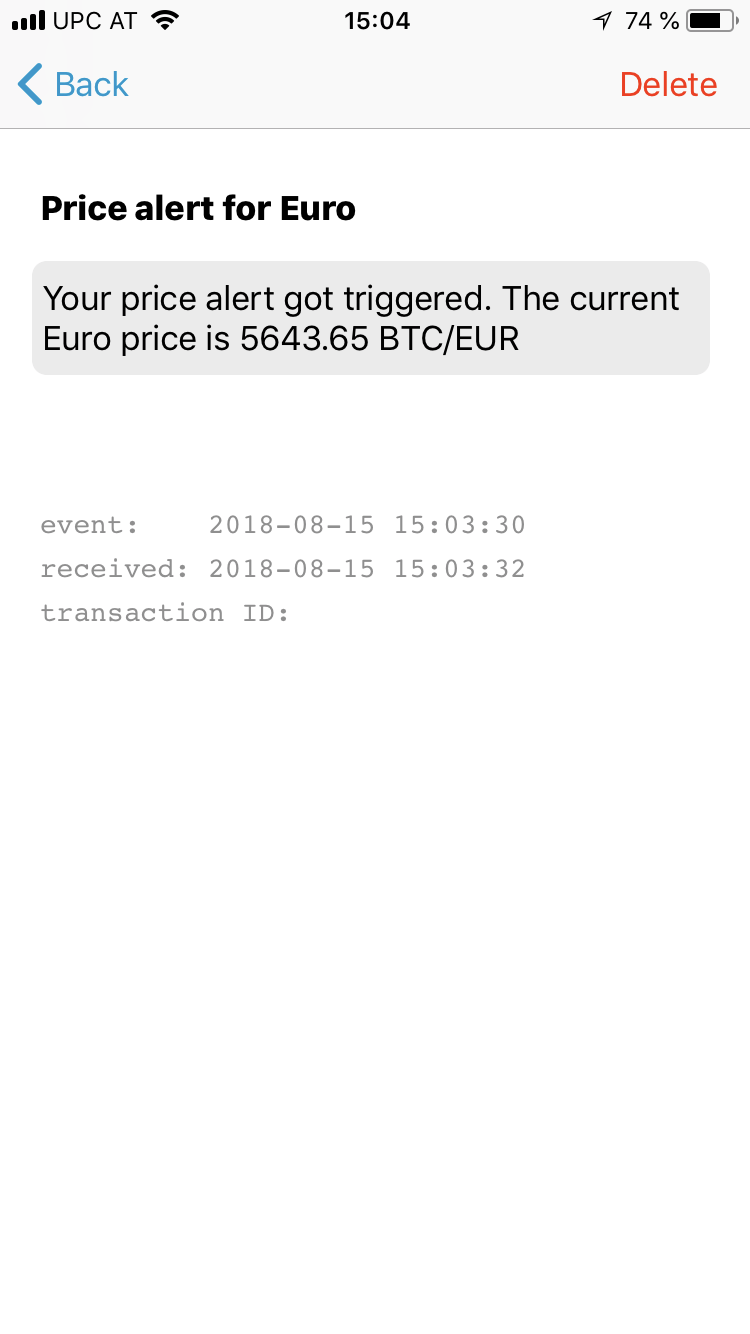
I think we should hide the transaction ID if there is none. Otherwise it looks like an error.
 ripcurlx
on 15 Aug 2018
ripcurlx
on 15 Aug 2018
If possible it would be great also to take the offer limit into account when sending market alerts. I just got a notification of an offer that I'm not able to take ;-)
ripcurlx
on 15 Aug 2018
The redirect I want to use is:
/mobile-notifications docs.bisq.network/mobile-notifications.html 302
@cbeams @m52go Is that redirect ok for you?
It's ok, but I'm not sure why / if it's actually necessary to have a redirect at all. Usually I only add these for links we want to use in twitter a lot, etc, e.g. https://bisq.network/get-started. If this is just a URL that the UI is going to put up, we might not need the redirect at all. Your call though, I'm not really plugged in to what's going on here.
 cbeams
on 15 Aug 2018
cbeams
on 15 Aug 2018
I think we should hide the transaction ID if there is none.
Ah yes, good point. @joachimneumann Could you have a look to that?
ManfredKarrer
on 15 Aug 2018
If possible it would be great also to take the offer limit into account when sending market alerts. I just got a notification of an offer that I'm not able to take ;-)
To fully implement the filter for an offer would make sense but its a bit more effort. Maybe we keep it for next update?
ManfredKarrer
on 15 Aug 2018
@cbeams I just though we are more flexible if we choose to use another location for the info text.
ManfredKarrer
on 15 Aug 2018
Sure, all good.
On Aug 15, 2018, at 4:05 PM, Manfred Karrer notifications@github.com wrote:
@cbeams https://github.com/cbeams I just though we are more flexible if we choose to use another location for the info text.
—
You are receiving this because you were mentioned.
Reply to this email directly, view it on GitHub https://github.com/bisq-network/bisq-desktop/issues/1622#issuecomment-413207768, or mute the thread https://github.com/notifications/unsubscribe-auth/AASa8jo5Cs163S0PFrV__VFhlxSVZRySks5uRCqNgaJpZM4V8Xo7.
cbeams
on 15 Aug 2018
@ManfredKarrer looks like you already got a great start on it! Thanks for doing that -- makes it vastly easier for me to refine it into a doc. If I get it done by the end of the weekend (08/19), is that soon enough?
m52go
on 15 Aug 2018
@m52go It depends a bit how long we need for testing. Tomorrow we start, and in best case we can deploy Thursday, but more likely it is Monday next week. But no worry, if are too fast ;-) then i will add it myself and you can improve it then any time.
And sorry for the short notice... Did not thought of it earlier...
ManfredKarrer
on 15 Aug 2018
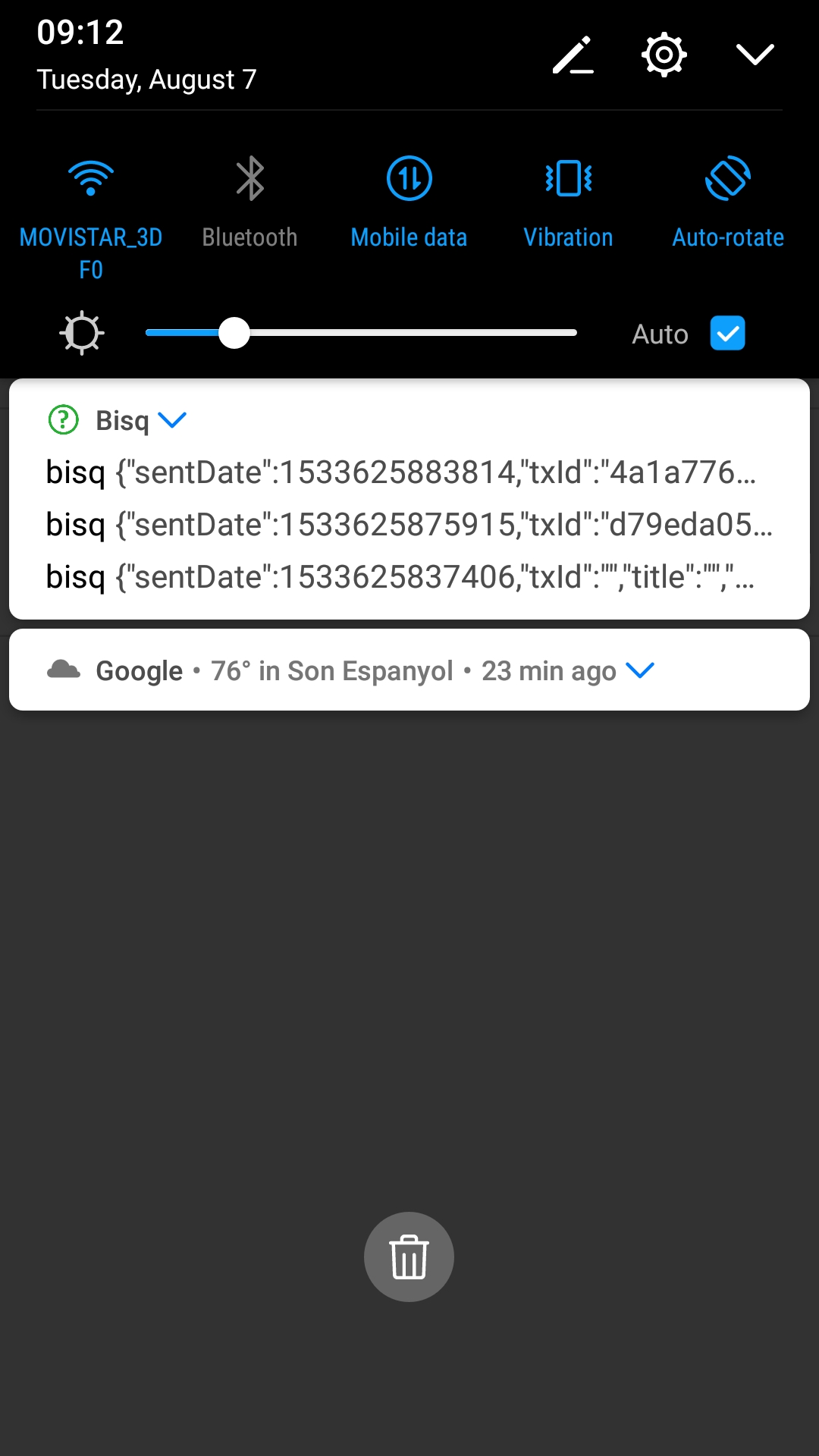
The message in the notification bar looks like a bit like a JSON. Is it just me because I'm using an older version or it looks like this for everyone?
 jbarcelo
on 16 Aug 2018
jbarcelo
on 16 Aug 2018
@joachimneumann Can you have a look?
ManfredKarrer
on 16 Aug 2018
As both iOS and Android versions are live now I'll close this issue as complete.
ripcurlx
on 10 Sep 2018
Related issues
ripcurlx
·
6Comments
 21isenough
·
5Comments
21isenough
·
5Comments
 wenk2018
·
3Comments
wenk2018
·
3Comments
 viperperidot
·
6Comments
viperperidot
·
6Comments
 0xb100d
·
4Comments
0xb100d
·
4Comments