Billboard.js: vuejs2: strange chart look
Trying render chart billboard.js at vue.js2
package.json:
"billboard.js": "^1.2.0",
"vue": "^2.2.2",
import: import {bb} from 'billboard.js'
Generate chart:
     var chartbb = bb.generate({
        bindto: '#bbChart',
        data: {
          columns: [
            ['data3', 300, 200, 160, 400, 250, 250]
          ],
          type: 'spline'
        }
      })

      setTimeout(function () {
        chartbb.load({
          columns: [
            ['data7', -130, -150, -200, -300, -200, -100]
          ]
        })
      }, 2000)
insert into code.vue: <div id="bbChart" ></div>
And get this:

Seems to that library it's not correct import...
There are no proper styling chart, axes, series.
Steps to check or reproduce
Any suggestions what I'm doing wrong?
Maybe should import style.css? But how?
 Bear4
Bear4
All 8 comments
@Bear4, did you loaded the default css file? It seems css styling issue.
 netil
on 12 Feb 2018
netil
on 12 Feb 2018
Yes I had install: npm install billboard
and have all set of library:
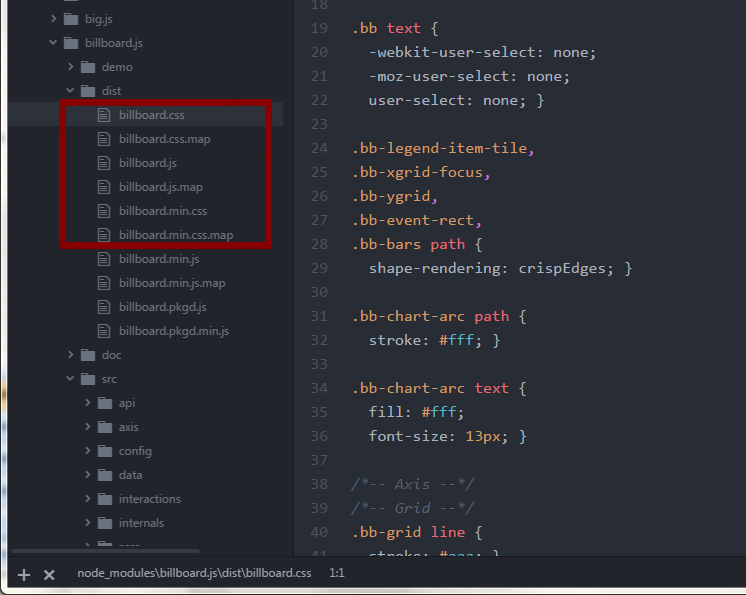
Strange that library *.js works so I have chart but *.css isn't read so my chart looks ugly :(
Bear4
on 13 Feb 2018
And when putting code billboard.css into block in my vue file, chart is rendered at proper styling...
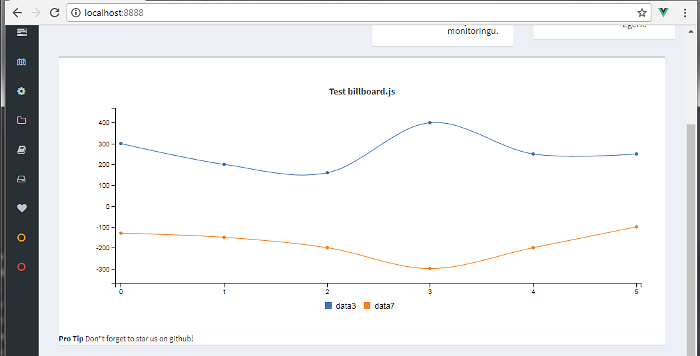
Why css dosn't work via node_modules ?
Bear4
on 13 Feb 2018
@Bear4 I don't know in which build environment working on, but if you use webpack with css loader, css can be imported as:
import css from 'file.css';
I added this into <style>...</style> section of my App.vue file:
@import "billboard.js/dist/billboard.min.css";
It works.
 ilya-vasilyev
on 14 Feb 2018
ilya-vasilyev
on 14 Feb 2018
Yes, thanks @netil I have webpack and had install css-loader style-loader.
@ilya-vasilyev For me works:
@import url('/static/js/plugins/billboardjs/billboard.min.css');
unfortunately
@import 'billboard.js/dist/billboard.min.css'
or
@import url('/node_modules/billboard.js/dist/billboard.min.css');
does't work :(
And for the end I have got err linked by chart.load() I think:
[Vue warn]: Error in nextTick: "TypeError: Cannot read property 'xs' of undefined"
TypeError: Cannot read property 'xs' of undefined
at Chart.load (billboard.js:9905)
What is 'xs' ? I don't set xs property in my code?
It's great work this library - I had use earlier c3.js but for new vue project I decided use Billboard.js. I like it! Thanks :)
Bear4
on 14 Feb 2018
I often find that this is the case with packages that have css as part of the project. For these cases I include a scss file as part of my main project in webpack and do my imports there so they are globally scoped.
For example:
My webpack.config.js looks something like this:
````
const path = require("path");
const srcDir = path.resolve(__dirname);
const baseDir = path.resolve(__dirname, "..");
const pluginsConfig = require(path.resolve(baseDir, 'config/webpack.plugins.config.js'));
const rulesConfig = require(path.resolve(baseDir, 'config/webpack.rules.config.js'));
module.exports = {
context: path.resolve(__dirname, ".."),
entry: {
index: [
srcDir + '/src/main.js',
srcDir + '/src/main.scss'
]
},
output: {
filename: "vendor/js/vendor_dll.js",
path: exportPath,
library: "vendor_dll",
},
resolve: {
modules: [
path.join(__dirname, "..", "node_modules"),
],
extensions: [".js", ".jsx", '.ts', '.vue',],
alias: {
'vue$': 'vue/dist/vue.esm.js',
}
},
plugins: pluginsConfig,
module: {
rules: rulesConfig
}
};
````
And in my main.scss file: (note that ~ resolves to the node_modules directory)
$fa-font-path: "~font-awesome/fonts";
@import "~font-awesome/scss/font-awesome";
@import '~buefy/lib/buefy.css';
@import '~flatpickr/dist/flatpickr.css';
@import "~billboard.js/dist/billboard.css";
 rshingleton
on 16 Feb 2018
rshingleton
on 16 Feb 2018
@rshingleton Thanks for the reply.
Bear4
on 16 Feb 2018
Related issues
 elielr01
·
3Comments
elielr01
·
3Comments
 flipcode1973
·
5Comments
flipcode1973
·
5Comments
 matthiaskomarek
·
4Comments
matthiaskomarek
·
4Comments
 doubletuna
·
3Comments
doubletuna
·
3Comments
 AyshvaryaLaxmiK
·
5Comments
AyshvaryaLaxmiK
·
5Comments
Most helpful comment
I often find that this is the case with packages that have css as part of the project. For these cases I include a scss file as part of my main project in webpack and do my imports there so they are globally scoped.
For example:
My webpack.config.js looks something like this:
````
const path = require("path");
const srcDir = path.resolve(__dirname);
const baseDir = path.resolve(__dirname, "..");
const pluginsConfig = require(path.resolve(baseDir, 'config/webpack.plugins.config.js'));
const rulesConfig = require(path.resolve(baseDir, 'config/webpack.rules.config.js'));
module.exports = {
context: path.resolve(__dirname, ".."),
entry: {
index: [
srcDir + '/src/main.js',
srcDir + '/src/main.scss'
]
},
output: {
filename: "vendor/js/vendor_dll.js",
path: exportPath,
library: "vendor_dll",
},
resolve: {
modules: [
path.join(__dirname, "..", "node_modules"),
],
extensions: [".js", ".jsx", '.ts', '.vue',],
alias: {
'vue$': 'vue/dist/vue.esm.js',
}
},
plugins: pluginsConfig,
module: {
rules: rulesConfig
}
};
````
And in my main.scss file: (note that ~ resolves to the node_modules directory)
$fa-font-path: "~font-awesome/fonts";
@import "~font-awesome/scss/font-awesome";
@import '~buefy/lib/buefy.css';
@import '~flatpickr/dist/flatpickr.css';
@import "~billboard.js/dist/billboard.css";