Bforartists: Help Needed - install to Debian
Issue
From a user on Discord:
I'm interested in trying bfartists out, but I can't install it. I used the .deb installation (I'm using Linux) and I keep getting this error message: Error while installing package: cannot copy extracted data for './opt/bforartists/bforartists' to '/opt/bforartists/bforartists.dpkg-new'.
I tried using the tar.xz file to install it with the terminal, but it says missing destination file operand after 'Bforartists-270-Linux.tar.xz'
I'm not sure of what to do or how
Task
Got some ideas?
It looks like there is an issue extracting the installation.
 Draise14
All 27 comments
Hm. The tar.xz is just an archive. No installer. Simply unpack it into the desired directory :)
I will have a look at the deb tomorrow. Maybe i have put the paths wrong.
 ReinerBforartists
on 27 Jan 2021
ReinerBforartists
on 27 Jan 2021
Or maybe the downloaded *.deb file is broken.
Can the related person verify that the md5 checksum of the deb file is: f690a8db74b78f1457ef42a0ffe645df
If not: Download again and retry, otherwise apt --fix-broken install
 naetherm
on 28 Jan 2021
naetherm
on 28 Jan 2021
I think i know what the problem is. I have build at Ubuntu 20.10. And as usual this means that you need Ubuntu 20.10 now to run it. BFA does not start at my Ubuntu 20.04 here. In Ubuntu 20.10 it works just fine.
I really hate Ubuntu. It's the very worst linux ever. This should not happen with a simple point upgrade.
ReinerBforartists
on 28 Jan 2021
No, that's not the problem here as it has an error during the installation process of the *.deb file.
Problem related to the Ubuntu version are more likely to happen during execution/runtime when specific versions of libraries do not match or there is a GLIB version problem.
naetherm
on 28 Jan 2021
Yes, that's what i have here between ubuntu 20.10 and 20.04 :)
x@ubuntu:~/Bforartists-270-Linux$ ./bforartists
./bforartists: /lib/x86_64-linux-gnu/libc.so.6: version `GLIBC_2.32' not found (required by ./bforartists)
But indeed. the deb installation worked flawless. And also extracting the xz archive.
ReinerBforartists
on 28 Jan 2021
That's during runtime, the user tries to install BFA.
And that's exactly what I meant by GLIB problems ;)
naetherm
on 28 Jan 2021
Yes. Very nasty. How can we prevent this from happen?
ReinerBforartists
on 28 Jan 2021
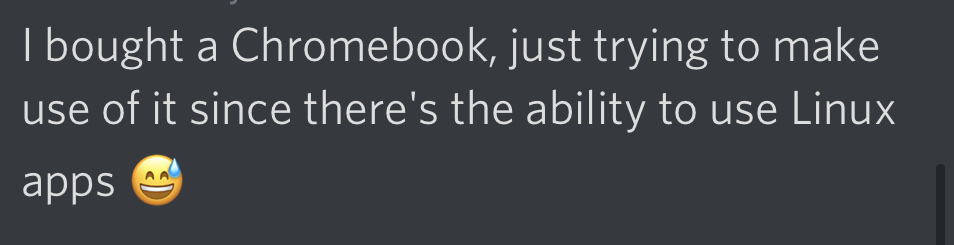
(I'm using Linux)
Before we go on with ranting into the blue, what Linux? There are over 1400 distributions. And every distribution has so and so much versions ...
ReinerBforartists
on 28 Jan 2021
He said he is trying to install the deb on a chromebook (probably Chrome OS) as he said
 iyadahmed
on 28 Jan 2021
iyadahmed
on 28 Jan 2021
Ouch. That's nothing trivial i was told XD
ReinerBforartists
on 28 Jan 2021
Ouch. That's nothing trivial i was told XD
Indeed I just googled it Chrome OS can't unpack tar by default, and it says newer versions doesn't work well with debs
iyadahmed
on 28 Jan 2021
You can't always win. I guess that's one of those cases.
EDIT, maybe he can unpack the archive across the google drive zip extractor. https://zipextractor.app/
ReinerBforartists
on 28 Jan 2021
You can't always win. I guess that's one of those cases.
EDIT, maybe he can unpack the archive across the google drive zip extractor. https://zipextractor.app/
Great idea, will tell him that
iyadahmed
on 28 Jan 2021
Let me know how it turns out :)
ReinerBforartists
on 28 Jan 2021
Let me know how it turns out :)
Sure he is offline now apparently
iyadahmed
on 28 Jan 2021
I guess this one is already solved in the one or another way. Can we close it? :)
ReinerBforartists
on 5 Feb 2021
The user didn't reply since then
Should we close it? @Draise14
iyadahmed
on 5 Feb 2021
He replied now, her converted the tar into zip file, now trying to run it
iyadahmed
on 5 Feb 2021
No success, the weird thing is he got blender working
iyadahmed
on 6 Feb 2021
I have unfortunately no idea what the problem could be :(
We have no chance to reproduce the trouble. I don't have a chromebook. So as sorry as i am, we need to close this issue unfixed.
ReinerBforartists
on 6 Feb 2021
I think I now know the problem, it is indeed Debian, that's what chrome os virtualize to run linux apps
the problem is related to outdated libc6
but the weird thing that he got Blender running
iyadahmed
on 6 Feb 2021
Yes this worries me too. We have the same kind of problem with Ubuntu 20.04 versus 20.10. I just have no idea what we could do here.
ReinerBforartists
on 6 Feb 2021
I looked it up, it says we could compile with a lower libc6 version
iyadahmed
on 6 Feb 2021
should we reopen this then?
iyadahmed
on 6 Feb 2021
Hm. Difficult. I use the libs that Blender uses. I worry about the possible trouble when we use a lib that is not the Blender default lib.
I would say leave it alone.
ReinerBforartists
on 6 Feb 2021
Is this even one of the Blender libs? I can't find libc in the lib folder here.
Ah, this means this is something that i would need to change at Ubuntu then. Even worse :D
Leave it alone ...
ReinerBforartists
on 6 Feb 2021
Ah ok, I'm not sure too :D
agree
iyadahmed
on 6 Feb 2021
Related issues
ReinerBforartists
·
4Comments
ReinerBforartists
·
4Comments
ReinerBforartists
·
6Comments
ReinerBforartists
·
5Comments
ReinerBforartists
·
6Comments