Bforartists: Node Editor - Expose listed Node Groups dynamically in Node shelf.
Issue
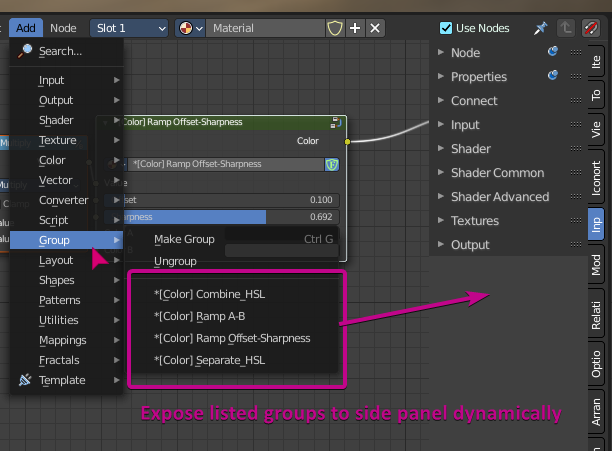
Currently, node groups are only accessible in the Add menu then group sub-menu. You can't just click and drag them into use. You have to search, or go into sub-menus to use them.
Feature Request
Bforartists exposes nodes into a panel, it would be great to be able to have these group nodes also exposed in the side panel with names dynamically, so it's easier to see what groups are available and to re-use them easily.
 Draise14
All 6 comments
Good idea. Shouldn't be too hard to add the enumeration into a panel (famous last words and so :D ) . This would best go into the relations tab then.
 ReinerBforartists
on 5 Jan 2021
ReinerBforartists
on 5 Jan 2021
Ah, i expected it already. This is nothing easy. I have lost the spaghetti after the fourth class :/
ReinerBforartists
on 9 Jan 2021
release\scripts\startup\nodeitems_builtins.py
line 85
def node_group_items(context):
No idea how this can be incorporated into a panel. The whole add menu is a sphaghettimonster, cluttered across several classes.
ReinerBforartists
on 9 Jan 2021
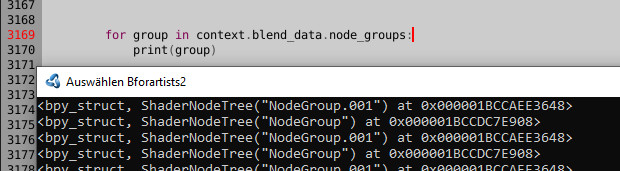
Giving up. This menu is over my head. I could print a list of the group items, at least this i have managed to some degree. But i cannot enumerate the buttons like in the sub menu. And that's the vital part. So that these groups can be reused and inserted like from the Add menu.
Maybe Iyad has an idea here. I am lost.
ReinerBforartists
on 9 Jan 2021
Someone posted an answer on stack exchange, so can be done. Looks like you've already got a commit! Nicely done.
https://blender.stackexchange.com/questions/207676/node-editor-python-expose-listed-node-groups-dynamically-in-node-shelf-panel?noredirect=1#comment351057_207676
Draise14
on 15 Jan 2021
Ah, nice, thanks :)
ReinerBforartists
on 16 Jan 2021
Related issues
 iyadahmed
·
6Comments
ReinerBforartists
·
6Comments
ReinerBforartists
·
4Comments
Draise14
·
7Comments
iyadahmed
·
6Comments
iyadahmed
·
6Comments
ReinerBforartists
·
6Comments
ReinerBforartists
·
4Comments
Draise14
·
7Comments
iyadahmed
·
6Comments