Bforartists: Node Editor - Rename UX on nodes/frames should also rename visible label
Issue
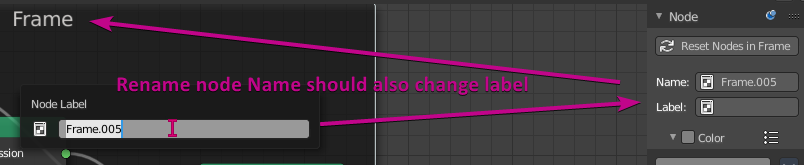
When renaming a frame, node or anything in a node editor (rename operator or F2), you name it, but not the label. So visually, you see nothing. This is rarely useful unless coding a script. For an artist, I want to name the node, frame or anything with one operation.
Task
- Check and see if it's possible to make the operator chain to also rename label.
- Implement it in the general GUI.
 Draise14
All 13 comments
Does it work in Blender? If not it might be worth a bug report ^^
 ReinerBforartists
on 8 Dec 2020
ReinerBforartists
on 8 Dec 2020

Yes.. just tested in 2.91, and it only renames the label. shock
Looks like something in BFA is not configured in the operator variables.
Draise14
on 8 Dec 2020
So it works in Blender?
ReinerBforartists
on 9 Dec 2020
So it works in Blender?
Just tested, it works in Blender
 iyadahmed
on 9 Dec 2020
iyadahmed
on 9 Dec 2020
Odd. Then it should work in Bforartists too. We have the same code.
ReinerBforartists
on 9 Dec 2020
Fails in Blender too from what i can say. Tried to rename the Principled node. And the name does not arrive.
So under what circumstances does it work in Blender and in Bforartists not? In what node editor? We have more than one. With which node? And what are the exact steps to reproduce?
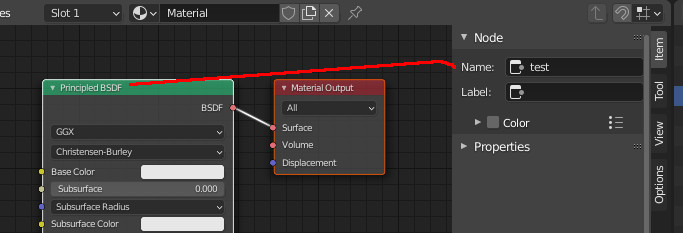
ReinerBforartists
on 9 Dec 2020
This applies for all node based editors, including those of addons.
Bforartists 2.6.0 (Bforartists Hotkeys)
- Create Cube and Select
- Create Material in Shader Editor
- Press F2 to rename any selected node, test on Principled
- Renames name, not label. Panel indicate "Rename label"
- Check Item>Node to verify
Blender 2.91.0 (Blender Hotkeys)
- Select Cube
- Create Material in Shader Editor, test on Principled
- Press F2 to rename any node
- Renames Label.
- Check Item>Node
Works in Blender, doesn't in BFA. Yes, the panel code and operator call is the same, so I assume the C operator must be a tad different.
Draise14
on 9 Dec 2020
Ah, now i managed to reproduce it. Thanks friends :)
Blender changes the label. Bforartists changes the name though. And so the label remains unchanged. I have just no idea why ^^
Let's have a look at the hotkey F2 ...
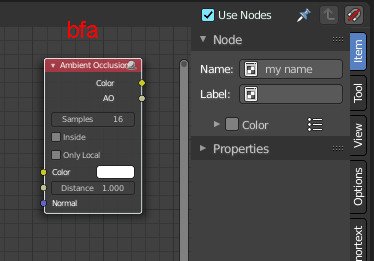
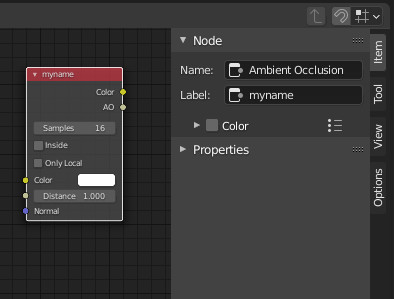
ReinerBforartists
on 9 Dec 2020
It's not the hotkey. It just calls the TOPBAR_PT_name popup in both cases.
ReinerBforartists
on 9 Dec 2020
Once more i have no idea what the problem is. And not even an idea how to catch this one.
ReinerBforartists
on 9 Dec 2020
It is bizzare.
Draise14
on 9 Dec 2020
Found it! It's just a single entry in the space_topbar.py.
Instead of "Name", it should be "Label" at line 717
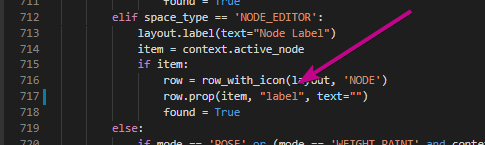
This has been reported to Blender before. Found the task and relevant code.
Looks like something slipped through.
Differential Patch
Draise14
on 9 Dec 2020
Excellent catch :)
ReinerBforartists
on 9 Dec 2020
Related issues
ReinerBforartists
·
6Comments
iyadahmed
·
7Comments
ReinerBforartists
·
5Comments
iyadahmed
·
6Comments
Draise14
·
7Comments