Bforartists: Toolbar Editor - Unnecessary Click to access toolbar types - UX issue
Issue
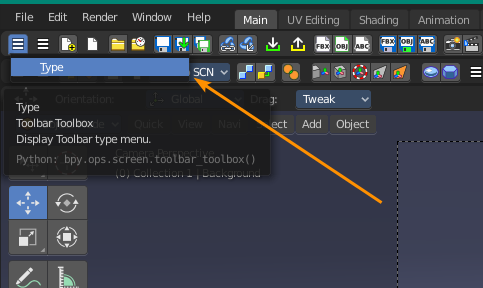
The first toolbar menu to set the toolbar Editor has a hidden floating submenu that only shows after you click on "Type". Ideally, like in BFA1, you should be able to just mouse over and see the toolbar options.
Desired funcionality:
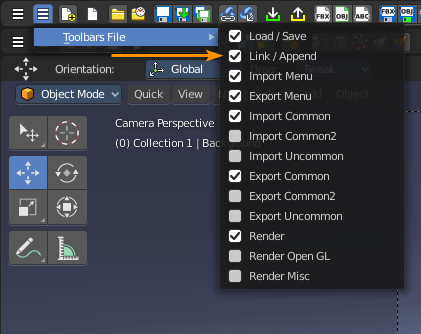
It's a little inconsistent and awkward needing to click. I remember Bforartists 1 didn't have this issue.
Version: Bforartists 2.0.0
Task
Make the first toolbar category checkbox list show on mouseover like the other toolbar lists.
 Draise14
All 13 comments
This is by design. It was not to achieve in another way when i made the toolbar. I was happy to have a menu here at all. I would have loved to display a menu here too. But i did not manage it.
But let's keep the task open. Maybe i find a better way nowadays.
 ReinerBforartists
on 28 Apr 2020
ReinerBforartists
on 28 Apr 2020
Bforartists was exactly the same implementation.
Mh, i am not sure if we talk about the same thing here. To save space the menus in the toolbar are collapsed. And then you need to click at the menu name first. That's of course one click more.
ReinerBforartists
on 6 Nov 2020
Now i remember why i have implemented a C popup menu here instead of a proper menu or panel ...

ReinerBforartists
on 7 Nov 2020
Man, i was so fixed at the idea to call the C menu as a whole that i have totally overlooked that you can call the single operators of the menu too -.-
We just need to make our own python menu here. I'll make a own panel now for the toolbar types. And am experimenting to implement quick expand collapse buttons in front of every toolbar. Draise here comes your solution from the request of the other closed issue ;)
I will make it optional though. It adds noise to those who doesn't want to expand collapse the toolbars regularly. And you have buttons in the way that you may not need. Playing around with the size here to make them more stick out between all the other buttons. The first one with 0.7 in width looks good. 0.5 is a bit small to click.
I also think to remove the collapsible menus, and just display an arrow button to call a panel with the available menus. Saves one more click.

ReinerBforartists
on 12 Nov 2020
Optional sounds awesome!! The second thinnist (0.7) one feels like a handle, which works for what it would do. And since it's the least invasive when it comes to reptition, it fits nicer.
How exciting.
Draise14
on 12 Nov 2020
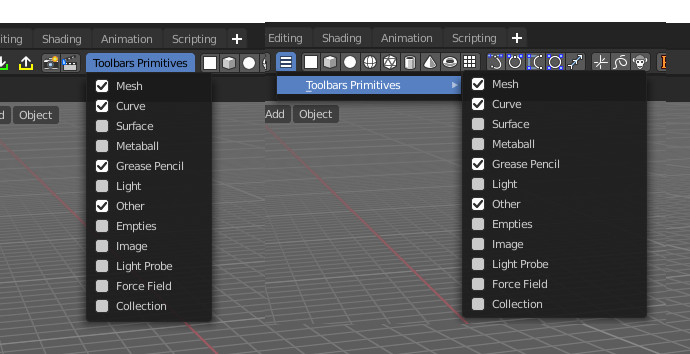
Can that "Toolbars" in the text in each of those in the last screenshot be eliminated/filtered out? It's just totally redundant. And I like the 0.7 option as well.
 seanr
on 12 Nov 2020
seanr
on 12 Nov 2020
The thinnest is 0.5. But that's too small and leads to missclicks. I like the 0.7 also the best. And the three dots icon fits perfect here :)
It's not redundant, it's the expanded menus for the single toolbars. The initial design idea was to setup the toolbars with expanded menus, then hide it away when done. But sure. I plan to make it a dropdown panel with an arrow down button at it. So no text here at all. This text is the title of the panel then.
ReinerBforartists
on 12 Nov 2020
Houston we have a problem ^^
Layout.prop() supports bpy.props and ID properties only.
I told you there was a reason why i made it a C menu then. The props in question are bpy.ops.screen. I can show them as buttons, like i did in the toolbar already. But to show them with checkboxes is not supported. I get errors. And these buttons doesn't even hilight when they are on -.-
Searching for workarounds ...
ReinerBforartists
on 13 Nov 2020
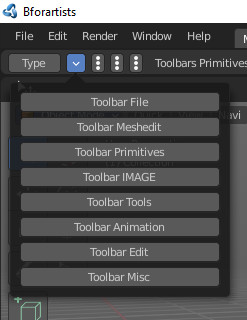
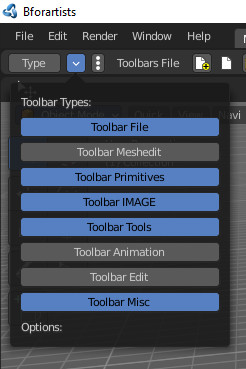
Found a workaround. I like it even better than checkboxes. At least at the moment. On it goes ...
And no idea why the letters turns black here when the button is on XD
ReinerBforartists
on 13 Nov 2020
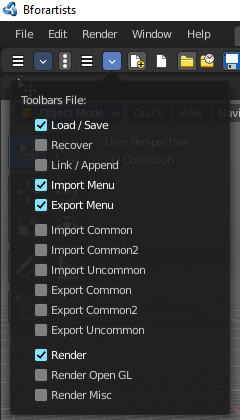
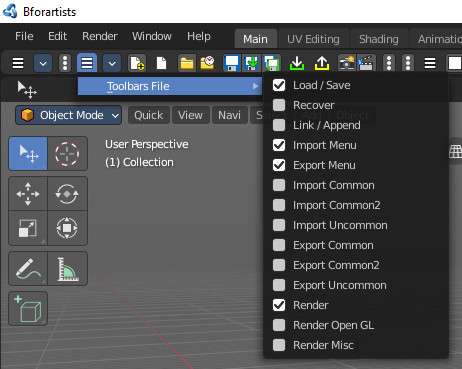
Menus turns into panels to have the triangle button at the top. It's a bit wider than a regular menu though. Benefit: colored checkboxes. In the text menu they are grey.
ReinerBforartists
on 13 Nov 2020
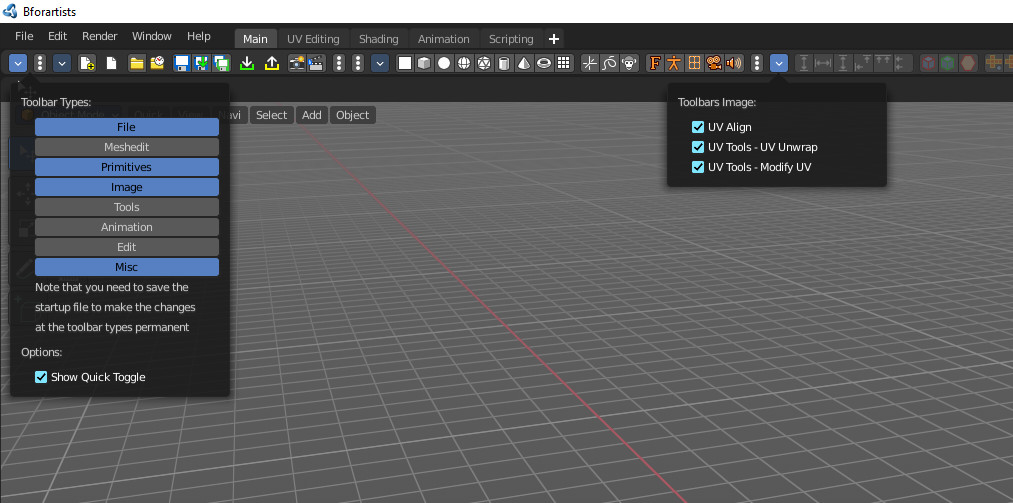
Fixed in master
ReinerBforartists
on 13 Nov 2020
You are a legend. I have shared this to the socials! I knew a few users who will be happy with this, including myself. Thanks for listening, and really putting in the effort to do this. You really make my day/s.
Draise14
on 13 Nov 2020
It was me a pleasure :)
ReinerBforartists
on 13 Nov 2020
Related issues
ReinerBforartists
·
4Comments
ReinerBforartists
·
6Comments
ReinerBforartists
·
5Comments
ReinerBforartists
·
8Comments
Draise14
·
6Comments