Bforartists: Video Sequencer - Strip menu needs icons
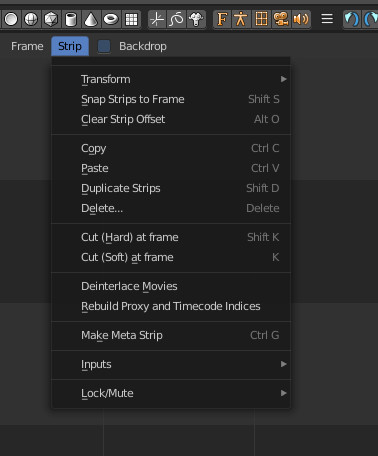
We need some icons here.
 ReinerBforartists
All 44 comments
Maybe I can learn how to put in icons with this task? I use the VSE a lot.
 Draise14
on 8 Apr 2019
Draise14
on 8 Apr 2019
Have a look here :)
ReinerBforartists
on 8 Apr 2019
Hey cool. I added an Icon to the UI. It already existed so.. piece of cake! The tutorial is really helpful, bit all over the place - yet I like how more info is better. I wish everything was like this.
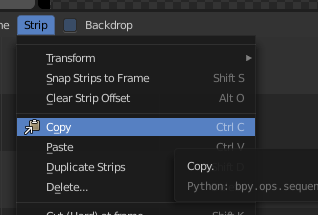
Looking at the sheet I've found a lot of design inconsistencies everywhere... but what a huge artistic feat it would be to design consistent icons across the board!
Now I'll.. try put in existing icons first then create any new ones later.
Draise14
on 11 Apr 2019
Gratulations :)
Yes, There's a ton of inconsistency. Starts with the icon names already as you may found out with the copy icon already ^^
I think somebody is already working at a new icon sheet. But not sure. He is so quiet at the moment ^^
ReinerBforartists
on 11 Apr 2019
Oh there is someone working on it? The new design for all should be fun.
Re-opened. Hang on, I haven't finished nor committed this one yet.
Draise14
on 11 Apr 2019
Q1: Who is assigned to the Icon redesign?
Q2: How did you optimize Inkscape with all the layers? I have found the workflow directly in there very difficult and slow.
Draise14
on 11 Apr 2019
I hate the close button XD Sorry ^^
Somebody at the forum. Rayman. He hasn't created a github account yet. So not sure if he is still working at it. It's a monster task for sure.
The workflow is slow. That's the way it is. Create a single icon. Then drop it into the sheet. Don't even try to work in the svg sheet directly :)
ReinerBforartists
on 11 Apr 2019
Ah right, yeah, would make sense. I'll use another instance of Inkscape to do the creation, then copy/paste in. No issue.
Would be great to see Rayman here on Github.
Draise14
on 11 Apr 2019
You can drag svg files directly into the sheet. No need for copy n paste.
ReinerBforartists
on 12 Apr 2019
Sorry for poking, but any progress here? The task is blocking all the other tasks where icons are missing Makes no sense to add new icons when you commit an old icon sheet then :)
ReinerBforartists
on 19 Apr 2019
Yes. I have done progress. But in other SVG files locally. Go ahead and do icon work. I'll merge in later. I'll keep my eye out on what is happening.
Draise14
on 19 Apr 2019
Damn, have i closed it again? The close button is killing me :D
Okay, will do the other icon work in the next days then, except VSE. You might need to repeat adding the existing ones then though. I'm currently at rearranging view and select menus ...
ReinerBforartists
on 19 Apr 2019
No problem, when you are done, I'll paste and then do the code part, nothing will be lsot. Right now I'm just designing, trying to understand the BFA icon designs.
Draise14
on 25 Apr 2019
A few colors, no gradients, and whatever fits. There are currently no design rules. We need to make them from scratch anyways ^^
ReinerBforartists
on 26 Apr 2019
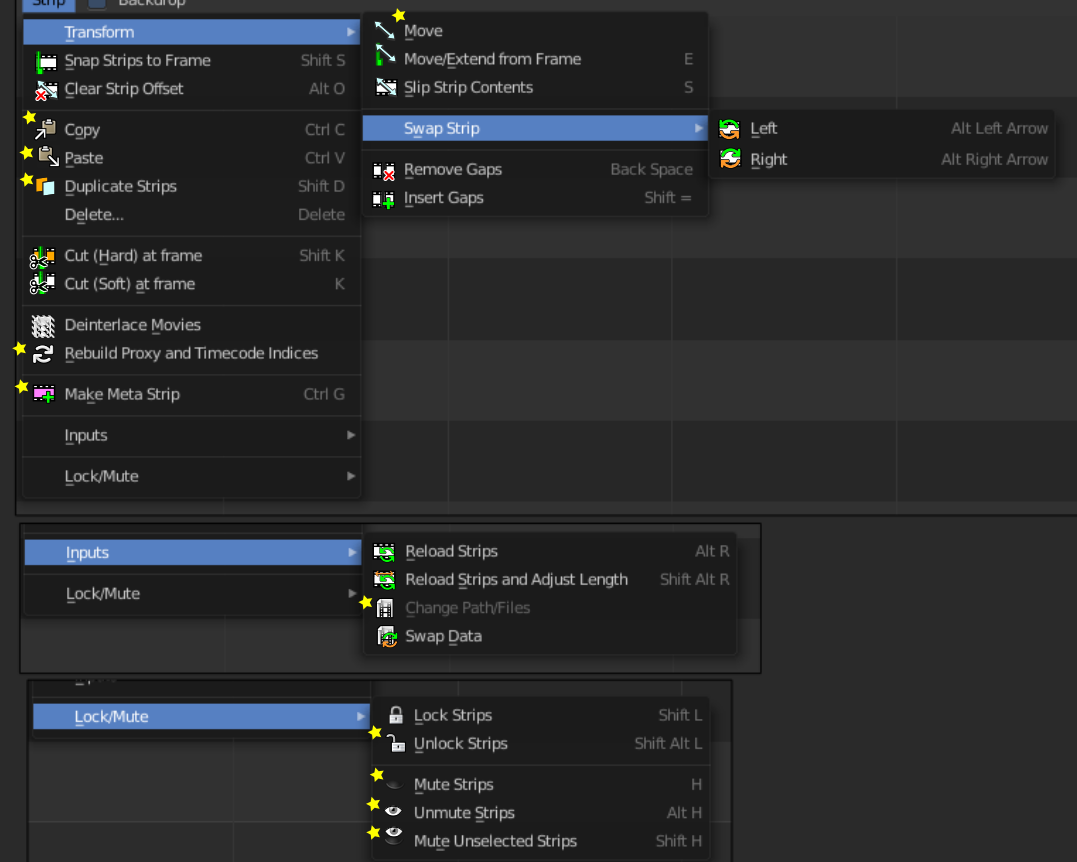
I have finished making the icons for this header entry. I'm now ready to do the code part. @ReinerBforartists, are you working on the icons file anywhere?
I have re-cycled some icons, as they are consistent with other similar functionality elsewhere. Those are the ones in stars.
I've noticed I should also probably re-organize these menu's eventually...
Draise14
on 30 Apr 2019
Yes i do. I have just yesterday committed a new icon. I wanted to do the icon related issues so that you can do this task here. But i can do some other things now until you have finished this one.
ReinerBforartists
on 30 Apr 2019
I would say let me finish the current icon related tasks first. Then you have all the time in the world.
ReinerBforartists
on 30 Apr 2019
Okay, finished all icon related tasks in the tracker for now. You have green light :)
ReinerBforartists
on 30 Apr 2019
Ok, giving this a go. I need to install python.
Draise14
on 2 May 2019
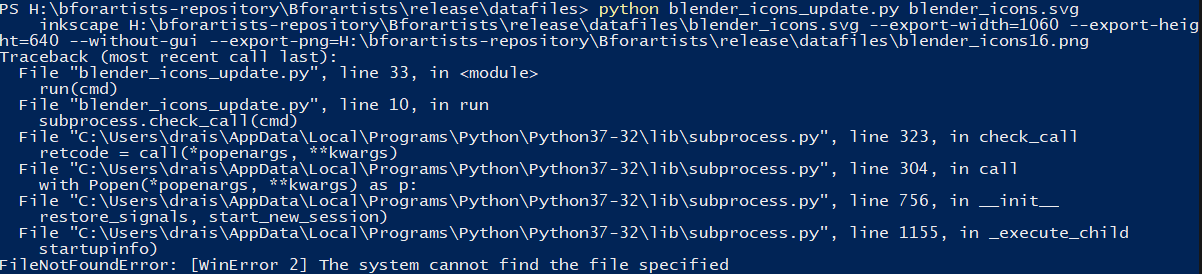
I hit an error when trying to make the icon DAT files. I have updated the UI_icons.H file, I have updated the blender_icons.svg - I have run command promt (and Windows Powershell) to make it do the python things.. and nope.
Gonna try update Python 3.x.x and check and see... and triple read again. I must be missing something.
Draise14
on 2 May 2019
I switched to the master to see if that fixed it, same issue. Looks like a file is getting lost, like my environment variables are wrong?
Draise14
on 2 May 2019
I have been trying to run the python blender_icons_update.py blender_icons.svg command from command prompt in the \release\datafiles folder, but without any luck. I get these errors:
FileNotFoundError: [WinError 2] The system cannot find the file specified
Line 10 (in the blender_icons_update.py) when it does the run(cmd) in line 33.
subprocess.check_call(cmd)
Something is wrong with the subprocess. What is the fix?
I have correct Python versions installed (2.7 and 3.5.0), Blender 2.79b installed, and... what is missing?
Draise14
on 2 May 2019
The errror says it all. You need Python 3.70 meanwhile. 3.50 is too low :)
ReinerBforartists
on 2 May 2019
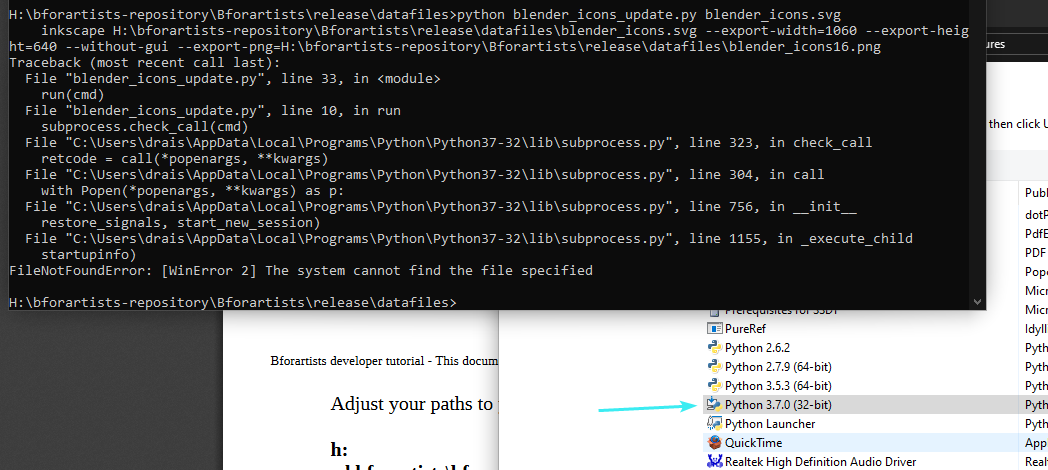
I updated uninstalled and re-installed to 3.7.0 and 3.7.3 and still have the same error. This is frustrating. The file exists, the paths exist, python exists...
Draise14
on 2 May 2019
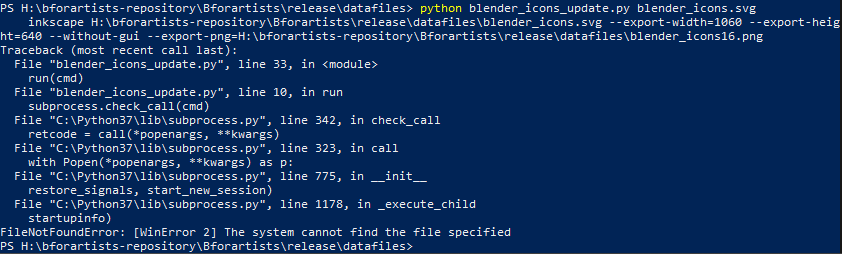
I tried installing Python 3.7 to a custom path, still no fix. But when I set the Path environment variables things are ok...
You need the repository. - Done, tried on Master and branch and files reverted to originals
You need to have Python 2.7x and 3.xx installed. - 2.7.9, 3.5.3 and 3.7.0 installed, in default. 3.7.3 installed on custom C:\Python37
You need Inkscape. - Installed 0.92.4 x64bit - then added that to the Path Environment Variables (didn't work without)
You need to have Blender installed to convert the icons from svg to dat - Blender 2.79b installed by it's *.exe to custom folder (not default) - and I added that to the Path Environment variable (as they also didn't add and wouldn't work without)
So.. the tutorial needs to make sure the requirements have the environment paths correctly placed.
Draise14
on 2 May 2019
Glad you got it working.
I think i have described the steps with the environment variables in the general compiling tutorial somewhere. Do you want to update the icon tutorial ?
ReinerBforartists
on 2 May 2019
I must have read it half a dozen times and missed the memo, so maybe yeah. I think I can update it sure, why not? It's in the Files repository, right?
Draise14
on 2 May 2019
Yes it is located here: https://github.com/Bforartists/files/tree/master/tutorials
For me it's sometimes a bit difficult to catch all necessary steps for the tutorial. I have set up everything before years ...
ReinerBforartists
on 2 May 2019
I'll do it after a successful compile and closing this task.
Draise14
on 2 May 2019
I have found another difficulty:
operator_menu_enum
How do you iconize these ones?
Draise14
on 2 May 2019
This is done in the C code.
You can either create a python menu by using the single operators. That's what i have done in the past for some menus. Or you search for this special enum, and change the icons there.
The downside of making a new python menu is that changes at the C code by the Blender developers may be lost by us. So nowadays i change the enum where possible.
Changing icons in a c enum is a bit more tricky. Usually empty icon slots are defined by a zero in the expression. Different from a python menu, where you just add the icon name, you have to add a ICON_ in front of the icon name. And the black magic here is to find the enum at all. Search for the tooltip. Then you usually also find the enum ...
Here you can find a example commit where i have added three new icons to such a enum. Should make things more clear:
https://github.com/Bforartists/Bforartists/commit/16ea465d4795379f0c8d35f2f88cdbe964428b2c
ReinerBforartists
on 2 May 2019
Ah, ok I'll do it in the python part. Ifgured out how to convert them to layout.operator. The C does look messy right now.
Draise14
on 2 May 2019
Just try it, it is not this hard, it's just new :)
I can have a look at it too if you want.
ReinerBforartists
on 2 May 2019
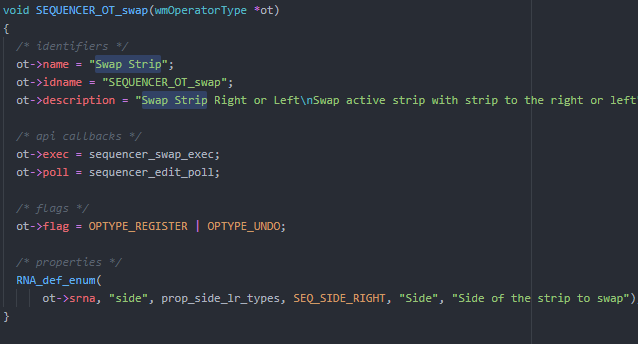
I had a quick look at the C. Found where the operator gets defined, and the tooltip. I can do it now. but now.. I don't want these in their own menu, 3 levels deep. As in: #843 So I will do the python version and add the icons that way up one level.
Draise14
on 2 May 2019
Okay. Your decision :)
ReinerBforartists
on 2 May 2019
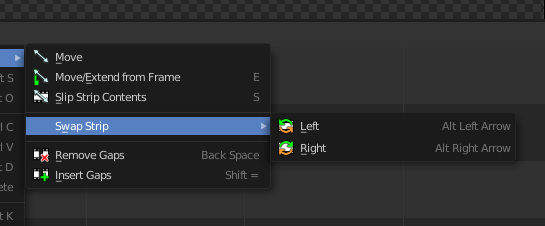
Ok! Got the Enumerated version working.
But.. now I've found a whole bunch of hidden option in the menu that change on selection. These would also be part of this task no?
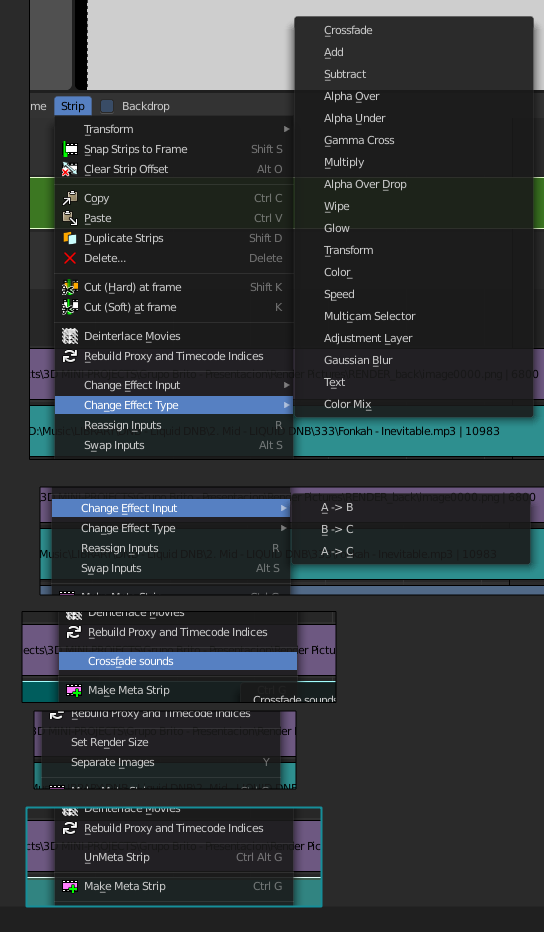
Back to the drawing board.
Draise14
on 2 May 2019
You could. But here you should make it an extra task. It becomes too much at once.
Golden rule, just fix what is part of the current task.
And make the tasks as small as possible! Don't even try to fix all other problems that you stumble across while fixing the current issue. Make them a own issue instead. And then fix them one by one.
ReinerBforartists
on 3 May 2019
Draise, have you already started to create new icons and modified the blender_icons.svg? I fear you need to do a new pull, sorry.
To fix this bug here i had to add the missing three icons. https://github.com/Bforartists/Bforartists/issues/846
In case you have already started, then you can also simply incorporate the three missing icons into your already modified sheet. We just need to make sure that the new icons doesn't get lost when we merge your tasks into the master.
ReinerBforartists
on 3 May 2019
I have already done this task, technically. I'll make a new task for the other dynamic entries, and merge #846, then commit and close this.
I assume I'll have to re-do the DAT icon file generation... Goddamit, no I have to re-do more: to switch to master to get the new icon sheet, I tried to stash my changes, but then it didn't store, and I lost my changes. If you had waited a few more hours! I was gonna commit today.
Crikey, you gotta be quick to commit and close a task before you get behind! hahaha
Draise14
on 3 May 2019
Ok, merged. Had my backups elsewhere.. I guess my paranoid backup system is working. I'm re-generating the icons, will re-compile, test, then commit my branch and close this task and #843.
Draise14
on 3 May 2019
That's why i had linked the task. You could've simple grabbed the iconsheet and the changes in the code from there :)
Icon recreation is of course required.
ReinerBforartists
on 3 May 2019
Ok, compiled on full and lite and no issues. I found that Master had new VSE caching included and that was not merged in. I also fixed up the icon sheet, no all is working well, atleast for me. I committed only this task.
Draise14
on 8 May 2019
I just updated the names of the icons now, shorthanded. I'm recompiling from a new Cmake file to see if I can reproduce the runtime error. (because right now I get none)
Draise14
on 8 May 2019
Oops committed the wrong space_sequencer.py file, now this last commit has the correct version with the correct shorthand.
Draise14
on 8 May 2019
Related issues
Draise14
·
5Comments
ReinerBforartists
·
6Comments
 iyadahmed
·
8Comments
iyadahmed
·
7Comments
iyadahmed
·
6Comments
iyadahmed
·
8Comments
iyadahmed
·
7Comments
iyadahmed
·
6Comments