Betaflight-configurator: Not able to select any configuration pages
10.6.0 worked perfectly but 10.7.0 does not work at all.
It opens the initial screen when I connect to my Trashcan and I get a 3D box that animates with the drone orientation (In 10.6.0 it was a 3D model of a drone).
If I try to select any other pages down the left hand side then the program freezes and I have to close it.
I've tried reinstalling and re-downloading but no change.
I am using windows 10 on a fairly old HP EliteBook 8730
The drone is connected by usb (usb 2). It worked ok on previous versions and is able to read the gyro on the initial page.
I've reverted to 10.6.0
 Johnnysod
All 21 comments
Issue-Label Bot is automatically applying the label bug to this issue, with a confidence of 0.76. Please mark this comment with :thumbsup: or :thumbsdown: to give our bot feedback!
Links: app homepage, dashboard and code for this bot.
![issue-label-bot[bot] picture](https://avatars2.githubusercontent.com/in/27079?v=4&s=40) issue-label-bot[bot]
on 15 Jun 2020
issue-label-bot[bot]
on 15 Jun 2020
Could you please indicate which BF firmware version you are using?
 haslinghuis
on 15 Jun 2020
haslinghuis
on 15 Jun 2020
True, usually this problem occurs when the firmware installed in the FC is not a final version, usually a beta version installed by the manufacturer.
Flash an official final version of Betaflight and the problem will be gone.
 McGiverGim
on 15 Jun 2020
McGiverGim
on 15 Jun 2020
Hey, I think this is totaly related to the graphic controller issue, solves disabling gpu usage
 Asizon
on 15 Jun 2020
Asizon
on 15 Jun 2020
@Johnnysod try runing configurator with --disable-gpu
Asizon
on 15 Jun 2020
Hi
When I connect the drone using 10.6.0, the message under the BeataFlight
logo is
Configurator: 10.6.0
Firmware: BTFL 4.1.7
Target: HAMO/CRAZYBEEF4FS(STM32F411
I dare not update incase I can't configure it
John
07764 335343 (Mobile)
0113 2841178 (Home)
[email protected] (Home)
John.[email protected] (Work)
J Dyson, Riffa Manor Cottage, Off Harrogate Road, Pool in Wharfedale,
W.Yorks, LS21 2PT
On Mon, 15 Jun 2020 at 00:12, haslinghuis notifications@github.com wrote:
Could you please indicate which BF firmware version you are using?
—
You are receiving this because you authored the thread.
Reply to this email directly, view it on GitHub
https://github.com/betaflight/betaflight-configurator/issues/2063#issuecomment-643835209,
or unsubscribe
https://github.com/notifications/unsubscribe-auth/AMOTG5FOJRZL5KSRUKDV33DRWVKPTANCNFSM4N5VACKQ
.
Johnnysod
on 15 Jun 2020
the same problem. it happens to me in all my constructions. I use a 32bit pc but with 10.6.0 it works perfectly. I still didn't flash 4.2 on any.
 rnxto
on 15 Jun 2020
rnxto
on 15 Jun 2020
Can you please try my avobe instructions?
Like that:
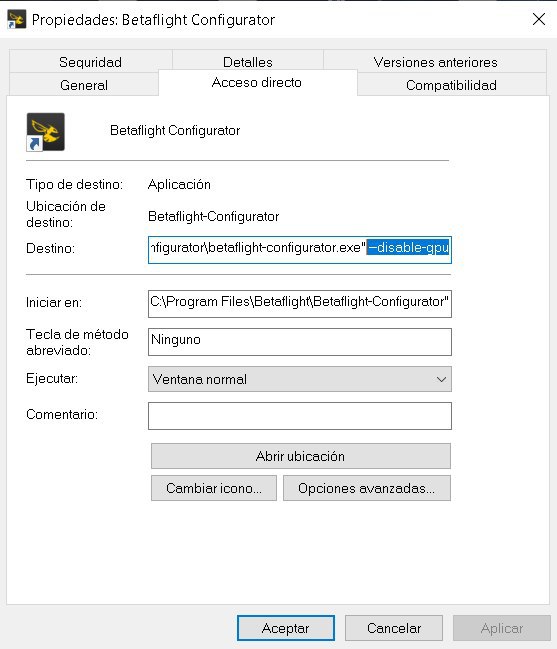
Asizon
on 15 Jun 2020
Ok.
El lun., 15 jun. 2020 20:36, Asier Ruiz notifications@github.com escribió:
Can you please try my avobe instructions?
Like that:
[image: IMG_20200615_203437_812]
https://user-images.githubusercontent.com/43983086/84693468-d045de00-af47-11ea-93ec-694641af7b2e.jpg—
You are receiving this because you commented.
Reply to this email directly, view it on GitHub
https://github.com/betaflight/betaflight-configurator/issues/2063#issuecomment-644307346,
or unsubscribe
https://github.com/notifications/unsubscribe-auth/AP653FYA5GADXVFCKLWYYPLRWZS2FANCNFSM4N5VACKQ
.
rnxto
on 15 Jun 2020
Hi
Yes that worked. Thank you.
Do I have to add that to all the shortcuts (Start menu)?
The 3D model of a drone is back too, instead of a 3D box.
The dashes in your linked picture had me fooled so for anyone else with the same issue, just copy/paste this into your short cut properties Target. (Right click the Betaflight Configurator short cut/select Properties/Paste the text)
"C:Program Files (x86)BetaflightBetaflight-Configuratorbetaflight-configurator.exe" -disable-gpu
Johnnysod
on 15 Jun 2020
Perfecto!!
it worked. Thank you
El lun., 15 jun. 2020 21:24, Johnnysod notifications@github.com escribió:
Hi
Yes that worked. Thank you.Do I have to add that to all the shortcuts (Start menu)?
The 3D model of a drone is back too, instead of a 3D box.
The dashes in your linked picture had me fooled so for anyone else with
the same issue, just copy/paste this into your short cut properties Target.
(Right click the Betaflight Configurator short cut/select Properties/Paste
the text)"C:Program Files
(x86)BetaflightBetaflight-Configuratorbetaflight-configurator.exe"
-disable-gpu—
You are receiving this because you commented.
Reply to this email directly, view it on GitHub
https://github.com/betaflight/betaflight-configurator/issues/2063#issuecomment-644330416,
or unsubscribe
https://github.com/notifications/unsubscribe-auth/AP653F6HOKZWOVAN3VDBGVLRWZYOVANCNFSM4N5VACKQ
.
rnxto
on 15 Jun 2020
I knew that this was going to happen.
@mikeller and I'm no longer the only one with this problem.
you should consider offering at least the nw.js version 0.45.6 as bugfix. This version has been running on my computer for weeks without any problems.
 TheIsotopes
on 16 Jun 2020
TheIsotopes
on 16 Jun 2020
Same issue solve by disable the GPU (prev version works without any problem)
 Honi60
on 16 Jun 2020
Honi60
on 16 Jun 2020
Also experiencing this, or a very similar issue.
Steps to reproduce:
Connect FC to configurator,
Setup tab looks totally normal (quad is an actual quad, not a box).
Click to a different tab (Ports, config, etc)
Expected behavior:
Tab with appropriate settings is opened
Actual behavior:
I get a progress wheel with "Waiting for Data" that spins forever
(I am able to click back to Setup tab, so app isnt completely frozen)
GPU disable has also not worked for me
Steps to reproduce:
Connect FC to configurator (using --disable-gpu as instructed above)
Setup tab looks mostly normal but animation of quad is not there (instruments still responding as expected, just no animated quad in the center of screen).
Click a different tab (Ports, config, etc)
Expected behavior:
Tab with appropriate settings is opened
Actual behavior:
App stays on Setup tab. The tabs all appear to be inert and do not respond to any clicks
 CharlesSampson
on 19 Jun 2020
CharlesSampson
on 19 Jun 2020
@TheIsotopes: The reasons for not changing NW.js versions as a bugfix were explained to you in betaflight/betaflight-configurator#1989. Please stop badgering about it.
 mikeller
on 21 Jun 2020
mikeller
on 21 Jun 2020
@mikeller the bug with the buttons is only from 0.46.x
with 0.45.6 everything is ok in my opinion, i have been using this for weeks
TheIsotopes
on 21 Jun 2020
I have the exact same issue with 10.7 and also with 10.8 nightly v20200711.695
With 10.6 everything worked fine; the issue occurred immediately after upgrading from 10.6. to 10.7
"-disable-gpu" helped as a workaround.
Chrome is current.
Complete uninstall and reinstall of both BF Configurator and Chrome did not change anything.
 alx-696
on 11 Jul 2020
alx-696
on 11 Jul 2020
Same issue solve by disable the GPU (prev version works without any problem)
how do you disable the GPU? and where can it be found?
 d605
on 31 Jul 2020
d605
on 31 Jul 2020
The solution with disabled gpu doesnt work for me either.
BF worked for month without any issue. I dont get it, why it wont anymore.
 el-kwadro-fpv
on 24 Aug 2020
el-kwadro-fpv
on 24 Aug 2020
This issue / pull request has been automatically marked as stale because it has not had recent activity. It will be closed if no further activity occurs within a week.
![stale[bot] picture](https://avatars3.githubusercontent.com/in/1724?v=4&s=40) stale[bot]
on 4 Oct 2020
stale[bot]
on 4 Oct 2020
Automatically closing as inactive.
stale[bot]
on 12 Oct 2020
Related issues
 bizmar
·
5Comments
bizmar
·
5Comments
 MadQ
·
7Comments
MadQ
·
7Comments
 HaroldBawls
·
5Comments
HaroldBawls
·
5Comments
 uberjay2
·
7Comments
uberjay2
·
7Comments
 DusKing1
·
4Comments
DusKing1
·
4Comments
Most helpful comment
Hi
Yes that worked. Thank you.
Do I have to add that to all the shortcuts (Start menu)?
The 3D model of a drone is back too, instead of a 3D box.
The dashes in your linked picture had me fooled so for anyone else with the same issue, just copy/paste this into your short cut properties Target. (Right click the Betaflight Configurator short cut/select Properties/Paste the text)
"C:Program Files (x86)BetaflightBetaflight-Configuratorbetaflight-configurator.exe" -disable-gpu