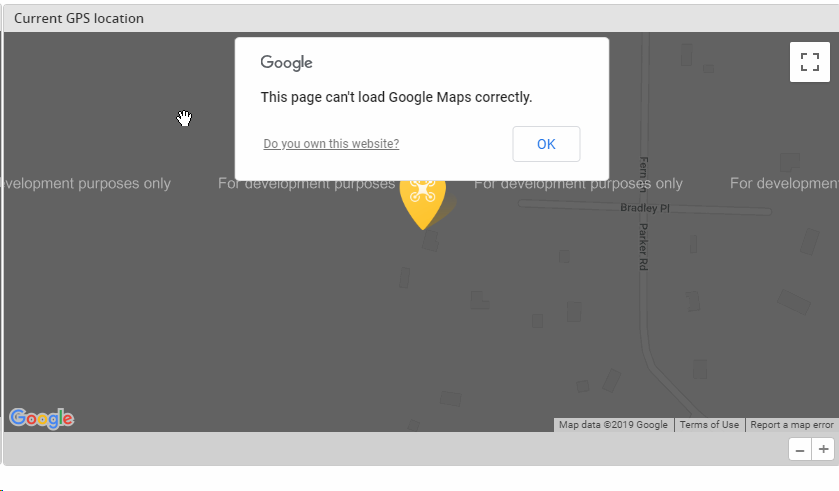
Betaflight-configurator: google maps problem in the GPS tab
 laurentopia
All 14 comments
@laurentopia: Can you try again? Sometimes this is caused by an outage of Google.
 mikeller
on 21 Feb 2019
mikeller
on 21 Feb 2019
The console message is clear:
You have exceeded your request quota for this API. See https://developers.google.com/maps/documentation/javascript/error-messages?utm_source=maps_js&utm_medium=degraded&utm_campaign=billing#api-key-and-billing-errors
The link in the capture points to the same link.
@mikeller who owns the API key? how many uses by day we have?
 McGiverGim
on 22 Feb 2019
McGiverGim
on 22 Feb 2019
Maybe we are not using an API key at all? In theory, is a parameter passed to the call, but I don't see it:
McGiverGim
on 22 Feb 2019
From the look of it access to Google Maps through the JS API is no longer free:
https://developers.google.com/maps/documentation/javascript/usage-and-billing
I read about that somewhere a while ago, but did not connect the dots that Betaflight configurator will be affected.
In short, this means that we can no longer use Google Maps for the GPS map in configurator, as we don't want to cover the cost of our users using this tab.
Looking at iNav, they seem to have switched to using OpenStreetMap (or Bing maps, through openlayer, see iNavFlight/inav-configurator#595). If we want to re-enable map support for the GPS tab, we'll have to switch as well.
mikeller
on 23 Feb 2019
Looking at the internet, I see at some places that Google gives 200$ free at month that can be used in different places including maps. I'm not too sure about conditions.
If I get some time I can look at Open Street Map, is enough for our usage.
McGiverGim
on 23 Feb 2019
Yeah, I saw the 'free USD 200' offer too. But as far as I understand it this requires you to set up payment through a credit card, and once the USD 200 are used up, your card will be charged for the requests. So adding an API key to configurator would be playing with fire, as we'd have no way to stop the requests once the USD 200 are used up.
mikeller
on 23 Feb 2019
I think we can block it in the API configuration, but if they need to have a payment configured, is a bad idea. Maybe now the limit is 200$, but if they change it, maybe we can hit the limit before :-(
McGiverGim
on 23 Feb 2019
Even with the USD 200 limit giving us a seemingly large number of free API calls I do not think it is a risk we can afford to take - what if there was a bug that under certain circumstances had configurator go into a loop and try to load the map 100 times a second - leaving a single configurator instance in this state would chew through the free USD 200 in under 5 minutes...
mikeller
on 23 Feb 2019
Seeing the API for embed maps, that is what we I using (I think), it seems that the basic use, that is the use of the configurator, is free:
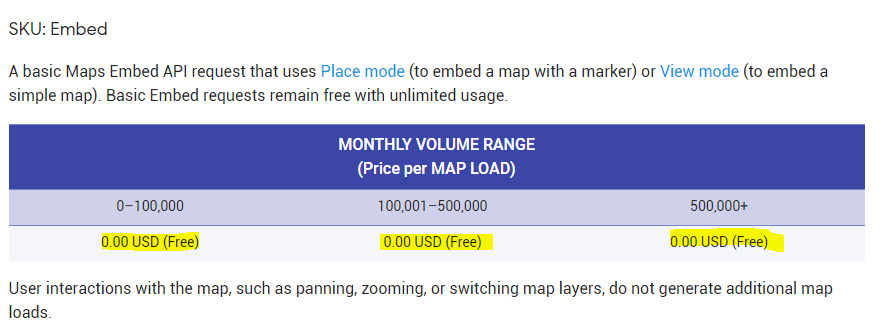
More info here: https://developers.google.com/maps/documentation/embed/guide#place_mode
What I don't know if it we can put in the console a limit of 0$ (to be protected if something goes wrong...)
McGiverGim
on 27 Feb 2019
@McGiverGim: Good point, I had not looked into the details of what requests are charged, but it looks like what we are doing might be available for zero charge.
This looks like it might be used to make sure it stays that way: https://cloud.google.com/billing/docs/how-to/budgets
It's not only that things can go wrong - since we'll have to put the API key into the application we ship, there is little we can do to stop people from extracting the key, and using it to access the API with apps other than the configurator...
mikeller
on 27 Feb 2019
Exactly! I don't know who can "officially" generate the key to test it. Do you have access to it?
McGiverGim
on 27 Feb 2019
The way I understand it anybody can create an account with Google, then register his credit card, and then create an API key. I think before we jump into this we need to evaluate if this is what we want to do, as this puts a financial liability on us (even if we expect the cost to always be 0, this is still different from 'we are sure we won't have to pay, even if things go wrong').
mikeller
on 27 Feb 2019
iNav uses OpenStreetMap. It works.
laurentopia
on 27 Feb 2019
I have been playing today with OpenStreetMaps, I have a version more or less working, but then I noticed that I was using API version 2, and the latest is 5.3 :-P
I will try to upgrade...
McGiverGim
on 27 Feb 2019
Related issues
 bizmar
·
5Comments
bizmar
·
5Comments
 AirBreak69
·
9Comments
AirBreak69
·
9Comments
 uberjay2
·
7Comments
uberjay2
·
7Comments
 derdanu
·
7Comments
derdanu
·
7Comments
 MathijsG
·
9Comments
MathijsG
·
9Comments
Most helpful comment
I have been playing today with OpenStreetMaps, I have a version more or less working, but then I noticed that I was using API version 2, and the latest is 5.3 :-P
I will try to upgrade...