Bert-as-service: mac启动bert-server报错TypeError: cannot unpack non-iterable NoneType object
I:VENTILATOR:[__i:__i: 67]:freeze, optimize and export graph, could take a while...
E:GRAPHOPT:[gra:opt:154]:fail to optimize the graph!
Traceback (most recent call last):
File "/usr/local/lib/python3.7/site-packages/bert_serving/server/graph.py", line 42, in optimize_graph
tf = import_tf(verbose=args.verbose)
File "/usr/local/lib/python3.7/site-packages/bert_serving/server/helper.py", line 186, in import_tf
tf.logging.set_verbosity(tf.logging.DEBUG if verbose else tf.logging.ERROR)
AttributeError: module 'tensorflow' has no attribute 'logging'
Traceback (most recent call last):
File "/usr/local/bin/bert-serving-start", line 10, in
sys.exit(main())
File "/usr/local/lib/python3.7/site-packages/bert_serving/server/cli/__init__.py", line 4, in main
with BertServer(get_run_args()) as server:
File "/usr/local/lib/python3.7/site-packages/bert_serving/server/__init__.py", line 71, in __init__
self.graph_path, self.bert_config = pool.apply(optimize_graph, (self.args,))
TypeError: cannot unpack non-iterable NoneType object
 cat1222
All 8 comments
This error can be cause by multiple reasons:
(1) Installing the wrong version of TensorFlow;
You should install TensorFlow >= 1.10 and <=1.15 (don't install TensorFlow 2.0)
(2) When trying to start the server using the command:
bert-serving-start -model_dir cased_L-24_H-1024_A-16/ -num_worker=4
change the path to the _model_dir_ to point to the model directory in your machine.
 disooqi
on 8 Mar 2020
disooqi
on 8 Mar 2020
I am still unable to do it. What am I doing wrong?
The path of the folder is:
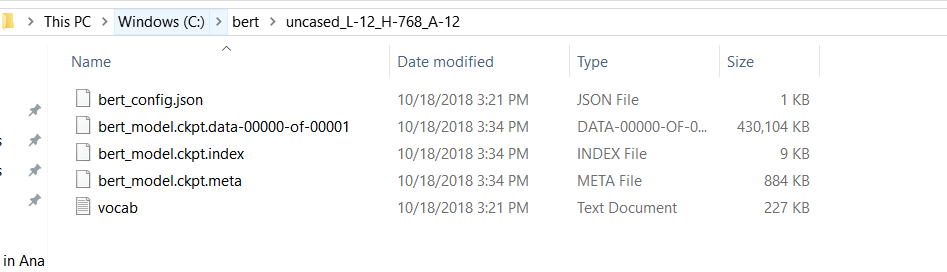
The command I'm running is:

 shikhar42
on 10 Mar 2020
shikhar42
on 10 Mar 2020
@shikhar42 looks like you're need a space between your path and num_workers.
 ghunkins
on 10 Mar 2020
ghunkins
on 10 Mar 2020
@ghunkins thank you for your reply. But when I do that, I get the following error

I was getting this error earlier and when I removed spaces between the path and num_workers, it accepted num_workers as an argument but then it fails with the type error optimizing the graph.
shikhar42
on 10 Mar 2020
@shikhar42 It defaults to gpu config I believe, add the -cpu flag and you should be fine. It's failing on some CUDA configuration, so the CPU should bypass that.
ghunkins
on 10 Mar 2020
@ghunkins

Is this what you mean, or am I doing something wrong?
Thanks
shikhar42
on 10 Mar 2020
anyone else facing the same issue?
shikhar42
on 11 Mar 2020
@shikhar42 you need to initialize your model_dir with the absolute path not the relative path.
 STHSF
on 19 Mar 2020
STHSF
on 19 Mar 2020
Related issues
 JulianGerhard21
·
4Comments
JulianGerhard21
·
4Comments
 kirdin
·
3Comments
kirdin
·
3Comments
 k-oul
·
7Comments
k-oul
·
7Comments
 KODGV
·
6Comments
KODGV
·
6Comments
 applenob
·
7Comments
applenob
·
7Comments
Most helpful comment
This error can be cause by multiple reasons:
(1) Installing the wrong version of TensorFlow;
You should install TensorFlow >= 1.10 and <=1.15 (don't install TensorFlow 2.0)
(2) When trying to start the server using the command:
bert-serving-start -model_dir cased_L-24_H-1024_A-16/ -num_worker=4
change the path to the _model_dir_ to point to the model directory in your machine.