Bert-as-service: TypeError: cannot unpack non-iterable NoneType object
Prerequisites
Please fill in by replacing
[ ]with[x].
- [x] Are you running the latest
bert-as-service? - [x] Did you follow the installation and the usage instructions in
README.md? - [x] Did you check the FAQ list in
README.md? - [x] Did you perform a cursory search on existing issues?
System information
Some of this information can be collected via this script.
- OS Platform and Distribution (e.g., Linux Ubuntu 16.04):windows10
- TensorFlow installed from (source or binary):
- TensorFlow version:1.13.0
- Python version:3.7
bert-as-serviceversion: latest- GPU model and memory: 2080 8G
- CPU model and memory: AMD 40G
Description
Please replace
YOUR_SERVER_ARGSandYOUR_CLIENT_ARGSaccordingly. You can also write your own description for reproducing the issue.
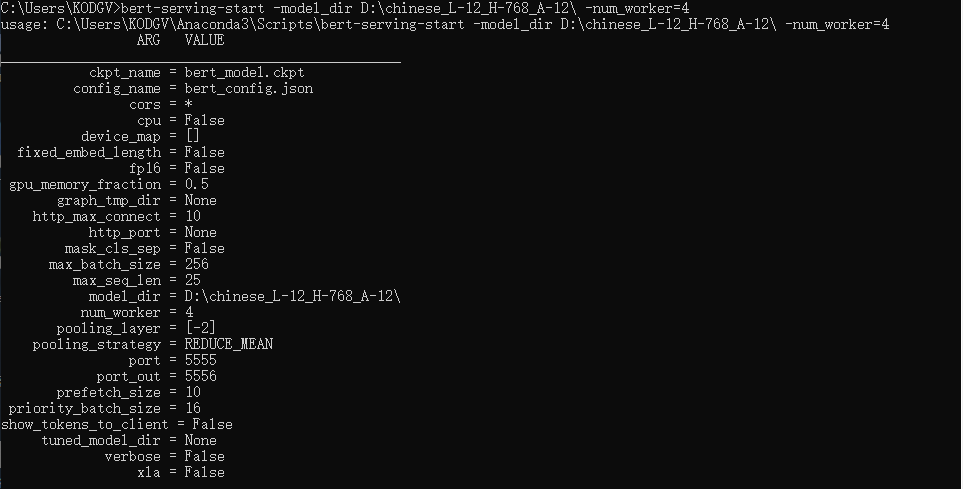
I'm using this command to start the server:
bert-serving-start -model_dir D:\chinese_L-12_H-768_A-12\ -num_worker=4
Then this issue shows up:
Traceback (most recent call last):
File "c:userskodgvanaconda3librunpy.py", line 193, in _run_module_as_main
"__main__", mod_spec)
File "c:userskodgvanaconda3librunpy.py", line 85, in _run_code
exec(code, run_globals)
File "C:UsersKODGVAnaconda3Scriptsbert-serving-start.exe__main__.py", line 9, in
File "c:userskodgvanaconda3libsite-packagesbert_servingservercli__init__.py", line 5, in main
server = BertServer(args)
File "c:userskodgvanaconda3libsite-packagesbert_servingserver__init__.py", line 70, in __init__
self.graph_path, self.bert_config = pool.apply(optimize_graph, (self.args,))
TypeError: cannot unpack non-iterable NoneType object
i'm using the full path of the files
 KODGV
KODGV
All 6 comments
it seems there may be some problems with the latest tensorflow version. i downgrade tensorflow-gpu==1.12.0 to fix the problem.
KODGV
on 17 Mar 2019
Updated the latest version of Tensorflow and have given absolute path still the same error
 NidhiRustagi
on 9 Oct 2019
NidhiRustagi
on 9 Oct 2019
For those who are on a CPU:
Follow these two steps if you're getting the same error.
pip uninstall___current_version_of_tf___pip install tensorflow==1.13.0rc1
 rowhitswami
on 29 Dec 2019
rowhitswami
on 29 Dec 2019
在libbert_servingservergraph.py 中引入
import traceback方法,
在150行(except Exception :后面)插入语句traceback.print_exc()。重新运行,打印出配置失败的原因是目录没对。重新检查目录后成功。所以,正确方法是打印出真正的错误原因
谷歌了很多,最后发现只有打印出真正的错误原因才可以解决。这是真的可以解决方法
KODGV
on 15 Jul 2020
Because tensorflow has no logging
The traceback error: AttributeError: module 'tensorflow' has no attribute 'logging'
So downgrade the version.
 Tao-Han
on 17 Aug 2020
Tao-Han
on 17 Aug 2020
My issue was with the pre-trained model I was trying to use. Check whether you get the same error with the original pre-trained BERT models.
 Sarvash
on 31 Jan 2021
Sarvash
on 31 Jan 2021
Related issues
 astariul
·
7Comments
astariul
·
7Comments
 un-lock-me
·
3Comments
un-lock-me
·
3Comments
 FanyiMo
·
3Comments
FanyiMo
·
3Comments
 kirdin
·
3Comments
kirdin
·
3Comments
 shashi-netra
·
3Comments
shashi-netra
·
3Comments
Most helpful comment
For those who are on a CPU:
Follow these two steps if you're getting the same error.
pip uninstall___current_version_of_tf___pip install tensorflow==1.13.0rc1