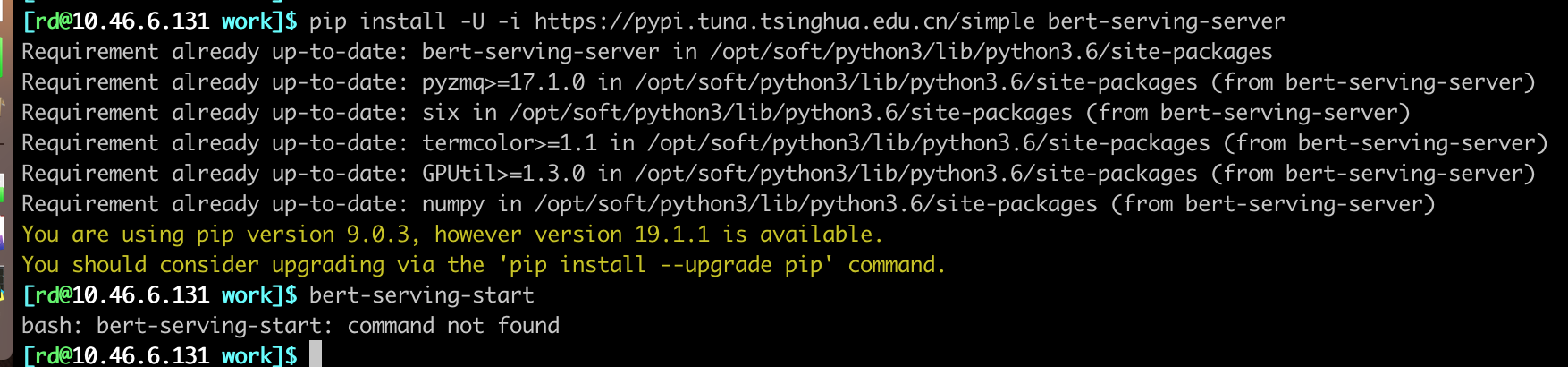
Bert-as-service: bash: bert-serving-start: command not found
 Jie-Yuan
>All comments
For future reference, this means your PATH is not set correctly.
Refer to this: https://stackoverflow.com/questions/46973667/python-console-scripts-doesnt-work-when-pip-install-user for more details.
If ~/.local/bin is not on your path, then do this in your .profile or something that gets loaded by your shell:
export PATH=~/.local/bin:$PATH
On a Mac, depending on your Python install, that folder may not exist. Instead the bin folder may sometimes be found here ~/Library/Python/3.7/bin.
 jabbany
on 17 Jun 2019
jabbany
on 17 Jun 2019
👍4
Was this page helpful?
0 / 5 - 0 ratings
Related issues
 JulianGerhard21
·
4Comments
JulianGerhard21
·
4Comments
 lu161513
·
4Comments
lu161513
·
4Comments
 KODGV
·
6Comments
KODGV
·
6Comments
 flyzaway
·
3Comments
flyzaway
·
3Comments
 un-lock-me
·
3Comments
un-lock-me
·
3Comments
Most helpful comment
For future reference, this means your PATH is not set correctly.
Refer to this: https://stackoverflow.com/questions/46973667/python-console-scripts-doesnt-work-when-pip-install-user for more details.
If
~/.local/binis not on your path, then do this in your.profileor something that gets loaded by your shell:export PATH=~/.local/bin:$PATHOn a Mac, depending on your Python install, that folder may not exist. Instead the bin folder may sometimes be found here
~/Library/Python/3.7/bin.