Bert-as-service: fail to start the server
I have already installed those two packages
still fail on Windows10.

 ghost
ghost
All 43 comments
looks like bert-serving-start is not in your PATH env variable. update your PATH variable.
 hanxiao
on 7 Dec 2018
hanxiao
on 7 Dec 2018
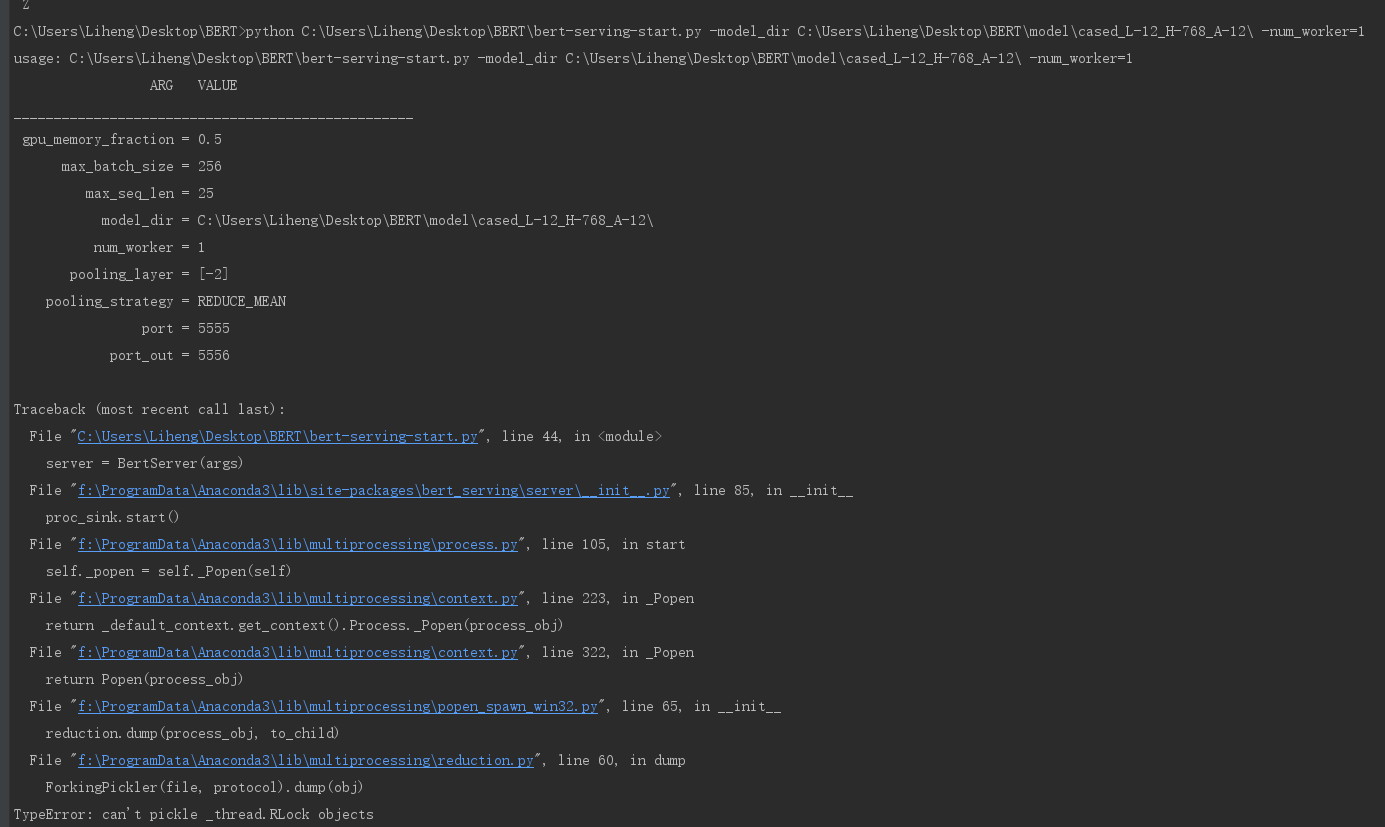
I run this command:
python C:\Users\Liheng\Desktop\BERTbert-serving-start.py -model_dir C:\Users\Liheng\Desktop\BERT\model\cased_L-12_H-768_A-12\ -num_worker=1,
but thie issue occurs:
 Lihengwannafly
on 7 Dec 2018
Lihengwannafly
on 7 Dec 2018
@RedRedZhang How you resolved it I also have same Windows 10, even declared the path in ENV Variable but still getting the same error.
 deepankar27
on 10 Dec 2018
deepankar27
on 10 Dec 2018
I run this command:
python C:\Users\Liheng\Desktop\BERTbert-serving-start.py -model_dir C:\Users\Liheng\Desktop\BERT\model\cased_L-12_H-768_A-12\ -num_worker=1,
but thie issue occurs:
i got same error
 Kaiseryang1224
on 12 Dec 2018
Kaiseryang1224
on 12 Dec 2018
有人知道怎么解决这个问题了么
 chenfu12138
on 12 Dec 2018
chenfu12138
on 12 Dec 2018
I'm reopening this issue for now as it seems a common error for Windows users. I will try to address this issue later.
Meanwhile, since I don't work on Windows and thus don't have the dev-env on hand, it would be really great if someone can help me on solving this issue especially if you are a Windows user. I mark this issue as "help wanted".
hanxiao
on 13 Dec 2018
I run this command:
python C:\Users\Liheng\Desktop\BERTbert-serving-start.py -model_dir C:\Users\Liheng\Desktop\BERT\model\cased_L-12_H-768_A-12\ -num_worker=1,
but thie issue occurs:
Same error, how to solve it? Thx!
 HuarongLi
on 17 Dec 2018
HuarongLi
on 17 Dec 2018
please create a new issue and provide detailed traceback.
hanxiao
on 17 Dec 2018
i got same error
same error
 IgorWang
on 24 Dec 2018
IgorWang
on 24 Dec 2018
same error
 nanhaishun
on 25 Dec 2018
nanhaishun
on 25 Dec 2018
I run this command:
python C:\Users\Liheng\Desktop\BERTbert-serving-start.py -model_dir C:\Users\Liheng\Desktop\BERT\model\cased_L-12_H-768_A-12\ -num_worker=1,
but thie issue occurs:
Same error, how to solve it? Thx!
The problem seems like this:
https://github.com/chainer/chainerrl/issues/175
and I got it to run by hacking multiprocessing.
reduction.py:
- import pickle
+ import dill as pickle
Maybe it will broke something else,but the error is solved
HuarongLi
on 26 Dec 2018
@HuarongLi Good to know! Thanks a lot.
I'd like to encourage everyone who encountered this problem on Windows system (apparently this is Windows-only problem) give a try on @HuarongLi solution or provide other clues. As I don't have any Windows dev-env on hands, it would be very difficult for me to verify this issue.
hanxiao
on 26 Dec 2018
I also test this service(1.5.8) in Ubuntu(14.04), and got same error, but after update service to 1.6.4, it's OK,
I don't recommend to hack system code.
HuarongLi
on 26 Dec 2018
Finally, I give up building on windows.
Now i building on Centos7 and test OK
Kaiseryang1224
on 26 Dec 2018
got same error on windows, could be a common multiprocessing issue.
 bojie
on 7 Jan 2019
bojie
on 7 Jan 2019
Windows pickle error caused by multiprocessing can't pickle logger , it can be solved by removing logger.
Another common issue in windows is znq tcp connect .
origin address is tcp://0.0.0.0:port, should be replaced by tcp://127.0.0.1:port because origin address will not caught by recv() and result in waiting for long time
 aron3312
on 8 Jan 2019
aron3312
on 8 Jan 2019
nice! good to know. will make a PR to address these two points.
hanxiao
on 8 Jan 2019
I refactor the server part according to @aron3312 suggestion. To Windows users, could you guys do pip install -U bert-serving-server bert-serving-client to upgrade to 1.6.7, and then give it a try?
hanxiao
on 9 Jan 2019
I refactor the server part according to @aron3312 suggestion. To Windows users, could you guys do
pip install -U bert-serving-server bert-serving-clientto upgrade to 1.6.7, and then give it a try?
i'm try it and it working
remove about logger (ex self.logger.info...etc.) or replace yourself log module
that working for me
Kaiseryang1224
on 9 Jan 2019
I am using win10 and just updated bert-serving-server and bert-serving-client to 1.6.8.
when run the server, I got the following error:
...lib\multiprocessing\reduction.py", line 60, in dump
ForkingPickler(file, protocol).dump(obj)
TypeError: can't pickle _thread.RLock objects
...
lib\multiprocessing\reduction.py", line 82, in steal_handle
_winapi.PROCESS_DUP_HANDLE, False, source_pid)
OSError: [WinError 87] The parameter is incorrect
The server cannot be started.
 henryTask1
on 9 Jan 2019
henryTask1
on 9 Jan 2019
For those who need run this on Windows 10 right now...
- to solve the
bert-serving-start not foundproblem
Create a start-bert-as-service.py with the following code
import sys

from bert_serving.server import BertServer
from bert_serving.server.helper import get_run_args


if __name__ == '__main__':
    args = get_run_args()
    server = BertServer(args)
    server.start()
    server.join()
so you can run with the following command
python start-bert-as-service.py -model_dir ./tmp/chinese_L-12_H-768_A-12/ -num_worker=1
- to solve the
TypeError: can't pickle _thread.RLock objectsproblem
Replace the set_logger function in the bert_serving/server/helper with yours
# def set_logger(context, verbose=False):
#     logger = logging.getLogger(context)
#     logger.setLevel(logging.DEBUG if verbose else logging.INFO)
#     formatter = logging.Formatter(
#         '%(levelname)-.1s:' + context + ':[%(filename).3s:%(funcName).3s:%(lineno)3d]:%(message)s', datefmt=
#         '%m-%d %H:%M:%S')
#     console_handler = logging.StreamHandler()
#     console_handler.setLevel(logging.DEBUG if verbose else logging.INFO)
#     console_handler.setFormatter(formatter)
#     logger.handlers = []
#     logger.addHandler(console_handler)
#     return logger
class FakeLogger:
    def __init__(self, *args, **kwargs):
        pass

    def info(self, *args, **kwargs):
        print(*args, **kwargs)

    def debug(self, *args, **kwargs):
        print(*args, **kwargs)


def set_logger(context, verbose=False):
    return FakeLogger()
 eggachecat
on 9 Jan 2019
eggachecat
on 9 Jan 2019
Thanks @eggachecat for pointing out a solution for the logger, I will do a PR to fix this.
hanxiao
on 9 Jan 2019
For those who need run this on Windows 10 right now...
- to solve the
bert-serving-start not foundproblemCreate a start-bert-as-service.py with the following code
import sys

from bert_serving.server import BertServer
from bert_serving.server.helper import get_run_args


if __name__ == '__main__':
    args = get_run_args()
    server = BertServer(args)
    server.start()
    server.join()
so you can run with the following command
python start-bert-as-service.py -model_dir ./tmp/chinese_L-12_H-768_A-12/ -num_worker=1
- to solve the
TypeError: can't pickle _thread.RLock objectsproblemReplace the _set_logger_ function in the _bert_serving/server/helper_ with yours
# def set_logger(context, verbose=False):
#     logger = logging.getLogger(context)
#     logger.setLevel(logging.DEBUG if verbose else logging.INFO)
#     formatter = logging.Formatter(
#         '%(levelname)-.1s:' + context + ':[%(filename).3s:%(funcName).3s:%(lineno)3d]:%(message)s', datefmt=
#         '%m-%d %H:%M:%S')
#     console_handler = logging.StreamHandler()
#     console_handler.setLevel(logging.DEBUG if verbose else logging.INFO)
#     console_handler.setFormatter(formatter)
#     logger.handlers = []
#     logger.addHandler(console_handler)
#     return logger
class FakeLogger:
    def __init__(self, *args, **kwargs):
        pass

    def info(self, *args, **kwargs):
        print(*args, **kwargs)

    def debug(self, *args, **kwargs):
        print(*args, **kwargs)


def set_logger(context, verbose=False):
    return FakeLogger()
Yes,the server can start in Windows 10 using this method! Thx!
 stellaHSR
on 10 Jan 2019
stellaHSR
on 10 Jan 2019
@eggachecat I refactor the logger part in #183 as you suggested. The new feature is available since 1.6.9 and please do
pip install -U bert-serving-server bert-serving-client
for the update. That should work on Windows.
To all Windows users, please try 1.6.9. And if there is still a problem feel free to reopen this issue.
hanxiao
on 10 Jan 2019
Great! The server can start in win10 by this approach. Thanks a lot!
henryTask1
on 10 Jan 2019
@eggachecat using your method I get the following error:
[jalal@goku test]$ python start-bert-as-service.py -model_dir english_L-12_H-768_A-12/ -num_worker=4
/scratch/sjn-p3/anaconda/anaconda3/lib/python3.6/site-packages/h5py/__init__.py:36: FutureWarning: Conversion of the second argument of issubdtype from `float` to `np.floating` is deprecated. In future, it will be treated as `np.float64 == np.dtype(float).type`.
  from ._conv import register_converters as _register_converters
usage: start-bert-as-service.py -model_dir english_L-12_H-768_A-12/ -num_worker=4
                 ARG   VALUE
__________________________________________________
           ckpt_name = bert_model.ckpt
         config_name = bert_config.json
                cors = *
                 cpu = False
          device_map = []
  fixed_embed_length = False
                fp16 = False
 gpu_memory_fraction = 0.5
       graph_tmp_dir = None
    http_max_connect = 10
           http_port = None
        mask_cls_sep = False
      max_batch_size = 256
         max_seq_len = 25
           model_dir = english_L-12_H-768_A-12/
          num_worker = 4
       pooling_layer = [-2]
    pooling_strategy = REDUCE_MEAN
                port = 5555
            port_out = 5556
       prefetch_size = 10
 priority_batch_size = 16
show_tokens_to_client = False
     tuned_model_dir = None
             verbose = False
                 xla = False

I:VENTILATOR:[__i:__i: 66]:freeze, optimize and export graph, could take a while...
I:GRAPHOPT:[gra:opt: 52]:model config: english_L-12_H-768_A-12/bert_config.json
I:GRAPHOPT:[gra:opt: 55]:checkpoint: english_L-12_H-768_A-12/bert_model.ckpt
E:GRAPHOPT:[gra:opt:150]:fail to optimize the graph!
Traceback (most recent call last):
  File "/home/grad3/jalal/.local/lib/python3.6/site-packages/bert_serving/server/graph.py", line 57, in optimize_graph
    bert_config = modeling.BertConfig.from_dict(json.load(f))
  File "/scratch/sjn-p3/anaconda/anaconda3/lib/python3.6/json/__init__.py", line 296, in load
    return loads(fp.read(),
  File "/home/grad3/jalal/.local/lib/python3.6/site-packages/tensorflow/python/lib/io/file_io.py", line 125, in read
    self._preread_check()
  File "/home/grad3/jalal/.local/lib/python3.6/site-packages/tensorflow/python/lib/io/file_io.py", line 85, in _preread_check
    compat.as_bytes(self.__name), 1024 * 512, status)
  File "/home/grad3/jalal/.local/lib/python3.6/site-packages/tensorflow/python/framework/errors_impl.py", line 526, in __exit__
    c_api.TF_GetCode(self.status.status))
tensorflow.python.framework.errors_impl.NotFoundError: english_L-12_H-768_A-12/bert_config.json; No such file or directory
Traceback (most recent call last):
  File "start-bert-as-service.py", line 9, in <module>
    server = BertServer(args)
  File "/home/grad3/jalal/.local/lib/python3.6/site-packages/bert_serving/server/__init__.py", line 70, in __init__
    self.graph_path, self.bert_config = pool.apply(optimize_graph, (self.args,))
TypeError: 'NoneType' object is not iterable
 monajalal
on 4 Mar 2019
monajalal
on 4 Mar 2019
I get the same error on CentOS 7:
[jalal@goku test]$ bert-serving-start -model_dir english_L-12_H-768_A-12/ -num_worker=4
bash: bert-serving-start: command not found...

$ lsb_release -a
LSB Version:    :core-4.1-amd64:core-4.1-noarch
Distributor ID: CentOS
Description:    CentOS Linux release 7.6.1810 (Core)
Release:    7.6.1810
Codename:   Core
$ uname -a
Linux goku.bu.edu 3.10.0-957.5.1.el7.x86_64 #1 SMP Fri Feb 1 14:54:57 UTC 2019 x86_64 x86_64 x86_64 GNU/Linux

$ python
Python 3.6.4 |Anaconda custom (64-bit)| (default, Jan 16 2018, 18:10:19)
[GCC 7.2.0] on linux
Type "help", "copyright", "credits" or "license" for more information.
>>> import tensorflow as tf
tf./scratch/sjn-p3/anaconda/anaconda3/lib/python3.6/site-packages/h5py/__init__.py:36: FutureWarning: Conversion of the second argument of issubdtype from `float` to `np.floating` is deprecated. In future, it will be treated as `np.float64 == np.dtype(float).type`.
  from ._conv import register_converters as _register_converters
>>> tf.__version__
'1.11.0'
@monajalal in your log
tensorflow.python.framework.errors_impl.NotFoundError: english_L-12_H-768_A-12/bert_config.json; No such file or directory
apparently, your model path is wrong. Try the absolute path if the relative one doesn't work for you.
hanxiao
on 4 Mar 2019
@hanxiao thanks a lot for the prompt response:
[jalal@goku test]$ bert-serving-start -model_dir /scratch2/NAACL2018/test/english_L-12_H-768_A-12/ -num_worker=4
bash: bert-serving-start: command not found...
[jalal@goku test]$ python start-bert-as-service.py -model_dir /scratch2/NAACL2018/test/english_L-12_H-768_A-12/ -num_worker=4
/scratch/sjn-p3/anaconda/anaconda3/lib/python3.6/site-packages/h5py/__init__.py:36: FutureWarning: Conversion of the second argument of issubdtype from `float` to `np.floating` is deprecated. In future, it will be treated as `np.float64 == np.dtype(float).type`.
  from ._conv import register_converters as _register_converters
usage: start-bert-as-service.py -model_dir /scratch2/NAACL2018/test/english_L-12_H-768_A-12/ -num_worker=4
                 ARG   VALUE
__________________________________________________
           ckpt_name = bert_model.ckpt
         config_name = bert_config.json
                cors = *
                 cpu = False
          device_map = []
  fixed_embed_length = False
                fp16 = False
 gpu_memory_fraction = 0.5
       graph_tmp_dir = None
    http_max_connect = 10
           http_port = None
        mask_cls_sep = False
      max_batch_size = 256
         max_seq_len = 25
           model_dir = /scratch2/NAACL2018/test/english_L-12_H-768_A-12/
          num_worker = 4
       pooling_layer = [-2]
    pooling_strategy = REDUCE_MEAN
                port = 5555
            port_out = 5556
       prefetch_size = 10
 priority_batch_size = 16
show_tokens_to_client = False
     tuned_model_dir = None
             verbose = False
                 xla = False

I:VENTILATOR:[__i:__i: 66]:freeze, optimize and export graph, could take a while...
I:GRAPHOPT:[gra:opt: 52]:model config: /scratch2/NAACL2018/test/english_L-12_H-768_A-12/bert_config.json
I:GRAPHOPT:[gra:opt: 55]:checkpoint: /scratch2/NAACL2018/test/english_L-12_H-768_A-12/bert_model.ckpt
E:GRAPHOPT:[gra:opt:150]:fail to optimize the graph!
Traceback (most recent call last):
  File "/home/grad3/jalal/.local/lib/python3.6/site-packages/bert_serving/server/graph.py", line 57, in optimize_graph
    bert_config = modeling.BertConfig.from_dict(json.load(f))
  File "/scratch/sjn-p3/anaconda/anaconda3/lib/python3.6/json/__init__.py", line 296, in load
    return loads(fp.read(),
  File "/home/grad3/jalal/.local/lib/python3.6/site-packages/tensorflow/python/lib/io/file_io.py", line 125, in read
    self._preread_check()
  File "/home/grad3/jalal/.local/lib/python3.6/site-packages/tensorflow/python/lib/io/file_io.py", line 85, in _preread_check
    compat.as_bytes(self.__name), 1024 * 512, status)
  File "/home/grad3/jalal/.local/lib/python3.6/site-packages/tensorflow/python/framework/errors_impl.py", line 526, in __exit__
    c_api.TF_GetCode(self.status.status))
tensorflow.python.framework.errors_impl.NotFoundError: /scratch2/NAACL2018/test/english_L-12_H-768_A-12/bert_config.json; No such file or directory
Traceback (most recent call last):
  File "start-bert-as-service.py", line 9, in <module>
    server = BertServer(args)
  File "/home/grad3/jalal/.local/lib/python3.6/site-packages/bert_serving/server/__init__.py", line 70, in __init__
    self.graph_path, self.bert_config = pool.apply(optimize_graph, (self.args,))
TypeError: 'NoneType' object is not iterable
@hanxiao downloaded the uncased large model from here, where else should I have downloaded it? Could you please guide?
https://storage.googleapis.com/bert_models/2018_10_18/uncased_L-24_H-1024_A-16.zip
monajalal
on 4 Mar 2019
@hanxiao nvm that was a stupid path problem.
[jalal@goku test]$ python start-bert-as-service.py -model_dir /scratch2/NAACL2018/test/english_L-12_H-768_A-12/uncased_L-24_H-1024_A-16 -num_worker=4
/scratch/sjn-p3/anaconda/anaconda3/lib/python3.6/site-packages/h5py/__init__.py:36: FutureWarning: Conversion of the second argument of issubdtype from `float` to `np.floating` is deprecated. In future, it will be treated as `np.float64 == np.dtype(float).type`.
  from ._conv import register_converters as _register_converters
usage: start-bert-as-service.py -model_dir /scratch2/NAACL2018/test/english_L-12_H-768_A-12/uncased_L-24_H-1024_A-16 -num_worker=4
                 ARG   VALUE
__________________________________________________
           ckpt_name = bert_model.ckpt
         config_name = bert_config.json
                cors = *
                 cpu = False
          device_map = []
  fixed_embed_length = False
                fp16 = False
 gpu_memory_fraction = 0.5
       graph_tmp_dir = None
    http_max_connect = 10
           http_port = None
        mask_cls_sep = False
      max_batch_size = 256
         max_seq_len = 25
           model_dir = /scratch2/NAACL2018/test/english_L-12_H-768_A-12/uncased_L-24_H-1024_A-16
          num_worker = 4
       pooling_layer = [-2]
    pooling_strategy = REDUCE_MEAN
                port = 5555
            port_out = 5556
       prefetch_size = 10
 priority_batch_size = 16
show_tokens_to_client = False
     tuned_model_dir = None
             verbose = False
                 xla = False

I:VENTILATOR:[__i:__i: 66]:freeze, optimize and export graph, could take a while...
I:GRAPHOPT:[gra:opt: 52]:model config: /scratch2/NAACL2018/test/english_L-12_H-768_A-12/uncased_L-24_H-1024_A-16/bert_config.json
I:GRAPHOPT:[gra:opt: 55]:checkpoint: /scratch2/NAACL2018/test/english_L-12_H-768_A-12/uncased_L-24_H-1024_A-16/bert_model.ckpt
I:GRAPHOPT:[gra:opt: 59]:build graph...
A couple of questions for you:
- so
bert-serving-startwould not work and I should just stick topython start-bert-as-service.py? - what is the max number of worker I could use if I have two 1080Ti GPUs?
- When do I know it is ready for running the client? for example right now I am seeing the following:
I:WORKER-0:[__i:_ru:478]:use device gpu: 1, load graph from /tmp/tmp2ggnx73k
I:WORKER-1:[__i:_ru:478]:use device gpu: 0, load graph from /tmp/tmp2ggnx73k
I:WORKER-2:[__i:_ru:478]:use device gpu: 1, load graph from /tmp/tmp2ggnx73k
I:WORKER-3:[__i:_ru:478]:use device gpu: 0, load graph from /tmp/tmp2ggnx73k
@monajalal and does /scratch2/NAACL2018/test/english_L-12_H-768_A-12/bert_config.json exist? could you do ls and double check?
I just tried minutes ago, works fine:
hanxiao:~/data# wget https://storage.googleapis.com/bert_models/2018_10_18/uncased_L-24_H-1024_A-16.zip -O temp.zip; unzip temp.zip; rm temp.zip
--2019-03-04 13:37:47--  https://storage.googleapis.com/bert_models/2018_10_18/uncased_L-24_H-1024_A-16.zip
Connecting to 10.197.1.187:52107... connected.
Proxy request sent, awaiting response... 200 OK
Length: 1247797031 (1.2G) [application/zip]
Saving to: ‘temp.zip’

100%[=================================================================================================>] 1,247,797,031  109MB/s   in 11s

2019-03-04 13:37:59 (106 MB/s) - ‘temp.zip’ saved [1247797031/1247797031]

Archive:  temp.zip
   creating: uncased_L-24_H-1024_A-16/
  inflating: uncased_L-24_H-1024_A-16/bert_model.ckpt.meta
  inflating: uncased_L-24_H-1024_A-16/bert_model.ckpt.data-00000-of-00001
  inflating: uncased_L-24_H-1024_A-16/vocab.txt
  inflating: uncased_L-24_H-1024_A-16/bert_model.ckpt.index
  inflating: uncased_L-24_H-1024_A-16/bert_config.json
hanxiao:~/data# bert-serving-start -model_dir uncased_L-24_H-1024_A-16/
usage: /data1/cips/.pyenv/versions/3.6.4/bin/bert-serving-start -model_dir uncased_L-24_H-1024_A-16/
                 ARG   VALUE
__________________________________________________
           ckpt_name = bert_model.ckpt
         config_name = bert_config.json
                cors = *
                 cpu = False
          device_map = []
  fixed_embed_length = False
                fp16 = False
 gpu_memory_fraction = 0.5
       graph_tmp_dir = None
    http_max_connect = 10
           http_port = None
        mask_cls_sep = False
      max_batch_size = 256
         max_seq_len = 25
           model_dir = uncased_L-24_H-1024_A-16/
          num_worker = 1
       pooling_layer = [-2]
    pooling_strategy = REDUCE_MEAN
                port = 5555
            port_out = 5556
       prefetch_size = 10
 priority_batch_size = 16
show_tokens_to_client = False
     tuned_model_dir = None
             verbose = False
                 xla = False

I:VENTILATOR:[__i:__i: 66]:freeze, optimize and export graph, could take a while...
I:GRAPHOPT:[gra:opt: 52]:model config: uncased_L-24_H-1024_A-16/bert_config.json
I:GRAPHOPT:[gra:opt: 55]:checkpoint: uncased_L-24_H-1024_A-16/bert_model.ckpt
I:GRAPHOPT:[gra:opt: 59]:build graph...
I:GRAPHOPT:[gra:opt:128]:load parameters from checkpoint...
I:GRAPHOPT:[gra:opt:132]:optimize...
I:GRAPHOPT:[gra:opt:140]:freeze...
I:GRAPHOPT:[gra:opt:145]:write graph to a tmp file: /data1/cips/tmp/tmp24sqz2cd
I:VENTILATOR:[__i:__i: 74]:optimized graph is stored at: /data1/cips/tmp/tmp24sqz2cd
I:VENTILATOR:[__i:_ru:106]:bind all sockets
I:VENTILATOR:[__i:_ru:110]:open 8 ventilator-worker sockets
I:VENTILATOR:[__i:_ru:113]:start the sink
I:VENTILATOR:[__i:_ge:188]:get devices
I:SINK:[__i:_ru:270]:ready
I:VENTILATOR:[__i:_ge:221]:device map:
        worker  0 -> gpu  7
I:WORKER-0:[__i:_ru:478]:use device gpu: 7, load graph from /data1/cips/tmp/tmp24sqz2cd
I:WORKER-0:[__i:gen:506]:ready and listening!
I'm all set thanks to you and Ajit Rajasekharan
monajalal
on 4 Mar 2019
CLI
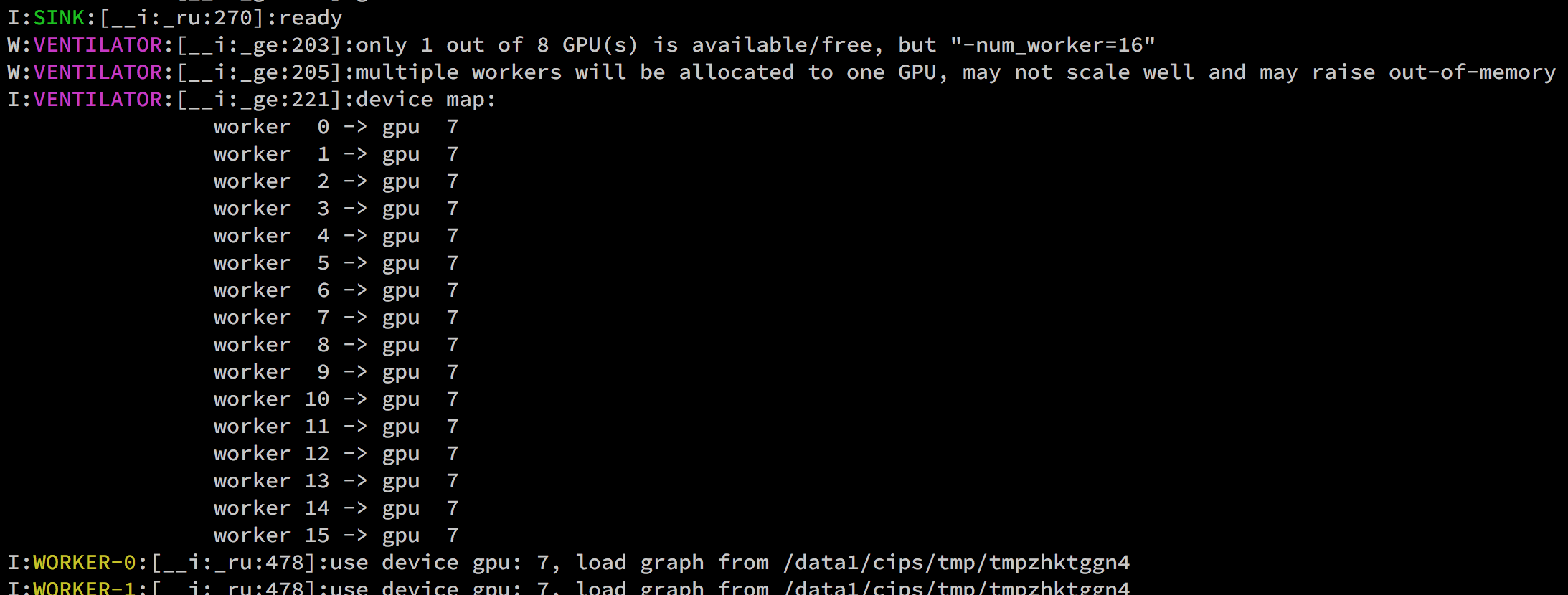
bert-serving-startworks fine, provided that you install it correctly viapip. This is validated by users on Linux, Windows and Mac. If not, please search history issues for help.Theoretically, the optimal value is 2 if you have two GPUs. In practice, you can use any many workers as you want until you get OOM (each worker takes 700MB (idle)-1.6G GPU memory). In that case, multiple workers will be stacked on the same GPU. As a consequence, one may observe marginal speedup that is slightly larger than 2. The following example shows a case where I allocate 16 workers on the same GPU and I can expect a marginal speedup around 1~1.5.
See-device_mapinbert-serving-start --helpor README.md or issues for more details.You should see
I:WORKER-0:[__i:gen:506]:ready and listening!when the server is ready.
hanxiao
on 4 Mar 2019
@hanxiao
clone this repo and run in linux
lsb_release -a
Description: Ubuntu 17.10
Release: 17.10
Codename: artful
Python 3.6.3 (default, Oct 3 2017, 21:45:48)
[GCC 7.2.0] on linux
Type "help", "copyright", "credits" or "license" for more information.
import tensorflow as tf
tf.version
'1.8.0'
and using this command to start the server:
bert-serving-start -model_dir /home/jack/p/chinese_L-12_H-768_A-12 -num_worker=4
Then this issue shows up:
bert-serving-start: command not found
i find this cls in this path
~/.local/bin$ ls
bert-serving-benchmark bert-serving-start
cd to here and updata tensorflow and run it ,it work!
Why can't I run here /bert-as-service$
thank you
 ares5221
on 4 Mar 2019
ares5221
on 4 Mar 2019
please help me. I used your method of fine-tuning the model, but reported this error.
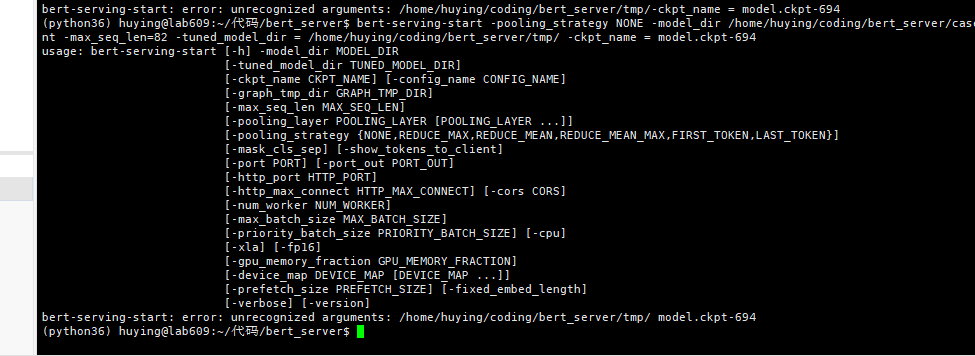


@hanxiao
 YingHuNLP
on 1 May 2019
YingHuNLP
on 1 May 2019
please help me. I used your method of fine-tuning the model, but reported this error.
@hanxiao
hi, it seems your file_path is not correct.
stellaHSR
on 10 May 2019
I had the same problem in win10, Finally located at two points:
1、"bert-serving-start -model_dir /chinese_L-12_H-768_A-12",this command should remove "/";
2、numpy version should update from 1.15.2 to 1.16.3
 BobCN2017
on 15 May 2019
BobCN2017
on 15 May 2019
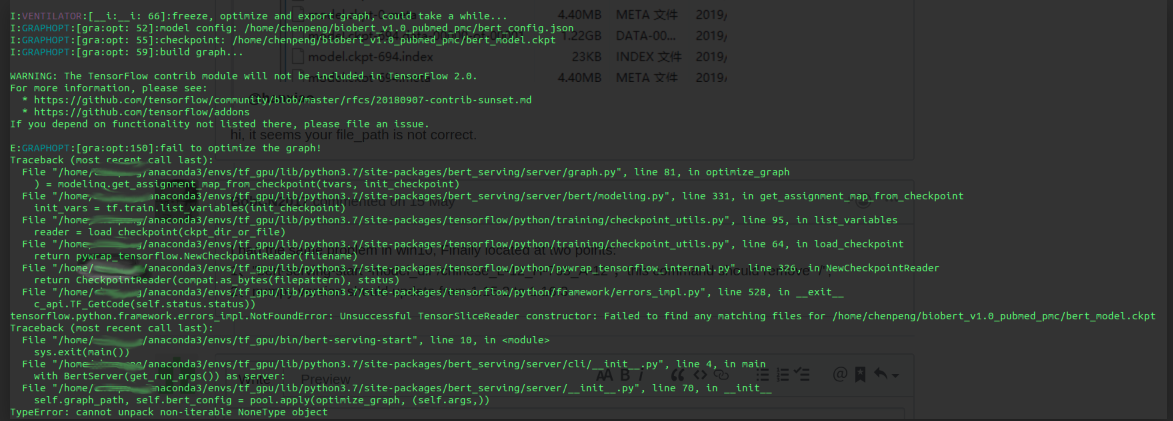
i have the same problem in ubuntu 18.04,and tensorflow version :1.13, python version 3.7
 cpmss521
on 15 Jun 2019
cpmss521
on 15 Jun 2019
ok.i have got the reason,i used the Pre-trained BIO-BERT Model (https://github.com/search?q=biobert) ,which not in your download list of Pre-trained Model,and then raise the error ,but when i use the Pre-trained Model your provide , it did work, so i want to know whether BIO-BERT Model is not suit for this job?? @hanxiao
cpmss521
on 16 Jun 2019
i get it! thanks!
cpmss521
on 16 Jun 2019
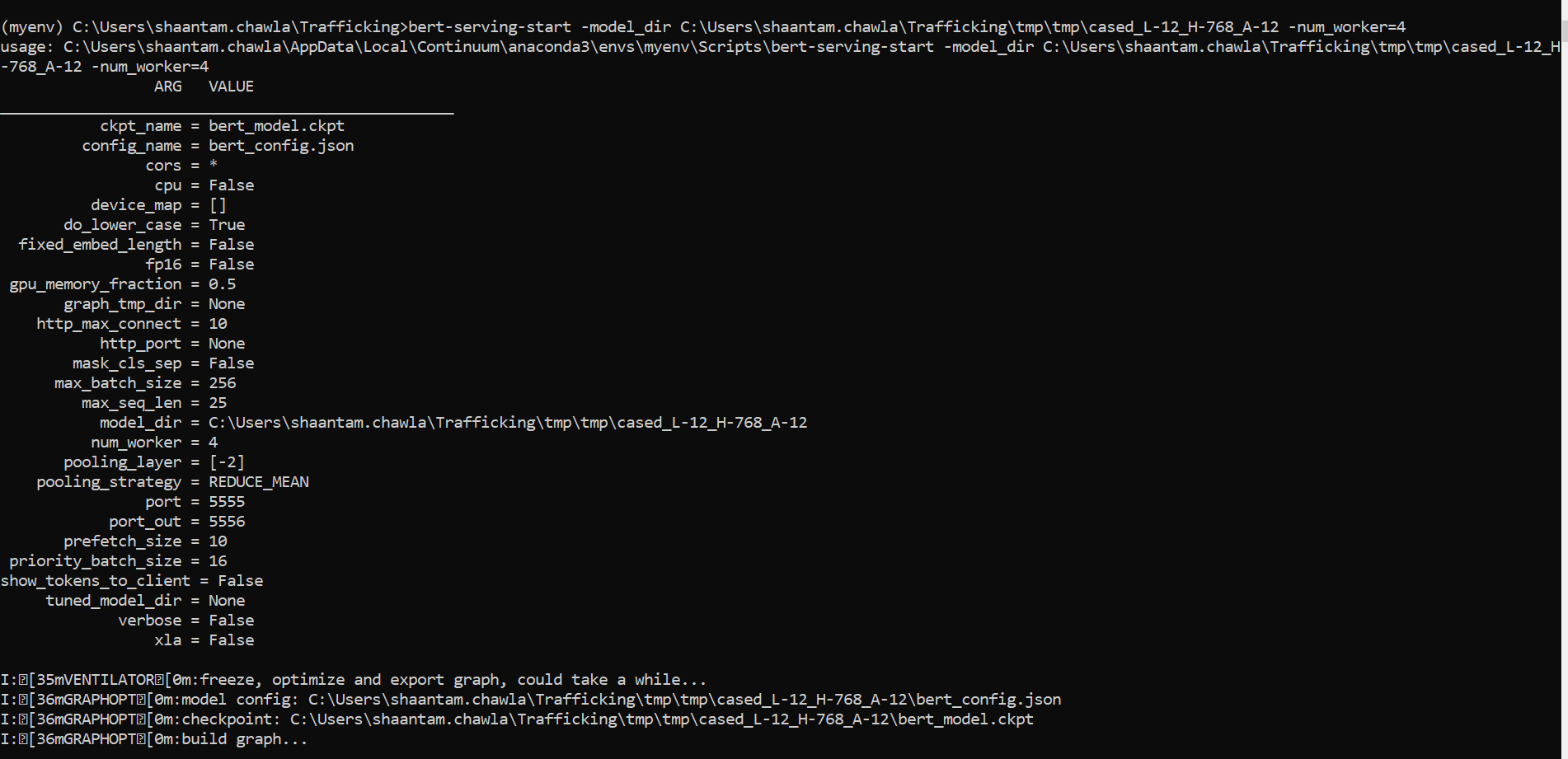
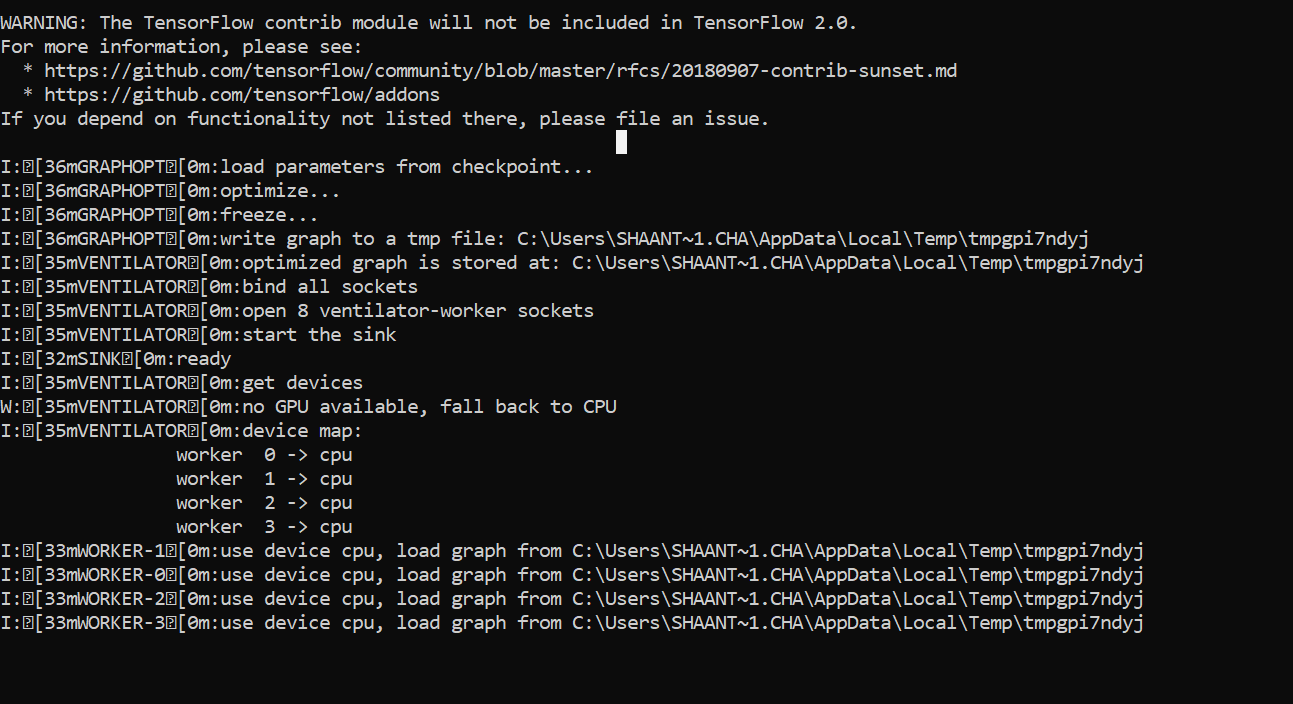
Hi, I'm having a different issue while running the bert-serving-start command on a windows 10 machine. As shown, I'm running a command to begin a service with 4 workers and I never get the "ready and listening!" message in my output - instead, it hangs after telling me that the 4 workers are ready.
The exact same command works perfectly on a Mac, and I'm at a loss for what to do to fix this on Windows. Things I've tried:
- upgrading
bert-serving-clientandbert-serving-server - changing the path from which I'm loading the pre-trained models (both relative and absolute paths)
- Changing python and tensorflow versions. Currently using: python 3.6.8 and tensorflow 1.13.1
 shaantamchawla
on 1 Jul 2019
shaantamchawla
on 1 Jul 2019
@shaantamchawla Did you get a fix for this issue ?
 Birendra20743592
on 25 Jul 2019
Birendra20743592
on 25 Jul 2019
Related issues
 boxabirds
·
4Comments
boxabirds
·
4Comments
 applenob
·
7Comments
applenob
·
7Comments
 KODGV
·
6Comments
KODGV
·
6Comments
 crapthings
·
3Comments
crapthings
·
3Comments
 babai3693
·
3Comments
babai3693
·
3Comments
Most helpful comment
For those who need run this on Windows 10 right now...
bert-serving-start not foundproblemCreate a start-bert-as-service.py with the following code
so you can run with the following command
python start-bert-as-service.py -model_dir ./tmp/chinese_L-12_H-768_A-12/ -num_worker=1TypeError: can't pickle _thread.RLock objectsproblemReplace the set_logger function in the bert_serving/server/helper with yours