Berry: [Bug] @types packages are not resolved by VSCode TypeScript pnpify SDK
_Created from this Discord conversation._
We have a monorepo where the root contains only dev dependencies like Prettier, and it uses PnP.
Then we have several projects in subfolders, like app1, app2, etc. Some of them are on Yarn 1, some on Yarn 2, but they all use the node-modules linker.
It all looks like this:
.
├── package.json
├── yarn.lock
├── .yarnrc.yml
├── .pnp.js
├── app1/
│   ├── package.json
│   ├── yarn.lock
│   ├── node_modules
│   └── .yarnrc.yml
└── app2/
    ├── package.json
    ├── yarn.lock
    ├── node_modules
    └── .yarnrc.yml
We've ran yarn dlx @yarnpkg/pnpify --sdk vscode which made most of the things work, however, TypeScript doesn't understand imports that depend on @types/... packages:
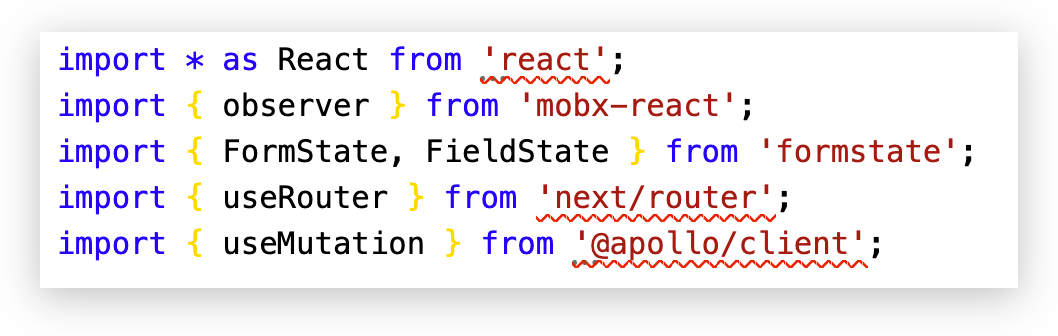
mobx-react and formstate contain .d.ts files so everything work fine, but react, next/router and @apollo/client depend on @types packages and those don't work.
It's also worth noting that this is purely a dev-time / VSCode issue – we can use tsc on app1 and app2 just fine.
This is our root .yarnrc.yml – I believe it is configured correctly:
yarnPath: '.yarn/releases/yarn-2.2.2.cjs'
pnpIgnorePatterns:
  - 'app1/**'
  - 'app2/**'
Environment:
- OS: macOS
- Node version: 12
- Yarn version: 2.2.2.
 borekb
All 10 comments
Could you attach a repro we can clone and test with please?
 merceyz
on 23 Sep 2020
merceyz
on 23 Sep 2020
I may be experiencing the same issue. You can clone and test with: https://github.com/NickHeiner/devtools/tree/yarn-2.
I tried to follow the Editor Setup instructions. However, in step 3 and 4, there was no valid option for a workspace version of typescript to use.

In any event, looks like I'll have to stick with Yarn 1 for now.
 NickHeiner
on 26 Sep 2020
NickHeiner
on 26 Sep 2020
In any event, looks like I'll have to stick with Yarn 1 for now.
@NickHeiner You can use the node-modules linker in V2, which should be much better than V1, until this is solved
yarn config set nodeLinker node-modules && yarn install
Hi! 👋
This issue looks stale, and doesn't feature the reproducible label - which implies that you didn't provide a working reproduction using Sherlock. As a result, it'll be closed in a few days unless a maintainer explicitly vouches for it or you edit your first post to include a formal reproduction (you can use the playground for that).
Note that we require Sherlock reproductions for long-lived issues (rather than standalone git repositories or similar) because we're a small team. Sherlock gives us the ability to check which bugs are still affecting the master branch at any given point, and decreases the amount of code we need to run on our own machines (thus leading to faster bug resolutions). It helps us help you! 😃
If you absolutely cannot reproduce a bug on Sherlock (for example because it's a Windows-only issue), a maintainer will have to manually add the upholded label. Thanks for helping us triaging our repository! 🌟
 yarnbot
on 26 Oct 2020
yarnbot
on 26 Oct 2020
I'm experiencing the same issue. Is it berry related or VSCode?
 szmarci
on 26 Oct 2020
szmarci
on 26 Oct 2020
Similar issue, which would probably be fixed by this.
I have a node_modules project in the same monorepo root as other workspaces which use PnP. It's in its own separate folder.
The NM linker project cannot find any of its own dependencies when using the pnpify sdk typescript.
 andreialecu
on 27 Oct 2020
andreialecu
on 27 Oct 2020
Was able to fix this, but it will need #2055 and https://github.com/arcanis/TypeScript/pull/3 to be merged and released.
andreialecu
on 27 Oct 2020
I made a branch on my fork which you can install via:
yarn set version from sources --repository https://github.com/andreialecu/berry.git --branch aa/typescript-patch
(it includes a fix for this issue and for the one at #1932)
Important: You will need to list any non-pnp projects in pnpIgnorePatterns then run yarn install.
andreialecu
on 28 Oct 2020
Forgot to mention that the patch in my comment above only works for typescript 4.0.x currently.
andreialecu
on 28 Oct 2020
Similar issue.
Environment:
OS: Mac OS
Node version: 10.22.1
yarn version: 2.3.3
typescript version: 4.0.5
yarn config set nodeLinker node-modules && yarn install
works for me.
 LiZ2z
on 17 Nov 2020
LiZ2z
on 17 Nov 2020
Related issues
 Bessonov
·
4Comments
Bessonov
·
4Comments
 juanpicado
·
4Comments
juanpicado
·
4Comments
 milichev
·
3Comments
milichev
·
3Comments
 thealjey
·
4Comments
thealjey
·
4Comments
 chrisands
·
3Comments
chrisands
·
3Comments
Most helpful comment
@NickHeiner You can use the
node-moduleslinker in V2, which should be much better than V1, until this is solved