Beets: Cannot match a MusicBrainz recording
Problem
There's one particular file in my folder that does not get imported properly.
It has a correct filename and metadata and I am using a MusicBrainz release URL for matching.
Every other file that belongs to this release is matched correctly, however the problematic one constantly gets matched with the wrong one. This seems to be an issue with fuzzy matching?
It's really best explained with a screenshot:
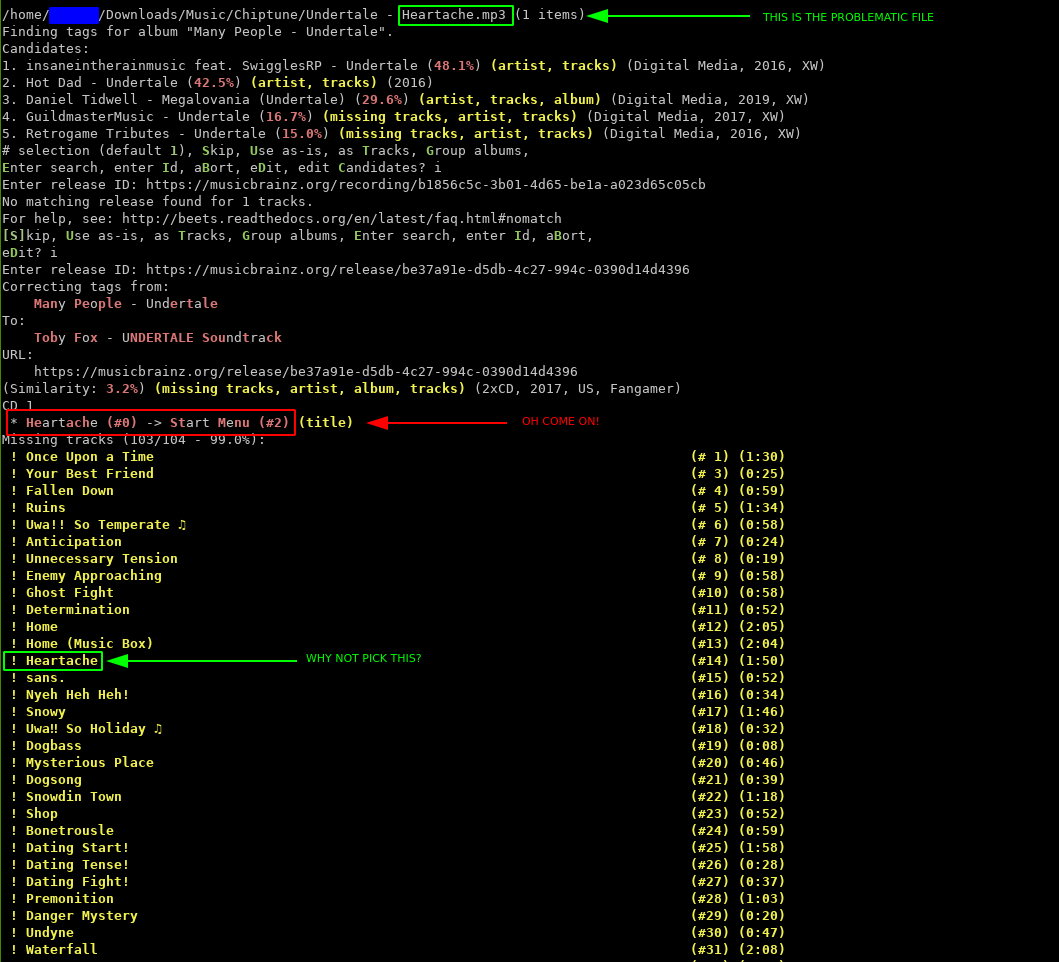
Basically, the song title is "Heartache", and a song with the exact same name exists in the release, but Beets matches my file with "Start Menu" instead, probably because it's "close enough" and it appears higher on the list than "Heartache". It's as though Beets didn't check the entire list for the best match, but instead iterated through the list and stopped upon finding the first good enough match.
I've tried pasting the link of both the release:
https://musicbrainz.org/release/be37a91e-d5db-4c27-994c-0390d14d4396
...and the exact recording:
https://musicbrainz.org/recording/b1856c5c-3b01-4d65-be1a-a023d65c05cb
...but it claims there's no match even when I pasted the recording.
Here's the output of beet -vv import /path/to/Heartache.mp3:
/home/pcache/Downloads/Music/Chiptune/Undertale - Heartache.mp3 (1 items)
Sending event: before_choose_candidate
Finding tags for album "Many People - Undertale".
Candidates:
1. insaneintherainmusic feat. SwigglesRP - Undertale (48.1%) (artist, tracks) (Digital Media, 2016, XW)
2. Hot Dad - Undertale (42.5%) (artist, tracks) (2016)
3. Daniel Tidwell - Megalovania (Undertale) (29.6%) (artist, tracks, album) (Digital Media, 2019, XW)
4. GuildmasterMusic - Undertale (16.7%) (missing tracks, artist, tracks) (Digital Media, 2017, XW)
5. Retrogame Tributes - Undertale (15.0%) (missing tracks, artist, tracks) (Digital Media, 2016, XW)
# selection (default 1), Skip, Use as-is, as Tracks, Group albums,
Enter search, enter Id, aBort, eDit, edit Candidates? i
Enter release ID: https://musicbrainz.org/recording/b1856c5c-3b01-4d65-be1a-a023d65c05cb
Tagging Many People - Undertale
Searching for album ID: https://musicbrainz.org/recording/b1856c5c-3b01-4d65-be1a-a023d65c05cb
Requesting MusicBrainz release https://musicbrainz.org/recording/b1856c5c-3b01-4d65-be1a-a023d65c05cb
Album ID match failed.
spotify: Searching for album https://musicbrainz.org/recording/b1856c5c-3b01-4d65-be1a-a023d65c05cb
Evaluating 0 candidates.
Sending event: before_choose_candidate
No matching release found for 1 tracks.
For help, see: http://beets.readthedocs.org/en/latest/faq.html#nomatch
[S]kip, Use as-is, as Tracks, Group albums, Enter search, enter Id, aBort,
eDit?
(at the time of writing this issue I had $albumartist field set to "Many People", but changing it to "Toby Fox" didn't change a thing)
Setup
- OS: Arch Linux x86_64 Linux 5.5.3-arch1-1
- Python version: 3.8.1
- beets version: 1.4.9
- Turning off plugins made problem go away (yes/no): no
My configuration (output of beet config) is:
library: ~/.config/beets/library.db
directory: ~/Music

format_item: $artist - $title
format_album: $albumartist - $album
sort_item: artist+ album+ disc+ track+

sort_album: albumartist+ album+
sort_case_insensitive: yes

import:
    write: no
    move: no
    copy: yes
    resume: ask
    incremental: no
    incremental_skip_later: no
    quiet: no
    detail: yes
    from_scratch: no
    log: ~/.config/beets/import.log
    languages: en pl de ja jp
    autotag: yes

paths:
    default: $albumartist/$album%aunique{}/$title
    singleton: $artist/no album/$title
    comp: Compilations/$album%aunique{}/$title
 Randoragon
All 7 comments
Hi! Since you're just tagging a single file, can you please try importing it as a singleton (with -s)? That would let you use the ID for a recording rather than a release.
 sampsyo
on 15 Feb 2020
sampsyo
on 15 Feb 2020
@sampsyo Thanks, importing as singleton works, but the problem is, it puts my file inside a Non-Album directory, as opposed to placing it in the album directory in which it belongs. And still, I don't see how "Start Menu" is a better match for "Heartache" than "Heartache", that is very concerning.
Randoragon
on 15 Feb 2020
Got it. You could consider changing your singleton path format, if you like… or, if you have other tracks on this album, definitely consider importing them all together! The extra context will help beets make better decisions, and you'll end up with a single "album" entry in the database.
Anyway, it's pretty hard to see exactly why beets made this decision… but if you try the singleton approach, maybe it will tell you which fields were mismatches? Like maybe there are MBID tags on this file?
sampsyo
on 15 Feb 2020
I have a directory full of music that mostly belongs to the same album, including "Heartache". My initial import was using beet import --group-albums path/to/dir and it matched every file correctly except for "Heartache", so I applied the changes and now am trying to correct just that single file. So, I definitely don't want to import as singleton, because I want Beets to store all files in their common album directory.
I can also confirm that the file itself doesn't have any misleading tags, here's my beet info path/to/file output:
$ beet info Downloads/Music/Chiptune/Undertale\ -\ Heartache.mp3
/home/user/Downloads/Music/Chiptune/Undertale - Heartache.mp3
      album: Undertale
albumartist: Toby Fox
        art: True
     artist: Undertale
   bitdepth: 0
    bitrate: 192000
   channels: 2
     format: MP3
      genre: Chiptune
     genres: Chiptune
     length: 30.87673469387755
 samplerate: 44100
      title: Heartache
...and also a screenshot from Kid3:
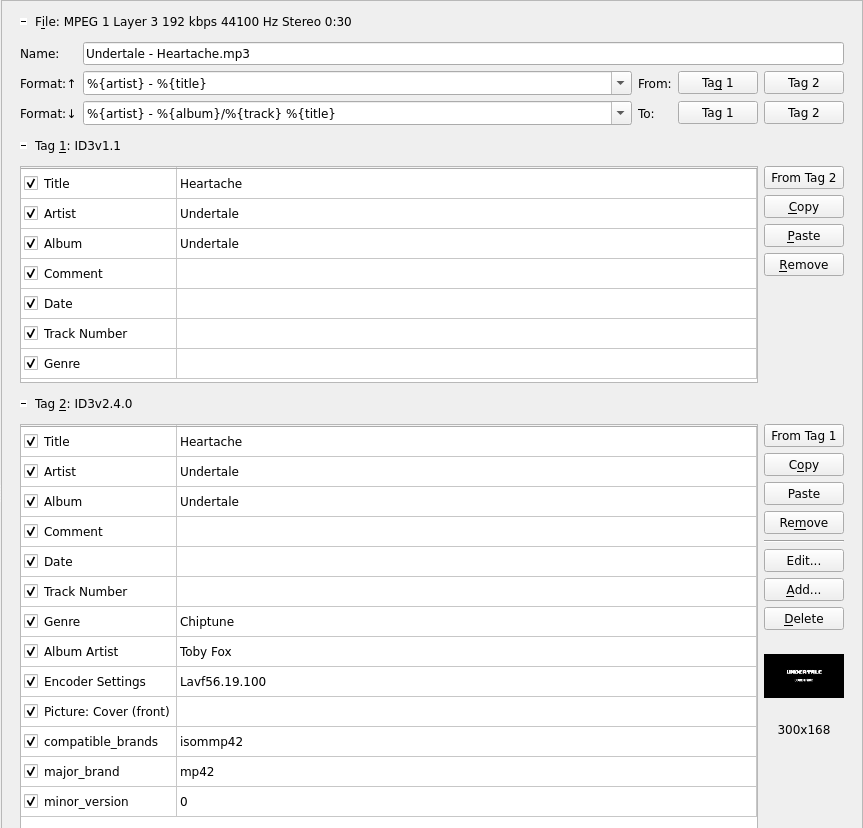
I'm not sure where this is going, should this be considered a bug, or just a quirk? I haven't had any similar issues with Beets up to this point, so this came as a surprise to me as well. I've uploaded the file here, if that's going to be of any help.
Maybe there should be a way to force-match tracks during beet imports? The release selection menu already gives options to Apply, More candidates, Skip, Use as-is, as Tracks, Group albums, Enter search, enter Id, aBort, eDit and edit Candidates. An additional option like Pick manually could be very useful in obscure cases. It could create a temporary text file, drop all the queried tracks and all the release tracks, and let the user manually pair them, save and exit, and done.
If the above is feasible, let me know and I could write a feature request to move this into a separate thread.
Randoragon
on 16 Feb 2020
Weird! I'm still not sure why the match isn't working out… seeing the verbose log where you import as a singleton and use the recording ID to force the match would be really helpful!
For this particular situation, though, I think what I'd do is try to complete the album. So if you import the new track in album mode, and select the appropriate album, even if the match is very bad for the new track, you should get a prompt that says "This album is already in the library!" And one of the prompts should be "Merge all," which will give you another shot to tag all the tracks (new and old) together.
sampsyo
on 16 Feb 2020
Alright, I found the issue while writing another confused answer.
The problem was, my file must have gotten corrupted or something and it didn't occur to me to actually listen to it to confirm it's 100% valid, until now. The audio cuts off after a measly 30 seconds, which Beets probably registers as mismatches of both song length, and audio fingerprint (if using chroma plugin).
I've downloaded a fresh copy of the file, and got it working in under a minute. Sorry for wasting your time on this, I feel really silly that this escaped my attention.
Randoragon
on 16 Feb 2020
😄 I should make it a policy to always ask when people show a case where beets seems to be doing the wrong thing: "Have you listened to the file? Maybe beets is right and you are wrong!"
sampsyo
on 16 Feb 2020
Related issues
 clounie
·
3Comments
clounie
·
3Comments
 Stunner
·
3Comments
Stunner
·
3Comments
 robot3498712
·
3Comments
robot3498712
·
3Comments
 ctrueden
·
3Comments
ctrueden
·
3Comments
 foways
·
5Comments
foways
·
5Comments
Most helpful comment
😄 I should make it a policy to always ask when people show a case where beets seems to be doing the wrong thing: "Have you listened to the file? Maybe beets is right and you are wrong!"